
Cache Core User Manual

# Preface
This document is the user manual for Apusic In-Memory Data Cache (AMDC) V2.0.4 cache core product, detailing the functionality usage, configuration methods, and management operations of AMDC cache core.
# Target Audience
This document is intended for AMDC product operations engineers, IT system operations engineers, and development engineers.
# Related Documentation
For more information about AMDC V2.0.4 product, please refer to the following AMDC V2.0.4 product manual documentation set:
| No. | Manual Document | Description |
|---|---|---|
| 1 | Apusic In-Memory Data Cache V2.0.4 Quick Start Guide | Brief introduction on how to quickly get started with AMDC. |
| 2 | Apusic In-Memory Data Cache V2.0.4 Installation Guide | Detailed introduction on how to install AMDC on various operating systems, AMDC service start/stop operations, and product registration process. |
| 3 | Apusic In-Memory Data Cache V2.0.4 Cache Core User Manual | Detailed introduction on the usage, configuration, management of AMDC related functions and supporting tools. |
| 4 | Apusic In-Memory Data Cache V2.0.4 Console User Manual | Detailed introduction on the usage and operation instructions of AMDC console related functions. |
| 5 | Apusic In-Memory Data Cache V2.0.4 Development Guide | Detailed introduction on AMDC client application development based on various programming languages. |
| 6 | Apusic In-Memory Data Cache V2.0.4 Migration Guide | Detailed introduction on migrating AMDC historical versions to V2.0.4, and migrating Redis to AMDC. |
| 7 | Apusic In-Memory Data Cache V2.0.4 Operations Guide | Detailed introduction on AMDC monitoring, operations, security hardening and other operational instructions. |
| 8 | Kingbee Apusic In-Memory Data Cache V2.0.4 Performance Optimization Guide | Detailed introduction on AMDC performance tuning. |
# Technical Support
AMDC product provides comprehensive technical support services. You can obtain technical support through the following channels:
- Website: www.apusic.com
- Phone: 400-855-5800
- Email: support@apusic.com
- Kingdee Cloud Community: https://vip.kingdee.com/?productId=73&productLineId=14&lang=zh-CN
When requesting technical support, please provide the following information:
- Your name
- Company information and contact details
- Operating system and version
- Product version number
- Detailed information about exceptions and errors, including logs and screenshots
# Introduction
Apusic In-Memory Data Cache Software (Apusic In-Memory Data Cache, referred to as AMDC) is a fully scenario-applicable, high-throughput, secure distributed cache software that provides secure and reliable caching support for large-scale, high-concurrency, high-availability critical applications. The product is compatible with Redis protocol and persistent data files, allowing simple, fast, and smooth replacement of Redis.
# Related Concepts
| Term | Meaning | Usage Notes |
|---|---|---|
| Standalone | Stores data, handles data read/write, handles data synchronization | AMDC's default mode, standalone mode. In standalone mode, the master node runs in standalone mode. |
| Master-Slave | Replicates data from master node, handles data read/write, does not participate in data synchronization | Real-time replica of master node data. It actively connects to the specified master node and receives the data stream sent by the master node, thereby maintaining data synchronization with the master node. By default, slave nodes are read-only, and all write operations must be sent to the master node. |
| Sentinel | Monitors master-slave nodes, handles master node failover, handles master-slave node synchronization | Sentinel mode. When the master node goes down, it automatically switches to a slave node. When a slave node goes down, it automatically switches to master node. |
| Cluster | A computer service system composed of multiple independent computers | In this document, master-slave/sentinel/cluster modes can all be considered clusters. Cluster mode specifically refers to the mode with multiple master nodes for data sharding storage. |
# Feature List
| Feature | Description | Additional Notes |
|---|---|---|
| Multi-data Type Cache | Provides data cache types: string, list, hash, set, sorted set, geo, hyperloglog, stream. | Supports Redis protocol compatible data structures, can directly replace Redis without modifying application code |
| Pub/Sub | Implements publish/subscribe functionality, enhancing system capabilities | Supports channel subscription, pattern subscription, can be used for message queues, event notifications, etc. |
| ACL Permission Control | Provides secure access mechanism for services, supporting fine-grained access permission control. | Role-based permission management, supports command-level and keyspace-level access control |
| Memory Data Eviction Policy | Provides multiple data eviction policies to meet various data eviction requirements and improve memory utilization. | Includes LRU, LFU, TTL and other eviction algorithms, can be flexibly selected according to business characteristics |
| Persistence | Improves availability for cache core, prevents data loss during crashes. | Supports RDB snapshot and AOF log persistence methods, ensuring data security |
| Lua Script Support | Supports using Lua scripts to operate cache core. | Supports atomic operations for complex logic, improves processing efficiency |
| Multi-threading Mode | Supports multi-threaded concurrent request processing, improving system throughput. | Uses I/O multiplexing technology, fully utilizing multi-core CPU performance |
| Master-Slave Mode | Supports master-slave backup. | Implements data redundancy, supports read-write separation, improves system availability |
| Sentinel Mode | Provides node monitoring, automatic failover, failure notification, configuration propagation for master-slave mode. | Implements high availability architecture, automatically detects failures and switches services |
| Cluster Mode | Supports elastic scaling (memory expansion/shrinking), and also has failover functionality. | Data sharding storage, supports online expansion and shrinking, meeting big data volume scenario requirements |
| Monitoring & Operations | Performance Monitoring | Provides detailed performance metric monitoring, including QPS, response time, memory usage, etc. |
| Slow Query Log | Records commands with execution time exceeding threshold, facilitating performance tuning | |
| Statistics | Obtain server running status and statistical data through INFO command | |
| High Availability | Automatic Failure Recovery | Automatically detects node health status, implements automatic failover |
| Data Consistency | Ensures data consistency between master and slave nodes | |
| Service Discovery | Supports automatic discovery of cluster nodes, simplifying configuration management | |
| Security Features | Access Control | Supports password authentication, SSL/TLS encrypted transmission |
| Audit Log | Records user operation logs, meeting compliance requirements | |
| Extension Features | Transaction Support | Supports MULTI/EXEC and other transaction commands |
| Pipeline Operations | Supports batch command execution, reducing network round-trip time | |
| Key Expiration Management | Supports TTL, EXPIRE and other key lifecycle management functions | |
| Development Support | Client Compatibility | Fully compatible with Redis client libraries (Jedis, Lettuce, etc.) |
| Protocol Compatibility | Supports RESP protocol, can seamlessly replace Redis | |
| Toolchain Support | Provides CLI tools, benchmark tools, etc. |
# Product Installation
For AMDC cache core installation, please refer to Apusic In-Memory Data Cache V2.0.4 Installation Guide
# Redis Configuration Compatibility
Starting from AMDC v2.0.2, it is compatible with Redis configuration files. AMDC will automatically convert the content in redis.conf to AMDC configuration content.
Usage: ./amdc-server redis.conf (specify Redis configuration file)
# Usage Introduction
# Cache Core Usage Guide
Distributed caching is the core capability of AMDC and the center of the entire product. Other functions are built on the data caching business. AMDC stores data directly in memory, uses multi-threaded read-write separation to achieve efficient storage, meets different types of data storage requirements, enables rapid development, and reduces type conversion. It supports multiple data eviction policies to reasonably utilize memory space.
# Operation Commands
| Command | Description |
|---|---|
| ACL LOAD | Reload ACL from configured ACL file |
| ACL SAVE | Save current ACL rules to configured ACL file |
| ACL LIST | List current ACL rules in ACL configuration file format |
| ACL USERS | List all configured ACL rule usernames |
| ACL GETUSER username | Get rules for specific ACL user |
| ACL SETUSER username [rule [rule ...]] | Modify or create rules for specific ACL user |
| ACL DELUSER username [username ...] | Delete specified ACL user and related rules |
| ACL CAT [categoryname] | List ACL categories or commands within category |
| ACL GENPASS [bits] | Generate pseudo-random secure password for ACL user |
| ACL WHOAMI | Return the name of the user associated with the current connection |
| ACL LOG [count or RESET] | List latest ACL security events |
| ACL HELP | Display helpful text about different subcommands |
| APPEND key value | Append value to key |
| ASKING | Sent by cluster client after -ask redirection |
| AUTH [username] password | Authenticate to the server |
| BGREWRITEAOF | Asynchronously rewrite append-only file |
| BGSAVE [SCHEDULE] | Asynchronously save dataset to disk |
| BITCOUNT key [start end [BYTE|BIT]] | Count set bits in string |
| BITFIELD key [GET encoding offset] [SET encoding offset value] [INCRBY encoding offset increment] [OVERFLOW WRAP|SAT|FAIL] | Perform arbitrary bitfield integer operations on strings |
| BITFIELD_RO key GET encoding offset | Read-only variant of arbitrary bitfield integer operations on strings |
| BITOP operation destkey key [key ...] | Perform bitwise operations between strings |
| BITPOS key bit [start [end [BYTE|BIT]]] | Find first bit set or clear in string |
| BLPOP key [key ...] timeout | Block, pop and return first element |
| BRPOP key [key ...] timeout | Block, pop and return last element |
| BRPOPLPUSH source target timeout | Pop last element from list and push to head of another list; blocks if list is empty until timeout or element available |
| BLMOVE source destination FROM-TOP|FROM-BOTTOM TO-TOP|TO-BOTTOM timeout | Block, pop and delete first or last element from source list, push to first or last position of destination list |
| LMPOP numkeys key [key ...] LEFT|RIGHT [COUNT count] | Pop one or more elements from first non-empty list key in provided key list |
| BLMPOP timeout numkeys key [key ...] LEFT|RIGHT [COUNT count] | Block, pop one or more elements from first non-empty list key; or block until another client pushes or timeout |
| BZPOPMIN key [key ...] timeout | Block, pop and return member with lowest score from one or more sorted sets, or block until another client pushes or timeout |
| BZPOPMAX key [key ...] timeout | Block, pop and return member with highest score from one or more sorted sets, or block until another client pushes or timeout |
| CLIENT CACHING YES|NO | Indicate whether server should track keys in next request |
| CLIENT ID | Return client ID of current connection |
| CLIENT INFO | Return information about current client connection |
| CLIENT KILL [ip:port] [ID client-id] [TYPE normal|master|slave|pubsub] [USER username] [ADDR ip:port] [LADDR ip:port] [SKIPME yes/no] | Kill client connection |
| CLIENT LIST [TYPE normal|master|replica|pubsub] [ID client-id [client-id ...]] | Get list of client connections |
| CLIENT GETNAME | Get current connection name |
| CLIENT GETREDIR | Get tracking notification redirect client ID (if any) |
| CLIENT UNPAUSE | Resume processing of paused clients |
| CLIENT PAUSE timeout [WRITE|ALL] | Stop client command processing for specified duration |
| CLIENT REPLY ON|OFF|SKIP | Indicate whether server should reply to commands |
| CLIENT SETNAME connection-name | Set current connection name |
| CLIENT TRACKING ON|OFF [REDIRECT client-id] [PREFIX prefix [PREFIX prefix ...]] [BCAST] [OPTIN] [OPTOUT] [NOLOOP] | Enable or disable server-assisted client cache support |
| CLIENT TRACKINGINFO | Return information about server-assisted client cache for current connection |
| CLIENT UNBLOCK client-id [TIMEOUT|ERROR] | Unblock client blocked on blocking command from different connection |
| COMMAND | Get array of Redis command details |
| COMMAND COUNT | Get total number of Redis commands |
| COMMAND GETKEYS | Extract keys given full Redis command |
| COMMAND INFO command-name [command-name ...] | Get array of specific Redis command details |
| CONFIG GET parameter [parameter ...] | Get configuration parameter values |
| CONFIG REWRITE | Rewrite configuration file with in-memory configuration |
| CONFIG SET parameter value [parameter value ...] | Set configuration parameter to given value |
| CONFIG RESETSTAT | Reset statistics returned by INFO |
| COPY source destination [DB destination-db] [REPLACE] | Copy a key |
| DBSIZE | Return number of keys in selected database |
| DEBUG OBJECT key | Get debugging information about key |
| DEBUG SEGFAULT | Crash the server |
| DECR key | Decrement integer value of key by one |
| DECRBY key decrement | Decrement integer value of key by given number |
| DEL key [key ...] | Delete a key |
| DISCARD | Discard all commands issued after MULTI |
| DUMP key | Return serialized version of value stored at specified key |
| ECHO message | Echo given string |
| EVAL script numkeys [key [key ...]] [arg [arg ...]] | Execute Lua script server-side |
| EVALSHA sha1 numkeys [key [key ...]] [arg [arg ...]] | Execute Lua script server-side |
| EXEC | Execute MULTI |
| EXISTS key [key ...] | Check if key exists |
| EXPIRE key seconds [NX|XX|GT|LT] | Set key time-to-live in seconds |
| EXPIREAT key timestamp [NX|XX|GT|LT] | Set key expiration time as UNIX timestamp |
| EXPIRETIME key | Get key expiration Unix timestamp |
| FAILOVER [TO host port [FORCE]] [ABORT] [TIMEOUT milliseconds] | Start coordinated failover between this server and one of its replicas |
| FLUSHALL [ASYNC|SYNC] | Delete all keys from all databases |
| FLUSHDB [ASYNC|SYNC] | Delete all keys from current database |
| GEOADD key [NX|XX] [CH] longitude latitude member [longitude latitude member ...] | Add one or more geospatial items to geospatial index represented by sorted set |
| GEOHASH key member [member ...] | Return members of geospatial index as standard geohash strings |
| GEOPOS key member [member ...] | Return longitude and latitude of geospatial index members |
| GEODIST key member1 member2 [m|km|ft|mi] | Return distance between two members of geospatial index |
| GEORADIUS key longitude latitude radius m|km|ft|mi [WITHCOORD] [WITHDIST] [WITHHASH] [COUNT count [ANY]] [ASC|DESC] [STORE key] [STOREDIST key] | Query sorted set representing geospatial index for members within given maximum distance from point |
| GEORADIUSBYMEMBER key member radius m|km|ft|mi [WITHCOORD] [WITHDIST] [WITHHASH] [COUNT count [ANY]] [ASC|DESC] [STORE key] [STOREDIST key] | Query sorted set representing geospatial index for members within given maximum distance from member |
| GEOSEARCH key [FROMMEMBER member] [FROMLONLAT longitude latitude] [BYRADIUS radius m|km|ft|mi] [BYBOX width height m|km|ft|mi] [ASC|DESC] [COUNT count [ANY]] [WITHCOORD] [WITHDIST] [WITHHASH] | Query sorted set representing geospatial index for members within box or circle area |
| GEOSEARCHSTORE destination source [FROMMEMBER member] [FROMLONLAT longitude latitude] [BYRADIUS radius m|km|ft|mi] [BYBOX width height m|km|ft|mi] [ASC|DESC] [COUNT count [ANY]] [STOREDIST] | Query sorted set representing geospatial index for members within box or circle area and store results in another key |
| GET key | Get value of a key |
| GETBIT key offset | Return bit value at offset in string value stored at key |
| GETDEL key | Get value of key and delete the key |
| GETRANGE key start end | Get substring of string stored at key |
| GETSET key value | Set string value of key and return its old value |
| HDEL key field [field ...] | Delete one or more hash fields |
| HELLO [protover [AUTH username password] [SETNAME clientname]] | Handshake with Redis |
| HEXISTS key field | Check if hash field exists |
| HGET key field | Get value of hash field |
| HGETALL key | Get all fields and values in hash |
| HINCRBY key field increment | Increment integer value of hash field by given number |
| HINCRBYFLOAT key field increment | Increment float value of hash field by given amount |
| HKEYS key | Get all fields in hash |
| HLEN key | Get number of fields in hash |
| HMGET key field [field ...] | Get values of all given hash fields |
| HMSET key field value [field value ...] | Set multiple hash fields to multiple values |
| HSET key field value [field value ...] | Set string value of hash field |
| HSETNX key field value | Set hash field value only if field does not exist |
| HRANDFIELD key [count [WITHVALUES]] | Get one or more random fields from hash |
| HSTRLEN key field | Get length of hash field value |
| HVALS key | Get all values in hash |
| INCR key | Increment integer value of key by one |
| INCRBY key increment | Increment integer value of key by given amount |
| INCRBYFLOAT key increment | Increment float value of key by given amount |
| INFO [section] | Get information and statistics about server |
| LOLWUT [VERSION version] | Display some computer art and Redis version |
| KEYS pattern | Find all keys matching given pattern |
| LASTSAVE | Get UNIX timestamp of last successful save to disk |
| LINDEX key index | Get element from list by index |
| LINSERT key BEFORE|AFTER pivot element | Insert element before or after another element in list |
| LLEN key | Get length of list |
| LPOP key [count] | Pop and return first element of list |
| LPOS key element [RANK rank] [COUNT num-matches] [MAXLEN len] | Return index of matching element in list |
| LPUSH key element [element ...] | Push one or more elements onto list |
| LPUSHX key element [element ...] | Push element onto list only if list exists |
| LRANGE key start stop | Get range of elements from list |
| LREM key count element | Remove elements from list |
| LSET key index element | Set element in list by index |
| LTRIM key start stop | Trim list to specified range |
| MEMORY DOCTOR | Output memory problem report |
| MEMORY HELP | Display helpful text about different subcommands |
| MEMORY MALLOC-STATS | Display allocator internal statistics |
| MEMORY PURGE | Request allocator to release memory |
| MEMORY STATS | Display memory usage details |
| MEMORY USAGE key [SAMPLES count] | Estimate memory usage of a key |
| MGET key [key ...] | Get values of all given keys |
| MIGRATE host port key| destination-db timeout [COPY] [REPLACE] [AUTH password] [AUTH2 username password] [KEYS key [key ...]] | Atomically transfer key from one Redis instance to another |
| MONITOR | Monitor all requests received by server in real-time |
| MOVE key db | Move key to another database |
| MSET key value [key value ...] | Set multiple keys to multiple values |
| MSETNX key value [key value ...] | Set multiple keys to multiple values only if none exist |
| MULTI | Mark start of transaction block |
| OBJECT ENCODING key | Inspect internal encoding of Redis object |
| OBJECT FREQ key | Get logarithmic access frequency counter of Redis object |
| OBJECT IDLETIME key | Get time since Redis object was last accessed |
| OBJECT REFCOUNT key | Get reference count of key value |
| OBJECT HELP | Display helpful text about different subcommands |
| PERSIST key | Remove expiration time from key |
| PEXPIRE key milliseconds [NX|XX|GT|LT] | Set key time-to-live in milliseconds |
| PEXPIREAT key milliseconds-timestamp [NX|XX|GT|LT] | Set key expiration time as UNIX timestamp specified in milliseconds |
| PEXPIRETIME key | Get key expiration Unix timestamp in milliseconds |
| PFADD key [element [element ...]] | Add specified elements to specified HyperLogLog |
| PFCOUNT key [key ...] | Return approximate cardinality of set(s) observed by HyperLogLog at key(s) |
| PFMERGE destkey sourcekey [sourcekey ...] | Merge N different HyperLogLogs into one |
| PING [message] | Ping server |
| PSETEX key milliseconds value | Set key value and expiration time in milliseconds |
| PSUBSCRIBE pattern [pattern ...] | Listen for messages published to channels matching given patterns |
| PUBSUB CHANNELS [pattern] | List active channels |
| PUBSUB NUMPAT | Get count of unique pattern subscriptions |
| PUBSUB NUMSUB [channel [channel ...]] | Get subscriber count for channels |
| PUBSUB HELP | Display helpful text about different subcommands |
| PTTL key | Get key time-to-live in milliseconds |
| PUBLISH channel message | Publish message to channel |
| PUNSUBSCRIBE [pattern [pattern ...]] | Stop listening for messages published to channels matching given patterns |
| QUIT | Close connection |
| RANDOMKEY | Return random key from keyspace |
| READONLY | Enable read queries for cluster replica node connection |
| READWRITE | Disable read queries for cluster replica node connection |
| RENAME key newkey | Rename key |
| RENAMENX key newkey | Rename key only if new key does not exist |
| RESET | Reset connection |
| RESTORE key ttl serialized-value [REPLACE] [ABSTTL] [IDLETIME seconds] [FREQ frequency] | Create key using provided serialized value, previously obtained using DUMP |
| ROLE | Return role of instance in replication context |
| RPOP key [count] | Pop and return last element of list |
| RPOPLPUSH source destination | Pop last element of list, push to another list and return |
| LMOVE source destination LEFT|RIGHT LEFT|RIGHT | Pop element from list, push to another list and return |
| RPUSH key element [element ...] | Append one or more elements to list |
| RPUSHX key element [element ...] | Append element to list only if list exists |
| SADD key member [member ...] | Add one or more members to set |
| SAVE | Synchronously save dataset to disk |
| SCARD key | Get number of members in set |
| SCRIPT DEBUG YES|SYNC|NO | Set debug mode for executed scripts |
| SCRIPT EXISTS sha1 [sha1 ...] | Check if script exists in script cache |
| SCRIPT FLUSH [ASYNC|SYNC] | Remove all scripts from script cache |
| SCRIPT KILL | Terminate currently executing script |
| SCRIPT LOAD script | Load specified Lua script into script cache |
| SDIFF key [key ...] | Subtract multiple sets |
| SDIFFSTORE destination key [key ...] | Subtract multiple sets and store resulting set in key |
| SELECT index | Change database selected by current connection |
| SET key value [EX seconds|PX milliseconds|EXAT timestamp|PXAT milliseconds-timestamp|KEEPTTL] [NX|XX] [GET] | Set string value of key |
| SETBIT key offset value | Set or clear bit at offset in string value stored at key |
| SETEX key seconds value | Set key value and expiration time |
| SETNX key value | Set key value only if key does not exist |
| SETRANGE key offset value | Overwrite part of string at key starting at specified offset |
| SHUTDOWN [NOSAVE|SAVE] | Synchronously save dataset to disk and shut down server |
| SINTER key [key ...] | Return members of set resulting from intersection of all given sets |
| SINTERCARD numkeys key [key ...] [LIMIT limit] | Intersect multiple sets and return cardinality of result |
| SINTERSTORE destination key [key ...] | Intersect multiple sets and store resulting set in key |
| SISMEMBER key member [member ...] | Return whether each member is member of set stored at key |
| REPLICAOF host port | Make server replica of another instance, or promote it as master |
| SLOWLOG GET [count] | Get entries from slow log |
| SLOWLOG LEN | Get length of slow log |
| SLOWLOG RESET | Clear all entries from slow log |
| SLOWLOG HELP | Display helpful text about different subcommands |
| SMEMBERS key | Get all members in set |
| SMOVE source destination member | Move member from one set to another |
| SORT key [BY pattern] [LIMIT offset count] [GET pattern [GET pattern ...]] [ASC|DESC] [ALPHA] [STORE destination] | Sort elements in list, set or sorted set |
| SORT_RO key [BY pattern] [LIMIT offset count] [GET pattern [GET pattern ...]] [ASC|DESC] [ALPHA] | Read-only variant of SORT for sorting elements in list, set or sorted set |
| SPOP key [count] | Pop and return one or more random members from set |
| SRANDMEMBER key [count] | Get one or more random members from set |
| SREM key member [member ...] | Remove one or more members from set |
| STRLEN key | Get length of value stored at key |
| SUBSCRIBE channel [channel ...] | Listen for messages published to given channels |
| SUNION key [key ...] | Return members of set resulting from union of all given sets |
| SUNIONSTORE destination key [key ...] | Store union of all given sets in key |
| SWAPDB index1 index2 | Swap two Redis databases |
| SYNC | Internal command for initiating replication stream from master |
| PSYNC replicationid offset | Internal command for initiating replication stream from master |
| TIME | Return current server time |
| TOUCH key [key ...] | Change last access time of keys, return number of specified existing keys |
| TTL key | Get time-to-live for key in seconds |
| TYPE key | Determine type stored at key |
| UNSUBSCRIBE [channel [channel ...]] | Stop listening for messages published to given channels |
| UNLINK key [key ...] | Asynchronously delete a key in another thread, non-blocking unlike DEL |
| UNWATCH | Forget about all watched keys |
| WAIT numreplicas timeout | Wait for synchronous replication of all write commands in current connection context |
| WATCH key [key ...] | Watch given keys to determine execution of MULTI/EXEC block |
| ZADD key [NX|XX] [GT|LT] [CH] [INCR] score member [score member ...] | Add one or more members to sorted set, or update scores if they exist |
| ZCARD key | Get number of members in sorted set |
| ZCOUNT key min max | Count members in sorted set with scores within given values |
| ZDIFF numkeys key [key ...] [WITHSCORES] | Subtract multiple sorted sets |
| ZDIFFSTORE destination numkeys key [key ...] | Subtract multiple sorted sets and store resulting sorted set in new key |
| ZINCRBY key increment member | Increment score of member in sorted set |
| ZINTERCARD numkeys key [key ...] [LIMIT limit] | Intersect multiple sorted sets and return cardinality of result |
| ZINTERSTORE destination numkeys key [key ...] [WEIGHTS weight [weight ...]] [AGGREGATE SUM|MIN|MAX] | Intersect multiple sorted sets and store resulting sorted set in new key |
| ZLEXCOUNT key min max | Count number of members in sorted set within given lexicographical range |
| ZPOPMAX key [count] | Pop and return member with highest score from sorted set |
| ZPOPMIN key [count] | Pop and return member with lowest score from sorted set |
| ZMPOP numkeys key [key ...] MIN|MAX [COUNT count] | Pop and return members with scores from sorted set |
| ZRANDMEMBER key [count [WITHSCORES]] | Get one or more random elements from sorted set |
| ZRANGESTORE dst src min max [BYSCORE|BYLEX] [REV] [LIMIT offset count] | Store range of members from sorted set in another key |
| ZRANGE key min max [BYSCORE|BYLEX] [REV] [LIMIT offset count] [WITHSCORES] | Return range of members in sorted set |
| ZRANGEBYLEX key min max [LIMIT offset count] | Return member range in sorted set by lexicographical order |
| ZREVRANGEBYLEX key max min [LIMIT offset count] | Return member range in sorted set by lexicographical range, ordered high to low by string |
| ZRANGEBYSCORE key min max [WITHSCORES] [LIMIT offset count] | Return range of members in sorted set by score |
| ZRANK key member | Determine index of member in sorted set |
| ZREM key member [member ...] | Remove one or more members from sorted set |
| ZREMRANGEBYLEX key min max | Remove all members in sorted set within given lexicographical range |
| ZREMRANGEBYRANK key start stop | Remove all members in sorted set within given index range |
| ZREMRANGEBYSCORE key min max | Remove all members in sorted set within given score range |
| ZREVRANGE key start stop [WITHSCORES] | Return range of members in sorted set by index, scores ordered high to low |
| ZREVRANGEBYSCORE key max min [WITHSCORES] [LIMIT offset count] | Return range of members in sorted set by score, scores ordered high to low |
| ZREVRANK key member | Determine index of member in sorted set, scores ordered high to low |
| ZSCORE key member | Get score associated with given member in sorted set |
| ZMSCORE key member [member ...] | Get scores associated with given members in sorted set |
| ZUNIONSTORE destination numkeys key [key ...] [WEIGHTS weight [weight ...]] [AGGREGATE SUM|MIN|MAX] | Add multiple sorted sets and store resulting sorted set in new key |
| SCAN cursor [MATCH pattern] [COUNT count] [TYPE type] | Incrementally iterate keyspace |
| SSCAN key cursor [MATCH pattern] [COUNT count] | Incrementally iterate Set elements |
| HSCAN key cursor [MATCH pattern] [COUNT count] | Incrementally iterate hash fields and associated values |
| ZSCAN key cursor [MATCH pattern] [COUNT count] | Incrementally iterate sorted set elements and associated scores |
| XINFO CONSUMERS key groupname | List consumers in consumer group |
| XINFO GROUPS key | List consumer groups for stream |
| XINFO STREAM key [FULL [COUNT count]] | Get information about stream |
| XINFO HELP | Display helpful text about different subcommands |
| XADD key [NOMKSTREAM] [MAXLEN|MINID [=|~] threshold [LIMIT count]] *|ID field value [field value ...] | Append new entry to stream |
| XTRIM key MAXLEN|MINID [=|~] threshold [LIMIT count] | Trim stream to (approximately if '~' is passed) specified size |
| XDEL key ID [ID ...] | Remove specified entries from stream, return count of deleted items |
| XRANGE key start end [COUNT count] | Return range of elements in stream with IDs matching specified ID interval |
| XREVRANGE key end start [COUNT count] | Return range of elements in stream with IDs matching specified ID interval, in reverse order (from higher to lower IDs) compared to XRANGE |
| XLEN key | Return number of entries in stream |
| XREAD [COUNT count] [BLOCK milliseconds] STREAMS key [key ...] ID [ID ...] | Return never seen elements in multiple streams with IDs greater than IDs reported by caller for each stream, can block |
| XGROUP CREATE key groupname id|$ [MKSTREAM] | Create consumer group |
| XGROUP CREATECONSUMER key groupname consumername | Create consumer in consumer group |
| XGROUP DELCONSUMER key groupname consumername | Delete consumer from consumer group |
| XGROUP DESTROY key groupname | Destroy consumer group |
| XGROUP SETID key groupname id|$ | Set consumer group to arbitrary last delivered ID value |
| XGROUP HELP | Display helpful text about different subcommands |
| XREADGROUP GROUP group consumer [COUNT count] [BLOCK milliseconds] [NOACK] STREAMS key [key ...] ID [ID ...] | Return new entries from stream using consumer group, or access history of pending entries for given consumer, can block |
| XACK key group ID [ID ...] | Mark pending message as correctly processed, effectively removing it from consumer group pending entries list, return count of successfully acknowledged messages |
| XCLAIM key group consumer min-idle-time ID [ID ...] [IDLE ms] [TIME ms-unix-time] [RETRYCOUNT count] [FORCE] [JUSTID] | In context of stream consumer group, change ownership of pending message so new owner is consumer specified as command argument |
| XAUTOCLAIM key group consumer min-idle-time start [COUNT count] [JUSTID] | In context of stream consumer group, automatically change ownership of pending message so new owner is consumer specified as command argument |
| XPENDING key group [[IDLE min-idle-time] start end count [consumer]] | Return information and entries from stream consumer group pending entries list, messages that were read but never acknowledged |
# AMDC Cluster Usage Guide
AMDC cluster is a high-availability scalable cluster with cluster modes including master-slave mode, sentinel mode, and cluster mode.
# Master-Slave Mode
AMDC master-slave mode, also known as Master-Slave Replication, uses one AMDC instance as the master and others as backups. Master and backup data are completely identical. Master supports data writing and reading operations, while slaves support data synchronization and reading from master. When one AMDC fails, other AMDC cache cores can be accessed.
# Master-Slave Commands
- Become a slave of a node: slaveof [ip] [port] (replicaof no one will make the slave become master)
# Sentinel Mode
Sentinel is an AMDC cache core program that automatically monitors and handles failover between AMDC cache cores. AMDC provides sentinel commands. Sentinels monitor multiple running AMDC instances by sending commands and waiting for AMDC cache core responses.
# Sentinel Commands
- View sentinel status: info
- Get all master nodes monitored by sentinel: sentinel masters
- Get status information of master-name master node: sentinel master [master-name]
- Get status information of all slaves under master-name node: sentinel slaves [master-name]
- Get IP address by node name in sentinel: sentinel get-master-addr-by-name [master-name]
- Add node: sentinel monitor [name] [ip] [port] [quorum]
- Reset amdc name matching specified status: sentinel reset [master-name]
- Remove node: sentinel remove [master-name]
- Force node subjective down: sentinel failover [master-name]
- Get other sentinel node information in sentinel cluster: sentinel sentinels
- Set access password for specified master node: sentinel set [master-name] auth-pass [password]
# Cluster Mode
Cluster mode is AMDC's implementation of elastic scaling for master nodes, mainly used to increase or decrease the memory capacity available to AMDC. It achieves meeting business cache requirements by expanding nodes without adding server memory. Cluster mode also has failover functionality similar to sentinel, with high availability, making it a better choice.
In cluster mode, all nodes can communicate with each other and sense each other's status. The cluster can automatically assign master-slave nodes or manually specify these nodes.
# Cluster Commands
- Assign new hash slots to receiving node: CLUSTER ADDSLOTS slot [slot ...]
- Command to trigger increment of cluster configuration age from connected node. If node's configuration age is zero or less than cluster's maximum age, age will be incremented: CLUSTER BUMPEPOCH
- Return count of active failure reports for given node: CLUSTER COUNT-FAILURE-REPORTS node-id
- Return local key count in specified hash slot: CLUSTER COUNTKEYSINSLOT slot
- Set hash slot as unbound in receiving node: CLUSTER DELSLOTS slot [slot ...]
- Force replica to perform manual failover of its master: CLUSTER FAILOVER [FORCE|TAKEOVER]
- Remove node's own slot information: CLUSTER FLUSHSLOTS
- Remove node from node table: CLUSTER FORGET node-id
- Return local key names in specified hash slot: CLUSTER GETKEYSINSLOT slot count
- Provide information about AMDC Cluster node status: CLUSTER INFO
- Return hash slot for specified key: CLUSTER KEYSLOT key
- Force node cluster to handshake with another node: CLUSTER MEET ip port
- Return node id: CLUSTER MYID
- Get node's cluster configuration: CLUSTER NODES
- Set current node as slave of specified master node: CLUSTER REPLICATE [master-node-id]
- Atomically migrate key to another instance: MIGRATE [host] [port] [key] [destination-db] [timeout] [COPY] [REPLACE] [KEYS key1 key2...]
- Set slot state (import, export, ownership): CLUSTER SETSLOT [STATE] [
] - Force current node to save current cluster configuration to nodes.conf file immediately: CLUSTER SAVECONFIG
- Reset node's cluster configuration: CLUSTER RESET [HARD|SOFT]
- Set node's configuration epoch: CLUSTER SET-CONFIG-EPOCH [epoch]
- Return all replica node information for specified master node: CLUSTER REPLICAS [node-id]
- Return mapping information for all slots in cluster, including master and replica nodes for each slot: CLUSTER SLOTS
# Cluster Operations Commands
The following commands are auxiliary tools provided by AMDC for daily cluster operations, executed through amdc-cli (non-Cluster protocol commands):
| Command | Description |
|---|---|
amdc-cli --cluster create ip:port1 ... --cluster-replicas 1 | Create cluster (auto meet + assign slots + master-slave) |
amdc-cli --cluster check ip:port | Check cluster health status |
amdc-cli --cluster info ip:port | View cluster statistics |
amdc-cli --cluster fix ip:port | Fix slot coverage issues (experimental) |
amdc-cli --cluster reshard ip:port | Online resharding (migrate slots) |
amdc-cli --cluster add-node new_ip:new_port existing_host:existing_port | Add new node |
amdc-cli --cluster del-node host:port node_id | Delete node |
Note: These commands are mainly used to simplify cluster creation, inspection, maintenance and expansion operations, suitable for administrators to manage clusters.
--cluster fixand--cluster reshardare advanced features, recommended to fully understand their behavior before use.
# SSL Usage
SSL is AMDC's built-in encrypted communication protocol. Enabling SSL enables mutual SSL authentication and encrypted communication with clients. OpenSSL can be used to generate corresponding certificates and key files.
SSL configuration exists in both amdc.yaml and sentinel.yaml with the same usage. For detailed configuration parsing, refer to the cache configuration file section or as follows:
# SSL Configuration Items
Based on common parameters for TLS configuration, here is the complete table:
| Parameter Name | Description | Usage |
|---|---|---|
| tls-port | SSL listening port. If only SSL listening is enabled, set the port under Network to 0 | port: 6369 |
| tls-cert-file | Server SSL certificate | tls-cert-file: "./certs/ssl_tls_cert/server.crt" |
| tls-key-file | Server SSL certificate key | tls-key-file: "./certs/ssl_tls_cert/server.key" |
| tls-key-file-pass | Server SSL certificate key password | tls-key-file-pass: "password" |
| tls-ca-cert-file | Certificate authority certificate file, i.e., trusted root certificate | tls-ca-cert-file: "./certs/ssl_tls_cert/ca.crt" |
| tls-ca-cert-dir | Certificate authority certificate file path. If multiple trusted root certificates exist, use this parameter to configure | tls-ca-cert-dir: "" |
| tls-client-cert-file | Client SSL certificate, for cluster/master-slave mode | tls-client-cert-file: "./certs/ssl_tls_cert/client.crt" |
| tls-client-key-file | Client SSL certificate key, for cluster/master-slave mode | tls-client-key-file: "./certs/ssl_tls_cert/client.key" |
| tls-client-key-file-pass | Client SSL certificate key password | tls-client-key-file-pass: "password" |
| tls-dh-params-file | Diffie-Hellman parameter file for forward secrecy | tls-dh-params-file: "./certs/ssl_tls_cert/dhparam.pem" |
| tls-protocols | TLS protocol versions, specify allowed TLS protocol versions | tls-protocols: "TLSv1.2 TLSv1.3" |
| tls-ciphers | SSL/TLS cipher suites (for TLSv1.2 and below) | tls-ciphers: "ECDHE-RSA-AES256-GCM-SHA384:ECDHE-RSA-AES128-GCM-SHA256" |
| tls-ciphersuites | TLSv1.3 cipher suites (for TLSv1.3) | tls-ciphersuites: "TLS_CHACHA20_POLY1305_SHA256:TLS_AES_256_GCM_SHA384" |
| tls-prefer-server-ciphers | Whether to prefer server-defined cipher suites over client-defined | tls-prefer-server-ciphers: "yes" |
| tls-session-caching | Whether to enable TLS session caching | tls-session-caching: "yes" |
| tls-session-cache-size | Maximum size of TLS session cache | tls-session-cache-size: 1000 |
| tls-session-cache-timeout | TLS session cache timeout (seconds) | tls-session-cache-timeout: 300 |
| tls-auth-clients | Whether server verifies client certificates. Default requires client to provide certificate and server verifies. Set to "no" if client doesn't need to provide. Set to "optional" for optional client certificate verification | tls-auth-clients: "" |
| tls-replication | Whether to use TLS for master-slave mode communication. When master parameter is true, slave must also be true | tls-replication: false |
| tls-cluster | Whether to use TLS for cluster mode communication | tls-cluster: false |
# Generate Certificates via OPENSSL
Other methods can be used to obtain required certificates as long as they are valid and usable.
For SSL mutual authentication:
- Server needs: CA certificate, server certificate, server private key
- Client needs: CA certificate, client certificate, client private key
Steps:
Download and install openssl from https://www.openssl.org/source/index.html
openssl.cnf file:
[ server_cert ]
keyUsage = digitalSignature, keyEncipherment
nsCertType = server

[ client_cert ]
keyUsage = digitalSignature, keyEncipherment
nsCertType = client
1
2
3
4
5
6
7Create CA certificate:
openssl genrsa -out ca.key 4096openssl req -x509 -new -nodes -sha256 -key ca.key -days 3650 -subj "/O=APUSIC /CN=AMDC.com" -out ca.crt
Create server private key and certificate
openssl genrsa -out amdc.key 2048openssl req -new -sha256 -subj "/O=APUISC /CN=AMD.com" -key amdc.key | openssl x509 -req -CA ca.crt -CAkey ca.key -CAcreateserial -days 365 -extfile openssl.cnf -extensions server_cert -out amdc.crt
Create client private key and certificate
openssl genrsa -out client.key 2048openssl req -new -sha256 -subj "/O=APUISC /CN=amdc.com" -key client.key | openssl x509 -req -CA ca.crt -CAkey ca.key -CAcreateserial -days 365 -extfile openssl.cnf -extensions server_cert -out client.crt
# Server SSL Startup
- Modify amdc.yaml (key sections):
 TLS/SSL:
   # TLS listening port, use with port 0 to enable TLS only
   tls-port: 0
   # Server TLS certificate file path (PEM format)
   tls-cert-file: "./cert/amdc.crt"
   # Server TLS private key file path (PEM format)
   tls-key-file: "./cert/amdc.key"
   # TLS private key file password (if encrypted)
   tls-key-file-pass: ""
   # Client TLS certificate file path (for client authentication)
   tls-client-cert-file: ""
   # Client TLS private key file path
   tls-client-key-file: ""
   # Client TLS private key file password (if encrypted)
   tls-client-key-file-pass: ""
   # DH parameter file path
   tls-dh-params-file: ""
   # CA certificate file path for verifying clients and nodes
   tls-ca-cert-file: "./cert/cat.crt"
1
2
3
4
5
6
7
8
9
10
11
12
13
14
15
16
17
18
19 - Start amdc
./amdc-server amdc.yaml
# Client SSL Connection
- Using amdc-cli:
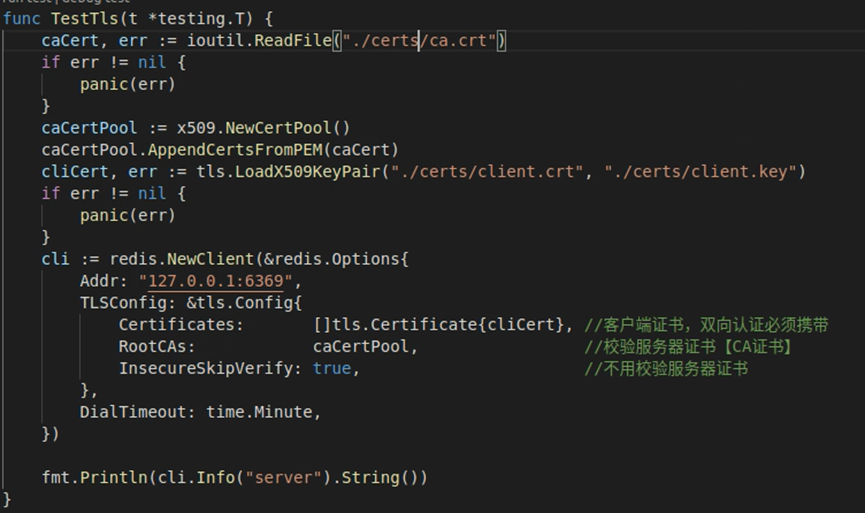
./amdc-cli -p 6369 --tls --cert ./client.crt --key ./client.key --cacert ./ca.crt - Go language connection:
# Data Persistence
AMDC provides two persistence methods: RDB and AOF. Related operations are also described in Operation Commands. Here we will expand on the usage and related tools for both persistence methods.
# RDB
RDB persistence stores data in AMDC in RDB format to hard disk.
# Methods to Generate RDB Files
There are three ways to generate RDB files:
- Configure save in configuration file to set RDB generation conditions. When triggered, system automatically uses bgsave to generate RDB file
- Use save command. This command will block all requests, and resume request processing after RDB file is generated
- Use bgsave command. This command will not block requests, but RDB file generation will be slower than save
# Methods to Restore Data from RDB
- Place one or more RDB files in the directory specified by dir in cache configuration file. Starting amdc will automatically load RDB data.
# Repair Corrupted RDB Files
AMDC provides RDB file repair tool
Usage: ./amdc-check-rdb [rdb-filename.rdb]
# AOF
AOF persistence writes data in amdc to text files in aof format, stored under appendonlydir folder. amdc will append new requests to the text file.
# Methods to Generate AOF Files
- Change AppendOnly to "yes" in configuration file.
# AOF Data Recovery Methods
- Place one or more AOF files or entire appendonlydir folder in the directory specified by dir in cache configuration file. Starting amdc will automatically load AOF data.
# Repair Corrupted AOF Files
AMDC provides AOF file repair tool. However, this tool can only be used if the last appended file is corrupted. This design is because if the base file is already corrupted, most data is lost, and there's no point in repairing.
Usage: ./aof-check-aof --fix [filename.aof|filename.mainfest]
# Command Auditing
AMDC provides monitor command to monitor all request information. Combined with shell client, monitoring content can be output to specific files.
Request information recording format: timestamp [database number client address:client port] command
Usage: amdc-cli -h [ip] -p [port] [-a password] monitor >amdc_commands.log
# amdc-cli Client Usage Introduction
To facilitate AMDC usage, the shell client provides convenient command-line usage and practical functions such as helping build clusters, manage cluster slots, LRU testing, etc.
# Client Parameters
Usage: amdc-cli [parameters] [command [command arguments ...]]
| Parameter | Description |
|---|---|
| -h [hostname] | Cache core IP (default: 127.0.0.1) |
| -p [port] | Cache core port (default: 6359) |
| -a [password] | Cache core requirepass password. Can use AMDCCLI_AUTH environment variable to set and input password for better security |
| --user [username] | Username when logging in with ACL user |
| --pass [password] | Corresponding password when logging in with ACL user |
| --askpass | Ignore AMDCCLI_AUTH environment variable, force use of directly entered password |
| -u [uri] | Cache core URI address (Redis protocol compatible) |
| -r [repeat] | Repeat specific command [repeat] times |
| -i [interval] | When using -r, set interval in seconds between repeats |
| -n [db] | Database number (default 16 databases, numbered 0-15) |
| -3 | Switch to RESP3 protocol |
| -x | Read input from stdin as last argument for amdc-cli. Example: amdc-cli -x set key < /opt/file |
| -d [delimiter] | Delimiter between raw format response blocks (e.g.: \n) |
| -D [delimiter] | Delimiter between multiple raw format responses (e.g.: \n) |
| -c | Connect to cluster mode |
| -e | Return error code when command execution fails |
| --raw | Use raw format output (when tty is not default output device) |
| --no-raw | Force formatted output even if stdout is not tty |
| --quoted-input | Force input processing as quoted string |
| --csv | Output in CSV format |
| --show-pushes [yn] | Whether to print resp3 push messages, default on |
| --stat | Dynamically print cache core status: memory/client connections, etc. |
| --lru-test | Simulate cache workload with 80-20 distribution (key usage) |
| --replica | Simulate a backup node showing commands received from master |
| --slave [host:ip] | Specify a node as master of currently connected node |
| --rdb [filename] | Get RDB file from cache core as local file |
| --pipe | Transfer raw amdc protocol (Redis compatible) from stdin to cache core |
| --pipe-timeout [n] | Timeout in pipe mode |
| --bigkeys | Find keys with large value memory usage |
| --memkeys | Find key-value pairs with large memory usage |
| --memkeys-samples | Find key-value pairs with large memory usage, more concise output |
| --hotkeys | Find frequently used keys, requires lfu cache policy |
| --scan | List all keys using scan command |
| --pattern [pat] | Regex pattern matching when using --scan/--bigkeys/--hotkeys, default * |
| --quoted-pattern [pat] | Similar to --pattern, but string type needs quotes, otherwise considered non-binary safe string |
| --intrinsic-latency [sec] | System intrinsic latency test, how many seconds test will last |
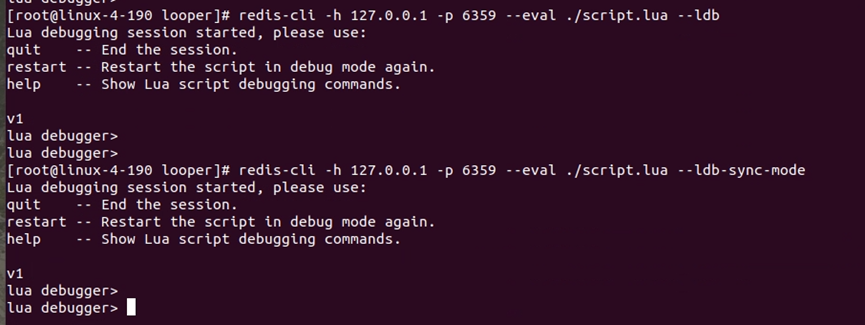
| --eval [file] | Send and execute LUA script file |
| --ldb | Use with --eval, enable amdc lua debugger |
| --ldb-sync-mode | Same as --ldb, but synchronized with debugger, cache core will be blocked |
| --cluster [command] [args...] [opts...] | Cluster management commands and arguments. Use --cluster help for detailed commands and arguments |
| --cluster help | View help information |
| --verbose | Verbose mode |
| --no-auth-warning | Don't show warning when using -a to enter password directly |
| --help | Help information |
| --version | amdc-cli version information |
| --tls | Establish a secure TLS connection. |
| --tls-host | Server name indication for TLS. |
| --cacert | CA Certificate file to verify with. |
| --cacert-dir | Directory where trusted CA certificates are stored. If neither cacert nor cacert-dir are specified, the default system-wide trusted root certs configuration will apply. |
| --insecure | Allow insecure TLS connection by skipping cert validation. |
| --cert | Client certificate to authenticate with. |
| --key | Private key file to authenticate with. |
| --tls-ciphers | Sets the list of preferred ciphers (TLSv1.2 and below) in order of preference from highest to lowest separated by colon ("😊. See the ciphers(1ssl) manpage for more information about the syntax of this string. |
| --tls-ciphersuites | Sets the list of preferred ciphersuites (TLSv1.3) in order of preference from highest to lowest separated by colon ("😊. See the ciphers(1ssl) manpage for more information about the syntax of this string, and specifically for TLSv1.3 ciphersuites. |
| --latency | Enter a special mode continuously sampling latency. If you use this mode in an interactive session, it runs forever displaying real-time stats. Otherwise if --raw or --csv is specified, or if you redirect the output to a non TTY, it samples the latency for 1 second (you can use -i to change the interval), then produces a single output and exits. |
| --latency-history | Like --latency but tracking latency changes over time. Default time interval is 15 sec. Change it using -i. |
| --latency-dist | Shows latency as a spectrum, requires xterm 256-colors. Default time interval is 1 sec. Change it using -i. |
Usage: amdc-cli --cluster [command [command arguments ...]]
| Primary Parameter | Secondary Parameter | Description |
|---|---|---|
| create host1:port1 ... hostN:portN | Create cluster | |
| --cluster-replicas [arg] | Number of slave nodes | |
| check host:port | Check cluster | |
| --cluster-search-multiple-owners | Check if slots are assigned to multiple nodes | |
| info host:port | View cluster status | |
| fix host:port | Fix cluster | |
| --cluster-search-multiple-owners | Fix slot duplicate assignment issues | |
| reshard host:port | Migrate slots from any node in cluster, reshard slots | |
| --cluster-from [arg] | Source nodes to migrate slots from, can be multiple nodes separated by comma, passing node id. Can also pass --from all so source nodes are all cluster nodes. If not passed, user will be prompted during migration | |
| --cluster-to [arg] | Destination node id for slot migration, only one destination node. If not passed, user will be prompted during migration | |
| --cluster-slots [arg] | Number of slots to migrate. If not passed, user will be prompted during migration | |
| --cluster-yes | Confirm input during migration | |
| --cluster-timeout [arg] | Set migrate command timeout | |
| --cluster-pipeline [arg] | Define number of keys retrieved by cluster getkeysinslot command at once, default 10 if not passed | |
| --cluster-replace | Whether to directly replace to destination node | |
| rebalance host:port | Balance cluster node slot count from any node | |
| --cluster-weight [node1=w1...nodeN=wN] | Specify cluster node weights | |
| --cluster-use-empty-masters | Allow empty master nodes without assigned slots to participate, default not allowed | |
| --cluster-timeout [arg] | Set migrate command timeout | |
| --cluster-simulate | Simulate rebalance operation, won't actually execute migration | |
| --cluster-pipeline [arg] | Define number of keys retrieved by cluster getkeysinslot command at once, default 10 | |
| --cluster-threshold [arg] | Slot migration threshold exceeds threshold, execute rebalance operation | |
| --cluster-replace | Whether to directly replace to destination node | |
| add-node new_host:new_port existing_host:existing_port | Add node, add new node to specified cluster, default adds master node | |
| --cluster-slave | New node as slave node, default random master node | |
| --cluster-master-id [arg] | Specify master node for new node | |
| del-node host:port node_id | Delete specified node, shut down node service after success | |
| call host:port command arg arg .. arg | Execute related commands on all cluster nodes | |
| set-timeout host:port milliseconds | Set cluster-node-timeout | |
| import host:port | Import external amdc data to cluster (non-cluster mode nodes) | |
| --cluster-from [arg] | Import data from specified instance to cluster | |
| --cluster-copy | Specify copy when migrate | |
| --cluster-replace | Specify replace when migrate |
# Client Usage
AMDC client covers mainstream programming languages such as Java, PHP, Python, C, C++, Node.js, etc. Can connect through amdc-cli, also supports Redis client connecting to amdc for operations, both have same effect.
# General Operations
Connect to amdc-server via URL
./amdc-cli -u amdc://user:password@127.0.0.1:6359/dbDisplay amdc-cli command help information --help
Omitted.
Connect to amdc using amdc-cli client
./amdc-cli -h host -p port -a password-h specifies IP
-p specifies port
-a specifies authentication passwordOutput return data to current command line --raw (hide data type) and --no-raw
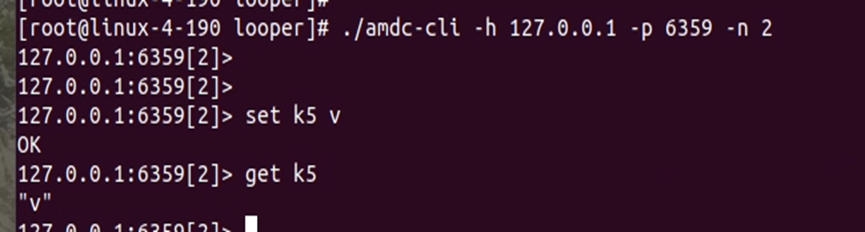
Run same command n times consecutively -r, set run interval -i (seconds)


Connect to specified db: -n
Execute command output in comma-separated format (CSV format) --csv

Read data from standard input (stdin) as last argument for amdc-cli -x

rdb backup --rdb

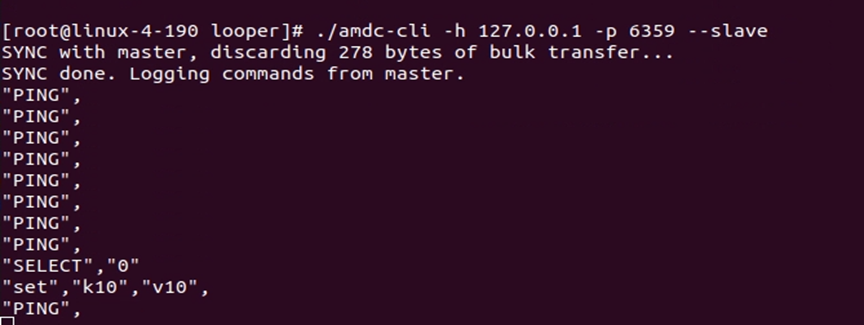
Slave mode, treat client as slave node of server --slave

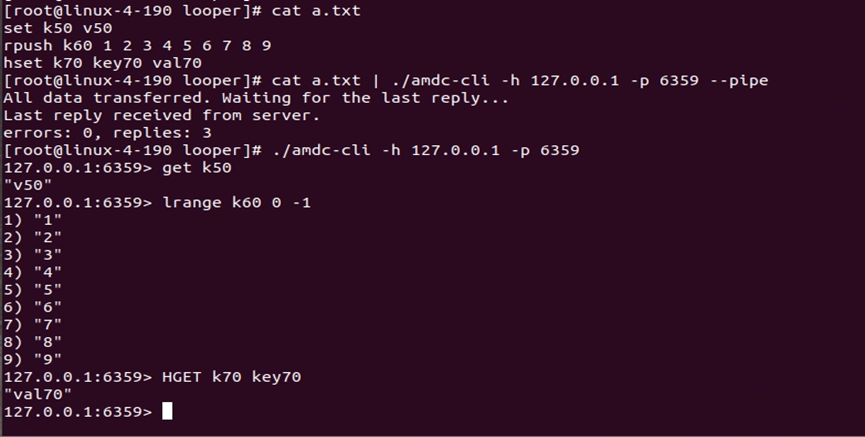
Pipeline mode, execute multiple commands at once --pipe
# Statistical Operations
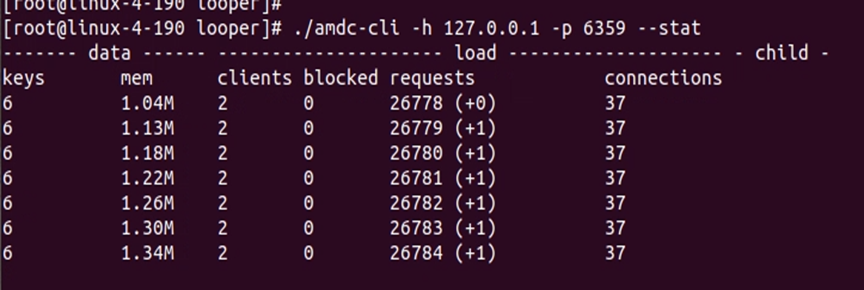
Continuous statistics mode, real-time view of amdc key count, memory usage, etc. --stat
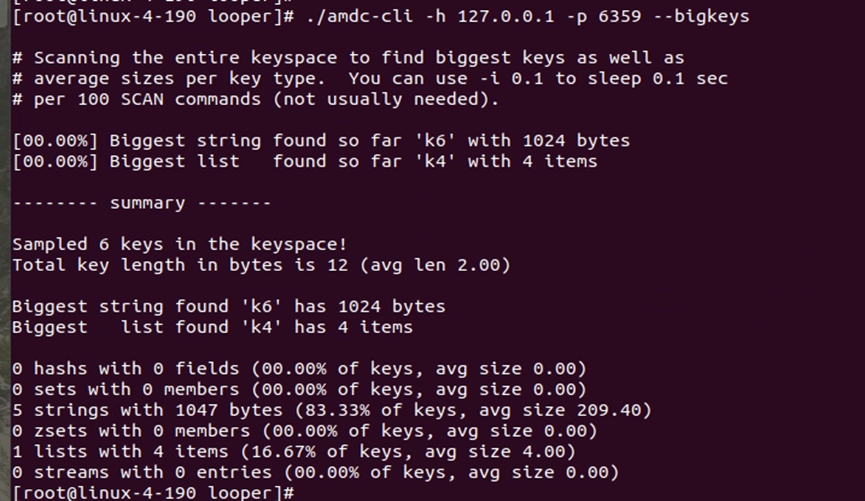
Find big keys --bigkeys
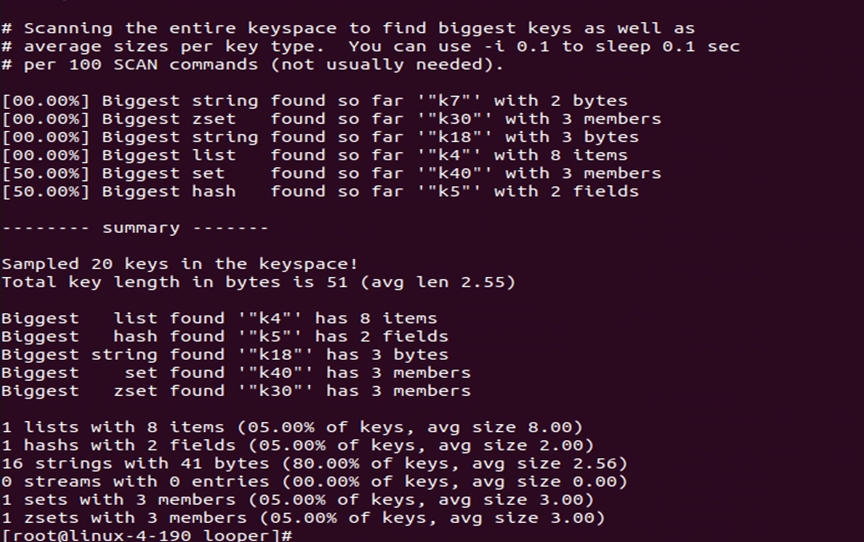
Find hot keys --hotkeys
# Query Operations
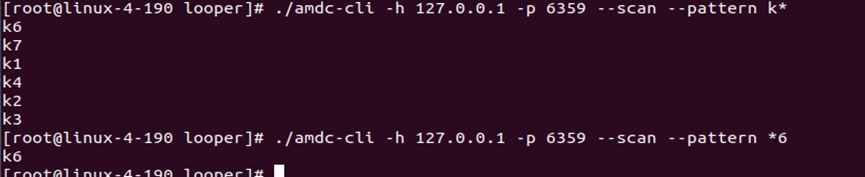
Get all key list --scan

Scan specified keys --pattern (regex)
View minimum, maximum, average access latency of amdc over a period --latency or --latency-history


# Test Operations
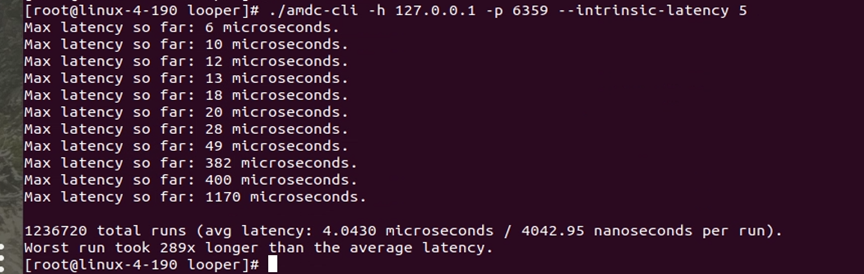
Measure amdc latency within n seconds --intrinsic-latency
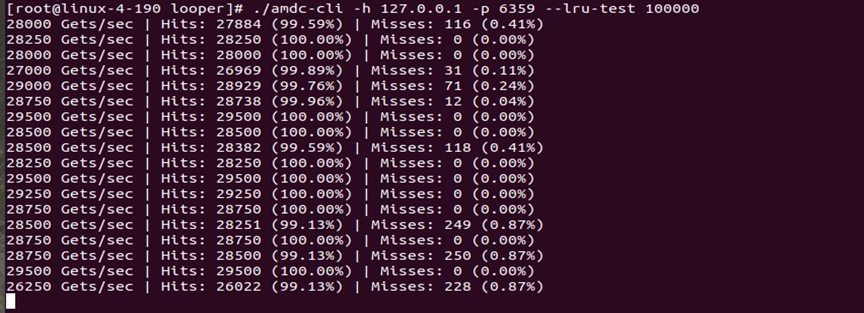
LRU simulation, simulate cache eviction policy --lru-test
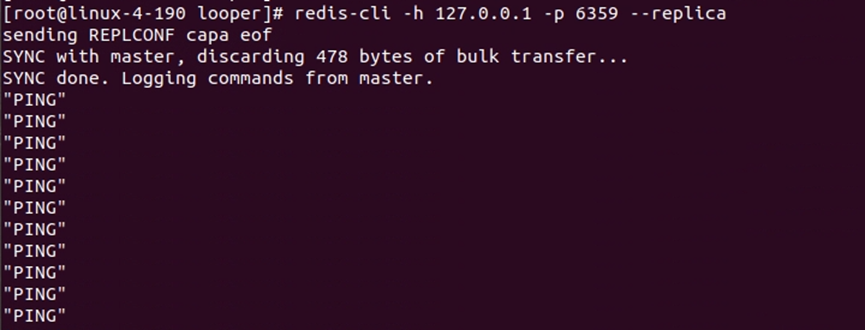
Simulate showing commands received from master server as replica --replica
# LUA Operations
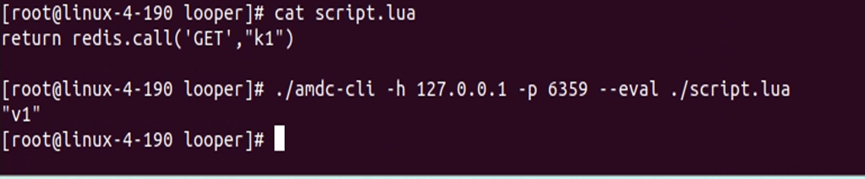
Execute lua script
Start lua debug mode: --ldb or --ldb-sync-mode
# Cluster Operations
Current multi-tenant version does not support cluster operations
# RDB Cluster Data Migration Tool Usage Introduction
Current multi-tenant version does not support cluster operations
# Performance Testing Tool Usage Introduction
amdc-benchmark is a dedicated performance testing tool provided to users for testing AMDC, enabling quick understanding of AMDC performance and providing reliable basis for tuning.
# AMDC benchmark Parameters
amdc-benchmark
Example: amdc-benchmark [-h <host>] [-p <port>] [-c <clients>] [-n <requests>]
Command parameters
-h <hostname>     Instance host name (default 127.0.0.1)
-p <port>         Instance port (default 6359)
-a <password>     Instance password
-c <clients>      Concurrent connections (default 50)
-n <requests>     Total requests (default 100000)
-d <size>         SET/GET data size in bytes (default 2)
-dbnum <db>       Specify db number (default AMDC has databases 0-15, default 0)
-k <boolean>      1=keep connection 0=reconnect (default 1)
-r <keyspacelen>  SET/GET/INCR use random key, SADD use random value, keyspacelen is max length of random data (max length range 0-12)
-P <numreq>       Merge specified number of requests using pipeline, default 1 (no pipeline)
-e                If server returns error, display in stdout (no more than 1 error per second)
-q                Only display query/sec value
--csv             Output in CSV format
-l                Loop, keep testing
-t <tests>        Specify test commands
-I                Idle mode, open N idle connections and wait
--threads <num>  Enable specified number of threads, default 1
2
3
4
5
6
7
8
9
10
11
12
13
14
15
16
17
memtier-benchmark parameters
Example: memtier-benchmark [-h <host>] [-p <port>] [-c <clients>] [-n <requests>] [-t <threads>]
Command parameters
-h <hostname>     Instance host name (default 127.0.0.1)
-p <port>         Instance port (default 6359)
-s <socket>       Use Unix domain socket
-a <password>     Authentication password
--tls             Enable TLS encryption
-c <clients>      Number of clients
-t <threads>      Number of threads
--ratio           Read/write ratio
--pipeline <num>  Pipeline command count
--randomdata      Use random data
--hide-histogram  Hide detailed histogram information
--csv <file>      Output csv format file
--test-time <sec> Continuous test duration
2
3
4
5
6
7
8
9
10
11
12
13
# Product Configuration Description
# Cache Core Configuration
AMDC cache core has three configurable configuration files: cache configuration (amdc.yaml), sentinel configuration (sentinel.yaml), and authorization center configuration (acls.properties).
# Cache Configuration File
AMDC cache core configuration file is located at: /installation_root_directory/amdc/amdc.yaml. Some configurations can be modified through console. Below is detailed configuration for AMDC cache core:
| Parameter Name | Default Value | Notes |
|---|---|---|
| include | empty | Used to include other configuration files, enabling configuration reuse and layered management. CONFIG REWRITE will not modify this option |
| loadmodule | empty | Load specified module at startup. If loading fails, server will terminate. Can be used multiple times to load multiple modules |
| bind | 127.0.0.1 -::1 | Network address to listen on. - prefix means address unavailability won't affect startup. Default only listens on local loopback address. Comment out this line to listen on all interfaces (security risk when exposed to public network) |
| protected-mode | yes | Protection mode. When no bind specified and no password, only local loopback address and Unix domain socket connections allowed |
| port | 6359 | TCP port to listen on. Set to 0 to not listen on TCP socket |
| tcp-backlog | 511 | TCP listen backlog size. Actual value may be limited by system somaxconn and tcp_max_syn_backlog |
| unixsocket | empty | Unix domain socket path. If not specified, won't listen on Unix socket |
| unixsocketperm | 700 | Unix domain socket permissions |
| timeout | 0 | Client idle timeout (seconds). 0 means disabled |
| tcp-keepalive | 300 | TCP keepalive time (seconds). Used to detect dead connections and maintain network connections |
| license | license.lic | License file path |
| tls-port | empty | TLS listening port. Use with port 0 to enable TLS only |
| tls-cert-file | empty | Server TLS certificate file path (PEM format) |
| tls-key-file | empty | Server TLS private key file path (PEM format) |
| tls-key-file-pass | empty | TLS private key file password (if encrypted) |
| tls-client-cert-file | empty | Client TLS certificate file path (for client authentication) |
| tls-client-key-file | empty | Client TLS private key file path |
| tls-client-key-file-pass | empty | Client TLS private key file password (if encrypted) |
| tls-dh-params-file | empty | DH parameter file path. Needed for older OpenSSL (❤️.0), not recommended for newer versions |
| tls-ca-cert-file | empty | CA certificate file path for verifying clients and nodes |
| tls-ca-cert-dir | empty | CA certificate directory path for verifying clients and nodes |
| tls-auth-clients | empty | Client certificate verification policy. no doesn't accept certificates, optional optional but must be valid |
| tls-replication | no | Whether to enable TLS in replication links |
| tls-cluster | no | Whether to enable TLS in cluster bus protocol |
| tls-protocols | "TLSv1.2 TLSv1.3" | Allowed TLS versions, case insensitive |
| tls-ciphers | DEFAULT:!MEDIUM | Cipher suites allowed for TLSv1.2 and below |
| tls-ciphersuites | TLS_CHACHA20_POLY1305_SHA256 | Cipher suites allowed for TLSv1.3 |
| tls-prefer-server-ciphers | no | Whether to prefer server cipher suite preferences |
| tls-session-caching | yes | Whether to enable TLS session caching to accelerate reconnections |
| tls-session-cache-size | 20480 | Maximum number of TLS session cache entries. 0 means unlimited |
| tls-session-cache-timeout | 300 | TLS session cache timeout (seconds) |
| daemonize | no | Whether to run as daemon. Will generate pid file if yes |
| supervised | no | Interaction mode with monitoring systems (upstart/systemd). Default no interaction |
| pidfile | /var/run/amdc_6379.pid | pid file path. Default generated in daemon mode |
| loglevel | notice | Log level: debug (detailed), verbose (more), notice (moderate, recommended for production), warning (key info only) |
| logfile | "" | Log file path. Empty string means output to stdout |
| syslog-enabled | no | Whether to enable system log |
| syslog-ident | amdc | System log identifier |
| syslog-facility | local0 | System log facility. Must be USER or LOCAL0-LOCAL7 |
| crash-log-enabled | yes | Whether to enable crash log |
| crash-memcheck-enabled | yes | Whether to enable fast memory check in crash log |
| worker-threads | 1 | Set number of worker threads. Default 1 |
| databases | 16 | Number of databases. Default uses DB 0. Can switch via SELECT |
| always-show-logo | no | Whether to display ASCII art logo in startup log. Default only shown in interactive sessions |
| set-proc-title | yes | Whether to modify process title to show runtime info |
| proc-title-template | "{title} {listen-addr} {server-mode}" | Process title template. Supports multiple variables |
| save | 3600 1, 300 100, 60 10000 | RDB persistence trigger conditions. Format <seconds> <modifications>. save "" disables RDB |
| stop-writes-on-bgsave-error | yes | Whether to stop accepting writes when RDB persistence fails |
| rdbcompression | yes | Whether to use LZF compression for string objects in RDB files |
| rdbchecksum | yes | Whether to add CRC64 checksum at end of RDB file. Disabling improves performance |
| sanitize-dump-payload | no | Whether to perform full validation when loading RDB or RESTORE data. Default no due to cluster migration issues |
| dbfilename | dump.rdb | RDB file name |
| rdb-del-sync-files | no | Whether to delete replication RDB files when no persistence configured. Only effective when both AOF and RDB disabled |
| dir | ./ | Directory for data files (RDB, AOF) |
| replicaof | empty | Master-slave replication configuration. Format <masterip> <masterport> |
| masterauth | empty | Master server authentication password |
| masteruser | empty | Username for replication master server |
| replica-serve-stale-data | yes | Whether to respond to client requests during replication sync (may return stale data) |
| replica-read-only | yes | Whether slave server is read-only mode |
| repl-diskless-sync | no | Whether to enable diskless replication (transfer RDB directly via socket) |
| repl-diskless-sync-delay | 5 | Delay time (seconds) to wait for new slave nodes during diskless replication |
| repl-diskless-load | disabled | How slave loads RDB. disabled (save to disk first), on-empty-db (diskless only when empty), swapdb (keep old data in memory) |
| repl-ping-replica-period | 10 | Interval (seconds) for slave to send PING to master |
| repl-timeout | 60 | Replication timeout (seconds). Covers SYNC transfer, master-slave heartbeat, etc. |
| repl-disable-tcp-nodelay | no | Whether to disable TCP_NODELAY for replication links. Yes reduces bandwidth but increases latency |
| repl-backlog-size | 1mb | Replication backlog buffer size. Affects partial resync capability |
| repl-backlog-ttl | 3600 | Delay time (seconds) to release backlog buffer after last slave disconnects. 0 means never release |
| replica-priority | 100 | Slave priority for Sentinel master selection. 0 means cannot be selected as master |
| replica-announced | yes | Whether slave is shown in Sentinel reports |
| min-replicas-to-write | 0 | Minimum number of slaves required for master to accept writes. 0 disables this feature |
| min-replicas-max-lag | 10 | Maximum lag time (seconds) for slaves. Used with min-replicas-to-write |
| replica-announce-ip | empty | IP address slave announces to master (for NAT scenarios) |
| replica-announce-port | empty | Port slave announces to master (for NAT scenarios) |
| tracking-table-max-keys | 1000000 | Maximum number of keys in client cache tracking table. 0 means unlimited |
| acllog-max-len | 128 | Maximum number of ACL log entries |
| aclfile | empty | External ACL user file path. Cannot be mixed with in-config user configuration |
| requirepass | empty | Default user password (equivalent to ACL default user password) |
| acl-pubsub-default | allchannels | Default Pub/Sub channel permissions for new users. allchannels (allow all), resetchannels (deny all) |
| rename-command | empty | Command renaming (deprecated). Can disable dangerous commands (e.g., rename-command CONFIG "") |
| maxclients | 10000 | Maximum concurrent client connections. Limited by system file descriptors |
| maxmemory | empty | Memory usage limit. When reached, handles according to maxmemory-policy |
| maxmemory-policy | noeviction | Eviction policy when memory limit reached. E.g., volatile-lru, allkeys-lfu, etc. |
| maxmemory-samples | 5 | Number of samples for LRU/LFU/TTL algorithms. Higher is more accurate but uses more CPU |
| maxmemory-eviction-tenacity | 10 | Aggressiveness of eviction processing. 0 (lowest latency) to 100 (prioritize eviction) |
| replica-ignore-maxmemory | yes | Whether slave ignores its own maxmemory configuration (default eviction handled by master) |
| active-expire-effort | 1 | Active expired key scan intensity. 1-10, higher is more frequent (may increase CPU and latency) |
| lazyfree-lazy-eviction | no | Whether to use lazy deletion for memory eviction (background thread frees memory) |
| lazyfree-lazy-expire | no | Whether to use lazy deletion for key expiration |
| lazyfree-lazy-server-del | no | Whether to use lazy deletion for internal server key deletion (e.g., RENAME overwrite) |
| replica-lazy-flush | no | Whether to lazy flush database during slave full sync |
| lazyfree-lazy-user-del | no | Whether to use lazy deletion for user DEL command (equivalent to UNLINK) |
| lazyfree-lazy-user-flush | no | Default behavior for user FLUSH command when sync/async not specified |
| oom-score-adj | no | Whether to control kernel OOM killer process score. yes/relative for relative adjustment, absolute for absolute setting |
| oom-score-adj-values | 0 200 800 | OOM score adjustment values for master, slave, background subprocess respectively |
| disable-thp | yes | Whether to disable kernel Transparent Huge Pages (THP). Avoids fork and CoW performance issues |
| appendonly | no | Whether to enable AOF persistence |
| appendfilename | "appendonly.aof" | AOF file name |
| appendfsync | everysec | AOF fsync strategy: no (depend on system), always (every write), everysec (once per second, default) |
| no-appendfsync-on-rewrite | no | Whether to disable main process fsync during AOF rewrite. May increase data loss risk but improves performance |
| auto-aof-rewrite-percentage | 100 | AOF auto rewrite trigger percentage (current size vs last rewrite growth) |
| auto-aof-rewrite-min-size | 64mb | Minimum file size for AOF auto rewrite |
| aof-load-truncated | yes | Whether to load truncated AOF file at startup. No means error and exit |
| aof-use-rdb-preamble | yes | Whether to use RDB prefix during AOF rewrite (improves rewrite and recovery speed) |
| lua-time-limit | 5000 | Maximum Lua script execution time (milliseconds). After timeout, only SCRIPT KILL and SHUTDOWN NOSAVE allowed |
| cluster-enabled | no | Whether to enable cluster mode |
| cluster-config-file | nodes-6379.conf | Cluster configuration file path. Automatically maintained by node |
| cluster-node-timeout | 15000 | Cluster node timeout (milliseconds). Used to determine node failure |
| cluster-replica-validity-factor | 10 | Slave failover validity factor. Affects failover conditions |
| cluster-migration-barrier | 1 | Slave migration barrier (number of slaves original master must retain) |
| cluster-allow-replica-migration | yes | Whether to allow slaves to automatically migrate to masters without slaves |
| cluster-require-full-coverage | yes | Whether cluster requires all hash slots covered to accept requests |
| cluster-replica-no-failover | no | Whether slaves are prohibited from automatic failover (manual trigger still possible) |
| cluster-allow-reads-when-down | no | Whether nodes still respond to read requests for their responsible slots when cluster is down |
| cluster-announce-ip | empty | Cluster node publicly announced IP address (for NAT/Docker scenarios) |
| cluster-announce-port | empty | Cluster node publicly announced client port |
| cluster-announce-tls-port | empty | Cluster node publicly announced TLS client port |
| cluster-announce-bus-port | empty | Cluster node publicly announced bus port (default client port + 10000) |
| slowlog-log-slower-than | 10000 | Slow log recording threshold (microseconds). Negative disables. 0 records all commands |
| slowlog-max-len | 128 | Maximum number of slow log entries. Oldest entries evicted when exceeded |
| latency-monitor-threshold | 0 | Latency monitoring threshold (milliseconds). 0 disables monitoring |
| notify-keyspace-events | "" | Keyspace event notification configuration. Composed of multiple characters (e.g., "Ex" for expiration events) |
| gopher-enabled | no | Whether to enable Gopher protocol support |
| hash-max-ziplist-entries | 512 | Maximum number of entries for hash table using ziplist encoding |
| hash-max-ziplist-value | 64 | Maximum value size (bytes) for hash table using ziplist encoding |
| list-max-ziplist-size | -2 | Node size limit for list using ziplist encoding. -1 to -5 corresponds to 4KB to 64KB. Positive numbers are entry count |
| list-compress-depth | 0 | List compression depth. 0 disables compression. Positive number means number of uncompressed nodes at head and tail |
| set-max-intset-entries | 512 | Maximum number of entries for set using intset encoding (elements are 64-bit signed integers) |
| zset-max-ziplist-entries | 128 | Maximum number of entries for sorted set using ziplist encoding |
| zset-max-ziplist-value | 64 | Maximum value size (bytes) for sorted set using ziplist encoding |
| hll-sparse-max-bytes | 3000 | Maximum bytes for HyperLogLog using sparse representation (includes 16 byte header) |
| stream-node-max-bytes | 4096 | Maximum bytes for single node in stream data structure |
| stream-node-max-entries | 100 | Maximum number of entries for single node in stream data structure |
| activerehashing | yes | Whether to enable active rehashing. Periodically frees hash table memory |
| client-output-buffer-limit normal | 0 0 0 | Normal client output buffer limit (hard limit, soft limit, soft limit duration) |
| client-output-buffer-limit replica | 256mb 64mb 60 | Slave client output buffer limit |
| client-output-buffer-limit pubsub | 32mb 8mb 60 | Pub/Sub client output buffer limit |
| client-query-buffer-limit | 1gb | Maximum size of client query buffer |
| proto-max-bulk-len | 512mb | Maximum size of bulk request in protocol (bytes). Must be ≥1mb |
| hz | 10 | Background task execution frequency (Hz). 1-500. Higher is more responsive but uses more CPU |
| dynamic-hz | yes | Whether to enable dynamic Hz. Automatically increases frequency when clients increase |
| aof-rewrite-incremental-fsync | yes | Whether to fsync every 32MB during AOF rewrite. Reduces latency spikes |
| rdb-save-incremental-fsync | yes | Whether to fsync every 32MB during RDB save. Reduces latency spikes |
| lfu-log-factor | 10 | LFU eviction algorithm counter log factor. Affects counter growth rate |
| lfu-decay-time | 1 | LFU counter decay time (minutes). Counter halves after this duration |
| activedefrag | no | Whether to enable active memory defragmentation (requires Jemalloc support) |
| active-defrag-ignore-bytes | 100mb | Minimum fragmentation waste bytes to trigger active defragmentation |
| active-defrag-threshold-lower | 10 | Minimum fragmentation rate (percentage) to trigger active defragmentation |
| active-defrag-threshold-upper | 100 | Fragmentation rate (percentage) to trigger maximum defragmentation effort |
| active-defrag-cycle-min | 1 | Minimum CPU percentage for defragmentation. Used when lower limit reached |
| active-defrag-cycle-max | 25 | Maximum CPU percentage for defragmentation. Used when upper limit reached |
| active-defrag-max-scan-fields | 1000 | Maximum fields processed per main dictionary scan (for sets, hashes, etc.) |
| jemalloc-bg-thread | yes | Whether to enable Jemalloc background thread for memory release |
| server_cpulist | empty | CPU affinity list for server/IO threads (e.g., "0-7:2" means cores 0, 2, 4, 6) |
| bio_cpulist | empty | CPU affinity list for background I/O threads |
| aof_rewrite_cpulist | empty | CPU affinity list for AOF rewrite subprocess |
| bgsave_cpulist | empty | CPU affinity list for BGSAVE subprocess |
| ignore-warnings | empty | List of warnings to ignore (space-separated). E.g., "ARM64-COW-BUG" |
# Sentinel Configuration File
Sentinel configuration file: sentinel.yaml
| Parameter Name | Default Value | Notes |
|---|---|---|
| bind | 127.0.0.1 | Network address to listen on. Default only accessible locally. Must explicitly configure (e.g., bind 127.0.0.1 192.168.1.1) or disable protection mode |
| port | 26379 | TCP port for sentinel process to listen on |
| protected-mode | yes | Protection mode. When no bind configured and no password, only local connections allowed. For public network, set to no and use with firewall |
| unixsocket | empty | Unix domain socket path. If not specified, won't listen on Unix socket |
| unixsocketperm | 700 | Unix domain socket permissions |
| daemonize | no | Whether to run as daemon. Yes means background run and generate pid file |
| pidfile | /var/run/amdc-sentinel.pid | pid file path. Default generated in daemon mode |
| logfile | "" | Log file path. Empty string means output to stdout. In daemon mode, logs discarded if empty |
| sentinel announce-ip | empty | For NAT environments. Specifies IP address sentinel publicly announces (replaces auto-detected local IP) |
| sentinel announce-port | empty | For NAT environments. Specifies port sentinel publicly announces (replaces port config) |
| dir | /. | Working directory. Sentinel performs persistence operations in this directory |
| maxclients | 10000 | Maximum concurrent client connections. Limited by system file descriptors |
| user | "" | |
| sentinel monitor mymaster | 127.0.0.1 6379 2 | Master node monitoring configuration. Format |
| sentinel auth-pass | empty | Authentication password for master and slave nodes. Must set if instance has requirepass configured |
| sentinel auth-user | empty | Username for sentinel to authenticate with instance (use with auth-pass) |
| sentinel down-after-milliseconds mymaster | 30000 | Timeout (milliseconds) for master (or slave, sentinel) to be judged subjectively down (S_DOWN). Default 30 seconds |
| acllog-max-len | 128 | Maximum number of ACL log entries. Records commands blocked by ACL and authentication events |
| aclfile | empty | External ACL user file path. Cannot be mixed with in-config user configuration |
| requirepass | empty | Sentinel's own authentication password. All sentinels must configure same password to communicate with each other |
| sentinel sentinel-user | empty | Username for sentinel inter-communication |
| sentinel sentinel-pass | empty | Password for sentinel inter-communication. Use with sentinel-user |
| sentinel parallel-syncs mymaster | 1 | Number of slaves that can be reconfigured as new master's slaves simultaneously during failover. Lower value means less client impact |
| sentinel failover-timeout mymaster | 180000 | Failover timeout (milliseconds). Default 3 minutes. Affects retry interval, slave reconfiguration and other scenarios |
| sentinel notification-script | empty | Sentinel event notification script path (e.g., warning level events). Script receives event type and description as parameters |
| sentinel client-reconfig-script | empty | Client reconfiguration script path. Triggered after failover to notify clients of master address change |
| sentinel deny-scripts-reconfig | yes | Whether to prohibit runtime script configuration modification via SENTINEL SET. Default prohibited to avoid security risks |
| sentinel rename-command | empty | Rename commands (e.g., when master renames CONFIG to GUESSME, sentinel must sync modification) |
| sentinel resolve-hostnames | no | Whether to enable hostname support. Default only supports IP. Enable requires proper DNS configuration |
| sentinel announce-hostnames | no | Enable hostname announcement. Use with resolve-hostnames. Default uses IP announcement |
# Authorization Authentication Center Configuration
When using authentication center, fill in acls.properties. Must provide apusic license authentication center address. Address must be in ip:port format, multiple addresses separated by comma.
Note: This configuration existed in old version's amdc.yaml. Removed in new version but still compatible with old version.
| Configuration Item | Default Value | Description |
|---|---|---|
| apusic_acls_enable | false | Whether to enable apusic license authentication center. Use true to enable, otherwise false |
| apusic_acls_authUrls | "" | Authentication center address. Must be in ip:port format. Multiple addresses separated by comma |
| apusic_acls_ns | "public" | Namespace |
| apusic_acls_tenant | "" | Tenant name |
# Product Tool Usage Instructions
# amdc-check-rdb Tool User Manual
# Common Issues Handling
amdc-check-rdb is AMDC's RDB file verification and repair tool, used to check the integrity and validity of RDB snapshot files, troubleshoot file corruption issues, and repair some corrupted RDB files to avoid AMDC startup failure or data loss due to RDB file corruption.
Core functions:
- Verify RDB file integrity, detect file format compliance with AMDC specifications
- Repair RDB files corrupted by unexpected interruptions (e.g., server crash, power outage)
- View basic RDB file information (e.g., version, data volume, expiration time, etc.)
# Tool Location and Running Prerequisites
# Tool Location
After AMDC installation, amdc-check-rdb tool is located in AMDC installation directory folder:
Linux: /amdc/amdc-check-rdb (default path, adjust if custom installation)
# Running Prerequisites
- No need to start AMDC service, can run directly from command line
- Must have read permission for RDB file (if insufficient permissions, use chmod to modify, Linux)
- RDB file path must be correct (absolute or relative path. Relative path based on current terminal directory)
# Basic Syntax
amdc-check-rdb syntax is simple. Core only needs to specify RDB file path to process. Optional parameters for repair or detailed information:
# Basic syntax (verify RDB file)
amdc-check-rdb [options] /path/to/dump.rdb

# Common shorthand (no options, default only verify file integrity)
amdc-check-rdb dump.rdb
2
3
4
5
# Core Options and Parameters
amdc-check-rdb has few options. Focus on repair and debugging options:
| Option | Description | Usage Scenario |
|---|---|---|
| --fix | Repair corrupted RDB file, keep recoverable data, discard unrepairable parts | RDB file corrupted, AMDC startup failed |
| --help (shorthand -h) | Display tool help information, including all option descriptions and basic syntax | Quick lookup when forgetting command syntax |
# Common Operation Examples
# Verify RDB File Integrity
No options needed. Just specify RDB file path. Tool automatically verifies file integrity and format correctness:
# Verify RDB file
amdc-check-rdb /path/to/dump.rdb
2
Normal output (file intact):
[offset 0] Checking RDB file dump.rdb
[offset 29] AUX FIELD amdc-ver = '2.0.4'
[offset 46] AUX FIELD amdc-bits = '64'
[offset 58] AUX FIELD ctime = '1769518212'
[offset 73] AUX FIELD used-mem = '2442688'
[offset 91] AUX FIELD repl-stream-db = '0'
[offset 141] AUX FIELD repl-id = '069cb616c524d6ec885da6218b669f1d9c970125'
[offset 156] AUX FIELD repl-offset ='0'
[offset 172] AUX FIELD aof-preamble ='0'
[offset 181] Checksum OK
[offset 181] \o/ RDB looks OK! \o/
[info]0 keys read
[info]0 expires
[info] 0 already expired
2
3
4
5
6
7
8
9
10
11
12
13
14
Abnormal output (file corrupted):
[offset 0] Checking RDB file dump.rdb
[offset 21] AUX FIELD ctime = '1768265496'
[offset 42] AUX FIELD used-mem = '4275241848'
[offset 60] AUX FIELD repl-stream-db = '0'
[offset 11 ] AUX FIELD repl-id = 'f0a6b7b58edlece135f1ba84bcc8add612e8b347'
[offset 135] AUX FIELD repl-offset = '67232446953'
[offset 137] Selecting DB ID 0
--- RDB ERROR DETECTED ---
[offset 73027] Internal error in RDB reading offset 0, function at rdb.c:1936 -> Intset integrity check failed.
[additional info] While doing: read-object-value
[additional info] Reading key 'jszt.894679007767823360.wf.isallownextparticipant.crrccardispatch.audit'
[additional info] Reading type 11 (set-intset)
[info] 159 keys read
[info] 158 expires
[info] 157 already expired
692:C 02 Feb 2026 10:49:23.182 # Terminating server after rdb file reading failure.
2
3
4
5
6
7
8
9
10
11
12
13
14
15
16
# Repair Corrupted RDB File
When RDB file is corrupted, use --fix option to repair. Repaired dump file is named dump-<process_id>.rdb:
# Repair corrupted RDB file
amdc-check-rdb --fix /path/to/dump.rdb
2
Successful repair output:
[offset 0] Checking RDB file --fix
[offset 21] AUX FIELD ctime = '1768265496'
[offset 42] AUX FIELD used-mem = '4275241848'
[offset 60] AUX FIELD repl-stream-db = '0'
[offset 10] AUX FIELD repl-id = 'f0a6b7b58edlece135f1ba84bcc8add612e8b347'
[offset 135] AUX FIELD repl-offset = '67232446953'
[offset 137] Selecting DB ID 0
--- RDB ERROR DETECTED---
[offset 73027] Internal error in RDB reading offset 0, function at rdb.c:1936 -> Intset integrity check failed.
[additional info] While doing: read-object-value
[additional info] Reading key 'jszt.894679007767823360.wf.isallownextparticipant.crrccardispatch.audit'
[additional info] Reading type 11 (set-intset)
[info] 159 keys read
[info] 158 expires
[info] 157 already expired
--- RDB ERROR DETECTED---
[offset 178543] Internal error in RDB reading offset 0, function at rdb.c:1936 -> Intset integrity check failed.
[additional info] While doing: read-object-value
[additional info] Reading key 'jszt.894679007767823360.wf.isallownextparticipant.crrclinefeedback.submit'
[additional info] Reading type 11 (set-intset)
[info] 392 keys read
[info] 390 expires
[info] 388 already expired
--- RDB ERROR DETECTED---
[offset 260382] Internal error in RDB reading offset 0, function at rdb.c:1936 -> Intset integrity check failed.
[additional info] While doing: read-object-value
[additional info] Reading key 'jszt.894679007767823360.wf.isallownextparticipant.ebruleexeccase.save'
[additional info] Reading type 11(set-intset)
[info] 571 keys read
[info] 568 expires
[info] 564 already expired
--- RDB ERROR DETECTED---
[offset 136547728] Invalid object type: 111
[additional info] While doing: read-type
[info] 114982 keys read
[info] 114589 expires
[info] 113699 already expired
[offset 136547728] \o/ RDB partially fixed: dump-790.rdb! \o/
[info] 114982 / 406455 keys fixed
2
3
4
5
6
7
8
9
10
11
12
13
14
15
16
17
18
19
20
21
22
23
24
25
26
27
28
29
30
31
32
33
34
35
36
37
38
39
# Notes
- Whether to backup original RDB file before repair: --fix option won't directly overwrite original file. Repaired dump file is named dump-<process_id>.rdb. For safety, backup RDB file before operation
- Can only repair partially corrupted files: If RDB file header info is corrupted or checksum is severely wrong, tool may not repair. Need backup files in this case
- Repair may lose some data: For key-value pairs with abnormal format in RDB file, tool will try to skip and discard that data. If unrecoverable data segments detected, will stop scanning remaining file content. Therefore tool may only complete partial file repair
- Tool version must match AMDC version: RDB file formats may differ between versions. Use amdc-check-rdb tool of same version as AMDC service to avoid verification or repair failure
# amdc-check-aof Tool User Manual
# Tool Introduction
amdc-check-aof is an AOF (Append Only File) file verification and repair tool, used to check AOF file integrity and syntax correctness, repair AOF file corruption caused by unexpected interruptions, ensuring AMDC can normally load AOF file to restore data at startup.
Core functions:
- Verify AOF file syntax correctness and integrity, detect file corruption
- Repair AOF file truncation and syntax errors caused by server crash, power outage, etc.
- Remove invalid commands from AOF file, ensuring AMDC can load normally
# Tool Location and Running Prerequisites
# Tool Location
Located in same directory as amdc-check-rdb, in AMDC installation folder:
Linux: /amdc/amdc-check-aof
# Running Prerequisites
No need to start AMDC service, can run directly from command line
- Must have read and write permissions for AOF file (write needed for repair)
- AOF file path must be correct. If using relative path, ensure terminal current directory matches file path
# Basic Syntax
amdc-check-aof syntax is similar to amdc-check-rdb. Core specifies AOF file path. Optional parameters for repair and debugging:
# Basic syntax (verify AOF file)
amdc-check-aof [options] /path/to/appendonlydir/appendonly.aof.manifest

# Common shorthand (no options, default verify file integrity)
amdc-check-aof appendonlydir/appendonlydir/appendonly.aof.manifest
2
3
4
5
# Core Options and Parameters
amdc-check-aof options focus on repair, forced repair and detailed output:
| Option | Description | Usage Scenario |
|---|---|---|
--fix | Repair corrupted AOF file, remove invalid commands, truncate error portions. Repaired file overwrites original (backup recommended) | AOF file corrupted, AMDC startup failed |
--truncate-to-timestamp | Precisely truncate to specified timestamp, retain all data before that time point | Known service exception time point, need to precisely retain data before specified time |
--help (shorthand -h) | Display tool help information, including all options and syntax | Quick lookup when forgetting commands |
# Common Operation Examples
# Verify AOF File Integrity
Directly specify AOF file path. Tool automatically verifies file syntax and integrity:
# Verify AOF file
amdc-check-aof /path/to/appendonlydir/appendonly.aof.manifest
2
Normal output aof-use-rdb-preamble no (file intact):
Start checking Multi Part AOF
Start to check BASE AOF (RESP format).
AOF analyzed: filename=appendonly.aof.1.base.aof,size=127,ok_up_to=127,ok_up_to_line=22,diff=0
BASE AOF appendonly.aof.1.base.aof is valid
Start to check INCR files.
INCR AOF appendonly.aof.1.incr.aof is empty
All AOF files and manifest are valid
2
3
4
5
6
7
Normal output aof-use-rdb-preamble yes (file intact):
Start checking Multi Part AOF
Start to check BASE AOF (RDB format).
[offset 0] Checking RDB file appendonlydir/appendonly.aof.1.base.rdb
[offset 25] AUX FIELD amdc-ver = '2.0.4'
[offset 38] AUX FIELD amdc-bits = '64'
[offset 50] AUX FIELD ctime = '1770690624'
[offset 65] AUX FIELD used-mem = '836208'
[offset 81] AUX FIELD aof-preamble = '1'
[offset 83] Selecting DB ID 0
[offset 151] Checksum OK
[offset 151] \o/ RDB looks OK! \o/
[info] 2 keys read
[info] 0 expires
[info] 0 already expired
RDB preamble is OK, proceeding with AOF tail...
AOF analyzed: filename=appendonly.aof.1.base.rdb, size=151, ok_up_to=151, ok_up_to_line=1, diff=0
BASE AOF appendonly.aof.1.base.rdb is valid
Start to check INCR files.
INCR AOF appendonly.aof.1.incr.aof is empty
All AOF files and manifest are valid
2
3
4
5
6
7
8
9
10
11
12
13
14
15
16
17
18
19
20
Abnormal output aof-use-rdb-preamble no (file corrupted):
Start checking Multi Part AOF
Start to check BASE AOF (RESP format).
AOF appendonly.aof.1.base.aof format error
AOF analyzed: filename=appendonly.aof.1.base.aof,size=194,ok_up_to=127,ok_up_to_line=22,diff=67
AOF appendonly.aof.1.base.aof is not valid. Use the --fix option to try fixing it.
2
3
4
5
Abnormal output aof-use-rdb-preamble yes (file corrupted):
Start checking Multi Part AOF
Start to check BASE AOF (RDB format).
[offset 0] Checking RDB file appendonlydir/appendonly.aof.1.base.rdb
[offset 25] AUX FIELD amdc-ver = '2.0.4'
[offset 38] AUX FIELD amdc-bits = '64'
[offset 50] AUX FIELD ctime = '1770690624'
[offset 65] AUX FIELD used-mem = '836208'
[offset 81] AUX FIELD aof-preamble = '1'
[offset 83] Selecting DB ID 0
[offset 151] Checksum OK
[offset 151] \o/ RDB looks OK! \o/
[info] 2 keys read
[info] 0 expires
[info] 0 already expired
RDB preamble is OK, proceeding with AOF tail...
AOF appendonlydir/appendonly.aof.1.base.rdb format error
AOF analyzed: filename=appendonly.aof.1.base.rdb,size=167,ok_up_to=151,ok_up_to_line=1,diff=16
AOF appendonlydir/appendonly.aof.1.base.rdb is not valid. Use the --fix option to try fixing it.
2
3
4
5
6
7
8
9
10
11
12
13
14
15
16
17
18
# Repair Corrupted AOF File
When AOF file is corrupted, use --fix option to repair first. Must backup original file before repair:
# 1. Backup original AOF file (Linux)
cp /path/to/appendonlydir /path/to/appendonlydir.bak

# 2. Normal repair
amdc-check-aof --fix /path/to/appendonlydir/appendonly.aof.1.base.aof
2
3
4
5
Successful repair output aof-use-rdb-preamble no (file corrupted):
Start checking Old-Style AOF
AOF appendonlydir/appendonly.aof.1.base.aof format error
AOF analyzed: filename=appendonlydir/appendonly.aof.1.base.aof,size=146,ok_up_to=127,ok_up_to_line=22,diff=19
This will shrink the AOF appendonlydir/appendonly.aof.1.base.aof from 146 bytes, with 19 bytes, to 127 bytes
Continue? [y/N]: y
Successfully truncated AOF appendonlydir/appendonly.aof.1.base.aof
2
3
4
5
6
Successful repair output aof-use-rdb-preamble yes (file corrupted):
Start checking Old-Style AOF
[offset 0] Checking RDB file appendonlydir/appendonly.aof.1.base.rdb
[offset 25] AUX FIELD amdc-ver = '2.0.4'
[offset 38] AUX FIELD amdc-bits = '64'
[offset 50] AUX FIELD ctime = '1770690624'
[offset 65] AUX FIELD used-mem = '836208'
[offset 81] AUX FIELD aof-preamble = '1'
[offset 83] Selecting DB ID 0
[offset 151] Checksum OK
[offset 151] \o/ RDB looks OK! \o/
[info] 2 keys read
[info] 0 expires
[info] 0 already expired
RDB preamble is OK, proceeding with AOF tail...
2
3
4
5
6
7
8
9
10
11
12
13
14
# Notes
- Backup first: Must backup original file before repairing AOF file to avoid complete data loss if repair fails
- Repair principle: Tool repairs files by truncating invalid commands and correcting syntax errors. Unrecognizable commands will be discarded. Check data integrity after repair
- Difference from AOF rewrite: amdc-check-aof is for repairing corrupted files, while AMDC's AOF rewrite (BGREWRITEAOF) is for compressing AOF files. Different functions
- Under appendonlydir directory, can repair specified files via --fix parameter. Supported files include: appendonly.aof.x.base.rdb, appendonly.aof.x.base.aof, appendonly.aof.x.incr.aof
# amdc-benchmark Tool User Manual
# Tool Introduction
amdc-benchmark is AMDC's built-in performance testing tool, used to simulate multi-client concurrent access to AMDC service, test AMDC performance metrics under different scenarios including requests per second (QPS), response time (latency), concurrent connections, etc., helping operations personnel and developers evaluate AMDC service capacity and optimize configuration parameters to ensure AMDC service runs stably in production environment.
Core functions:
- Test AMDC service throughput (QPS) under different concurrent connection counts and command types
- Evaluate AMDC service response latency (min, max, average latency), troubleshoot performance bottlenecks
- Simulate access scenarios with different data volumes and command combinations, verify AMDC configuration (memory, thread count) reasonableness
- Compare AMDC performance differences under different environments (standalone, cluster) and versions, provide basis for deployment plans
Note: amdc-benchmark is a stress testing tool that will consume AMDC service's CPU, memory and network resources during testing. Use cautiously in production environment. Recommend testing in test environment or during low business periods to avoid affecting online business.
# Tool Location and Running Prerequisites
# Tool Location
Located in same directory as previous three tools, in AMDC installation folder. No additional installation needed. Deploys with AMDC:
Linux: /amdc/amdc-benchmark
Note: If AMDC installation directory is added to system environment variables, can directly type amdc-benchmark in terminal to run without full path.
# Running Prerequisites
- Must start AMDC service: amdc-benchmark needs to connect to AMDC service to execute tests. Ensure amdc-server is running normally
- Network connectivity: Local testing needs 127.0.0.1:6359 (default port) accessible. Remote testing needs AMDC service port (default 6359) open and configured to allow remote connections
- Sufficient permissions: User running amdc-benchmark needs terminal execution permissions. If AMDC service has password, must specify password during testing
- Resource reservation: Reserve sufficient CPU, memory resources before testing. Avoid insufficient test environment resources affecting result accuracy
# Basic Syntax
amdc-benchmark syntax core specifies connection parameters and test parameters. Options control test scenarios. Basic syntax:
# Basic syntax (connect AMDC service + execute test)
amdc-benchmark [connection options] [test options]

# Common shorthand (local default connection, no extra options, execute default test)
amdc-benchmark
2
3
4
5
Notes:
- Connection options: Specify AMDC service host, port, password, etc. Basically same as amdc-cli connection options
- Test options: Control concurrency, test commands, test duration, data volume, etc. Core options for amdc-benchmark
- Default test: If no options specified, tool will test 16 common AMDC commands with 10 concurrent connections, 10000 times each command, outputting performance report
# Core Options and Parameters
amdc-benchmark options are divided into "connection options" and "test options". Test options are the focus:
# Connection Options
| Option | Value Type | Description | Default |
|---|---|---|---|
-h <host> | String (IP/domain) | Specify AMDC service host address (IP). Can omit for local testing. Must specify for remote testing | 127.0.0.1 |
-p <port> | Integer (port number) | Specify AMDC service port | 6359 |
-s <socket> | String (socket path) | Specify AMDC service password (if service has requirepass configured) | None (default no password) |
-a <password> | String | Specify connection timeout (seconds). Avoid connection blocking during testing | None (default no timeout) |
# Core Test Options
| Option | Value Type | Description | Default |
|---|---|---|---|
-c <clients> | Integer | Specify concurrent client count. Simulates multiple users accessing simultaneously | 50 |
-n <requests> | Integer | Specify total requests per test command. All clients complete together | 100000 |
-d <size> | Integer (bytes) | Specify SET/GET command value data size. Simulates real business value length | 3 |
--dbnum <db> | Integer (database number) | Specify AMDC database to use (SELECT command). Corresponds to AMDC's db0~db15 | 0 |
-k <boolean> | Boolean (1/0) | Connection keepalive strategy: 1=keep connection (long connection), 0=reconnect each request (short connection). Simulates real business connection pattern | 1 |
-r <keyspacelen> | Integer | Use random key names for SET/GET/INCR commands, random values for SADD, random members and scores for ZADD. Automatically replaces randint in parameters with 12-digit random number from 0 to keyspacelen-1. Avoids hot keys, fits real scenarios | None |
-P <numreq> | Integer | Enable pipeline requests. Each pipeline packages | None |
--help | None | Display tool help information including all options and basic syntax | Quick lookup when forgetting command syntax |
--version | None | Display amdc-benchmark tool version. Same as AMDC service version | Confirm version compatibility |
# Advanced Extension Parameters (Multi-threading/Cluster/Special Test Modes)
| Option | Value Type | Description | Default |
|---|---|---|---|
--threads <num> | Integer | Enable multi-threading mode for stress testing tool. Utilizes multi-core CPU to improve stress testing side performance (avoid stress testing side becoming bottleneck) | 4 |
--cluster | None (switch parameter) | Enable cluster mode. Adapts to AMDC Cluster cluster stress testing. Automatically identifies slots and distributes requests | Off |
-l | None (switch parameter) | Loop test mode: Run tests infinitely until manually press Ctrl+C to stop. For long-term stability stress testing | Off |
-I | None (switch parameter) | Idle mode: Only open N idle connections specified by -c. Don't send any requests. For testing AMDC's idle connection capacity | Off |
# Common Operation Examples (Core Focus)
Following examples cover most common daily test scenarios. Combined with actual business requirements, adapted for AMDC V2.0.3 and V2.0.4 versions. Can reference directly:
# Local Default Test
No options specified. Execute default test: 50 concurrent clients, test 16 default commands, 100000 times each command, output complete performance report:
amdc-benchmark
Default test commands include: SET, GET, INCR, LPUSH, LPOP, SADD, SPOP and other common commands. Suitable for quick understanding of local AMDC basic performance.
# Specify Concurrency and Request Count Test
Simulate real concurrent scenarios. Specify concurrent client count and request count per command. Most common testing method:
# Example: 50 concurrent clients, 100000 requests per command, test local AMDC performance
amdc-benchmark -c 50 -n 100000

# Example: 100 concurrent clients, 50000 requests per command, test remote AMDC (with password)
amdc-benchmark -h 192.168.1.100 -p 6359 -a 123456 -c 100 -n 50000
2
3
4
5
# Targeted Core Command Testing
Actual business typically uses only a few AMDC commands. Specify commands via -t option to avoid useless testing and improve efficiency:
# Example: Test SET and GET commands, 50 concurrent, 100000 requests per command
amdc-benchmark -t SET,GET -c 50 -n 100000

# Example: Test hash commands (HSET, HGET), 30 concurrent, value size 1KB
amdc-benchmark -t HSET,HGET -c 30 -n 50000 -d 1024
2
3
4
5
# Time-based Stress Testing
Simulate long-term stable access. Specify test duration. Suitable for testing Redis long-term running stability:
# Example: Loop test (manual stop), test SET command, 60 concurrent, value size 512 bytes
amdc-benchmark -t SET -c 60 -l -d 512
2
# Simplified Output, Quick QPS View
No detailed latency info needed. Only view QPS per command. Suitable for quick performance comparison:
# Example: Default test, simplified output QPS
amdc-benchmark -q

# Example: Test remote AMDC SET, GET commands, simplified output
amdc-benchmark -h 192.168.1.100 -a 123456 -t SET,GET -c 50 -n 100000 -q
2
3
4
5
# Test Result Interpretation (Key Metrics)
After executing test, tool outputs detailed report. Focus on these 4 key metrics. Using SET command as example:
SET: 100000 requests completed in 0.89 seconds
50 parallel clients
3 bytes payload
keep alive:1
host configuration "save": 3600 1 300 100 60 10000
host configuration"appendonly": no
multi-thread:no
Latencyby percentile distribution:
0.000% <= 0.103 ms (cumulative count 123)
50.000% <= 0.215 ms (cumulative count 50123)
90.000% <= 0.327 ms (cumulative count 90123)
99.000% <= 0.439 ms (cumulative count 99012)
99.900% <= 0.551 ms (cumulative count 99901)
99.990% <= 0.663 ms (cumulative count 99990)
99.999% <= 0.775 ms (cumulative count 99999)
100.000% <= 0.887 ms (cumulative count 100000)
Cumulative distribution of latencies:
0.103 ms: 123 requests (0.12%)
0.215 ms: 50123 requests (50.12%)
0.327 ms: 90123 requests (90.12%)
0.439 ms: 99012 requests (99.01%)
0.551 ms: 99901 requests (99.90%)
0.663 ms: 99990 requests (99.99%)
0.775 ms: 99999 requests (99.999%)
0.887 ms: 100000 requests (100.00%)

Summary:
throughput summary: 112359.55 requests per second
latency summary (msec):
| avg   | min   | p50   | p95   | p99   | max   |
|-------|-------|-------|-------|-------|-------|
| 0.220 | 0.080 | 0.215 | 0.383 | 0.439 | 0.887 |
2
3
4
5
6
7
8
9
10
11
12
13
14
15
16
17
18
19
20
21
22
23
24
25
26
27
28
29
30
31
32
Key metric interpretation:
- throughput summary: QPS (requests per second). Core performance metric. Higher is better (112359.55 QPS in example)
- avg / min / max: Average, minimum, maximum latency (milliseconds). Lower is better
- p50 / p95 / p99: Latency percentiles. Represents 50%/95%/99% of requests have latency not exceeding this value (99% of requests in example have latency ≤ 0.439ms). Percentiles better reflect real performance
- requests completed: Total completed requests. Consistent with -n specified request count. Indicates normal testing
# Notes
- Use cautiously in production: amdc-benchmark will consume significant AMDC CPU, memory and network resources. May cause online business lag, timeout. Recommend only in test environment or during low business periods. Stop promptly after testing
- Test environment consistent with production: Try to ensure AMDC configuration (memory, thread count, persistence method), server hardware (CPU, memory) consistent with production during testing. Otherwise test results have no reference value
- Avoid single test scenario: Real business scenarios are complex. Recommend combining concurrency, data volume, command types for multi-scenario testing to comprehensively evaluate performance
- Exclude interference factors: Disable AMDC persistence (appendonly no, save "") during testing to avoid persistence operations affecting test results. Also close other resource-consuming processes on server
- Password security: When using -a option to enter password, password will be displayed in plaintext in terminal history. Recommend clearing terminal history after testing or hiding password via other means
- Reasonably set test parameters: Concurrency should not be too high (exceeding server capacity). Request count/test duration should not be too short (avoid test result fluctuation). Recommend multiple tests and taking average
# amdc-conf-conv Tool User Manual
# Tool Introduction
amdc-conf-conv is AMDC's dedicated configuration file format conversion tool. Core function is converting AMDC V2.0.2 and below version AMDC configuration files to AMDC V2.0.4 version AMDC configuration files. Solves incompatibility issues between different version AMDC configuration file formats. Enables smooth migration from AMDC V2.0.2 and below to AMDC V2.0.4 without manual configuration modification, improving version migration efficiency and accuracy.
Core functions:
- One-click conversion of AMDC V2.0.2 and below YAML configuration files to AMDC V2.0.4 compatible YAML configuration files. Automatically adapts configuration item formats and naming conventions
- Supports precise conversion of both server and sentinel configuration types. Matches corresponding version functionality configurations
- Preserves all valid configuration items from original configuration file. Ensures converted AMDC V2.0.4 can load and use directly
- Avoids manual conversion configuration syntax errors and missing items. Reduces configuration risks in version migration
Configuration conversion tool execution logic: "First read original structure and basic configuration from --c-yaml template file -> Extract valid configuration items from AMDC V2.0.2 and below configuration file pointed by --go-yaml -> Replace corresponding configuration items in template file with AMDC V2.0.2 and below configuration values -> Finally overwrite and write to file pointed by --c-yaml". Not directly generating new AMDC V2.0.4 configuration file from AMDC V2.0.2 and below configuration. --c-yaml pointed configuration file must not be empty.
# Tool Location and Running Prerequisites
# Tool Location
Located in same directory as other AMDC supporting tools (like amdc-check-aof, amdc-check-rdb). Deploys with AMDC installation package. No additional installation needed:
Linux: /amdc/amdc-conf-conv
# Running Prerequisites
- No need to start AMDC service. Can run directly from command line
- Must have read permission for AMDC V2.0.2 and below configuration file, and read/write permission for target AMDC V2.0.4 configuration file
- Ensure AMDC V2.0.2 and below / AMDC V2.0.4 configuration files (yaml format) paths are correct and files are complete without corruption. Can be read normally
# Basic Syntax
amdc-conf-conv syntax rules are fixed. Must specify configuration type and source or target configuration file path. No default execution logic. Must pass complete valid parameters to run. Basic syntax:
# Basic syntax (specify configuration type + source AMDC V2.0.2 and below config + target C version config)
amdc-conf-conv [--server|--sentinel] --go-yaml <amdc_go.yaml> --c-yaml <amdc.yaml>
2
# Core Options and Parameters
amdc-check-aof options focus on repair, forced repair and detailed output:
| Option | Description | Usage Scenario |
|---|---|---|
--server | Specify converting AMDC server type configuration file. [--server|--sentinel] is one required parameter. Cannot omit or use simultaneously | Migrating AMDC V2.0.2 and below AMDC server to C version |
--sentinel | Specify converting AMDC sentinel type configuration file. [--server|--sentinel] is one required parameter. Cannot omit or use simultaneously | Migrating AMDC V2.0.2 and below AMDC sentinel to C version |
--go-yaml | AMDC V2.0.2 and below AMDC configuration file full path (absolute or relative). Specifies conversion source file | All conversion scenarios. Required source file path |
--c-yaml | Converted C version AMDC configuration file full path (absolute or relative). Used as replacement template for overwriting | All conversion scenarios. Required target file path |
--help | Display tool help information including all options and syntax | Quick lookup when forgetting commands |
# Common Operation Examples
Following examples cover both server and sentinel core configuration type conversion scenarios. Adapted for Linux environment. Can reference directly. Recommend backing up related configuration files before execution.
# Convert AMDC V2.0.2 and below Server Configuration to V2.0.4
Specify --server parameter. Convert AMDC V2.0.2 and below server configuration file conf.yaml to AMDC V2.0.4 server configuration file amdc.yaml:
# Use absolute path (recommended, no path compatibility issues)
amdc-conf-conv --server --go-yaml /amdc/conf.yaml --c-yaml /amdc/amdc.yaml

# Use relative path (ensure terminal current directory is /amdc)
cd /amdc
amdc-conf-conv --server --go-yaml conf.yaml --c-yaml amdc.yaml
2
3
4
5
6
Successful conversion:
Skip unsupported configuration item: ReplSlaveIgnoreMaxMemory
Skip unsupported configuration item: PoolSliceSize
Skip unsupported configuration item: PoolSliceNum
Skip unsupported configuration item: PoolNewWorkerNum
Skip unsupported configuration item: AofNoFsyncOnRewrite
Skip unsupported configuration item: GoroutineMaxCpuNum
Skip unsupported configuration item: SlowLogSlowerThan
Skip unsupported configuration item: LuaMaxLocalVarNum
Skip unsupported configuration item: LuaMaxStackSize
Skip unsupported configuration item: ReplServeStaleData
Skip unsupported configuration item: ReplPingSlavePeriod
Skip unsupported configuration item: Ip
Skip unsupported configuration item: Segment
\o/ Config file converted successfully! (conf.yaml -> amdc.yaml)\o/
2
3
4
5
6
7
8
9
10
11
12
13
14
conf.yaml before conversion:
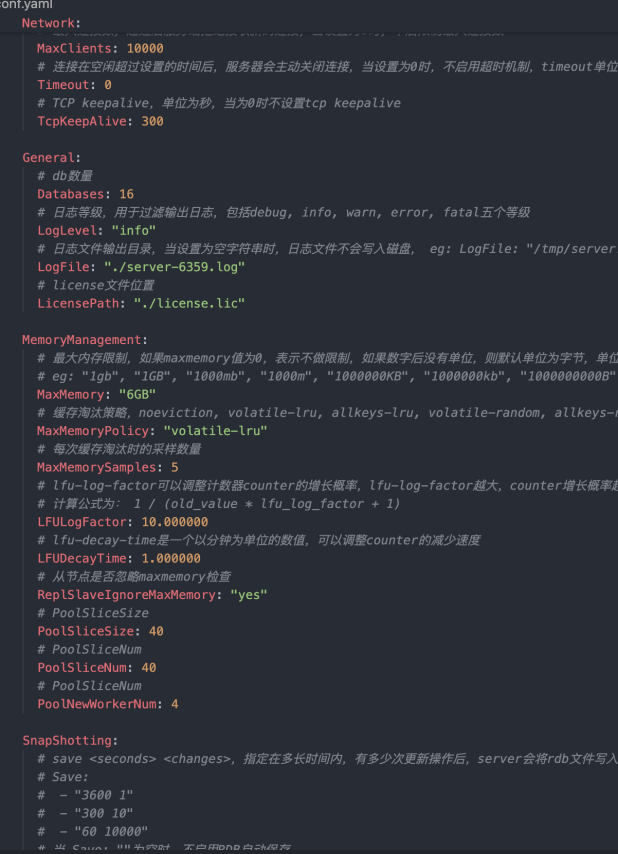
amdc.yaml before conversion:

amdc.yaml after conversion:
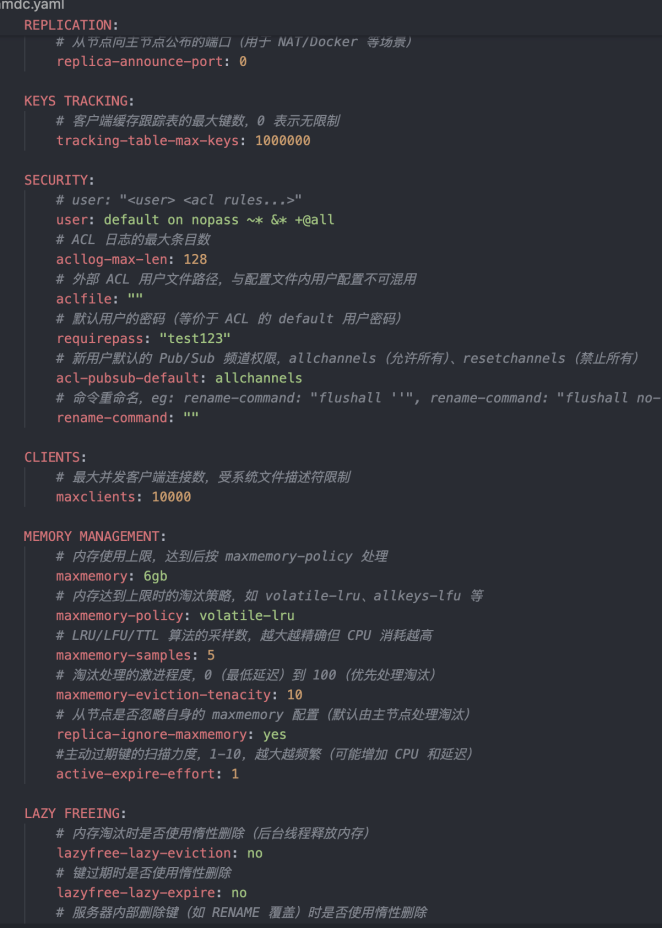
# Convert AMDC V2.0.2 and below Sentinel Configuration to V2.0.4
Specify --sentinel parameter. Convert AMDC V2.0.2 and below sentinel configuration file sentinel.yaml to AMDC V2.0.4 sentinel configuration file sentinel.yaml:
# Absolute path example
amdc-conf-conv --sentinel --go-yaml /amdc/sentinelgo.yaml --c-yaml /amdc/sentinel.yaml

# Relative path example (terminal current directory is /amdc)
amdc-conf-conv --sentinel --go-yaml sentinelgo.yaml --c-yaml sentinel.yaml
2
3
4
5
Successful repair output:
Config file converted successfully! (sentinelgo.yaml -> sentinel.yaml)
sentinel_go.yaml before conversion:

sentinel.yaml before conversion:
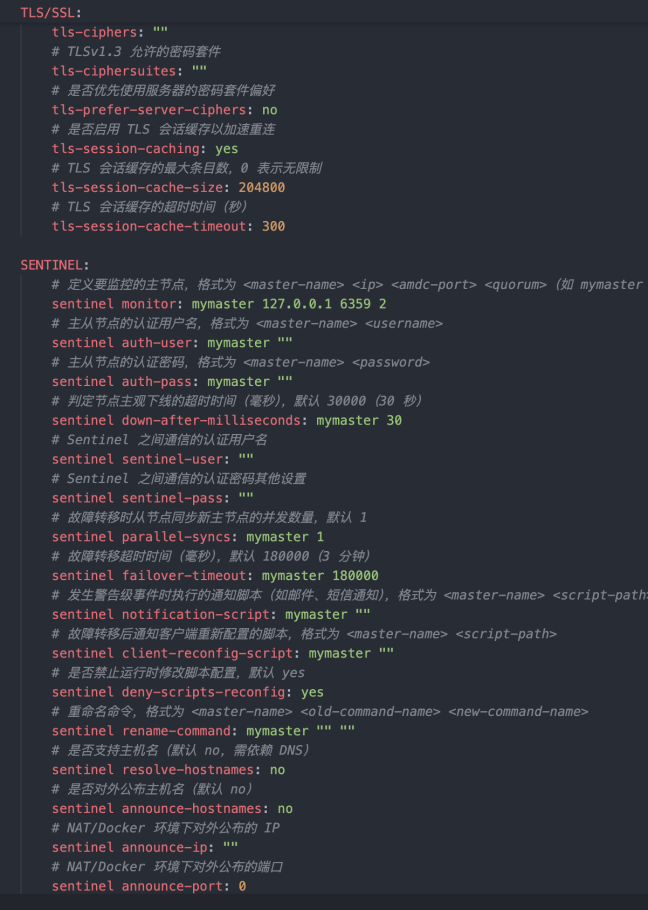
sentinel.yaml after conversion:
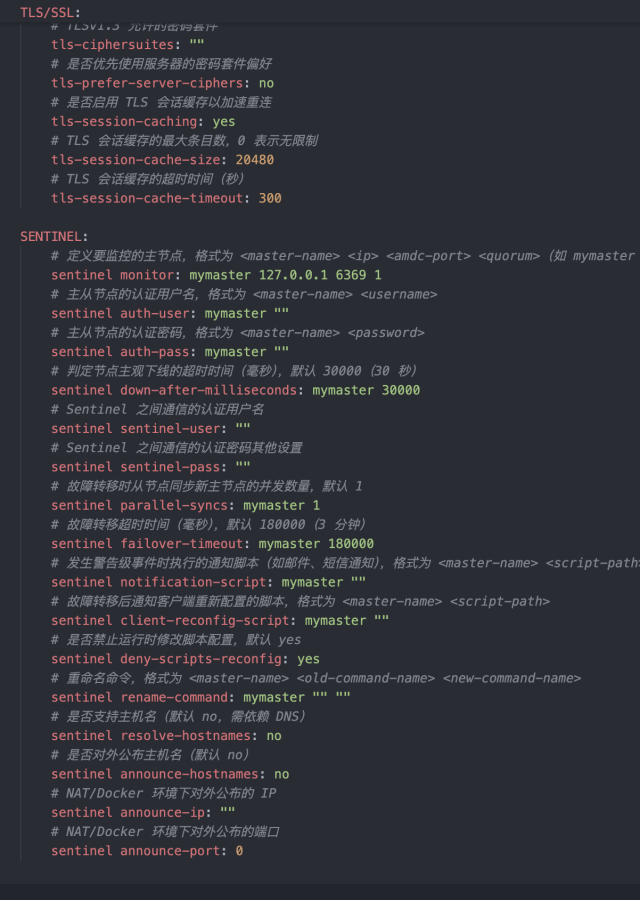
# Notes
- Replacement rule: --c-yaml pointed file is AMDC V2.0.4 configuration replacement template. Tool execution logic: "First read original structure and basic configuration from --c-yaml template file -> Extract valid configuration items from AMDC V2.0.2 and below configuration file pointed by --go-yaml -> Replace corresponding configuration items in template file with AMDC V2.0.2 and below configuration values -> Finally overwrite and write to file pointed by --c-yaml". Not directly generating new AMDC V2.0.4 configuration file from AMDC V2.0.2 and below configuration
- Template file direct overwrite: After tool completes configuration item replacement, will directly overwrite --c-yaml pointed template file without any popup or command line prompt. Must make complete backup of template file before conversion to avoid losing original AMDC V2.0.4 configuration structure or basic items
- Strict parameter rules: Must choose one of --server or --sentinel configuration types. Cannot omit or use simultaneously. --go-yaml (AMDC V2.0.2 and below source config) and --c-yaml (AMDC V2.0.4 replacement template) are required parameters. Must be followed by actual file path. Missing parameters, format errors or invalid paths will trigger tool error and exit
- Conversion direction and type unique: This tool only supports AMDC V2.0.2 and below AMDC config -> AMDC V2.0.4 AMDC config one-way replacement. Does not support AMDC V2.0.4 to AMDC V2.0.2 and below reverse conversion. Not compatible with other version AMDC config replacement. --server or --sentinel must match source file and template file configuration type (server config can only replace server template, sentinel config can only replace sentinel template)
- Must verify validity after replacement: After replacement completes (no error output), must first check if --c-yaml file is properly overwritten and configuration items are replaced, then start corresponding type AMDC V2.0.4 (server or sentinel) to load that file. Confirm service can start normally without configuration related errors to avoid service startup failure due to configuration item matching exceptions
# Common Issues Troubleshooting
# Tool Cannot Run
Issue 1: Terminal shows "command not found" when entering amdc-check-rdb (Linux)
- Cause: Tool path not added to system environment variable
- Solution: Enter full path to run (e.g., /usr/local/amdc/amdc-check-rdb), or add environment variable (echo "export PATH=/usr/local/amdc/:$PATH" >> /etc/profile, source /etc/profile)
# Verification/Repair File Failed
Issue 1: amdc-check-rdb or amdc-check-aof shows "Permission denied"
- Cause: No file read/write permission
- Solution: Use chmod to modify file permissions (chmod 644 dump.rdb), or use sudo to run tool (sudo amdc-check-rdb --fix dump.rdb)
Issue 2: AMDC still cannot start after repair
- Cause: File corruption too severe, or tool version doesn't match AMDC version
- Solution: Use backup file to restore, or upgrade or downgrade tool version to match AMDC service version
# amdc-cli Cannot Connect to AMDC Service
Issue 1: Connection shows "Could not connect to AMDC at 127.0.0.1:6359: Connection refused"
- Cause: AMDC service not started
- Solution: Start AMDC service (amdc-server /path/to/amdc.yaml, Linux)
Issue 2: Remote connection shows "Could not connect to AMDC at 192.168.1.100:6359: Connection timed out"
- Cause: Firewall hasn't opened port 6359, or AMDC configuration doesn't allow remote connection
- Solution: Open firewall port (firewall-cmd --add-port=6359/tcp --permanent, Linux), modify AMDC configuration (bind 0.0.0.0, protected-mode no), restart AMDC service
Issue 3: Command execution after connection shows "NOAUTH Authentication required"
- Cause: AMDC service has password set, not entered during connection
- Solution: Enter password using -a option during connection, or enter AUTH password in interactive mode
# Summary
This document detailed the usage methods of four AMDC core tools. Key summary:
- amdc-check-rdb: Focused on RDB file verification and repair. Core option --fix. Must backup before repair
- amdc-check-aof: Focused on AOF file verification and repair. Supports normal repair (--fix). Risks require caution
- amdc-benchmark: AMDC's built-in performance testing tool. Used to test AMDC service throughput, response time and other metrics. Core is controlling test scenarios via options to adapt to different performance evaluation needs
- amdc-conf-conv: AMDC's dedicated configuration file format conversion tool. Used to convert AMDC V2.0.2 and below AMDC configuration files to AMDC V2.0.4 AMDC configuration files
All four tools are included with AMDC. No additional installation needed. Must master proficiently in daily operations, especially amdc-cli and amdc-benchmark. Can efficiently complete various AMDC operations, troubleshooting and performance evaluation. During use, must pay attention to data security and testing standards to avoid data loss or service exceptions from misoperation.
# Common Issue Resolution
# Issue 1: Port Occupation and Resolution
Installing AMDC will occupy some ports. At the same time, client connections depend on internal DNS service. If ports cannot be guaranteed unused, or installation machine environment lacks effective DNS, startup will fail.
Product default occupied ports:
- AMDC cache core default port: 6359
- AMDC sentinel service default port: 26359
If above ports are occupied before startup, startup will fail. Can switch ports or stop programs using those ports.
# AMDC Cache Core Port Modification
Modify configuration file: vim amdc.yaml, port field
For more configuration, refer to: Cache Configuration (amdc.yaml)
# ACL File Loading
Place ACL file in directory specified by AMDC cache configuration item "ACLFile", then execute ACL load in AMDC cache command line to reload user configuration from ACL file.
Notes:
- Reloading ACL file will replace existing ACL rules in cache
- If one or more items in ACL file are invalid, entire file cannot be loaded, existing rules in cache system will continue to be used
# Resolving AMDC Master-Slave Failover
- If slave fails in cache core cluster, system will automatically reconnect When Slave fails and crashes, it will automatically reconnect after recovery. After Master receives Slave connection, it sends complete data file to Slave. If Master receives sync requests from multiple Slaves simultaneously, Master only starts one background process to save data file, then sends to all Slaves, ensuring Slaves function normally.
- If master fails in cache core cluster, manually restart master service to enable client read/write operations on system When cache core master fails, clients can still read from slave service. Need to manually restart master service. After master restarts and system returns to normal, clients can read/write to master service.
# Request Latency Issues
If AMDC requests show obvious latency, can identify specific issues through following methods:
- slowlog command: Can query commands with longer execution time (duration can be configured via slowlog parameter in amdc.yaml file), better tracking code execution process.
- –bigkeys: Use amdc-cli client, connect and add –bigkeys parameter to query largest values, determining if large values cause request latency.
- –memkeys: Same as above. This parameter queries overall key-value memory usage size, determining if large key-value pairs cause request latency.
# How to Detect Which Commands Were Executed
Use amdc-cli to connect, then use monitor command to monitor which commands AMDC continuously received. Can also use following command to record to monitor.log in background:
amdc-cli -h [ip] -p [port] [-a password] monitor >monitor.log 2>&1 &
To stop recording monitor.log, use following command:
ps -ef | grep amdc-cli | grep -v grep | awk '{print $2}' | xargs kill -9
# Process Exists But Cannot Connect
When clients exceed Linux limits or memory usage exceeds license memory limit, process may exist but connection times out/cannot connect.
Clients exceed Linux limits: Some Linux systems default client connection limit to 1024. When business applications create over 1024 client connections, excess will be restricted by Linux and cannot continue connecting.
Solution: Permanently set user-level file descriptor limits. Add to /etc/security/limits.conf:
* soft nofile 65535
* hard nofile 65535
1
2Note: Different Linux systems may have different modification methods. If above doesn't take effect, please search for corresponding system's TCP connection count.
Memory usage exceeds license memory limit: License default memory limit is usually 6G (most cases). When business system writes over 6G of data and continues writing, AMDC will frequently trigger memory eviction algorithm, causing AMDC performance degradation. Under sustained high concurrency, some requests may timeout, causing business side errors.
Solution: Scale up to resolve. Two scaling methods: 1. Apply for larger memory license file to directly expand node available memory (not recommended over 16G, too large will reduce query efficiency); 2. Create distributed cluster mode (corresponding to Redis cluster mode).
# dir Path Issues
The path configured by "dir" configuration item in configuration file will become the current execution file path after program reads configuration file, not the amdc-server executable file path.
Please note: Method 1: Use absolute paths for certificate paths, log file paths, etc., for stability and reliability. Method 2: If still need to use relative paths, check paths in configuration. Modify certificate, log, etc. paths based on path configured by "dir" configuration item.
# Password Setting Issues
When using AMDC master-slave mode, we know requirepass needs to be configured to add password for nodes.
Note: Also need to fill in master node's requirepass for slave node's masterauth configuration item so slave and master nodes can interact normally. Otherwise, if master has requirepass set but slave doesn't have masterauth set, or password is wrong, replication connection will be immediately rejected by master. Logs will show (error) NOAUTH Authentication required. or (error) ERR invalid password errors.
-- Recommendation: Whether cluster service or master-slave service, whether master node or slave node, configure requirepass and masterauth completely to prevent authentication failure issues after master-slave switching.
Similarly, sentinel monitoring also needs to configure node passwords.
Sentinel needs to continuously monitor all master-slave nodes and execute automatic failover when master fails. Therefore, sentinel must also be able to "enter" these password-protected nodes. This is achieved through sentinel auth-pass directive in sentinel's own configuration file:
sentinel auth-pass
# Log Configuration Issues
System can perform log configuration management on machine for amdc's server.log. Combine with own business to perform simple processing on logs written to server.log by default. Makes logs more personalized and easy to use.
# Master-Slave Buffer Configuration Issues
repl-backlog-size is master-slave buffer size. Default configuration is 1mb. Cannot provide buffer function for master-slave services with large data interaction. Recommend increasing to 128mb.