
Nginx Migration Guide

# Preface
This document is the Nginx Adaptation and Migration Guide for the Apusic Application Server Load Balancer (ALB) V2.0.6 Standard Edition. It is intended for users currently using Nginx and introduces ALB V2.0.6's Nginx compatibility, as well as the complete methodology for smoothly migrating from Nginx to ALB V2.0.6, helping users successfully complete the replacement and upgrade.
# Target Audience
This document is intended for IT information business leaders, R&D managers, software project managers, software architects, and operations engineers.
# Related Documents
For more information about the ALB V2.0.6 product, please refer to the following ALB V2.0.6 product manual document set:
| No. | Document | Description |
|---|---|---|
| 1 | ALB V2.0.6 Release Notes | Introduces the ALB product version update content. |
| 2 | ALB V2.0.6 Quick Start Guide | Briefly introduces how to quickly get started with ALB. |
| 3 | ALB V2.0.6 Installation Guide | Details how to install ALB on various operating systems, ALB service start/stop operations, and the product registration process. |
| 4 | ALB V2.0.6 Proxy Function Manual | Details the use, configuration, management of ALB-related functions and the usage of supporting tools. |
| 5 | ALB V2.0.6 Console User Manual | Details the use and operation of ALB Console-related functions. |
| 6 | ALB V2.0.6 Developer Manual | Details the ALB external API, alb-cli command-line tool, and AI Agent integration methods. |
| 7 | ALB V2.0.6 Migration Guide | Details the instructions for migrating from ALB historical versions to V2.0.6. |
| 8 | ALB V2.0.6 Operations Manual | Details ALB monitoring, operations, security hardening, and other operations instructions. |
| 9 | ALB V2.0.6 Performance Optimization Guide | Details the instructions for ALB performance tuning. |
| 10 | ALB V2.0.6 Nginx Adaptation and Migration Guide | Details ALB's Nginx compatibility and the methodology for migrating from Nginx to ALB (this document). |
# Technical Support
ALB products provide comprehensive technical support services. You can obtain technical support through the following channels:
Website: www.apusic.com
Phone: 400-855-5800
Email: support@apusic.com
Kingdee Cloud Community: https://vip.kingdee.com/?productId=73&productLineId=14&lang=zh-CN
When seeking technical support, please provide the following information:
Your name
Company information and contact details
Operating system and its version
Product version number
Detailed information such as logs and screenshots of the anomalies and errors that occurred
# Nginx Compatibility
# Overall Compatibility Statement
The ALB V2.0.6 core is compatible with the configuration syntax and directive system of Nginx 1.10 ~ Nginx 1.30 versions. A standard nginx.conf configuration file can be directly reused as the ALB main configuration alb.conf, and in most scenarios the replacement can be completed without rewriting the configuration.
On top of Nginx compatibility, ALB V2.0.6 also provides the following enhanced capabilities:
- National Cryptographic SSL: Supports the SM2 dual-certificate (signing certificate + encryption certificate) system.
- Active Health Check: Built-in
alb_healthcheck_module, supports layer-4 (TCP/UDP) and layer-7 (HTTP) active probing. - Session Persistence: Built-in sticky module, supports cookie, route, and learn working modes.
- Traffic Monitoring: Built-in vts/sts status statistics module, provides page, JSON, and Prometheus monitoring data output.
- Protocol Capabilities: Supports HTTP/2, HTTP/3 (QUIC), gRPC, WebSocket, RTMP live streaming, HTTP CONNECT forward proxy.
- Extensibility: Built-in Lua scripting engine, Brotli compression, headers-more, geo2 geolocation module.
- Management Capabilities: Provides Web Console (site management, configuration management, certificate management, high availability, backup/restore, third-party module management), alb-cli command line, and AI Agent integration.
- High Availability: Supports active/standby HA (including unicast mode), configuration synchronization, smooth upgrade and rollback.
- TCP Acceleration: The ebpf feature installation package supports kernel eBPF accelerated TCP forwarding.
# Configuration Compatibility Classification
The directives in existing Nginx configurations are classified into the following four levels based on their compatibility with ALB V2.0.6:
| Compatibility Level | Description | Typical Directives/Configuration |
|---|---|---|
| Fully compatible, directly reusable | Nginx standard directives, syntax and behavior consistent, no modification needed | worker_processes, events, http/server/location, upstream (round-robin, weight, ip_hash, least_conn, hash ... consistent), proxy_pass and proxy_* series, listen, server_name, root/alias, index, try_files, rewrite/return, map/geo, gzip, proxy_cache, limit_req/limit_conn, allow/deny, auth_basic, error_page, add_header, ssl_* (RSA/ECC certificates), stub_status, stream layer-4 proxy, include, etc. |
| Compatible, but requires adjustment | Syntax compatible, but due to differences in product directory structure and default values, paths or parameters need adjustment | Log paths (access_log, error_log), pid path, certificate file paths, static resource root/alias paths, include relative paths, default listening port (ALB factory default is 8080), user directive (default nobody) |
| ALB extensions, enable as needed | Capabilities not present in Nginx open source version, available after migration to enhance configuration | check (active health check), sticky (session persistence), vhost_traffic_status_* (vts monitoring), stream_server_traffic_status_* (layer-4 monitoring), national cryptographic dual-certificate configuration (ssl_certificate configures sig + enc dual certificates), brotli_*, Lua directives such as access_by_lua_*, more_set_headers, proxy_connect, geo2, eBPF acceleration |
| Incompatible, manual handling required | Not built into ALB or conflicts with product mechanism, needs to be replaced or removed during migration | Third-party dynamic modules (.so) compiled for Nginx cannot be directly loaded in ALB; modules built for ALB need to be used and uploaded/enabled through the Console "Third-party Module Management"; Nginx commercial version (Nginx Plus) exclusive directives are not in the compatibility scope; module directives not in the ALB built-in module list will report unknown directive errors during alb -t validation |
Note: For Nginx standard directives not listed in the table above, please refer to the actual validation result of ./sbin/alb -t.
# Built-in Module List
ALB V2.0.6 is factory-compiled with the following modules built-in, corresponding to Nginx same-name compilation options or modules:
| Module | Function Description |
|---|---|
--with-http_stub_status_module | Enables the stub_status interface to provide runtime status statistics. |
--with-http_ssl_module | Enables HTTPS/SSL support (including national cryptographic SSL). |
--with-ipv6 | Enables IPv6 listening support. |
--with-http_mp4_module | Supports MP4 streaming pseudo-streaming. |
--with-http_auth_request_module | Implements sub-request authentication (auth_request), facilitating integration with external authentication services. |
--with-http_gzip_static_module | Supports directly sending .gz pre-compressed files, saving CPU. |
--with-http_realip_module | Obtains the real client IP from X-Forwarded-For/X-Real-IP and other headers. |
--with-http_gunzip_module | Automatically decompresses response content for clients that do not support gzip. |
--with-http_sub_module | Response body string replacement (sub_filter). |
--with-stream | Enables layer-4 TCP/UDP proxy (stream subsystem). |
--with-stream_ssl_module | Provides SSL/TLS support for the stream subsystem. |
--with-threads | Enables thread pool support to improve file I/O performance. |
--with-file-aio | Enables asynchronous file I/O (Linux AIO). |
--with-http_v2_module | Enables HTTP/2 support. |
--with-http_v3_module | Enables HTTP/3 (QUIC) support. |
--with-http_addition_module | Appends content before and after response (add_before_body / add_after_body). |
--with-http_dav_module | Supports WebDAV protocol (PUT, DELETE, MKCOL, etc.). |
--with-http_random_index_module | Randomly selects the default file when listing directories. |
--with-http_secure_link_module | Generates and validates "secure links" with time-based anti-tampering. |
--with-mail | Enables mail proxy (IMAP/POP3/SMTP) subsystem. |
--with-mail_ssl_module | Provides SSL/TLS support for mail proxy. |
--with-http_slice_module | Supports large file slice download (Range Slice). |
--with-stream_ssl_preread_module | Pre-reads SNI/ALPN in layer-4 proxy to enable domain-based routing. |
alb_healthcheck_module | ALB active health check module, supports layer-4 and layer-7 proxy node active probing. |
alb-module-vts | Provides detailed traffic / status statistics interface (/status). |
alb-module-stream-sts | Provides real-time status statistics for the stream subsystem. |
alb-module-sts | Provides real-time status statistics for the http subsystem. |
alb_http_proxy_connect_module | Supports HTTP CONNECT method to forward proxy HTTPS traffic. |
alb-rtmp-module | Introduces RTMP/HLS/DASH live streaming and streaming media functions. |
alb_brotli | Supports Brotli compression algorithm to reduce transmission volume. |
alb-module-lua | Introduces Lua scripting functionality, extensible ALB functions. |
alb-headers-more | Sets and clears request and response headers. |
If your existing Nginx uses modules outside the above table (third-party modules compiled via --add-module or dynamic modules loaded via load_module), please investigate and confirm individually before migration, and contact technical support to obtain ALB-version module files if necessary.
# Product Differences Compared with Nginx
After migrating to ALB, the objects and methods of daily operations differ from Nginx in the following aspects:
| Item | Nginx | ALB V2.0.6 | Migration Impact |
|---|---|---|---|
| Binary Program | sbin/nginx | sbin/alb | Program names in scripts and operations commands need to be replaced |
| Main Configuration File | conf/nginx.conf | conf/alb.conf | The original nginx.conf can be directly copied as alb.conf |
| Factory Default HTTP Port | 80 | 8080 | When migrating the configuration, follow the listen from the original nginx configuration |
| pid File | logs/nginx.pid | logs/alb.pid | The pid path in operations scripts needs adjustment |
| Configuration Syntax Check | nginx -t | ./sbin/alb -t | Same usage |
| Smooth reload | nginx -s reload | bin/reload-alb.sh (or kill -HUP) | Recommended to use the scripts provided with the installation package |
| Start/Stop Method | nginx / nginx -s quit | bin/start-alb.sh, bin/stop-alb.sh, bin/start-alb-and-console.sh, bin/stop-alb-and-console.sh | Refer to the Quick Start Guide |
| Process Signals | HUP/USR2/WINCH/QUIT | Same-name signals fully compatible, supports USR2 smooth upgrade | Original signal-based operation habits can be preserved |
| systemd Service | Self-written nginx.service | Installation package utils/systemd/ provides alb.service and enable_startup.sh one-click registration | Need to replace the original nginx.service and disable it |
| Response Server Header | Server: nginx | Server: alb | If there are front-end validation or security scanning rules that depend on this string, adjustments are needed |
| Product Licensing | None | Need to place license file: license.lic, license.xml or unified license acls.properties | Apply for license before migration, refer to the Installation Guide |
| Visual Management | Not available in open source version | Console (default port 8887), supports site/configuration/certificate/HA/backup management | Can be migrated to Console management after migration |
| Monitoring Interface | stub_status | Compatible with stub_status, additionally provides vts /status (page/JSON/Prometheus) | Monitoring collection can be smoothly upgraded |
# Typical Use Scenario Compatibility Quick Reference
| Nginx Typical Scenario | ALB V2.0.6 Compatibility | Reference Chapter (Proxy Function Manual) |
|---|---|---|
| Static resource hosting / SPA single-page application | Fully supported | User Scenario Configuration Examples - Scenario One |
| Reverse proxy and load balancing | Fully supported, supports round-robin/weight/IP hash/least connections/consistent hash | Load Balancing Algorithms |
| HTTPS / SSL Termination | Fully supported, and supports national cryptographic dual certificates | HTTPS and National Cryptographic |
| HTTP/2 | Fully supported | HTTPS and National Cryptographic |
| HTTP/3 (QUIC) | Supported (from V2.0.6) | HTTPS and National Cryptographic - HTTP/3 |
| WebSocket Proxy | Fully supported | WebSocket Proxy |
| gRPC Proxy | Fully supported | gRPC Proxy |
| TCP/UDP Layer-4 Proxy | Fully supported (stream) | TCP Proxy |
| Forward Proxy (HTTP CONNECT) | Supported | Forward Proxy |
| Reverse Proxy Cache (proxy_cache) | Fully supported | Cache Configuration |
| Rate Limiting (limit_req/limit_conn) | Fully supported | Traffic Control |
| URL Rewriting and Redirection | Fully supported | URL Rewriting and Redirection |
| Cross-Origin (CORS) | Fully supported | Cross-Origin Configuration (CORS) |
| Failover and Retry | Fully supported (proxy_next_upstream) | Failover and Retry |
| Session Persistence | Supports ip_hash / Cookie consistent hash / sticky module / Lua+Redis | Session Persistence |
| Active Health Check | Supported (check directive, not available in Nginx open source version) | Health Check |
| Canary Release | Supported (by IP, ratio, Cookie, Lua dynamic routing) | Canary Release and Canary Testing |
| Compression | Supports Gzip, Brotli, pre-compressed static files | Compression |
| Mail Proxy (IMAP/POP3/SMTP) | Supported | Built-in Module List |
| RTMP/HLS Live Streaming | Supported | Built-in Module List |
| Lua Extension Development | Built-in Lua engine and lua-resty ecosystem libraries | Session Persistence - Method Three |
| Dynamic DNS Resolution (resolver) | Fully supported | Dynamic DNS Resolution |
# Migration Guide
# Migration Process Overview
The overall process for migrating from Nginx to ALB V2.0.6 is as follows:
Migration Evaluation and Inventory → Install ALB and Apply for License → Configuration Migration (choose one of three methods)
→ Adaptation and Adjustment → Verification and Testing → Business Cutover → Observation Period (Keep Rollback Capability)
2
Comparison of three configuration migration methods:
| Migration Method | Applicable Scenarios | Features |
|---|---|---|
| Console "Migrate from Nginx" Wizard | All scenarios, recommended | Visual operation, automatically scans and imports sites and configurations, supports append/overwrite modes |
| nginx-migrate command-line tool | No browser access to the console on the server, accustomed to command-line operations | Automatically migrates configuration, certificates, static resources, log paths, supports preview mode (some installation packages do not include this tool, refer to the actual installation package utils/ directory) |
| Manual Migration | Simple configuration, or need fine-grained control over migration content | Directly copy nginx.conf as alb.conf, adjust paths item by item |
# Pre-Migration Evaluation and Inventory
Please complete the following inventory work before migration and output an inventory list:
Confirm Nginx Version and Compilation Parameters
nginx -v     # View version, confirm within the 1.10 ~ 1.30 compatibility range
nginx -V     # View compilation options and built-in/third-party modules
1
2Export Complete Effective Configuration
nginx -T > nginx-full-config-backup.conf # Export main configuration and all include sub-configurations1Inventory Configuration Dependencies, record item by item:
Inventory Item Inventory Content Investigation Command/Method Example Configuration Files Location of main configuration and all include sub-configuration files nginx -T, checkincludedirectiveThird-Party Modules load_moduledynamic modules,--add-modulecompiled modulesnginx -V,nginx -T \| grep load_moduleSSL Certificates Certificate/private key file paths, expiration time, whether national cryptographic grep -r ssl_certificateStatic Resources Directories pointed to by root,aliasand disk usagegrep -E 'root\|alias'Listening Ports All listenports and firewall allowancegrep -r listen, check firewall rulesBackend Services upstream backend node list, current health check method grep -A5 upstreamLogs access_log/error_log paths, logrotate configuration grep -E '_log',/etc/logrotate.d/Auto-start systemd unit, init scripts, rc.local systemctl status nginxScheduled Tasks Certificate renewal, log rotation, etc. crontab crontab -l,/etc/cron.d/Monitoring Integration stub_status collection, Prometheus exporter Check monitoring system configuration Special Directive Investigation: If the configuration includes
load_module, Perl/njs scripts, Nginx Plus commercial version directives, etc., please record them separately and focus on handling them during migration.
# Install ALB and Apply for License
Install ALB V2.0.6 on the target server (supports tar.gz extraction, RPM, Docker, K8s multiple deployment methods), refer to the Installation Guide for detailed steps.
tar -zxvf ALB-V2.0.6-SE-amd64.tar.gz -C /opt/1Obtain the local machine authorization code and apply for the license file, place the license file (
license.lic/license.xml/acls.properties) in the installation directory:cd /opt/ALB-V2.0.6-SE-amd64 ./bin/alb-authcode # Obtain the authorization code, apply for the license file with the authorization code1
2Verify ALB starts normally:
./bin/start-alb.sh
./sbin/alb -v
# Output: alb version: alb/2.0.6-xxxxxx
1
2
3
Migration period recommendation: After installing ALB, keep the default port (8080) running first, parallel with the existing Nginx, and cutover the port after the configuration migration verification is complete.
# Migration Method 1: Console "Migrate from Nginx" Wizard (Recommended)
ALB V2.0.6 Console has a built-in Nginx migration wizard that can import existing nginx configuration files as ALB sites and configurations.
Prerequisites: ALB and Console have been started, and the Nginx configuration files are located on the ALB server (or the configuration files have been copied to that server).
Operation Steps:
Log in to the Console (default
http://server IP:8887), enter the Configuration Management page, click "Migrate from Nginx", fill in the Nginx configuration file path in the dialog box, and click Scan: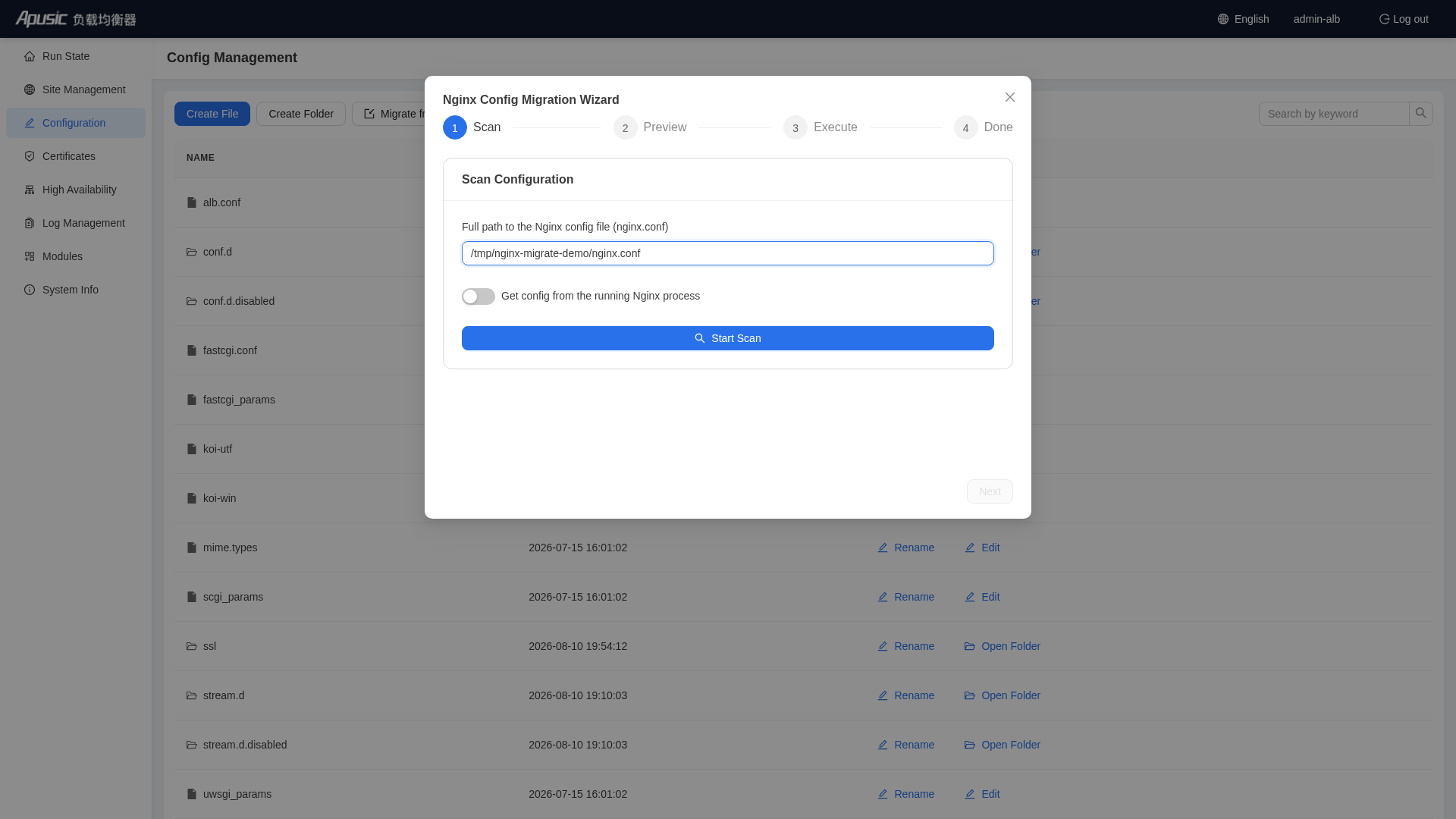
After the scan is successful, you can view the scan results, confirm and proceed with migration:
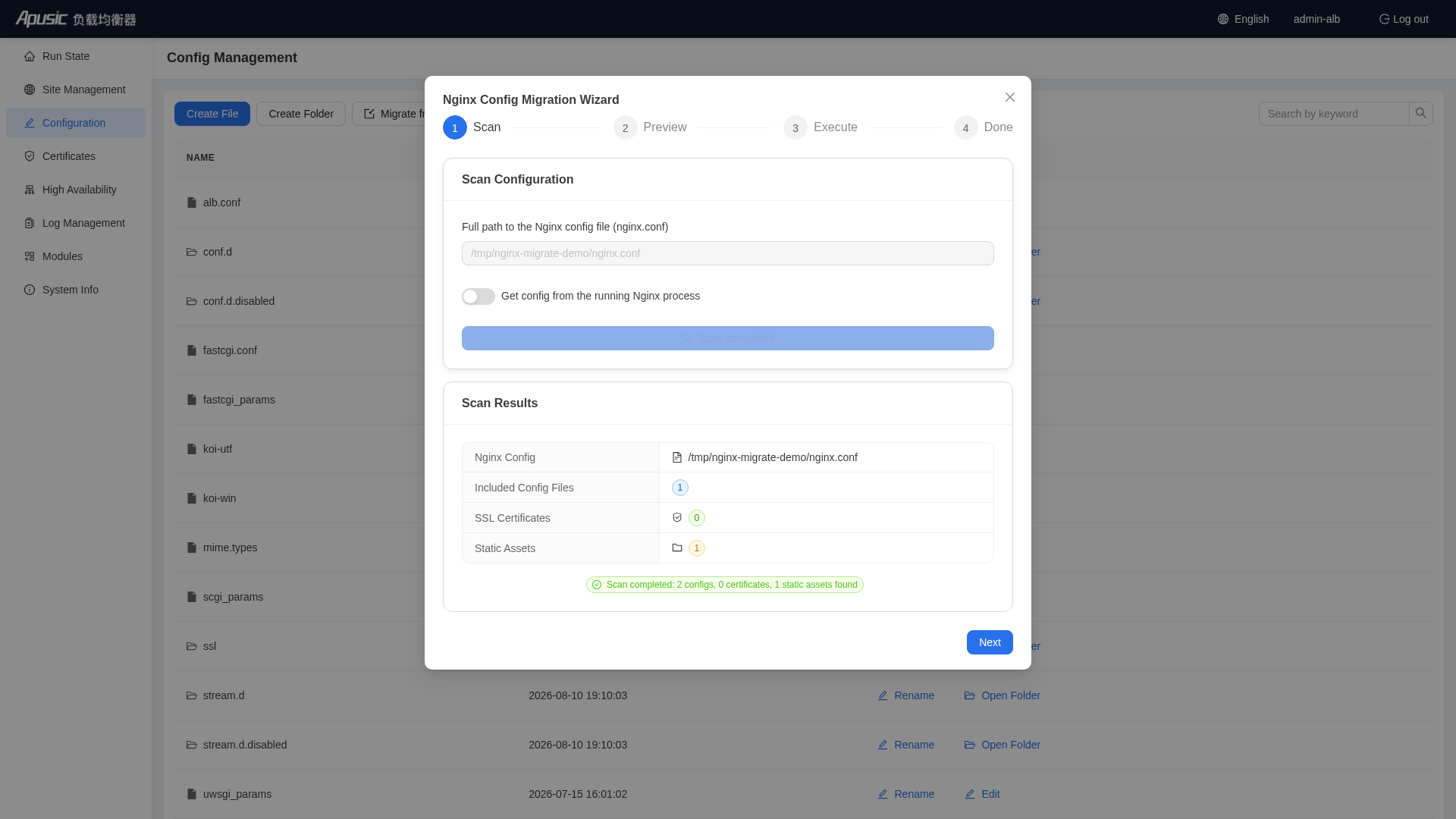
View the migration results after migration is complete.
Note: Enabling "Overwrite Original Configuration" will clear the original configuration; the default behavior is to append the Nginx configuration rather than overwrite it.
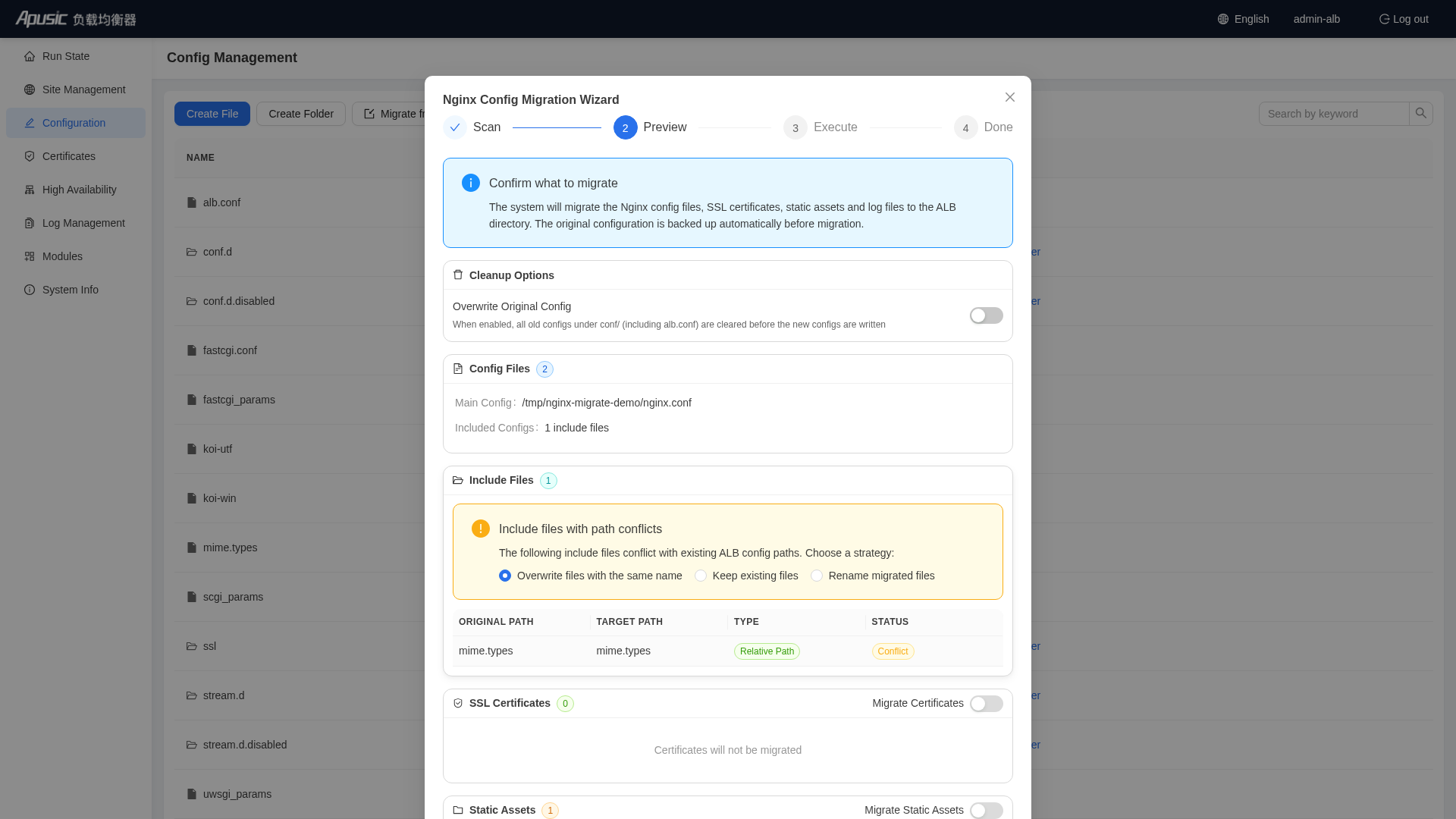
View migration result details:
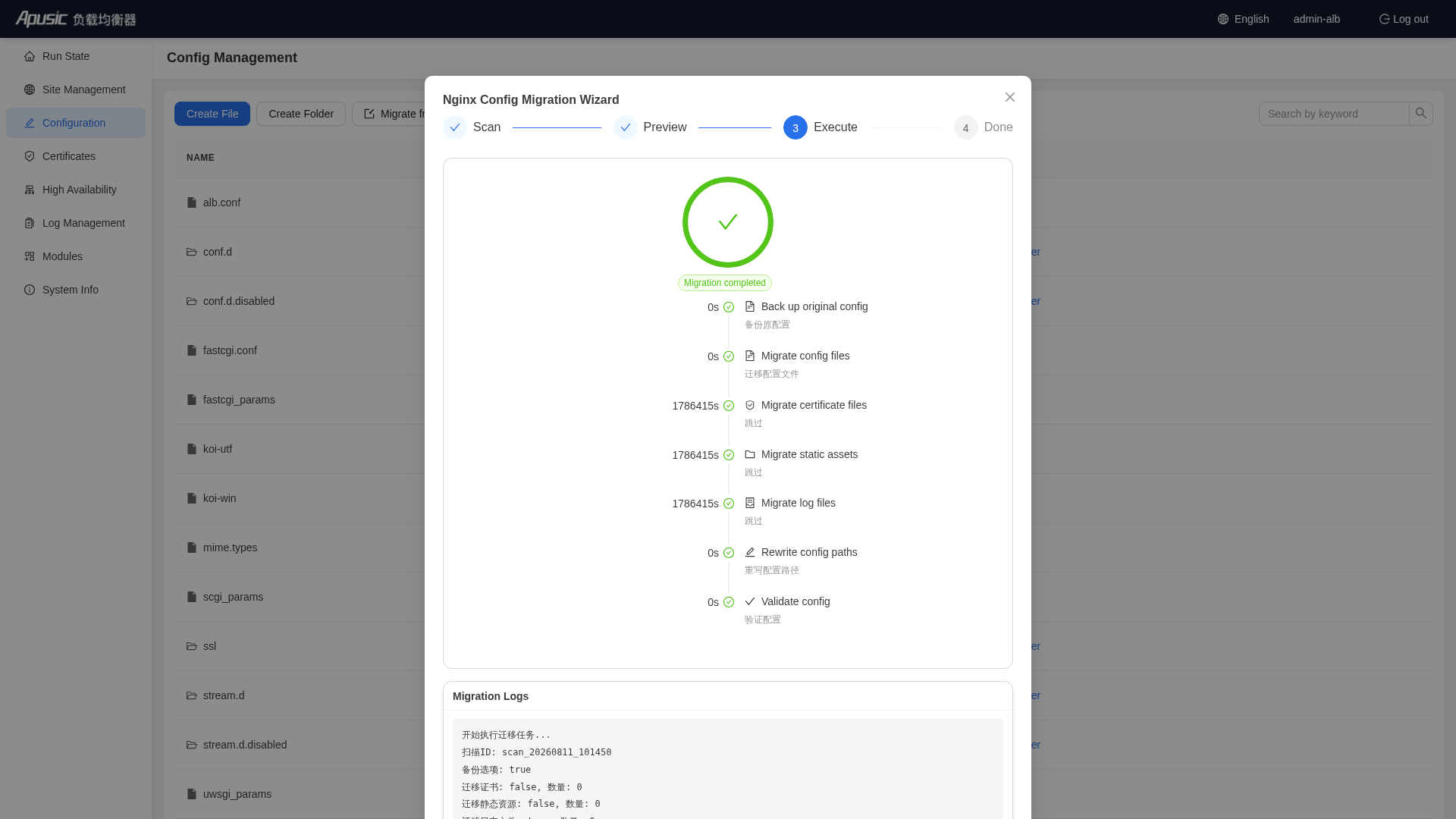
View the final result:
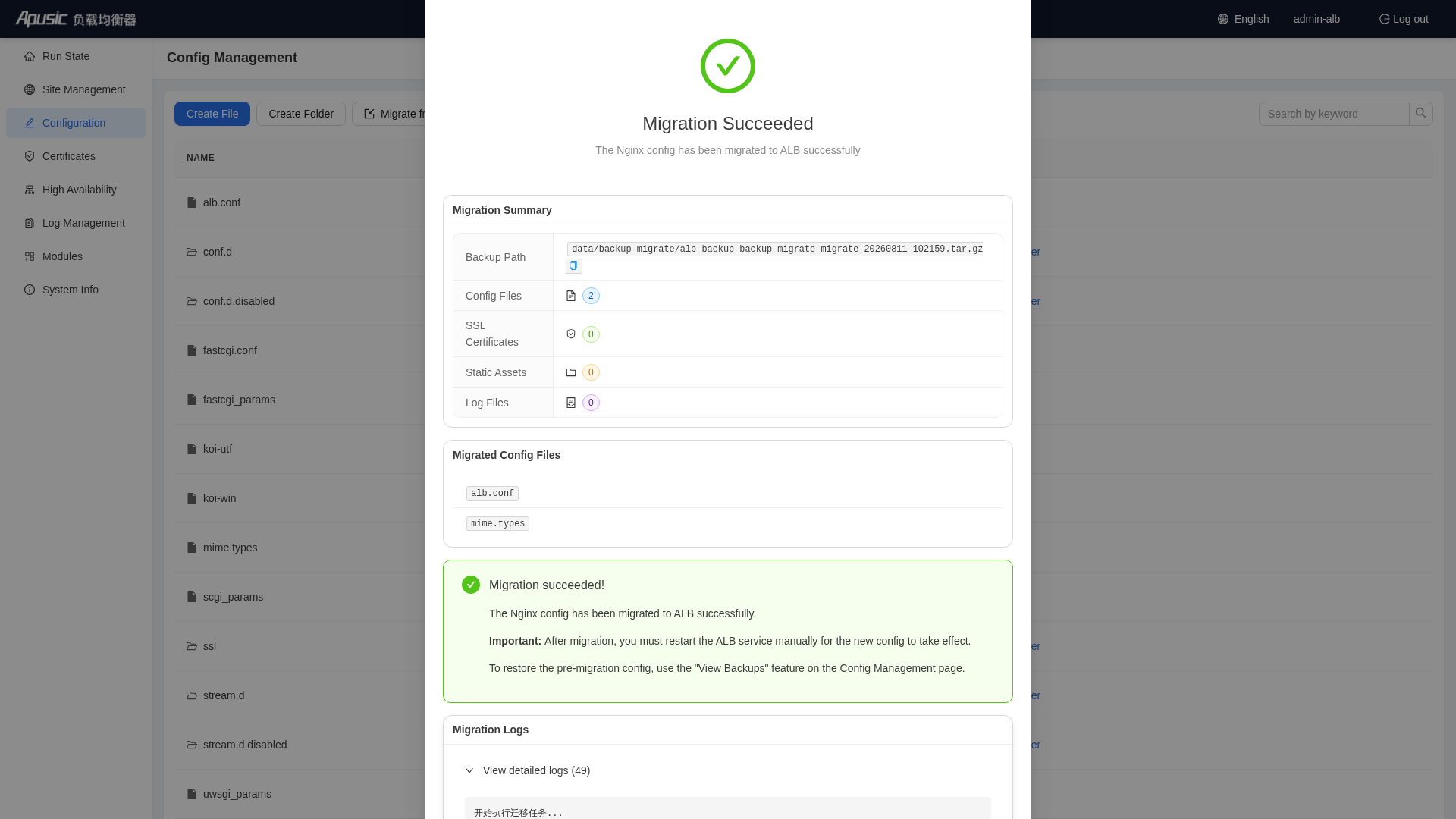
After migration is complete, reload ALB to apply the configuration:
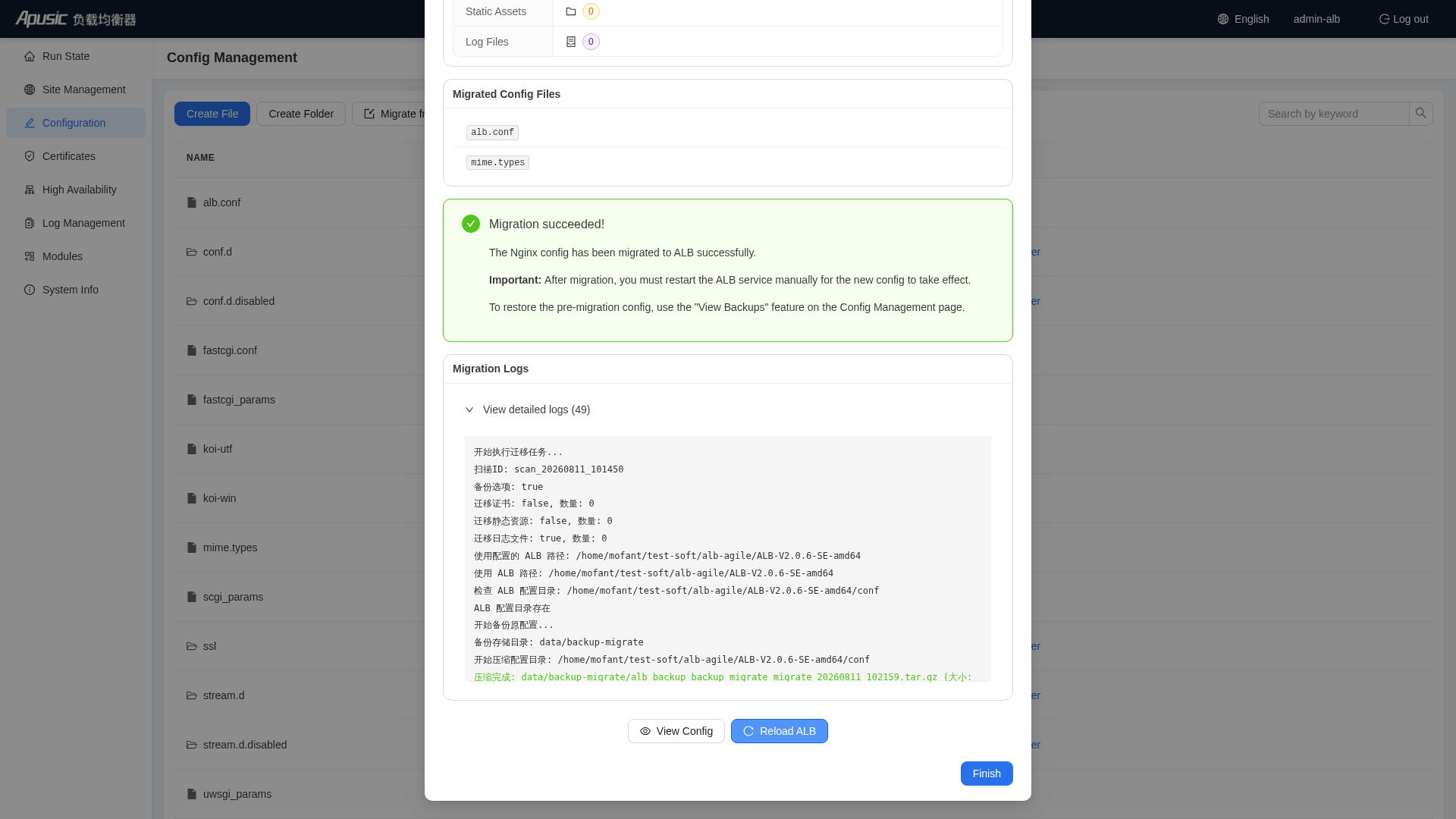
Notes:
- The site configuration imported by migration is written to the
conf/conf.d/directory, please confirm that the main configurationconf/alb.confcontainsinclude conf.d/*.conf;, otherwise the Console will show a yellow warning and the site configuration will not take effect. - After migration is complete, it is recommended to use the Console "Configuration Management" backup function to create a complete backup.
- If the configuration contains directives not built into ALB, a configuration error will be prompted during reload, please handle it according to the "Post-Migration Adaptation and Adjustment" chapter.
# Migration Method 2: nginx-migrate Command-Line Tool
Some installation packages provide a Nginx configuration migration command-line tool, located at [ALB installation path]/utils/nginx-migrate, used to migrate nginx configuration to ALB configuration with one click.
Note: Please refer to the actual installation package
utils/directory. If this tool is not provided in the installation package, please use the Console migration wizard or manual migration.
# Features
- Configuration Migration: Scans nginx main configuration file (nginx.conf), parses and migrates all include sub-configuration files to the
conf/conf.d/directory, automatically updates the main configuration's include path toconf.d/*.conf. - SSL Certificate Migration: Automatically scans
ssl_certificate,ssl_certificate_key,ssl_trusted_certificate, copies certificate files to theconf/certs/directory and updates the certificate paths in the configuration. - Static Resource Migration: Automatically scans
rootandaliasdirectives, copies static resources to theconf/html/directory and updates the static resource paths in the configuration to absolute paths. - Log Path Migration: Automatically migrates
error_log,access_log,pidpaths, unified into the{ALBPath}/logs/directory. - Others: Automatically backs up original configuration before migration, interactive confirmation (can be skipped), verbose logging mode, configuration validation.
# Usage Method
Prerequisites:
- ALB has been deployed and installed on the same machine.
- The directory where the nginx configuration files are located and the ALB installation directory already exist.
# Auto-detect nginx configuration and ALB path
./nginx-migrate

# Specify nginx configuration and ALB directory
./nginx-migrate --nginx-path /path/to/nginx.conf --alb-path /path/to/ALB
2
3
4
5
# Command-Line Options
| Option | Short | Description | Default Value |
|---|---|---|---|
--nginx-path | - | nginx configuration file path | Auto-detect |
--alb-path | - | ALB installation directory | Inferred from tool location |
--from-running | - | Get configuration path from running nginx process | false |
--dry-run | - | Only scan, do not perform migration | false |
-y / --yes | - | Automatically confirm all prompts | false |
-v / --verbose | - | Show verbose logs | false |
--backup | - | Back up original configuration before migration | true |
# Usage Examples
# Get configuration from running nginx process and migrate
./nginx-migrate --from-running --alb-path /path/to/ALB

# Full mode (auto-confirm + verbose logs)
./nginx-migrate --nginx-path /etc/nginx/nginx.conf --alb-path /opt/ALB -y -v

# Preview mode (scan only)
./nginx-migrate --nginx-path /etc/nginx/nginx.conf --alb-path /opt/ALB --dry-run

# Disable backup
./nginx-migrate --nginx-path /etc/nginx/nginx.conf --alb-path /opt/ALB --backup=false
2
3
4
5
6
7
8
9
10
11
# Post-Migration Directory Structure
ALB/
├── conf/
│   ├── alb.conf              # Main configuration file
│   ├── certs/               # SSL certificates
│   │   ├── server.crt
│   │   ├── server.key
│   │   └── ca.crt
│   ├── conf.d/              # Sub-configuration files
│   │   ├── default.conf
│   │   ├── ssl.conf
│   │   └── upstream.conf
│   └── html/                # Static resources
│       ├── index.html
│       ├── css/
│       └── js/
└── logs/                    # Log directory
    ├── access.log
    ├── error.log
    └── alb.pid
2
3
4
5
6
7
8
9
10
11
12
13
14
15
16
17
18
19
# Notes
- Path Issues: Ensure that the paths in the nginx configuration file are relative paths or absolute paths, relative paths will be resolved based on the directory where the configuration file is located. It is recommended to use
--dry-runfor preview first. - Backup: The original configuration will be automatically backed up to
conf.backup_YYYYMMDD_HHMMSSbefore migration; to restore, delete the new configuration and rename the backup directory toconf. - Permissions: Ensure you have permission to read nginx configuration and certificate files, and permission to write to the ALB directory.
- Verification: After migration is complete, the tool will automatically validate the configuration syntax. It is recommended to manually run
./sbin/alb -tonce more before restarting ALB.
# Migration Method 3: Manual Migration
# Simple Direct Use of nginx.conf File
Back up old configuration, and copy nginx.conf as alb.conf:
cp /opt/ALB-V2.0.6-SE-amd64/conf/alb.conf /opt/ALB-V2.0.6-SE-amd64/conf/alb.conf.bak
cp /path/to/nginx.conf /opt/ALB-V2.0.6-SE-amd64/conf/alb.conf  # Modify the source path according to actual situation
chmod 644 /opt/ALB-V2.0.6-SE-amd64/conf/alb.conf
1
2
3Adjust include path: If the original nginx.conf uses the
includedirective to reference sub-configuration files (such asconf.d/*.conf), you need to ensure these paths are valid in the ALB installation directory. It is recommended to copy the sub-configuration files to theconf/conf.d/directory:mkdir -p /opt/ALB-V2.0.6-SE-amd64/conf/conf.d cp /path/to/nginx/conf.d/*.conf /opt/ALB-V2.0.6-SE-amd64/conf/conf.d/1
2Migrate SSL certificate files: Copy the SSL certificate files used by the original nginx to the ALB directory, and update the certificate paths in alb.conf:
mkdir -p /opt/ALB-V2.0.6-SE-amd64/conf/certs
cp /path/to/ssl/server.crt /opt/ALB-V2.0.6-SE-amd64/conf/certs/
cp /path/to/ssl/server.key /opt/ALB-V2.0.6-SE-amd64/conf/certs/
1
2
3Edit alb.conf, update the
ssl_certificateandssl_certificate_keypaths to the new absolute paths.Adjust log and pid paths:
error_log /opt/ALB-V2.0.6-SE-amd64/logs/error.log;
access_log /opt/ALB-V2.0.6-SE-amd64/logs/access.log;
pid /opt/ALB-V2.0.6-SE-amd64/logs/alb.pid;
1
2
3Validate configuration and start ALB:
/opt/ALB-V2.0.6-SE-amd64/sbin/alb -t -c /opt/ALB-V2.0.6-SE-amd64/conf/alb.conf
# Validation success prompts: syntax is ok and test is successful

# Stop Nginx (modify Nginx installation path according to actual situation)
/path/to/sbin/nginx -s stop

# Start ALB
/opt/ALB-V2.0.6-SE-amd64/bin/start-alb.sh
1
2
3
4
5
6
7
8
# Post-Migration Adaptation and Adjustment
After configuration migration is complete, please check the following adaptation items one by one:
# Ports and Listening
The ALB factory default configuration listens on port 8080. When migrating, follow the
listenfrom the original nginx configuration.If you need to run ALB as a regular user and listen on privileged ports such as 80/443, you need to execute first (root user):
setcap cap_net_bind_service=+eip ./sbin/alb1Confirm that the firewall/security group has allowed the ALB listening port and the Console port (default 8887).
# Users and Permissions
- Confirm that the user/group specified by the
userdirective in the configuration exists on the system (defaultnobody). If startup reportsgetgrnam("nobody") failed, please create the corresponding user group or modify theuserdirective, refer to the Operations Manual FAQ.
# Path Verification Checklist
- Whether the
access_log,error_log,pidpaths point to the ALB installation directorylogs/. - Whether the
ssl_certificate,ssl_certificate_key,ssl_trusted_certificatecertificate paths are valid. - Whether the
root,aliasstatic resource paths are valid, and whether the directory permissions are correct. - Whether cache paths such as
proxy_cache_pathare valid. - Whether all sub-configuration files referenced by
includeare in place (relative paths are resolved based on the ALB installation directory).
# National Cryptographic Certificates
If national cryptographic SSL is enabled after migration, both the signing certificate (sig) and the encryption certificate (enc) need to be configured, and the sig certificate must be configured before the enc certificate:
ssl_certificate     /path/to/your_domain_name.sig.crt.pem;   # Signing certificate (configure first)
ssl_certificate_key /path/to/your_domain_name.sig.key.pem;
ssl_certificate     /path/to/your_domain_name.enc.crt.pem;   # Encryption certificate (configure after)
ssl_certificate_key /path/to/your_domain_name.enc.key.pem;
1
2
3
4You can also upload national cryptographic certificates through the Console "Certificate Management" and bind them to sites.
# Third-Party Modules
- The
.sodynamic modules loaded by the original Nginx viaload_modulecannot be used directly in ALB. You need to use module files built for ALB, and upload and enable them through the Console "Third-party Module Management". - The
load_modulelines remaining in the configuration that do not correspond to a valid module need to be commented out first, otherwise thealb -tvalidation will fail.
# Service Start/Stop and Boot Auto-Start
Disable and remove the original nginx auto-start:
systemctl stop nginx && systemctl disable nginx1Register ALB boot auto-start:
cd /opt/ALB-V2.0.6-SE-amd64
./utils/systemd/enable_startup.sh    # Automatically set the boot startup item (usually requires root permissions)
systemctl start alb
1
2
3
# Log Rotation
- The original nginx logrotate configuration does not apply to ALB log paths, please use ALB's built-in log rotation tool (
utils/logrotate), which supports scheduled rotation and backup, refer to the Log Rotation chapter in the Operations Manual. The Console "Log Management" also supports scheduled rotation and backup of log files according to the configuration.
# Monitoring Integration
The original
stub_status-based collection can be directly continued.It is recommended to upgrade to vts monitoring for more comprehensive traffic and status indicators, and supports direct Prometheus integration:
http {
    vhost_traffic_status_zone;             # Enable vts module
    server {
        listen 8080;
        location /status {                 # Configure the URI address for vts viewing
            vhost_traffic_status_display;
            vhost_traffic_status_display_format html;
        }
    }
}
1
2
3
4
5
6
7
8
9
10- Monitoring page:
http://IP:Port/status - JSON data:
http://IP:Port/status/format/json - Prometheus:
http://IP:Port/status/format/prometheus
- Monitoring page:
# Optional Enhancements (Enable as Needed After Migration)
Active Health Check: Upgrade from the original passive
max_fails/fail_timeouttocheckactive probing:upstream backend { server 192.168.0.1:80; server 192.168.0.2:80; check interval=3000 rise=2 fall=3 timeout=2000 type=http; check_http_send "GET /healthcheck HTTP/1.0\r\nHost: www.example.com\r\n\r\n"; check_http_expect_alive http_2xx http_3xx; }1
2
3
4
5
6
7Enhanced Session Persistence: Use the built-in sticky module instead of ip_hash to avoid uneven sessions in NAT scenarios:
upstream backend {
    sticky cookie srv_id expires=1h domain=.example.com path=/ httponly secure;
    server 10.0.0.10:8080;
    server 10.0.0.11:8080;
}
1
2
3
4
5Console Management: Manage sites, certificates, high availability and configuration backups through the Console to improve operations efficiency.
# Verification and Cutover
# Configuration Verification
cd /opt/ALB-V2.0.6-SE-amd64
./sbin/alb -t          # Validate whether the conf/alb.conf configuration has syntax errors
2
# Parallel Verification (Recommended)
Before cutover, let ALB and Nginx run in parallel (ALB uses a temporary port), compare and verify one by one:
# Compare response status codes, response bodies, key response headers
curl -s -o /dev/null -w "%{http_code}\n" http://nginx-address/business-path
curl -s -o /dev/null -w "%{http_code}\n" -H "Host: business-domain" http://alb-temporary-port/business-path
2
3
Functional Verification Checklist:
- Static resource access (pages, images, CSS/JS)
- Reverse proxy backend business (including POST requests, large file uploads)
- HTTPS sites (certificates, protocol versions, HTTP/2)
- WebSocket long connections (if any)
- Load balancing and session persistence (if any)
- Security policies such as rate limiting and access control (if any)
- Logs are output normally, and the format meets expectations
If you need performance comparison verification, refer to the Performance Optimization Guide.
# Business Cutover
It is recommended to perform cutover during business low-peak hours:
- Modify the
listenin the ALB configuration to the formal business port (80/443, etc.), and execute./sbin/alb -tto verify. - Stop the Nginx service:
systemctl stop nginx(ornginx -s quit). - Reload or start ALB:
./bin/reload-alb.sh(or./bin/start-alb.sh). - Immediately verify the core business access, and observe whether there are any anomalies in
logs/error.log. - Enter the observation period (recommended not less than one business peak cycle), during which the Nginx environment and configuration are kept to ensure that you can roll back at any time.
If there are traffic entrances such as DNS, LVS, and cloud load balancing at the front end, you can also adopt the canary cutover method of "add ALB nodes → gradually switch traffic → take Nginx nodes offline" to further reduce risk.
# Rollback Plan
Configuration-Level Rollback: For ALB configuration issues, you can roll back to any historical backup through the Console "Configuration Management → View Backup" (backups are stored in
[ALB installation directory]/backup/, default retains the most recent 30), rollback does not interrupt service, only triggers configuration reload; command-line method can restore theconf.backup_YYYYMMDD_HHMMSSdirectory automatically backed up by the migration tool.Service-Level Rollback: If you need to roll back to Nginx entirely during the observation period, stop ALB and directly restart the original Nginx (the original Nginx binary and configuration have not been modified):
cd /opt/ALB-V2.0.6-SE-amd64 && ./bin/stop-alb.sh
systemctl start nginx    # or /path/to/sbin/nginx
1
2
# FAQ
# After Migration, Executing alb -t Reports unknown directive Error
- Cause: The configuration contains module directives not built into ALB (such as third-party module directives from the original Nginx).
- Solution: Compare with the "Built-in Module List" in this document to confirm module support; third-party modules need to use the version built for ALB and upload and enable them through the Console "Third-party Module Management"; for temporary handling, you can first comment out the relevant configuration lines. If you cannot confirm, please contact technical support.
# After Migration, load_module Loading Failed
- Cause: The
.sodynamic modules compiled for Nginx are incompatible with the ALB binary. - Solution: Remove or comment out the
load_moduleconfiguration line, and contact technical support to obtain the ALB-version module files.
# Startup Failed: getgrnam("nobody") failed
- Cause: The user group specified by the
userdirective in the configuration does not exist in the system. - Solution: Create the corresponding user/group, or modify the
userdirective to an existing system user, see the Operations Manual FAQ for details.
# After Migration, Accessing the Page Returns a 403 Error
- Cause: Insufficient permissions on the static resource directory, missing index files in the directory, or the running user specified by the
userdirective does not have permission to read the resources. - Solution: Check the directory permissions and the
root/aliaspaths, see the Operations Manual FAQ for details.
# 502 Error: no live upstreams while connecting to upstream
- Cause: All upstream backend nodes are unavailable, or the health check removes all nodes.
- Solution: Confirm that the backend services are reachable; if the
checkactive health check is configured, confirm that the health check parameters (URL, expected status code) match the backend reality, see the Operations Manual FAQ for details.
# Regular User Starting ALB Cannot Listen on Port 80
- Cause: Privileged ports such as 80/443 can only be bound by root by default.
- Solution: After the root user executes
setcap cap_net_bind_service=+eip ./sbin/alb, regular users can listen on port 80.
# After Migration, Security Scanning or Front-End Validation Anomalies
- Cause: The
Serveridentifier in the ALB response header isalb, which is different from Nginx'snginx. - Solution: Adjust the validation/scanning rules that depend on this string; if you need to hide version information, you can configure
server_tokens off;.
# Configuration Imported by the Console Migration Wizard Does Not Take Effect
- Cause: The main configuration
alb.confdoes not containinclude conf.d/*.conf;. - Solution: Add this include directive to the
httpblock inalb.confand reload; the Console page will display a yellow warning prompt for this situation.
# Appendix: Nginx → ALB Common Operations Quick Reference
| Operation | Nginx | ALB V2.0.6 |
|---|---|---|
| View Version | nginx -v | ./sbin/alb -v |
| View Compilation Parameters | nginx -V | ./sbin/alb -V |
| Validate Configuration | nginx -t | ./sbin/alb -t |
| Validate Specified Configuration | nginx -t -c /path/nginx.conf | ./sbin/alb -t -c conf/alb.conf |
| Start | nginx or systemctl start nginx | ./bin/start-alb.sh (with Console: ./bin/start-alb-and-console.sh) |
| Stop | nginx -s quit or systemctl stop nginx | ./bin/stop-alb.sh (with Console: ./bin/stop-alb-and-console.sh) |
| Smooth Reload | nginx -s reload | ./bin/reload-alb.sh (or kill -HUP $(cat logs/alb.pid)) |
| Smooth Binary Upgrade | kill -USR2 + kill -WINCH/QUIT | Same-name signals fully compatible, refer to the Migration Guide |
| Main Configuration File | conf/nginx.conf | conf/alb.conf |
| pid File | logs/nginx.pid | logs/alb.pid |
| Boot Auto-Start | Self-written systemd unit | ./utils/systemd/enable_startup.sh |
| Log Rotation | logrotate | utils/logrotate tool or Console log management |
| Runtime Status | stub_status | stub_status compatible, also supports vts /status (page/JSON/Prometheus) |
| Visual Management | None | Console http://IP:8887 |