
Proxy Function Manual

# Preface
This document is the Proxy Function Manual for Apusic Application Load Balancer software V2.0.6 Standard Edition. It provides a detailed introduction to the use, configuration, and management of ALB proxy-related features, including load balancing, health checks, traffic control, canary releases, TCP/UDP proxy, HTTPS and national cryptography, HTTP/3, and forward proxy.
# Target Audience
This document is intended for IT business leaders, R&D managers, software project managers, software architects, and operations engineers.
# Related Documents
To learn more about ALB V2.0.6 products, please refer to the following ALB V2.0.6 product manual documentation set:
| No. | Manual Document | Description |
|---|---|---|
| 1 | ALB V2.0.6 Release Notes | Describes the ALB product version updates. |
| 2 | ALB V2.0.6 Quick Start Guide | Briefly describes how to get started with ALB. |
| 3 | ALB V2.0.6 Installation Guide | Details how to install ALB on various operating systems, ALB service start/stop operations, and the product registration process. |
| 4 | ALB V2.0.6 Proxy Function Manual | Details how to use, configure, and manage ALB features and the supporting tools. |
| 5 | ALB V2.0.6 Console User Manual | Details the use and operation instructions for ALB console-related features. |
| 6 | ALB V2.0.6 Developer Manual | Details ALB external APIs, the alb-cli command-line tool, and AI Agent integration methods. |
| 7 | ALB V2.0.6 Migration Guide | Details instructions for migrating and upgrading from historical ALB versions to V2.0.6. |
| 8 | ALB V2.0.6 Operations Manual | Details monitoring, operations, and security hardening instructions for ALB. |
| 9 | ALB V2.0.6 Performance Optimization Guide | Details instructions for ALB performance tuning. |
# Technical Support
ALB products provide comprehensive technical support services. You can obtain technical support through the following channels:
Website: www.apusic.com
Phone: 400-855-5800
Email: support@apusic.com
Kingdee Cloud Community: https://vip.kingdee.com/?productId=73&productLineId=14&lang=zh-CN
When obtaining technical support, please provide the following information:
Your name
Company information and contact details
Operating system and its version
Product version number
Detailed information about the exception and error logs, screenshots, etc.
# Feature Module List
# ALB Feature Module List
| Module | Feature Description |
|---|---|
--with-http_stub_status_module | Enables the stub_status interface, providing runtime statistics. |
--with-http_ssl_module | Enables HTTPS/SSL support. |
--with-ipv6 | Enables IPv6 listening support. |
--with-http_mp4_module | Supports MP4 pseudo-streaming. |
--with-http_auth_request_module | Implements sub-request authentication (auth_request), facilitating integration with external authentication services. |
--with-http_gzip_static_module | Supports directly sending pre-compressed .gz files, saving CPU. |
--with-http_realip_module | Obtains the real client IP from headers such as X-Forwarded-For/X-Real-IP. |
--with-http_gunzip_module | Automatically decompresses response content for clients that do not support gzip. |
--with-http_sub_module | Response body string replacement (sub_filter). |
--with-stream | Enables the Layer 4 TCP/UDP proxy (stream subsystem). |
--with-stream_ssl_module | Provides SSL/TLS support for the stream subsystem. |
--with-threads | Enables thread pool support, improving file I/O performance. |
--with-file-aio | Enables asynchronous file I/O (Linux AIO). |
--with-http_v2_module | Enables HTTP/2 support. |
--with-http_v3_module | Enables HTTP/3 (QUIC) support. |
--with-http_addition_module | Appends content before or after responses (add_before_body / add_after_body). |
--with-http_dav_module | Supports the WebDAV protocol (PUT, DELETE, MKCOL, etc.). |
--with-http_random_index_module | Randomly selects a default file when indexing a directory. |
--with-http_secure_link_module | Generates and validates time-limited, tamper-proof "secure links". |
--with-mail | Enables the mail proxy (IMAP/POP3/SMTP) subsystem. |
--with-mail_ssl_module | Provides SSL/TLS support for the mail proxy. |
--with-http_slice_module | Supports large file segmented downloads (Range Slice). |
--with-stream_ssl_preread_module | Pre-reads SNI/ALPN in Layer 4 proxy, implementing domain-name-based routing. |
alb_healthcheck_module | ALB active health check module, supporting active probing of Layer 4 and Layer 7 proxy nodes. |
alb-module-vts | Provides detailed traffic/status statistics interface (/status). |
alb-module-stream-sts | Provides real-time status statistics for the stream subsystem. |
alb-module-sts | Provides real-time status statistics for the http subsystem. |
alb_http_proxy_connect_module | Supports the HTTP CONNECT method, forwarding HTTPS traffic via forward proxy. |
alb-rtmp-module | Introduces RTMP/HLS/DASH live streaming and media features. |
alb_brotli | Supports the Brotli compression algorithm to reduce transmission size. |
alb-module-lua | Introduces Lua scripting functionality, extending ALB features. |
alb-headers-more | Sets and clears request and response headers. |
# Load Balancing Algorithms
# Round Robin
Round Robin is ALB's default load balancing algorithm. It distributes requests to backend servers in chronological order. If a server goes down, ALB automatically removes it.
After configuring multiple backend servers as below, the Round Robin load balancing algorithm is used by default.
upstream backend {
    server backend1.example.com;
    server backend2.example.com;
}
2
3
4
# Weighted Round Robin
On the basis of Round Robin, requests are distributed according to the specified weight. The higher the weight, the more requests the server processes. This is suitable when backend servers have different performance levels.
After configuring multiple backend servers as below, the weight parameter is used to specify the weight.
upstream backend {
    server backend1.example.com weight=10;  # Set the weight via the weight parameter
    server backend2.example.com weight=20;
}
2
3
4
# IP Hash
A hash operation is performed on the client's IP address to assign the request to a backend server. This ensures that requests from the same IP address are always assigned to the same backend server.
After configuring multiple backend servers as below, the ip_hash directive enables the IP Hash load balancing algorithm.
upstream backend {
    ip_hash;  # Enable IP Hash load balancing
    server backend1.example.com;
    server backend2.example.com;
}
2
3
4
5
# Least Connections
Based on the current number of active connections to backend servers, the request is assigned to the backend server with the fewest active connections. It is suitable for scenarios with large differences in request processing time.
After configuring multiple backend servers as below, the least_conn directive enables the Least Connections load balancing algorithm.
upstream backend {
    least_conn;  # Enable Least Connections load balancing
    server backend1.example.com;
    server backend2.example.com;
}
2
3
4
5
# Health Check
ALB supports health checks on backend servers. When a backend server's response does not meet expectations, ALB will remove it.
# Passive Health Check
Passive health check is automatically performed by ALB, judging the health of backend servers based on the response status codes and timeout.
ALB passive health checks are configured via the fail_timeout and max_fails parameters.
fail_timeout: Specifies the period during which ALB marks a backend server as unhealthy after consecutive failures. The default value is 10 seconds.max_fails: Specifies the number of consecutive failures within thefail_timeoutperiod. The default value is 3.
For example, if you want to mark a backend server as unavailable after 3 consecutive failures and not send requests to it for the next 30 seconds, you can configure it as follows
upstream backend {
    server 192.168.0.1:80 fail_timeout=30s max_fails=3;
    server 192.168.0.2:80 fail_timeout=30s max_fails=3;
}
2
3
4
Notes:
- If the backend server is still unavailable after the fail_timeout period expires, ALB will try to send requests to the server again.
- When the backend server recovers, ALB will automatically add it back to the round robin queue.
- Using these directives helps reduce the impact on user experience from short-term failures caused by network fluctuations.
# Active Health Check
Active health checks are performed periodically by ALB, judging health by sending specific requests to backend servers. If the request returns successfully, the backend server is considered healthy; otherwise, it is marked as unhealthy.
# Layer 7 HTTP Proxy Health Check
ALB active health checks are configured via the check directive.
upstream backend {
    server 192.168.0.1:80;
    server 192.168.0.2:80;

    # Enable health check
    check interval=3000 rise=2 fall=3 timeout=2000 type=http;

    # Define the health check URL
    check_http_send "GET /healthcheck HTTP/1.0\r\nHost: www.example.com\r\n\r\n";
    check_http_expect_alive http_2xx http_3xx;
}
2
3
4
5
6
7
8
9
10
11
Explanation of configuration directives:
- check: Enable health check, configuring the basic parameters of health check.
- interval: Defines the interval between two checks (in milliseconds).
- rise: Defines the number of consecutive successful responses required to consider the backend server healthy.
- fall: Defines the number of consecutive failed responses required to consider the backend server unhealthy.
- timeout: Defines the timeout for a single health check request (in milliseconds).
- type: Defines the type of health check request, such as http or tcp.
- check_http_send: Defines the HTTP request sent to the backend server.
- A GET request is used here to check the /healthcheck path.
- check_http_expect_alive: Defines the expected status code range of successful responses from the backend server.
- http_2xx and http_3xx mean 2xx and 3xx status codes are expected.
# Layer 4 TCP Proxy Health Check
ALB active health check supports TCP proxy. Here is an example:
stream {
    upstream tcp-cluster {
        server 127.0.0.1:22;
        server 192.168.0.2:22;
        check interval=3000 rise=2 fall=5 timeout=5000 default_down=true type=tcp;
    }
    server {
        listen 522;
        proxy_pass tcp-cluster;
    }

    upstream udp-cluster {
        server 127.0.0.1:53;
        server 8.8.8.8:53;  # Example DNS server
        check interval=3000 rise=2 fall=5 timeout=5000 default_down=true type=udp;
    }
    server {
        listen 53 udp;
        proxy_pass udp-cluster;
    }
}
2
3
4
5
6
7
8
9
10
11
12
13
14
15
16
17
18
19
20
21
# Description of Different Types
- TCP Health Check (type=tcp), suitable for all TCP backend services
TCP health check is one of the simplest types. It only needs to establish a TCP connection to the backend server and read a byte to determine whether the server is reachable. The following is an example configuration
http {
    upstream backend {
        server 192.168.0.1:80;
        server 192.168.0.2:80;

        check interval=3000 rise=2 fall=3 timeout=2000 type=tcp;

    }

    server {
        listen 80;
        server_name example.com;

        location / {
            proxy_pass http://backend;
        }
    }
}
2
3
4
5
6
7
8
9
10
11
12
13
14
15
16
17
18
- HTTP Health Check (type=http), mainly used for Layer 7 HTTP proxy
HTTP health check judges the server status by sending an HTTP request to the backend server. The following is an example configuration
http {
    upstream backend {
        server 192.168.0.1:80;
        server 192.168.0.2:80;

        check interval=3000 rise=2 fall=3 timeout=2000 type=http;

        # Send a GET request to the /healthcheck path
        check_http_send "GET /healthcheck HTTP/1.0\r\nHost: www.example.com\r\n\r\n";

        # Expect 2xx or 3xx status code from the server to indicate health
        check_http_expect_alive http_2xx http_3xx;
    }

    server {
        listen 80;
        server_name example.com;

        location / {
            proxy_pass http://backend;
        }
    }
}
2
3
4
5
6
7
8
9
10
11
12
13
14
15
16
17
18
19
20
21
22
23
- SSL Hello Health Check (type=ssl_hello)
SSL Hello health check judges whether the server is healthy by sending an SSL client Hello packet and receiving the server's SSL Hello packet. The following is an example configuration
http {
    upstream backend {
        server 192.168.0.1:443;
        server 192.168.0.2:443;

        check interval=3000 rise=2 fall=3 timeout=2000 type=ssl_hello;
    }

    server {
        listen 443 ssl;
        server_name example.com;

        location / {
            proxy_pass https://backend;
        }
    }
}
2
3
4
5
6
7
8
9
10
11
12
13
14
15
16
17
- MySQL Health Check (type=mysql)
MySQL health check judges whether the database server is healthy by establishing a MySQL connection and receiving a greeting response.
http {
    upstream backend {
        server 192.168.0.1:3306;
        server 192.168.0.2:3306;

        check interval=3000 rise=2 fall=3 timeout=2000 type=mysql;
    }

    server {
        listen 80;
        server_name example.com;

        location / {
            proxy_pass http://backend;
        }
    }
}
2
3
4
5
6
7
8
9
10
11
12
13
14
15
16
17
- FastCGI Health Check (type=fastcgi)
FastCGI health check judges whether the server is healthy by sending a FastCGI request and receiving the response.
http {
    upstream backend {
        server 192.168.0.1:9000;
        server 192.168.0.2:9000;

        check interval=3000 rise=2 fall=3 timeout=2000 type=fastcgi;
    }

    server {
        listen 80;
        server_name example.com;

        location / {
            proxy_pass fastcgi://backend;
        }
    }
}
2
3
4
5
6
7
8
9
10
11
12
13
14
15
16
17
- UDP Health Check (type=udp), only supports Layer 4 proxy
UDP health check judges whether the server is healthy by sending a UDP request and receiving the response.
stream {
    upstream udp-cluster {
        server 127.0.0.1:53;
        server 8.8.8.8:53;  # Example DNS server
        check interval=3000 rise=2 fall=5 timeout=5000 default_down=true type=udp;
    }
    server {
        listen 53 udp;
        proxy_pass udp-cluster;
    }
}
2
3
4
5
6
7
8
9
10
11
# Active Health Check Status Retrieval
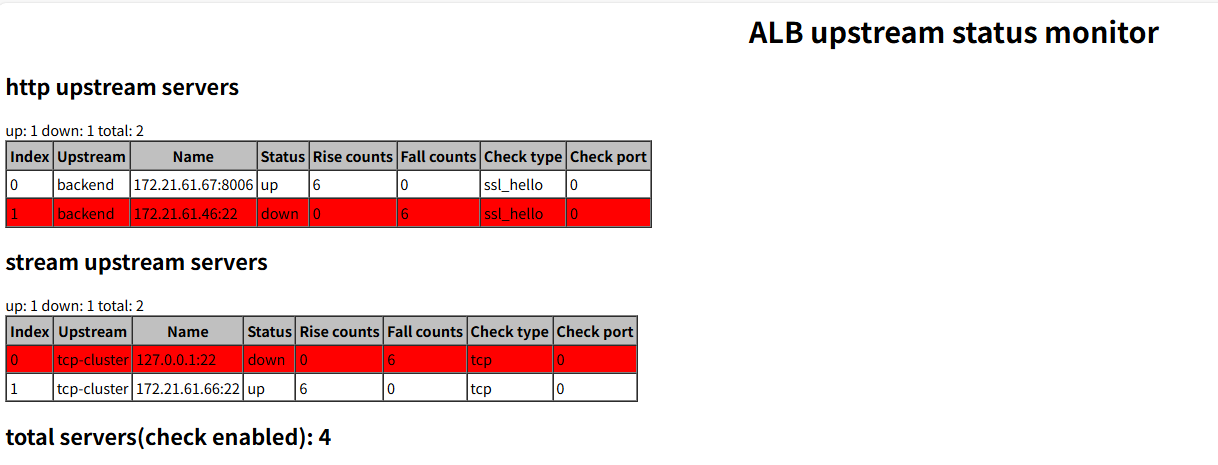
ALB supports retrieving active health check status through a specified interface, as follows:
- Enable active health check status retrieval
# Omit other configurations

http {
    server {
        listen 8080;

        # URL to retrieve active health check status
        # Get the health status data page through the /status interface on ALB's 8080 port
        location /status {
            healthcheck_status html;
        }
    }
    # Omit other configurations
}
2
3
4
5
6
7
8
9
10
11
12
13
14
15
Access the /status interface on port 8080 to get the health status data page:
- Supported Types
- html: Returns an HTML page
- json: Returns JSON data
- csv: Returns CSV data
- prometheus: Returns Prometheus format data
# Monitoring
ALB provides rich monitoring metrics, including:
- Simple traffic statistics: Provides basic connection and request statistics, does not support Prometheus collection format.
- Prometheus-exporter: Supports exposing traffic data in Prometheus format, facilitating integration with the Prometheus monitoring system.
- VTS monitoring data: Provides fine-grained ALB monitoring data, supporting HTML page display, JSON data format, and Prometheus collection format, with the most comprehensive functionality.
Note: One of the above three methods can be selected as needed.
# Simple Traffic Statistics
ALB provides simple traffic statistics, including:
- Active connections: The current number of active connections.
- Server accepts, handled, requests: The number of connections accepted and handled, and the number of requests received since ALB started.
- Reading: The current number of client requests being read.
- Writing: The current number of responses being written to the client.
- Waiting: The current number of connections in the waiting state. These connections have completed the read operation and are waiting for the next write operation.
# Configuring and Retrieving Simple Traffic Statistics
Add the following to the ALB configuration file:
server {
    listen 8080;            # Port for node_status

    location /node_status {
        stub_status on;     # Enable node_status function
    }
}
2
3
4
5
6
7
After starting ALB, visit http://alb_ip:8080/node_status to view.
# Prometheus-exporter (Prometheus Monitoring Data)
ALB provides Prometheus monitoring functionality, which is disabled by default. To enable it, switch to the utils/exporter directory,
Run: ./start-exporter.sh to start ALB's exporter.
# Startup Instructions
To start ALB's exporter, you must enable the stub_status function in the configuration file, as follows:
server {
  listen 8080;            # Port for node_status
  location /node_status { # Must use node_status
        stub_status on;   # Enable stub_status
        access_log off;
        allow 127.0.0.1;
    }
}
2
3
4
5
6
7
8
After running the start-exporter script, you are required to enter
- The server listening port corresponding to node_status, the default is 8080.
- The exporter listening port, the default is 9113
The following is the input process:
root@root:/opt/ALB-V2.0.6-SE-amd64/utils/exporter$ ./start-exporter.sh
input alb server listening port(请输入node_status监听端口):
alb server listening port(ALB node_status端口): 8080
input exporter listening port(请输入监听端口):
exporter listening port is 9113
exporter are running now!(exporter启动成功)
2
3
4
5
6
# Prometheus Monitoring Data Retrieval
After successfully running start-exporter, you can access http://IP:9113/metrics via a browser or prometheus to obtain monitoring data.
Note: If the exporter listening port was modified above, also update the 9113 in the URL above.
# VTS Monitoring Data
The vts module provides more detailed monitoring information, including connection counts, status codes, etc. Compared with the two monitoring methods above, the vts module can provide more comprehensive and richer monitoring data, through which you can gain deeper insight into ALB's operational status.
# Description of Monitoring Metrics
| Monitoring Category | Metric Name | Description |
|---|---|---|
| 1. Basic Information | Host Information | Hostname or IP address of the proxy server |
| Version Number | Version of ALB or the monitoring module | |
| Server Uptime | Time the ALB process has been running (usually in seconds) | |
| 2. Connection Information | Current Client Connections | Number of currently active client connections |
| Total Client Connections Read | Cumulative number of connections reading requests from clients | |
| Total Client Connections Written | Cumulative number of connections writing responses to clients | |
| Total Processed Client Connections | Cumulative total of processed client connections | |
| 3. HTTP Virtual Host Monitoring | Total Requests | Total number of requests received by this virtual host |
| Requests Per Second (RPS) | Number of requests processed per second | |
| 1xx Status Code Statistics | Cumulative count of all 1xx status codes (e.g., 100, 101) | |
| 2xx Status Code Statistics | Cumulative count of all 2xx successful responses (e.g., 200, 201) | |
| 3xx Status Code Statistics | Cumulative count of all redirect responses (e.g., 301, 302) | |
| 4xx Status Code Statistics | Cumulative count of client errors (e.g., 404, 403) | |
| 5xx Status Code Statistics | Cumulative count of server errors (e.g., 500, 502) | |
| All Status Codes Statistics | Sum of all non-2xx responses (or summary of all status code categories) | |
| Total Traffic Sent | Total bytes sent by this virtual host to clients | |
| Total Traffic Received | Total bytes received by this virtual host from clients | |
| Traffic Send Rate | Current bytes sent per second (B/s) | |
| Traffic Receive Rate | Current bytes received per second (B/s) | |
| 4. HTTP Cache Monitoring | Cache Hits | Number of request cache hits |
| Cache Misses | Number of request cache misses | |
| Cache Bypasses | Number of requests that bypassed cache due to bypass configuration | |
| Cache Expired | Number of cache items discarded due to expiration | |
| Cache Invalidations | Number of cache removals caused by active invalidation (e.g., purge) | |
| Cache Updates | Number of times the cache was updated (e.g., stale-while-revalidate) | |
| Cache Revalidations | Number of cache requests requiring revalidation against the origin | |
| Total Cache | Sum of cache hits + misses + bypasses, etc. (or current total cache items) | |
| 5. HTTP Upstream Server Monitoring | Service Status | Current status of upstream server (up/down/checking) |
| Service Weight | Configured weight value | |
| Max Failures | max_fails configuration value | |
| Downtime After Failure | fail_timeout configuration value (in seconds) | |
| Total Requests | Total requests sent to this upstream | |
| Requests Per Second | Current requests per second sent to this upstream | |
| 1xx Status Code Statistics | Cumulative count of all 1xx status codes | |
| 2xx Status Code Statistics | Cumulative count of all 2xx successful responses | |
| 3xx Status Code Statistics | Cumulative count of all redirect responses | |
| 4xx Status Code Statistics | Cumulative count of client errors | |
| 5xx Status Code Statistics | Cumulative count of server errors | |
| All Status Codes Statistics | Summary of all status code categories returned by upstream | |
| Total Traffic Sent | Total bytes sent between this upstream | |
| Total Traffic Received | Total bytes received between this upstream | |
| Traffic Send Rate | Current send rate to/from upstream (B/s) | |
| Traffic Receive Rate | Current receive rate to/from upstream (B/s) | |
| 6. Stream Virtual Host Monitoring | Total Requests | Total Stream (TCP/UDP) sessions |
| Requests Per Second | New sessions per second | |
| Connection Success/Failure Statistics | ⚠️ Stream layer has no HTTP status codes; this counts connection success/failure | |
| Connection Success/Failure Statistics | Same as above | |
| Connection Redirect Statistics | Same as above | |
| Connection Reject Statistics | Same as above | |
| Server Error Statistics | Same as above | |
| All Status Codes Statistics | Can refer to connection exceptions, timeouts, rejections, and other non-HTTP errors | |
| Total Traffic Sent | Total bytes sent by Stream proxy | |
| Total Traffic Received | Total bytes received by Stream proxy | |
| Traffic Send Rate | Current Stream send rate (B/s) | |
| Traffic Receive Rate | Current Stream receive rate (B/s) | |
| 7. Stream Upstream Server Monitoring | Service Status | Stream upstream health status |
| Service Weight | Configured weight value | |
| Max Failures | max_fails configuration value | |
| Downtime After Failure | fail_timeout configuration value (in seconds) | |
| Total Requests | Total connections sent to this Stream upstream | |
| Requests Per Second | New connections per second | |
| Connection Exception Statistics | Same as Stream virtual host; typically refers to connection result rather than HTTP status | |
| All Status Codes Statistics | Connection failures, timeouts, etc. | |
| Total Traffic Sent | Total bytes sent between this Stream upstream | |
| Total Traffic Received | Total bytes received between this Stream upstream | |
| Traffic Send Rate | Current send rate (B/s) | |
| Traffic Receive Rate | Current receive rate (B/s) |
# vts Module Configuration and Viewing
The following is an example of enabling vts configuration:
http {
    vhost_traffic_status_zone;             # Enable vts module

    ...

    server {

        ...

        location /status {                  # Configure the URI for vts viewing
            vhost_traffic_status_display;   # The current /status URI displays vts monitoring metrics
            vhost_traffic_status_display_format html;  # Set the default format to html page
        }
    }
}
2
3
4
5
6
7
8
9
10
11
12
13
14
15
- HTML Monitoring Data Viewing
Visit the monitoring page through a browser: http://IP:Port/status 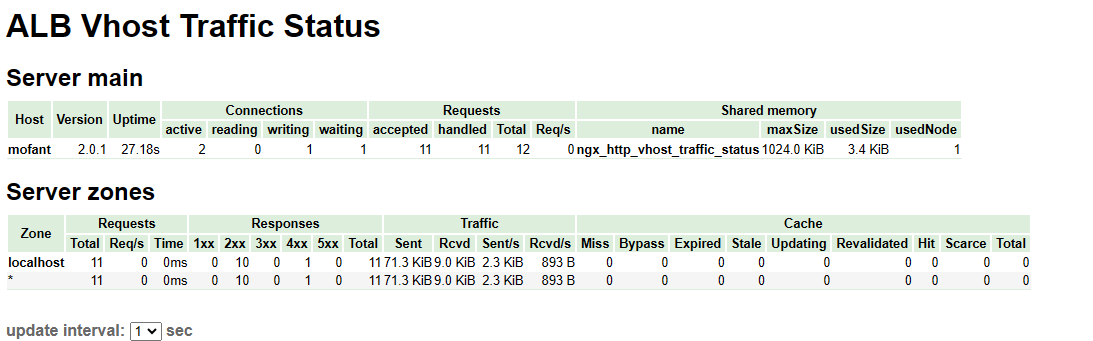
- JSON Data Format Viewing
Get JSON data via a browser or curl: http://IP:Port/status/format/json
- Prometheus Monitoring Metrics Data Interface
Can be directly integrated via Prometheus: http://IP:Port/status/format/prometheus
# Custom Monitoring Metrics
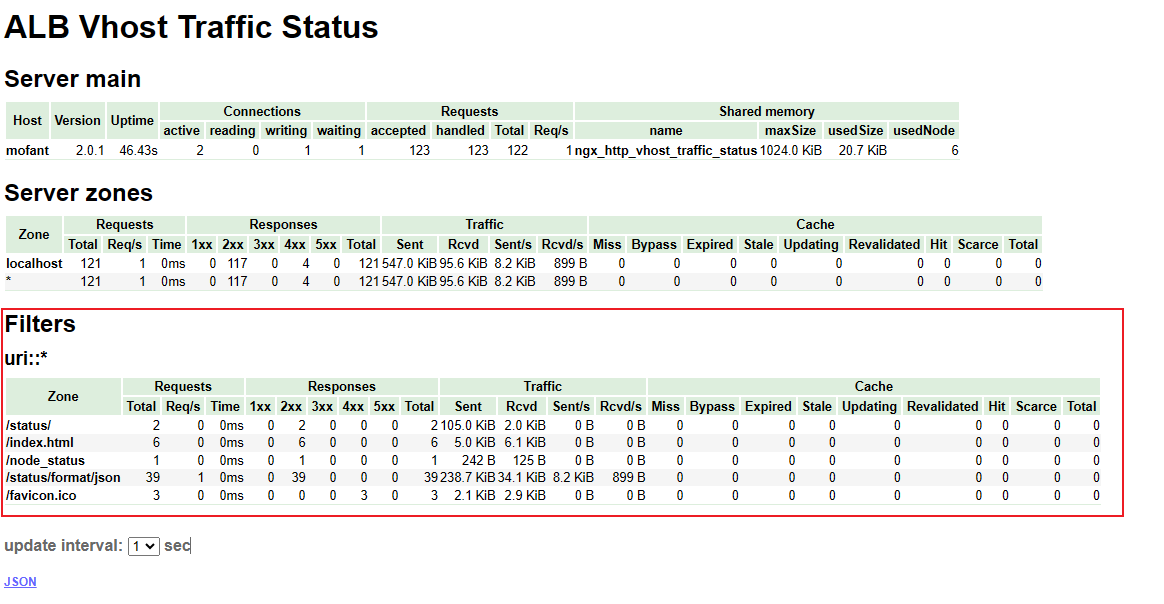
The vhost_traffic_status_filter_by_set_key directive allows you to specify a key name. VTS will filter traffic statistics based on this key name. Usually, this key name corresponds to a variable defined in the set directive.
vhost_traffic_status_filter_by_set_key key_name;
# Configuration context: http, server, location
2
Description: Enables the key via a user-defined variable. The key is the key string used for traffic calculation. The name is the group string used for traffic calculation. Both the key and the name can contain variables, such as $host and $server_name. If specified, the group to which the name belongs. If the second parameter name is not specified, the group to which the key belongs.
The following is an example:
http {
    vhost_traffic_status_zone;             # Enable vts module

    ...

    server {

        ...
        vhost_traffic_status_filter_by_set_key  $uri uri::*;  # Filter by uri to count traffic for different uris
        location /status {                  # Configure the URI for vts viewing
            vhost_traffic_status_display;   # The current /status URI displays vts monitoring metrics
            vhost_traffic_status_display_format html;  # Set the default format to html page
        }
    }
}
2
3
4
5
6
7
8
9
10
11
12
13
14
15
After configuration, you can view the traffic for different uris:
# Stream Monitoring
The ALB-VTS module supports stream module monitoring, but it is not enabled by default and needs to be manually configured. The usage is as follows:
http {
    ...

    server {

        ...

        location /stream/status {     # URI for exposing monitoring metrics
            stream_server_traffic_status_display;
            stream_server_traffic_status_display_format html;
        }
    }
}

stream {
    stream_server_traffic_status_zone;  # Enable stream vts module in stream block

    ...

    server {
        ...
    }
}
2
3
4
5
6
7
8
9
10
11
12
13
14
15
16
17
18
19
20
21
22
23
- HTML Monitoring Data Viewing
Visit the monitoring page through a browser: http://IP:Port/stream/status 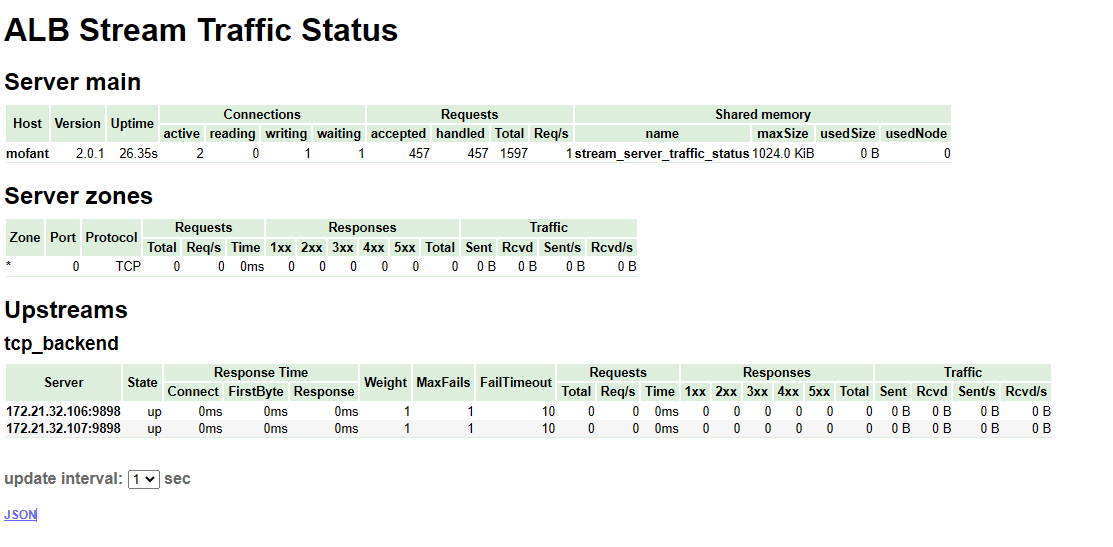
- JSON Data Format Viewing
Get JSON data via a browser or curl: http://IP:Port/stream/status/format/json
- Prometheus Monitoring Metrics Data Interface
Can be directly integrated via Prometheus: http://IP:Port/stream/status/format/prometheus
# VTS Monitoring Metrics Grafana Integration
The above VTS monitoring metrics provide Prometheus collection format. In Prometheus, you can configure the following collection:
scrape_configs:
- job_name: 'alb-vts-status'
  honor_timestamps: true
  scrape_interval: 1m
  scrape_timeout: 10s
  metrics_path: /status/format/prometheus # ALB vts monitoring metrics collection URL
  scheme: http
  enable_compression: true
  follow_redirects: true
  enable_http2: true
  static_configs:
  - targets:
      - 192.168.1.40:8080                 # ALB VTS monitoring metrics collection address
    labels:
      group: 'alb'
      instance: 'alb'
2
3
4
5
6
7
8
9
10
11
12
13
14
15
16
Where the grafana Dashboard sample configuration file path is:
ALB installation directory/utils/grafana/alb-grafana.json
The sample configuration file's display effect is as follows:
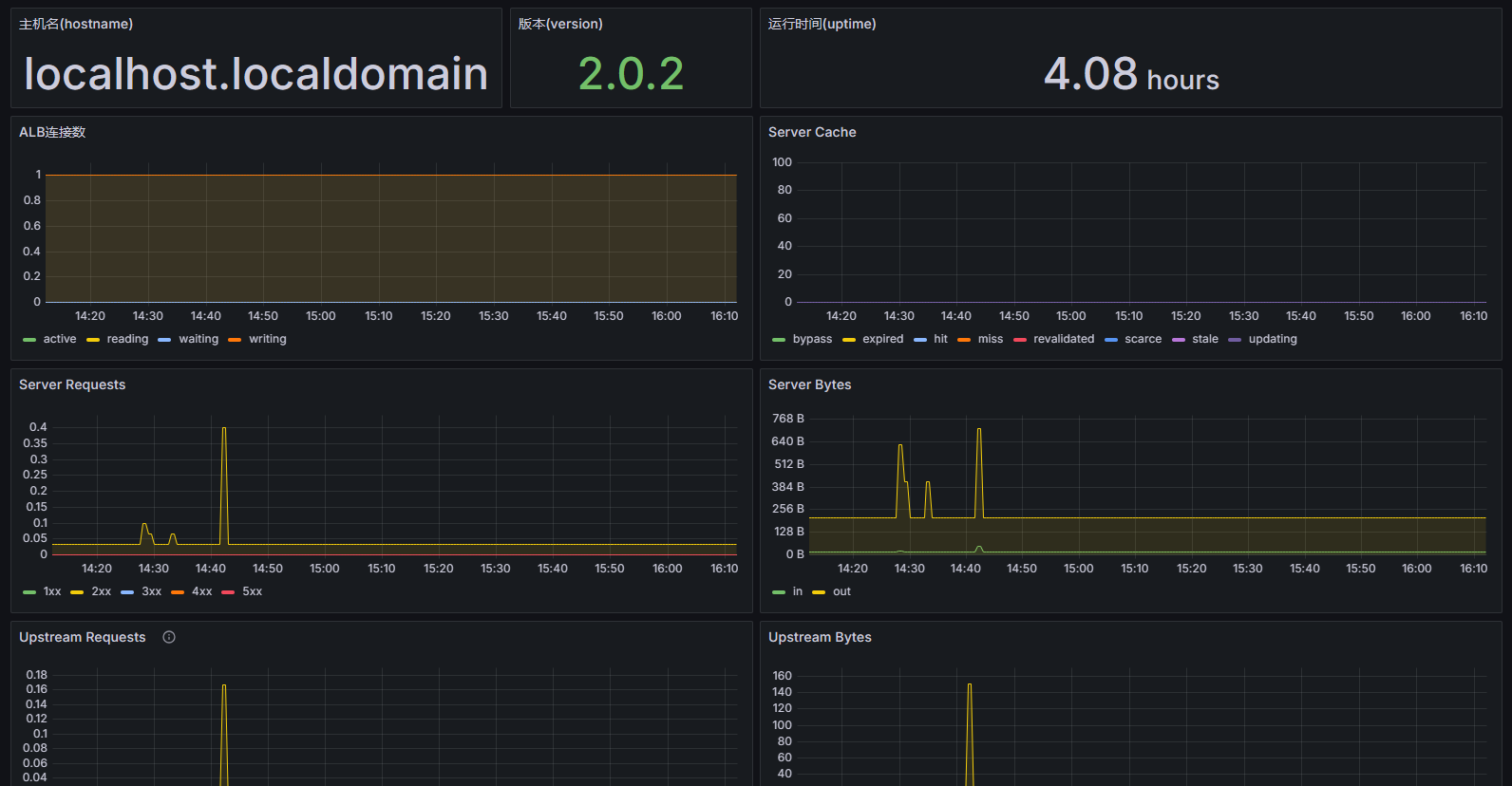
In a deployed grafana, you can import this configuration file to achieve the above monitoring dashboard.
# TCP Proxy
ALB's stream module can be used for TCP proxy. TCP proxy can be implemented by configuring the stream module in the alb configuration file.
The following is a tcp proxy example:
# TCP proxy
stream {
    upstream backend {
        server 127.0.0.1:8080;
    }

    server {
        listen 443;   # Listening port

        proxy_pass backend;  # Forward to backend
    }
}

# The following is the HTTP configuration content
http {
  # Omitted
}
2
3
4
5
6
7
8
9
10
11
12
13
14
15
16
17
Note: TCP proxy configuration can only be written at the outermost configuration and cannot be written in the http block or imported via include in the http block.
# TCP Proxy Acceleration
ALB TCP proxy acceleration is based on the kernel's eBPF feature, implementing efficient packet processing and forwarding mechanisms on the data plane, significantly improving TCP proxy performance.
# Advantages of Kernel eBPF for TCP Forwarding Acceleration
- Zero-copy forwarding: Processes network packets directly in kernel state via eBPF programs, avoiding frequent data copies between user space and kernel state in traditional methods.
- Intelligent routing decisions: Uses eBPF's efficient matching capabilities to quickly determine the forwarding path of packets, enabling TCP proxy acceleration.
# title: "Proxy Function Manual" permalink: "/pages/alb-v206-core-features-en/"
# Configuration Requirements
User permissions:
The
userdirective must use a privileged user (such as root, admin)Or, if the kernel supports it, set
/proc/sys/kernel/unprivileged_bpf_disabledto 0 to use an unprivileged userIn production environments, it is recommended to use an unprivileged user with CAP_BPF capability, or configure kernel parameters to allow unprivileged eBPF.
Connection limits:
- Total connections must not exceed 100,000 (100K)
Hardware configuration:
- Memory: >= 16G
Kernel version:
kernelversion >= 5.15
ALB product package requirement:
- For example
ALB-V2.0.6-SE-20260421-amd64-ebpf.tar.gz, the suffix carries the ebpf feature.
- For example
# Usage Example
user root;  # Example uses root; in production, it is recommended to use an unprivileged user with CAP_BPF capability


stream {
    upstream backend_servers {
        server 127.0.0.1:20001;
    }

    # Global configuration
    ebpf_proxy_timeout 600;  # Idle timeout (in seconds) when no data is forwarded between upstream and downstream
    ebpf_enable on;          # Enable eBPF acceleration globally

    server {
        listen 10000;
        ebpf_enable on;           # Enable eBPF in a specific server (can override global settings)
        proxy_pass backend_servers;
    }

    server {
        listen 10001;
        ebpf_enable off;          # Disable eBPF acceleration
        proxy_pass backend_servers;
    }
}
2
3
4
5
6
7
8
9
10
11
12
13
14
15
16
17
18
19
20
21
22
23
24
# Configuration Parameter Description
# ebpf_status_return
- Syntax:
ebpf_status_return; - Context: server
- Purpose: Returns simple status information for debugging purposes
- Example:
    server {
        listen 30001;
        ebpf_status_return;
    }
2
3
4
# ebpf_enable
- Syntax:
ebpf_enable on | off; - Default: off
- Context: main, server
- Purpose: Enable or disable the eBPF acceleration feature
- Example:
    # Enable globally
    ebpf_enable on;

    server {
        listen 10000;
        # Enable in a specific server
        ebpf_enable on;
        proxy_pass backend;
    }
2
3
4
5
6
7
8
9
# ebpf_proxy_timeout
- Syntax:
ebpf_proxy_timeout milliseconds; - Default: 600000 (milliseconds, = 600 seconds)
- Context: main, server
- Purpose: eBPF connection idle timeout. If no data is forwarded beyond this time, the connection is closed. For long-lived connection scenarios, set this to 0 (never time out).
- Example:
    # Global setting
    ebpf_proxy_timeout 300000;

    server {
        listen 10000;
        # Override at the server level
        ebpf_proxy_timeout 60000;
        proxy_pass backend;
    }
2
3
4
5
6
7
8
9
# ebpf_proxy_buffer_size
- Syntax:
ebpf_proxy_buffer_size size; - Default: 16384 (16KB)
- Context: main, server
- Purpose: Sets the buffer size used to store data received from upstream
- Example:
    # Global setting
    ebpf_proxy_buffer_size 32k;

    server {
        listen 10000;
        # Setting at the server level
        ebpf_proxy_buffer_size 64k;
        proxy_pass backend;
    }
2
3
4
5
6
7
8
9
# ebpf_timer_period
- Syntax:
ebpf_timer_period milliseconds; - Default: 2000 (2 seconds)
- Context: main, server
- Purpose: Sets the timer period used to update traffic statistics
- Example:
    # Global setting
    ebpf_timer_period 1000;

    server {
        listen 10000;
        # Setting at the server level
        ebpf_timer_period 5000;
        proxy_pass backend;
    }
2
3
4
5
6
7
8
9
# TCP Proxy for ADMQ
ALB supports using the TCP protocol to proxy ADMQ services. The following is an example of using ALB Standard Edition to proxy an ADMQ service.
# Configuration Process
- ADMQ has been deployed (omitted)
- Deploy ALB (omitted)
- Modify the ALB configuration to support ADMQ proxying
- Verify the ADMQ service proxy
# ADMQ Environment and Proxy Requirements
Assume the three service nodes of the target ADMQ cluster are: 192.168.3.10, 192.168.3.11, 192.168.3.12, and the MQTT service port is 5682.
Assume that ALB also opens port 5682 externally to provide the ADMQ service.
# Modify the ALB Configuration to Support TCP Proxying ADMQ
Edit the ALB installation directory/conf/alb.conf file and add the following configuration at the outermost layer above the http configuration:
stream {
    upstream mq_server {
        server 192.168.3.10:5682 max_fails=3 fail_timeout=10s;
        server 192.168.3.11:5682 max_fails=3 fail_timeout=10s;
        server 192.168.3.12:5682 max_fails=3 fail_timeout=10s;
    }
    server {
        listen 5682 so_keepalive=on;   # ALB listens on port 5682
        proxy_connect_timeout 15s;    # Connection timeout
        proxy_timeout 300s;
        proxy_pass mq_server;          # ALB reverse proxies to the three MQ nodes
    }
}


# The following is the http configuration content, no changes needed
http {
    .... #omitted
}
2
3
4
5
6
7
8
9
10
11
12
13
14
15
16
17
18
19
20
# Verify ALB Proxying ADMQ Service
- Check whether ALB is listening on port 5682.
- If the corresponding port exists, use an MQ client to verify through ALB's IP and port 5682.
# Streaming Response Proxy
ALB supports streaming response proxying, that is, ALB does not cache responses but directly forwards the responses to the client. It is commonly used in various AI/ChatGPT and chatbot scenarios. The following is a configuration example
location /streaming {
    proxy_pass http://backend_server;

    proxy_cache off; # Disable caching
    proxy_buffering off; # Disable proxy buffering
    chunked_transfer_encoding on; # Enable chunked transfer encoding
    tcp_nopush off; # Disable the TCP NOPUSH option to allow fast sending of small packets, reducing latency
    tcp_nodelay on; # Enable the TCP NODELAY option, disabling the delayed ACK algorithm
    keepalive_timeout 300; # Set the keep-alive timeout to 300 seconds
}
2
3
4
5
6
7
8
9
10
# Detailed Configuration Description
proxy_cache off
Disable the caching feature to prevent the proxy server from caching streaming response content, ensuring that clients receive real-time, complete responses.
proxy_buffering off
Disable response buffering on the proxy server to prevent it from buffering the entire response before sending it to the client, thereby achieving a true streaming effect.
chunked_transfer_encoding on
Enable chunked transfer encoding, allowing responses to be transmitted in multiple chunks. This is the key to achieving streaming.
tcp_nopush off
Disable the TCP NOPUSH option, allowing fast sending of small packets.
tcp_nodelay on
Enable the TCP NODELAY option, disabling the delayed ACK algorithm. This helps reduce ACK packet delay and ensures timely data transmission.
keepalive_timeout 300
Increase the keepalive timeout to prevent the connection between the proxy and the origin server from being closed before the streaming response completes. It is set to 300 seconds here and can be adjusted according to actual needs.
# Log Configuration
ALB supports two types of logs: access logs and error logs. The following describes in detail how to configure these two types of logs.
# Access Logs
Access logs record information about each HTTP request, including the request method, request URI, response status code, response size, client IP address, etc.
# Access Log Configuration
Access logs can be configured through the access_log directive. This directive can appear in http, server, or location blocks.
# Basic Configuration Example
http {
    log_format main '$remote_addr - $remote_user [$time_local] "$request" '
                    '$status $body_bytes_sent "$http_referer" '
                    '"$http_user_agent" "$http_x_forwarded_for"';

    server {
        listen 80;
        server_name example.com;

        access_log /var/log/alb/example.access.log main;
    }
}
2
3
4
5
6
7
8
9
10
11
12
- log_format: Defines the format of log entries. The example above defines a format named main
- access_log: Specifies the location of the log file and the format to use. In this example, the log file is saved at /var/log/alb/example.access.log and uses the main format.
# Detailed Log Format Description
- $remote_addr: Client IP address.
- $remote_user: Authenticated user name.
- $time_local: Local timestamp.
- $request: Complete request line.
- $status: HTTP status code.
- $body_bytes_sent: Size of the response body sent to the client.
- $http_referer: Referer request header of the request.
- $http_user_agent: User-Agent request header of the client.
- $http_x_forwarded_for: X-Forwarded-For request header, commonly used in reverse proxy environments.
# Disabling Access Logs
If you do not want to record access logs, you can set access_log to off:
access_log off;
# Error Logs
Error logs record error information encountered during ALB operation, which is very important for debugging and maintenance.
# Configuring Error Logs
Error logs are configured through the error_log directive. This directive can appear in http, server, or location blocks.
# Basic Configuration
http {
    error_log /var/log/alb/error.log warn;

    server {
        listen 80;
        server_name example.com;
    }
}
2
3
4
5
6
7
8
- error_log: Specifies the location of the error log file and the minimum record level. In this example, the error log is saved at /var/log/alb/error.log and only records errors at the warn level and above.
# Log Levels
The error log levels include:
- debug: Debugging information.
- info: General information.
- notice: Important information.
- warn: Warning information.
- error: Error information.
- crit: Critical error information.
- alert: Alert information.
- emerg: Emergency information.
# Traffic Control
ALB provides multiple ways to implement traffic control, including rate limiting, speed limiting, and connection limits.
# Using the limit_req Module for Rate Limiting
The limit_req module allows you to limit client requests based on request frequency.
- Directive name:
limit_req_zone
- Syntax: limit_req_zone key zone=name:size rate= number r/s
- Default: no
- Scope: http
- Usage example: limit_req_zone $binary_remote_addr zone=addr:10m rate=1r/s
- Description: Defines a rate limiting zone, where
$binary_remote_addris the client's IP address from the request,zone=addr:10mindicates the zone memory size is 10MB, andrate=1r/sindicates each IP address can only make one request per second.
- Directive name:
limit_req
- Syntax: limit_req zone=name [burst=number] [nodelay]
- Default: no
- Scope: http, server, location
- Usage example: limit_req zone=mylimit burst=5 nodelay
- Description: Limits the request rate in the specified zone, where
burst=5indicates the allowed burst request count is 5, andnodelayindicates requests exceeding burst are not delayed.
# Example Configuration
Assume you want to limit each IP address to making only 1 request per second:
http {
    limit_req_zone $binary_remote_addr zone=mylimit:10m rate=1r/s;

    server {
        listen 80;
        server_name example.com;

        location / {
            limit_req zone=mylimit burst=5 nodelay;
            proxy_pass http://backend;
        }
    }
}
2
3
4
5
6
7
8
9
10
11
12
13
- limit_req_zone: Defines a rate limiting zone, where
$binary_remote_addris the client IP address,mylimitis the zone name,10mis the memory size (used to store rate limiting information), andrate=1r/sindicates at most 1 request per second. - limit_req: Applies the rate limiting rule in the location block.
zone=mylimitspecifies the rate limiting zone defined earlier,burst=5allows burst requests, that is, more than 1 request can be sent in a short period, but cannot exceed the burst value;nodelayindicates that requests are not allowed to be delayed.
# Using the limit_conn Module for Connection Limit
The limit_conn module can limit the number of connections per client.
- Directive name:
limit_conn_zone
- Syntax: limit_conn_zone key zone=name:size;
- Default: no
- Scope: http
- Usage example: limit_conn_zone $binary_remote_addr zone=addr:10m;
- Description: Defines a rate limiting zone, where
keyis the key used to identify the client (such as IP address),zone=nameis the zone name, andsizeis the memory size (used to store connection information).
- Directive name:
limit_conn
- Syntax: limit_conn zone number;
- Default: no
- Scope: http, server, location
- Usage example: limit_conn addr 10;
- Description: Limits the request rate in the specified zone, where
zoneis the zone name defined earlier, andnumberis the maximum number of allowed connections.
# Example Configuration
Assume you want to limit each IP address to at most 10 concurrent connections:
http {
    limit_conn_zone $binary_remote_addr zone=myconn:10m;

    server {
        listen 80;
        server_name example.com;

        location / {
            limit_conn myconn 10;
            proxy_pass http://backend;
        }
    }
}
2
3
4
5
6
7
8
9
10
11
12
13
- limit_conn_zone: Defines a connection limiting zone, where
$binary_remote_addris the client IP address,myconnis the zone name, and10mis the memory size (used to store connection information). - limit_conn: Applies the connection limit rule in the location block.
zone=myconnspecifies the connection limiting zone defined earlier, and10indicates at most 10 concurrent connections are allowed.
# Using the limit_rate Directive for Speed Limiting
The limit_rate directive can limit the client download speed.
- Directive name:
limit_rate
- Syntax: limit_rate rate;
- Default: no limit
- Scope: http, server, location
- Usage example: limit_rate 100k;
- Description: Sets the download speed limit per connection, where
rateis the rate (for example,100kmeans transmitting 100KB of data per second).
# Example Configuration
Assume you want to limit each client's download speed to 100k/s:
server {
    listen 80;
    server_name example.com;

    location / {
        limit_rate 100k;
        proxy_pass http://backend;
    }
}
2
3
4
5
6
7
8
9
- limit_rate: Applies the speed limiting rule in the location block.
100kindicates at most 100KB of data can be transmitted per second.
# Grayscale Release and Grayscale Testing
ALB supports grayscale release and grayscale testing, which makes it convenient to test new versions and smoothly upgrade to the production environment.
# Scenario Introduction
| Scenario | Requirement | Typical Example |
|---|---|---|
| New feature grayscale | Allow only internal/whitelist users to experience | The new order interface is only accessible to users with uid=1000~2000 |
| AB experiment | Compare two sets of backends by traffic proportion | 50% of users go to v1 service, 50% go to v2 service |
| Region/channel grayscale | Divert traffic based on request characteristics | Users in Guangdong go to the new data center, others go to the old one |
| Canary release | Release 5% of traffic first, automatically roll back if error rate > 1% | Monitor the 5xx ratio, switch back with one click when the threshold is exceeded |
| UI/UX redesign testing | Two groups of A/B users see different interfaces to evaluate click-through rate and other metrics | |
| Fault rollback drill | Quickly switch back to the old version to ensure system availability |
# ALB Key Directive Quick Reference
ALB itself does not directly provide "grayscale" functionality, but it can be achieved through the combination of the following modules and directives:
mapdirective: Generates variables based on request characteristics (such as Cookie, Header, IP)split_clientsdirective: Diverts traffic proportionally based on hash valuesupstream + server: Defines multiple backend service groups
| Directive/Variable | Purpose | Example |
|---|---|---|
split_clients | Performs consistent hash distribution by variable | split_clients "${remote_addr}AAA" $group { 5% canary; 95% stable; } |
map | Reads header, cookie, and arg for conditional mapping | map $cookie_ab_version $backend { default v1; canary v2; } |
set $var / rewrite | Changes variables at runtime | set $backend ''; rewrite ^/api/(.*) /$1 break; |
proxy_pass | Forwards traffic to the corresponding upstream | proxy_pass http://$backend; |
access_log | Logs to facilitate rollback | access_log /var/log/alb/canary.log main if=$log_canary; |
# Detailed Description of Key Directives
# 1. split_clients — Proportional Distribution (Recommended)
split_clients ${variable} $backend {
    10%     backend_v2;
    *       backend_v1;
}
2
3
4
${variable}: The variable used for hashing, such as$request_id,$remote_addr,$http_user_agent$backend: The output variable, used forproxy_pass10%: Traffic proportion, supports decimals (such as 0.5%)*: Fallback, matches remaining traffic
✅ Advantages: Simple, efficient, stateless
❌ Disadvantages: Cannot be precisely controlled based on user identity (unless the variable is the user ID)
# 2. map — Rule-Based Routing
map $http_x_version_flag $target_backend {
    default          backend_v1;
    "v2"             backend_v2;
    ~*beta           backend_v2;
}
2
3
4
5
- Routes to v2 based on the request header
X-Version-Flag: v2 - Supports regex matching (
~*indicates case-insensitive)
✅ Advantages: Flexible, can be combined with Cookie, Header, IP, etc.
❌ Disadvantages: Requires client cooperation to pass the identifier
# 3. upstream — Define Backend Service Group
upstream backend_v1 {
    server 192.168.1.100:8080;
}

upstream backend_v2 {
    server 192.168.1.101:8081;
}
2
3
4
5
6
7
Each upstream can contain multiple servers and supports load balancing.
Can be used together with parameters such as weight, backup.
# Configuration Example: Grayscale Release by IP Address and Proportion
Perform a hash calculation based on the client IP ($remote_addr) and assign approximately 5% of the IPs to the grayscale group.
http {
    # 1. Define upstreams
    upstream stable { server 10.0.0.100:8080; }
    upstream canary { server 10.0.0.200:8080; }

    # 2. Perform 5% grayscale by IP
    split_clients "${remote_addr}AAA" $is_canary {
        5%      1;      # A variable value of 1 means entering grayscale
        *       0;
    }

    # 3. Select backend
    map $is_canary $backend {
        1       canary;
        0       stable;
    }

    server {
        listen 80;
        server_name api.example.com;

        location / {
            proxy_set_header Host $host;
            proxy_pass http://$backend;
            # Log to facilitate rollback
            access_log /var/log/alb/canary.log combined if=$is_canary;
        }
    }
}
2
3
4
5
6
7
8
9
10
11
12
13
14
15
16
17
18
19
20
21
22
23
24
25
26
27
28
29
# Cookie-Based Grayscale
When the user visits, they bring the Cookie gray=true to enter the grayscale environment.
# If the Cookie contains gray=true, route to the new version
map $http_cookie $backend {
    default          old_app;
    ~*gray=true      new_app;
}

upstream old_app { server 10.0.0.10:8000; }
upstream new_app { server 10.0.0.11:8001; }

server {
    listen 80;
    location / {
        proxy_pass http://$backend;
    }
}
2
3
4
5
6
7
8
9
10
11
12
13
14
15
# IP Whitelist-Based Forced Grayscale (Internal Testing Solution)
upstream old_app { server 10.0.0.10:8000; }
upstream new_app { server 10.0.0.11:8001; }

map $remote_addr $backend {
    default          old_app;
    192.168.1.100    new_app;  # Internal testing IP
    10.0.0.0/16     new_app;  # Entire internal network segment
}
2
3
4
5
6
7
8
9
# Dynamically Control Grayscale Proportion or Divert Traffic Based on Database User Tags
- Read the user ID from the request parameter (such as
?user_id=123) or request header (such asX-User-ID: 123); - Call a Lua script to determine whether the user belongs to the grayscale group (for example: if the user ID is even, enter the new version);
- Based on the judgment result, proxy the request to the
old_appornew_appbackend service; - Supports logging of grayscale routing results for easy monitoring and troubleshooting.
http {

  # Use map to define variables at the http block level, ensuring log_format can access them
  map $arg_user_id $user_id_from_arg {
      default $arg_user_id;
      "" "";
  }

  map $http_x_user_id $user_id_from_header {
      default $http_x_user_id;
      "" "";
  }

  log_format gray_log '$remote_addr - [$time_local] '
                      '"$request" $status $body_bytes_sent '
                      '"$http_referer" "$http_user_agent" '
                      'user_id=$gray_user_id backend=$gray_backend';


  upstream old_app { server 10.0.0.10:8000; }
  upstream new_app { server 10.0.0.11:8001; }

  server {
    listen 80;
    server_name localhost;

    # Initialize variables for Lua and logging
    set $gray_user_id "";
    set $gray_backend "";

    location / {
      # Use access_by_lua_block to execute Lua logic in the access phase
      access_by_lua_block {
          -- 1. Get user_id from query string or header
          local user_id = ngx.var.arg_user_id
          if not user_id or user_id == "" then
              user_id = ngx.var.http_x_user_id
          end

          -- 2. Set log variables
          ngx.var.gray_user_id = user_id or ""

          -- 3. Determine whether it is a grayscale user (even user_id); if no user_id, default to old version
          local backend = "old_app"
          if user_id and user_id ~= "" then
              local num = tonumber(user_id)
              if num and num % 2 == 0 then
                  backend = "new_app"---
title: Proxy Function Manual
permalink: /pages/alb-v206-core-features-en/
---

              end
          end

          ngx.var.gray_backend = backend
      }

      # 4. Proxy to the corresponding backend
      proxy_pass http://$gray_backend;
      proxy_set_header Host $host;
      proxy_set_header X-Real-IP $remote_addr;
      proxy_set_header X-Forwarded-For $proxy_add_x_forwarded_for;
    }

    # Access log contains canary release information
    access_log logs/access.log gray_log;
  }
}
2
3
4
5
6
7
8
9
10
11
12
13
14
15
16
17
18
19
20
21
22
23
24
25
26
27
28
29
30
31
32
33
34
35
36
37
38
39
40
41
42
43
44
45
46
47
48
49
50
51
52
53
54
55
56
57
58
59
60
61
62
63
64
65
66
67
68
69
70
# Dynamic DNS Resolution
ALB supports dynamic DNS resolution, enabling real-time resolution of domain names. The core of this feature is using the resolver directive together with variables. Example:
http {
    server {
        listen 80;
        # Declare the DNS server address and the validity period of the resolution result (recommended at the server block level to share the DNS cache)
        resolver 8.8.8.8 valid=10s;  # Example DNS server
        # Define a variable for dynamic DNS resolution
        set $test private.server1.com.cn;
        location / {
            # Use a variable to implement dynamic DNS resolution
            proxy_pass http://$test;
        }
    }
}
2
3
4
5
6
7
8
9
10
11
12
13
In the configuration above, when accessing the server's root path /, the request is forwarded to the backend address http://private.server1.com.cn defined by the $test variable. Because the $test variable is used, ALB re-resolves the domain name through the DNS server specified by resolver (e.g., 8.8.8.8) on every request (or after the cache expires).
The validity period of the resolution result is specified by valid=10s, meaning the cache lasts 10 seconds. After the validity period expires, the next access will trigger a new DNS query.
Important Note: If a domain name is written directly after proxy_pass (rather than a variable), for example proxy_pass http://private.server1.com.cn;, ALB only resolves the domain name once when starting or reloading the configuration and cannot achieve dynamic updates, so the dynamic DNS resolution effect cannot be achieved.
# resolver Configuration Explained
Dynamic domain name resolution relies on the combined use of the resolver directive and variables. resolver can be configured in the http or server blocks, with corresponding scope differences. It is recommended to place resolver at the server block level to share the DNS cache and avoid each location maintaining its own.
http {
    server {
        listen 80;
        # Recommended to configure resolver at the server block level to share the DNS cache
        resolver 8.8.8.8 valid=10s;  # Example DNS server
        set   $test  private.server1.com.cn;
        location / {
            proxy_pass http://$test;
        }
        location /duplicate/ {
            # Reuse the server block's resolver configuration without redeclaring
            proxy_pass http://$test;
        }
    }
}
2
3
4
5
6
7
8
9
10
11
12
13
14
15
In this configuration, when accessing the / and /duplicate/ paths, although the proxied target domain name is the same (both private.server1.com.cn), they use different DNS servers for resolution:
/uses8.8.8.8/duplicate/uses114.114.114.114
In addition, the DNS resolution results of these two paths are independent of each other and do not share cache.
Parameter Description:
valid=10s: Specifies the cache validity period of the DNS resolution result;ipv6=on|off: Controls whether IPv6 addresses are accepted. The default ison, meaning when a domain name resolves to both IPv4 and IPv6 addresses, both will be used. You can disable IPv6 resolution by settingipv6=off.
# HTTPS and GMSSL (Chinese Cryptography)
ALB implements secure HTTP communication by configuring SSL certificates and private keys.
# Prerequisites
- Obtain SSL certificates and private keys. GMSSL (Chinese Cryptography) SSL certificates are supported.
- Server-side encryption certificate file
- Server-side encryption certificate private key file
- Server-side signature certificate (required for GMSSL)
- Server-side signature certificate private key file (required for GMSSL)
# Edit the ALB Configuration File to Enable SSL
- Configuration Description: the content of the
serverblock in theconf/alb.conffile. - Core Configuration:
listen,server_name,ssl_certificate,ssl_certificate_key - Example Configuration:
server {
    listen 443 ssl;   # Use the SSL marker to enable HTTPS on the current port
    server_name your_domain.com;   # Domain name corresponding to the SSL certificate

    ssl_certificate /path/to/your_domain_name.enc.crt.pem;      # Server-side encryption certificate file
    ssl_certificate_key /path/to/your_domain_name.enc.key.pem;  # Server-side encryption certificate private key file

    ssl_protocols TLSv1.2 TLSv1.3; # Use more secure protocol versions
    ssl_prefer_server_ciphers on;  # Prefer the cipher suites defined by the server
    ssl_ciphers HIGH:!aNULL:!MD5;  # Use more secure cipher algorithms

    location / {
        root /var/www/html;
        index index.html index.htm;
    }
}
2
3
4
5
6
7
8
9
10
11
12
13
14
15
16
listen: Specifies the listening port number. Here it is set to 443, indicating the HTTPS protocol is used.server_name: Specifies the server name. Here it is set toyour_domain.com, indicating the domain name corresponding to this server.ssl_certificate: Specifies the path to the SSL certificate. Here it is set to/path/to/your_domain_name.crt, indicating the certificate file.ssl_certificate_key: Specifies the path to the SSL private key. Here it is set to/path/to/your_domain_name.key, indicating the private key file.ssl_protocols: Specifies the supported SSL protocol versions. Here set toTLSv1.2andTLSv1.3, indicating the use of more secure protocol versions.ssl_prefer_server_ciphers: Specifies the use of stronger ciphers, indicating the use of more secure encryption algorithms.ssl_ciphers: Specifies the supported cipher algorithms. Here set toHIGH:!aNULL:!MD5, indicating the use of more secure encryption algorithms.
# Configuration Directive Description
# listen
- Description: Specifies the port and protocol that the server listens on.
- Example:
listen 443 ssl;
# ssl_certificate and ssl_certificate_key
- Description: Specifies the paths to the SSL certificate and private key.
- Example:
ssl_certificate /path/to/your_domain_name.crt;
# ssl_protocols
- Description: Specifies the supported SSL protocol versions.
- Example:
ssl_protocols TLSv1.2 TLSv1.3;(TLS 1.2 and TLS 1.3 are recommended)
# ssl_ciphers
- Description: Specifies the stronger ciphers and supported cipher algorithms.
- Example:
ssl_ciphers HIGH:!aNULL:!MD5;(stronger ciphers are recommended)
# ssl_prefer_server_ciphers
- Description: Prefer the cipher suites defined by the server.
- Example:
ssl_prefer_server_ciphers on;
# ssl_session_cache
- Description: Enables SSL session caching to reduce the number of SSL connection handshakes.
- Example:
ssl_session_cache shared:SSL:10m;
# ssl_session_timeout
- Description: Sets the expiration time of the SSL session cache.
- Example:
ssl_session_timeout 10m;
# GMSSL (Chinese Cryptography) Configuration Example
Note: GMSSL certificate and key file names must contain the signature certificate (sig) and the server-side certificate (enc); otherwise they will not be recognized. Additionally, the sig certificate must be configured first, as in the following configuration:
server {
    listen 443 ssl;   # Use the SSL marker to enable HTTPS on the current port
    server_name your_domain.com;   # Domain name corresponding to the SSL certificate

    # GMSSL server-side signature certificate and key, typically with "sig" in the name (sig certificate must be configured first)
    ssl_certificate /path/to/your_domain_name.sig.crt.pem;      # Server-side signature certificate file
    ssl_certificate_key /path/to/your_domain_name.sig.key.pem;  # Server-side signature certificate private key file

    # GMSSL server-side certificate and key, typically with "enc" in the name (enc certificate placed after sig certificate)
    ssl_certificate /path/to/your_domain_name.enc.crt.pem;      # Server-side encryption certificate file
    ssl_certificate_key /path/to/your_domain_name.enc.key.pem;  # Server-side encryption certificate private key file

    ssl_protocols TLSv1.2 TLSv1.3; # Use more secure protocol versions
    ssl_prefer_server_ciphers on;  # Prefer the cipher suites defined by the server
    ssl_ciphers HIGH:!aNULL:!MD5;  # Use more secure cipher algorithms

    location / {
        root /var/www/html;
        index index.html index.htm;
    }
}
2
3
4
5
6
7
8
9
10
11
12
13
14
15
16
17
18
19
20
21
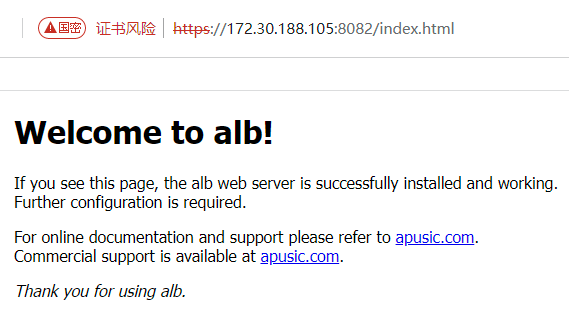
When accessed with a GMSSL (Chinese Cryptography) browser, GMSSL is marked in the address bar.
# HTTP/3
ALB V2.0.6 and later versions support the HTTP/3 protocol. When using the HTTP/3 protocol, please ensure that the client (browser) supports the HTTP/3 protocol.
To maintain compatibility with existing protocols, you can refer to the following HTTP/3 configuration:
server {
    listen 443 ssl;   # Use the SSL marker to enable HTTPS on the current port
    listen 443 quic reuseport;   # The same port can simultaneously listen on SSL and QUIC (HTTP/3); requires ALB 1.25+

    server_name your_domain.com;   # Domain name corresponding to the SSL certificate

    ssl_certificate /path/to/your_domain_name.crt;      # Certificate file
    ssl_certificate_key /path/to/your_domain_name.key;  # Private key file

    ssl_protocols TLSv1.3; # Use more secure protocol versions; HTTP/3 requires TLSv1.3
    ssl_prefer_server_ciphers on;  # Prefer the cipher suites defined by the server
    ssl_ciphers HIGH:!aNULL:!MD5;  # Use more secure cipher algorithms

    # Tell the browser: HTTP/3 is supported on the same port. If the port is not 443, please make the request consistent with the listening port.
    add_header Alt-Svc 'h3=":443"; ma=86400';

    location / {
        root /var/www/html;
        index index.html index.htm;
    }
}
2
3
4
5
6
7
8
9
10
11
12
13
14
15
16
17
18
19
20
21
Use a curl tool that supports HTTP/3 to test:
 root@root:~$ /snap/bin/curl --http3-only -I  https://localhost:443/index.html -v -k
* Host localhost:443 was resolved.
* IPv6: ::1
* IPv4: 127.0.0.1
*   Trying [::1]:443...
* error:8000006F:system library::Connection refused
* QUIC connect to ::1 port 443 failed: Could not connect to server
*   Trying 127.0.0.1:443...
* Server certificate:
*  subject: CN=localhost
*  start date: Aug 25 10:23:08 2025 GMT
*  expire date: Aug 25 10:23:08 2026 GMT
*  issuer: CN=localhost
*  SSL certificate verify result: self-signed certificate (18), continuing anyway.
*   Certificate level 0: Public key type RSA (2048/112 Bits/secBits), signed using sha256WithRSAEncryption
* Connected to localhost (127.0.0.1) port 443
* using HTTP/3
* [HTTP/3] [0] OPENED stream for https://localhost:443/index.html
* [HTTP/3] [0] [:method: HEAD]
* [HTTP/3] [0] [:scheme: https]
* [HTTP/3] [0] [:authority: localhost:443]
* [HTTP/3] [0] [:path: /index.html]
* [HTTP/3] [0] [user-agent: curl/8.15.0]
* [HTTP/3] [0] [accept: */*]
> HEAD /index.html HTTP/3
> Host: localhost:443
> User-Agent: curl/8.15.0
> Accept: */*
>
* Request completely sent off
< HTTP/3 200
HTTP/3 200
< server: alb/2.0.6
server: alb/2.0.6
< date: Tue, 26 Aug 2025 08:37:04 GMT
date: Tue, 26 Aug 2025 08:37:04 GMT
< content-type: text/html
content-type: text/html
< content-length: 617
content-length: 617
< last-modified: Fri, 22 Aug 2025 08:05:21 GMT
last-modified: Fri, 22 Aug 2025 08:05:21 GMT
< etag: "68a824c1-269"
etag: "68a824c1-269"
< alt-svc: h3=":443"; ma=86400
alt-svc: h3=":443"; ma=86400
< accept-ranges: bytes
accept-ranges: bytes
<

* Connection #0 to host localhost left intact
2
3
4
5
6
7
8
9
10
11
12
13
14
15
16
17
18
19
20
21
22
23
24
25
26
27
28
29
30
31
32
33
34
35
36
37
38
39
40
41
42
43
44
45
46
47
48
49
50
51
# Forward Proxy
ALB can be used as a forward proxy server. It can help clients access other servers or services while hiding the client's real IP address. The main uses of a forward proxy include caching, load balancing, security filtering, etc.
# Example Configuration
Below is a simple ALB configuration example that supports both HTTP and HTTPS forward proxy, used to forward requests to another server:
server {
    listen                           8080;
    server_name                      localhost;
    resolver                         114.114.114.114 ipv6=off;
    proxy_connect on;
    proxy_connect_allow              443 80;
    location / {
        proxy_pass $scheme://$http_host$request_uri;
    }
}
2
3
4
5
6
7
8
9
10
resolver: Sets the DNS resolution server. Here,114.114.114.114is used.proxy_connect: Enables the proxy connection function.proxy_connect_allow: The allowed port numbers. Here, 443 and 80 are allowed.
In the location block, the $scheme, $http_host, and $request_uri variables are used to construct the address of the target server.
location /: Configures the path that handles all requests and forwards them to the target server.$scheme: Indicates the protocol used by the request (http or https).$http_host: Indicates the hostname and port number of the request.$request_uri: Indicates the URI of the request.
# Cache Configuration
ALB supports the Proxy Cache feature, which caches backend response content on the local disk. Within the cache validity period, ALB returns the response directly, significantly reducing backend pressure and shortening response latency. It is commonly used in "read-heavy, write-light" scenarios such as product detail pages, news articles, and API query results.
# Basic Configuration
http {
    # 1. Define the cache storage path and shared memory zone (must be in the http context)
    proxy_cache_path /var/cache/alb/proxy levels=1:2 keys_zone=my_cache:10m
                     max_size=10240m inactive=60m use_temp_path=off;

    upstream backend {
        server 10.0.0.10:8080;
    }

    server {
        listen 80;
        server_name cache.example.com;

        location / {
            # 2. Enable cache in the location
            proxy_cache my_cache;
            proxy_cache_valid 200 302 10m;
            proxy_cache_valid 404 1m;
            proxy_cache_key "$scheme$proxy_host$request_uri";
            proxy_cache_bypass $http_cache_control;
            proxy_cache_use_stale error timeout http_500 http_502 http_503 http_504;
            add_header X-Cache-Status $upstream_cache_status;

            proxy_pass http://backend;
        }
    }
}
2
3
4
5
6
7
8
9
10
11
12
13
14
15
16
17
18
19
20
21
22
23
24
25
26
27
# Key Directive Description
| Directive | Context | Function |
|---|---|---|
proxy_cache_path | http | Defines the cache directory, directory levels, shared memory zone name and size |
levels=1:2 | proxy_cache_path | Directory hierarchy, which affects the number of files in a single directory |
keys_zone=name:size | proxy_cache_path | Name and size of the shared memory zone; 1m can store approximately 8000 keys |
max_size=10g | proxy_cache_path | Upper limit of the total cache capacity; when exceeded, items are evicted by LRU |
inactive=60m | proxy_cache_path | Cache items are deleted if not accessed within the specified time |
proxy_cache | http/server/location | Enables caching and specifies the keys_zone name |
proxy_cache_valid | http/server/location | Sets the cache time for different response status codes |
proxy_cache_key | http/server/location | Cache key, defaulting to $scheme$proxy_host$request_uri |
proxy_cache_bypass | http/server/location | Specifies conditions to skip reading from the cache |
proxy_cache_use_stale | http/server/location | Uses stale cache when the backend fails |
proxy_cache_min_uses | http/server/location | Number of times the same resource must be requested before it is cached |
proxy_cache_lock | http/server/location | When concurrent requests target the same resource, only one request is allowed to go to the origin |
proxy_cache_revalidate | http/server/location | Enables conditional requests with If-Modified-Since to update the cache |
$upstream_cache_status | — | Cache status variable: HIT/MISS/EXPIRED/STALE/BYPASS/UPDATING/REVALIDATED |
# Real Use Cases
# Scenario One: Product Detail Page Cache
For e-commerce product detail pages, 80% of accesses concentrate on the "product is listed" state, and content changes infrequently:
proxy_cache_path /cache/goods levels=1:2 keys_zone=GOODS:50m max_size=20g inactive=30m;

location /goods/detail {
    proxy_cache GOODS;
    proxy_cache_valid 200 5m;
    proxy_cache_key "$scheme$proxy_host$request_uri";  # Recommended to include multi-dimensional information to avoid conflicts from caching only by product ID
    proxy_cache_min_uses 2;
    proxy_cache_bypass $arg_nocache;
    proxy_cache_use_stale error timeout;
    add_header X-Cache $upstream_cache_status;
    proxy_pass http://goods_service;
}
2
3
4
5
6
7
8
9
10
11
12
# Scenario Two: API Gateway Response Cache + Backend Degradation
Provides read-only query interfaces externally; when the backend fails, expired data can still be returned:
proxy_cache_path /cache/api levels=1:2 keys_zone=API:20m max_size=5g inactive=10m;

location /api/v1/products {
    proxy_cache API;
    proxy_cache_valid 200 1m;
    proxy_cache_valid any 5s;
    proxy_cache_use_stale error timeout invalid_header updating http_500 http_502 http_503 http_504;
    proxy_cache_lock on;
    proxy_cache_revalidate on;
    proxy_pass http://api_backend;
}
2
3
4
5
6
7
8
9
10
11
# Notes
- It is recommended to use SSD for the cache directory to avoid I/O bottlenecks;
- Enabling
use_temp_path=offreduces file copy overhead; - Responses containing
Set-Cookiewill not be cached; - Interfaces involving user personal data (shopping cart, orders, login state) are prohibited from using proxy cache.
# Session Persistence
Session persistence refers to always routing requests from the same client to the same backend server. It is commonly used in stateful scenarios such as shopping carts, login states, and WebSocket long connections. ALB provides multiple session persistence methods that can be selected according to business requirements.
# Method One: IP Hash
Performs hash calculation based on the client IP. The same IP is always assigned to the same backend. This is the simplest configuration, but it cannot handle NAT/proxy environments (multiple users sharing the same IP).
upstream backend {
    ip_hash;
    server 10.0.0.10:8080;
    server 10.0.0.11:8080;
}
2
3
4
5
# Method Two: Cookie-based Consistent Hash (Recommended)
Use the hash $cookie_xxx consistent directive to perform consistent hashing based on the user Cookie. Even if the client IP changes (e.g., switching networks), session consistency is maintained as long as the Cookie remains unchanged.
upstream backend {
    hash $cookie_session_id consistent;
    server 10.0.0.10:8080;
    server 10.0.0.11:8080;
    server 10.0.0.12:8080;
}
2
3
4
5
6
# Method Three: Lua + Redis Custom Session Persistence
Use a Lua script to access external storage (Redis) to query the user's session binding relationship. This is suitable for scenarios where session state needs to be shared across nodes, or where business rules need to be incorporated.
upstream backend_pool {
    server 10.0.0.10:8080;
    server 10.0.0.11:8080;
    server 10.0.0.12:8080;
}

server {
    listen 80;
    location / {
        set $backend "";
        access_by_lua_block {
            local redis = require "resty.redis"
            local red = redis:new()
            red:set_timeout(1000)
            local ok, err = red:connect("127.0.0.1", 6379)
            if not ok then
                local hash = ngx.var.remote_addr
                local servers = {"10.0.0.10:8080", "10.0.0.11:8080", "10.0.0.12:8080"}
                ngx.var.backend = servers[(string.byte(hash, 1) % #servers) + 1]
                return
            end
            local sid = ngx.var.cookie_session_id
            if not sid or sid == "" then
                red:close()
                ngx.var.backend = "10.0.0.10:8080"
                return
            end
            local backend = red:get("session:" .. sid)
            if not backend or backend == ngx.null then
                local servers = {"10.0.0.10:8080", "10.0.0.11:8080", "10.0.0.12:8080"}
                backend = servers[(ngx.var.remote_addr:byte() % #servers) + 1]
                red:set("session:" .. sid, backend, "EX", 3600)
            end
            red:close()
            ngx.var.backend = backend
        }
        proxy_pass http://$backend;
    }
}
2
3
4
5
6
7
8
9
10
11
12
13
14
15
16
17
18
19
20
21
22
23
24
25
26
27
28
29
30
31
32
33
34
35
36
37
38
39
# Method Four: sticky Module (Recommended)
sticky is ALB's built-in session persistence module, shipped with the product and ready to use without additional deployment. sticky supports three working modes: cookie, route, and learn. It is enabled in the upstream block via the sticky directive.
# 1. cookie Mode
ALB actively creates a Cookie to record the backend node. When the client visits for the first time, a backend is assigned and a Cookie is issued. Subsequent requests carrying the Cookie can be routed to the same node.
upstream backend {
    sticky cookie srv_id expires=1h domain=.example.com path=/ httponly secure;
    server 10.0.0.10:8080;
    server 10.0.0.11:8080;
}
2
3
4
5
Parameter Description:
| Parameter | Required | Description |
|---|---|---|
srv_id | Yes | Cookie name; can be customized to a business-related name (e.g., JSESSIONID, route_id) |
expires=1h | No | Cookie validity period; expires when the browser is closed (session-level) |
domain | No | Effective domain for the Cookie (e.g., .example.com covers subdomains) |
path | No | Effective path for the Cookie, defaults to / |
secure | No | Only transmitted over HTTPS connections, preventing plaintext leakage |
httponly | No | Prohibits JavaScript from reading it, mitigating XSS attacks |
# 2. route Mode
Reads variables from the request in order (e.g., Cookie, Header, parameter), using the first non-empty variable as the routing key. Suitable for scenarios where the upstream application issues a business identifier Cookie upon login.
upstream backend {
    sticky route $cookie_session_id $cookie_user_id $http_x_session;
    server 10.0.0.10:8080;
    server 10.0.0.11:8080;
}
2
3
4
5
The lookup order is $cookie_session_id → $cookie_user_id → $http_x_session, using the first non-empty value as the routing key.
# 3. learn Mode
Learns the session identifier from the Set-Cookie of the upstream response. ALB does not actively create a Cookie, but transparently passes through the Session Cookie issued by the upstream. Suitable for backend applications such as Java/PHP that already use a Session mechanism.
upstream backend {
    sticky learn create=$upstream_cookie_JSESSIONID lookup=$cookie_JSESSIONID
                 expires=1h;
    server 10.0.0.10:8080;
    server 10.0.0.11:8080;
}
2
3
4
5
6
create=$upstream_cookie_JSESSIONID: ExtractJSESSIONIDfrom theSet-Cookieheader of the upstream response and write it into a variable.lookup=$cookie_JSESSIONID: ReadJSESSIONIDfrom the client's request Cookie as the routing key.- The upstream application is responsible for writing the Session Cookie upon login (e.g., Java's
JSESSIONID); ALB automatically recognizes and maintains the session.
# Key Directive Description
| Directive/Variable | Function |
|---|---|
ip_hash | Enables hash-based assignment based on the client IP |
hash $key consistent | Consistent hash based on any variable (Cookie, Header, parameter) |
sticky cookie | ALB creates a session Cookie for sticky sessions |
sticky route | Uses request variables (Cookie, Header) as the routing key |
sticky learn | Learns the session identifier from the upstream Set-Cookie |
$cookie_xxx | Reads the value of a Cookie with the specified name |
access_by_lua_block | Executes Lua code during the request access phase; commonly used to dynamically select a backend |
lua-resty-redis | ALB's built-in Redis client library (Lua module); can be used for session storage |
# Real Use Cases
# Scenario One: E-commerce Login State Persistence
After a user logs in, a session_id Cookie is written. Subsequent requests are routed to the same backend based on this Cookie to prevent shopping cart loss:
upstream user_backend {
    hash $cookie_session_id consistent;
    server 10.0.0.10:8080;
    server 10.0.0.11:8080;
}

server {
    listen 80;
    server_name shop.example.com;
    location / {
        proxy_pass http://user_backend;
        proxy_set_header X-Real-IP $remote_addr;
    }
}
2
3
4
5
6
7
8
9
10
11
12
13
14
# Scenario Two: WebSocket Long Connection Persistence
After a WebSocket connection is established, it is bound to a specific backend. The same user must always connect to the same backend; otherwise, the connection needs to be rebuilt:
upstream ws_backend {
    ip_hash;
    server 10.0.0.10:8080;
    server 10.0.0.11:8080;
}

server {
    listen 80;
    location /ws/ {
        proxy_pass http://ws_backend;
        proxy_http_version 1.1;
        proxy_set_header Upgrade $http_upgrade;
        proxy_set_header Connection "upgrade";
    }
}
2
3
4
5
6
7
8
9
10
11
12
13
14
15
# Scenario Three: Seamless Integration of sticky Mode for Java Backend
The backend is a Java application (such as Spring Boot) that already uses JSESSIONID. ALB enables sticky learn mode to automatically recognize the upstream Session Cookie without modifying the business:
upstream java_backend {
    sticky learn create=$upstream_cookie_JSESSIONID lookup=$cookie_JSESSIONID
                 expires=1h;
    server 10.0.0.10:8080;
    server 10.0.0.11:8080;
    server 10.0.0.12:8080;
}

server {
    listen 80;
    server_name java.example.com;
    location / {
        proxy_pass http://java_backend;
        proxy_set_header Host $host;
        proxy_set_header X-Real-IP $remote_addr;
    }
}
2
3
4
5
6
7
8
9
10
11
12
13
14
15
16
17
# Notes
- When
consistentis enabled, backend scale-out/scale-in only affects some users' sessions, resulting in low migration cost; - The Cookie-based approach requires the backend application to set a unified
session_idCookie upon successful login; - The Lua + Redis solution requires additional deployment of a Redis service and ensuring its high availability;
- In
sticky cookiemode, the Cookie name should avoid conflicting with the backend application's Session Cookie (for example, when a Java application also usesJSESSIONID, do not name the sticky Cookie asJSESSIONID); sticky learnmode requires the upstream response'sSet-Cookieheader to carry the session identifier; common Java frameworks meet this requirement by default;- The
stickymodule works via Cookies, so the client must have Cookies enabled.
# Compression
ALB supports compressing response content to reduce transmission size and speed up page loading. Both Gzip and Brotli algorithms are supported: Gzip has the best compatibility (supported by all browsers), while Brotli has a higher compression ratio but requires the HTTPS protocol and is only supported by modern browsers such as Chrome/Firefox/Edge.
# Gzip Compression
http {
    gzip on;
    gzip_min_length 1024;
    gzip_comp_level 6;
    gzip_vary on;
    gzip_proxied any;
    gzip_types
        text/plain
        text/css
        text/xml
        application/json
        application/javascript
        application/xml
        application/xml+rss
        image/svg+xml
        font/ttf
        font/otf;

    server {
        listen 80;
        server_name www.example.com;
        root /var/www/html;
    }
}
2
3
4
5
6
7
8
9
10
11
12
13
14
15
16
17
18
19
20
21
22
23
24
# Key Directive Description
| Directive | Default | Function |
|---|---|---|
gzip | off | Whether to enable Gzip compression |
gzip_min_length | 20 | Responses smaller than this value are not compressed (in bytes) |
gzip_comp_level | 1 | Compression level 1-9, recommended 4-6 |
gzip_vary | off | Whether to add Vary: Accept-Encoding to the response header |
gzip_proxied | off | Conditions under which compression is enabled for upstream responses |
gzip_types | text/html | MIME types that need to be compressed (text/html is always compressed) |
gzip_disable | — | Disables compression by regular expression matching |
gzip_buffers | 32 4k | Number and size of compression buffers |
gzip_http_version | 1.1 | Minimum HTTP version for which compression is enabled |
# Brotli Compression (Requires ALB compiled with the alb_brotli module)
The Brotli algorithm can improve compression ratio by 15-25% compared to Gzip, making it especially suitable for text resources such as JS/CSS/HTML.
http {
    brotli on;
    brotli_comp_level 6;
    brotli_min_length 1024;
    brotli_types
        text/plain
        text/css
        text/xml
        application/json
        application/javascript
        application/xml
        image/svg+xml;

    server {
        listen 443 ssl;
    }
}
2
3
4
5
6
7
8
9
10
11
12
13
14
15
16
17
# Pre-compressed Files (gzip_static / brotli_static)
If the backend has generated .gz / .br pre-compressed files at the build stage, you can use gzip_static on to let ALB send the pre-compressed files directly, skipping the real-time compression process, which can significantly reduce CPU usage.
http {
    gzip_static on;
    brotli_static on;
    gzip_proxied any;
    gzip on;
}
2
3
4
5
6
Pre-compressed file naming rules (using index.html as an example):
- Original file:
index.html - Gzip pre-compressed:
index.html.gz - Brotli pre-compressed:
index.html.br
# Real Use Cases
# Scenario One: API Response Compression
JSON APIs have large payloads on mobile networks. Enabling Gzip typically reduces the size by 60-80%:
http {
    gzip on;
    gzip_min_length 256;
    gzip_types application/json application/javascript text/css;

    server {
        location /api/ {
            gzip on;
            gzip_types application/json;
            proxy_pass http://api_backend;
        }
    }
}
2
3
4
5
6
7
8
9
10
11
12
13
# Scenario Two: Static Resource Dual Compression (Gzip + Brotli)
Enable Gzip and Brotli simultaneously. Use the Vary: Accept-Encoding header so browsers and CDN caches store separate versions by compression algorithm:
http {
    gzip on;
    gzip_static on;
    brotli on;
    brotli_static on;
    gzip_vary on;

    server {
        listen 80;
        root /var/www/static;
        location / {
            add_header Vary "Accept-Encoding";
        }
    }
}
2
3
4
5
6
7
8
9
10
11
12
13
14
15
# Notes
- Already-compressed resources (jpg, png, mp4, zip, etc.) waste CPU if compressed again. Avoid listing them in
gzip_types. - When CPU resources are tight, prefer
gzip_staticto skip real-time compression. - Brotli must be used over HTTPS (browsers only send the
brtoken under TLS). - In high-concurrency scenarios, set
gzip_comp_levelto 4-5 to avoid CPU becoming the bottleneck.
# gRPC Proxy
ALB supports gRPC proxying and can serve as the unified entry point for gRPC service clusters in microservices architectures. gRPC is transported over HTTP/2, and ALB implements reverse proxying of gRPC requests through the grpc_pass directive.
# Basic Configuration
upstream grpc_backend {
    server 10.0.0.10:50051;
    server 10.0.0.11:50051;
}

server {
    listen 80 http2;        # http2 must be enabled (in production, use port 443 with TLS enabled)
    server_name grpc.example.com;

    location / {
        grpc_pass grpc://grpc_backend;

        # Convert upstream errors to gRPC status codes
        error_page 502 = /grpc_error;
        error_page 503 = /grpc_error;
        error_page 504 = /grpc_error;

        # For gRPC health checks, see the "Health Check -> Layer-7 HTTP Proxy Health Check" section
    }

    location = /grpc_error {
        internal;
        default_type application/grpc;
        add_header grpc-status 14;        # 14 = UNAVAILABLE
        add_header content-length 0;
        return 204;
    }
}
2
3
4
5
6
7
8
9
10
11
12
13
14
15
16
17
18
19
20
21
22
23
24
25
26
27
28
# HTTPS Encrypted Proxy
HTTPS is recommended for encrypting gRPC traffic in production:
server {
    listen 443 ssl http2;
    server_name grpc.example.com;

    ssl_certificate     /path/to/server.crt;
    ssl_certificate_key /path/to/server.key;
    ssl_protocols       TLSv1.2 TLSv1.3;

    location / {
        grpc_pass grpcs://grpc_backend;     # grpcs indicates HTTPS encryption

        # Pass through client metadata
        grpc_set_header X-Request-Id $request_id;
        grpc_set_header X-Real-IP    $remote_addr;
    }
}

upstream grpc_backend {
    server 10.0.0.10:50051;
    server 10.0.0.11:50051;
}
2
3
4
5
6
7
8
9
10
11
12
13
14
15
16
17
18
19
20
21
# Key Directive Reference
| Directive | Context | Purpose |
|---|---|---|
grpc_pass grpc://upstream | location | Proxy gRPC traffic to the upstream (plaintext) |
grpc_pass grpcs://upstream | location | Proxy gRPC traffic to the upstream (TLS-encrypted) |
grpc_set_header | location | Set/rewrite gRPC metadata headers passed to the upstream |
error_page 502 = /grpc_error | http/server/location | Convert HTTP errors to gRPC status codes |
grpc-status 14 | — | gRPC status code: 14 = UNAVAILABLE, commonly used when the backend is unreachable |
listen ... http2 | server | Enable HTTP/2, required for gRPC |
# Real-World Scenarios
# Scenario One: Unified Entry Point for Microservice gRPC Clusters
In microservices architectures, ALB exposes multiple gRPC services through a unified external entry point:
upstream user_service {
    server 10.0.0.10:50051;
    server 10.0.0.11:50051;
}

upstream order_service {
    server 10.0.0.20:50051;
    server 10.0.0.21:50051;
}

server {
    listen 443 ssl http2;
    server_name api.example.com;

    ssl_certificate     /etc/alb/certs/api.crt;
    ssl_certificate_key /etc/alb/certs/api.key;

    # User service
    location /user.UserService/ {
        grpc_pass grpcs://user_service;
    }

    # Order service
    location /order.OrderService/ {
        grpc_pass grpcs://order_service;
    }
}
2
3
4
5
6
7
8
9
10
11
12
13
14
15
16
17
18
19
20
21
22
23
24
25
26
27
# Scenario Two: gRPC Reflection and Health Checking
After the upstream gRPC service enables gRPC Reflection and Health Checking protocols, active health checks can be performed with the check directive:
upstream grpc_backend {
    server 10.0.0.10:50051;
    server 10.0.0.11:50051;

    # type=http is fine; gRPC reuses the HTTP health check mechanism
    check interval=3000 rise=2 fall=3 timeout=2000 type=http;

    # gRPC health check path (uses HTTP/1.1; the ALB health check module currently does not support HTTP/2.0 requests)
    check_http_send "POST /grpc.health.v1.Health/Check HTTP/1.1\r\nHost: grpc.example.com\r\nContent-Type: application/grpc\r\n\r\n";
    check_http_expect_alive http_2xx;
}
2
3
4
5
6
7
8
9
10
11
# Notes
- gRPC proxying must enable HTTP/2 (
listen 443 ssl http2;orlisten 80 http2;). - HTTP errors must be converted to gRPC status codes via
error_page; otherwise, clients will receive meaningless HTTP errors. - gRPC clients are very sensitive to proxy timeouts. Set
grpc_connect_timeout,grpc_send_timeout, andgrpc_read_timeoutreasonably based on upstream RTT. - TLS (
grpcs://) is recommended between ALB and upstream gRPC services.
# WebSocket Proxy
ALB supports WebSocket proxying and can reverse-proxy client WebSocket connections to backend WebSocket services. WebSocket establishes an HTTP upgrade handshake separately between the client (browser) and ALB, and between ALB and the upstream service. After the handshake succeeds, the connection switches to a bidirectional long-lived connection.
# Basic Configuration
upstream ws_backend {
    server 10.0.0.10:8080;
    server 10.0.0.11:8080;
    ip_hash;            # WebSocket long connections should maintain session stickiness, but in production, sticky cookies or cookie-based consistent hashing are recommended
}

server {
    listen 80;
    server_name ws.example.com;

    location /ws/ {
        proxy_pass http://ws_backend;

        # Required headers for WebSocket upgrade
        proxy_http_version 1.1;
        proxy_set_header Upgrade $http_upgrade;
        proxy_set_header Connection "upgrade";

        # Long connection timeouts (default 60s is too short)
        proxy_read_timeout 3600s;        # Disconnect after 1 hour of no data
        proxy_send_timeout 3600s;

        # Pass through real client information
        proxy_set_header Host $host;
        proxy_set_header X-Real-IP $remote_addr;
        proxy_set_header X-Forwarded-For $proxy_add_x_forwarded_for;
    }
}
2
3
4
5
6
7
8
9
10
11
12
13
14
15
16
17
18
19
20
21
22
23
24
25
26
27
28
# Sharing Port 443 with HTTPS
The WebSocket protocol can be carried over HTTPS via Upgrade: websocket, without requiring a separate port:
server {
    listen 443 ssl;
    server_name ws.example.com;

    ssl_certificate     /etc/alb/certs/ws.crt;
    ssl_certificate_key /etc/alb/certs/ws.key;

    # Within the same server block, locations can handle both HTTPS and WebSocket
    location /ws/ {
        proxy_pass http://ws_backend;
        proxy_http_version 1.1;
        proxy_set_header Upgrade $http_upgrade;
        proxy_set_header Connection "upgrade";
        proxy_read_timeout 3600s;
    }

    location / {
        # Regular HTTPS requests
        proxy_pass http://backend;
    }
}
2
3
4
5
6
7
8
9
10
11
12
13
14
15
16
17
18
19
20
21
# Key Directive Reference
| Directive | Purpose |
|---|---|
proxy_http_version 1.1 | Required; WebSocket upgrade is based on HTTP/1.1 |
proxy_set_header Upgrade $http_upgrade | Pass through the client's Upgrade header ($http_upgrade defaults to empty) |
proxy_set_header Connection "upgrade" | Set to upgrade to notify the upstream to establish a long connection |
proxy_read_timeout | Read idle timeout (WebSocket silent period); default 60s is very easy to disconnect |
proxy_send_timeout | Write idle timeout |
proxy_buffering off | Disable response buffering, suitable for real-time bidirectional communication |
ip_hash / sticky | WebSocket long connections require session persistence, otherwise node changes will force reconnections |
# Real-World Scenarios
# Scenario One: WebSocket Proxy for Online Customer Service System
The customer service system uses WebSocket to push user messages, agent replies, and ticket status changes:
upstream chat_backend {
    ip_hash;            # Same user always connects to the same backend
    server 10.0.0.10:8080;
    server 10.0.0.11:8080;
    server 10.0.0.12:8080;
}

server {
    listen 443 ssl;
    server_name support.example.com;

    ssl_certificate     /etc/alb/certs/support.crt;
    ssl_certificate_key /etc/alb/certs/support.key;

    location /ws/chat {
        proxy_pass http://chat_backend;
        proxy_http_version 1.1;
        proxy_set_header Upgrade $http_upgrade;
        proxy_set_header Connection "upgrade";
        proxy_read_timeout 86400s;       # 24-hour silent timeout
        proxy_send_timeout 86400s;
        proxy_buffering off;
    }
}
2
3
4
5
6
7
8
9
10
11
12
13
14
15
16
17
18
19
20
21
22
23
24
# Scenario Two: Real-Time Data Push (Stock Quotes, K-Line)
Financial quote pushing requires millisecond-level latency. Disable all buffering and increase timeouts:
upstream market_backend {
    server 10.0.0.10:8080;
    server 10.0.0.11:8080;
}

server {
    listen 443 ssl;
    server_name market.example.com;

    location /ws/quote {
        proxy_pass http://market_backend;
        proxy_http_version 1.1;
        proxy_set_header Upgrade $http_upgrade;
        proxy_set_header Connection "upgrade";

        # Real-time optimizations
        proxy_buffering off;
        proxy_cache off;
        tcp_nodelay on;
        tcp_nopush off;
        keepalive_timeout 300s;

        # Long connection timeouts
        proxy_read_timeout 7d;            # One week, to avoid disconnections during long silences
        proxy_send_timeout 7d;
    }
}
2
3
4
5
6
7
8
9
10
11
12
13
14
15
16
17
18
19
20
21
22
23
24
25
26
27
# Notes
ip_hashorstickymust be used for session persistence; otherwise, WebSocket node switching will force the connection to reconnect.proxy_read_timeoutis the connection idle timeout, not the total lifetime. It should be set to the maximum interval allowed by the business.- When reverse-proxying, disable
proxy_bufferingandproxy_cacheto avoid message delay. - When the client uses HTTPS, ALB and the upstream can use HTTP (e.g.,
proxy_pass http://ws_backend;), without requiring double TLS. - WebSocket over HTTP/2 (RFC 8441) currently has poor compatibility. ALB currently recommends using the HTTP/1.1 upgrade method to establish WebSocket connections.
# URL Rewriting and Redirection
ALB provides flexible URL rewriting and redirection capabilities, which can be used for path beautification, legacy link migration, API version routing, forced HTTPS redirection, routing fallback, and other scenarios.
# Basic Configuration
# 1. Force HTTPS with return
server {
    listen 80;
    server_name example.com;

    location / {
        return 301 https://$host$request_uri;
    }
}

# 2. Path rewriting with rewrite
server {
    listen 80;
    server_name example.com;

    location /old-api/ {
        rewrite ^/old-api/(.*)$ /new-api/v2/$1 permanent;
    }
}

# 3. Routing fallback with try_files
server {
    listen 80;
    server_name example.com;

    location / {
        try_files $uri $uri/ /index.html;
    }
}
2
3
4
5
6
7
8
9
10
11
12
13
14
15
16
17
18
19
20
21
22
23
24
25
26
27
28
29
# Key Directive Reference
| Directive | Context | Purpose |
|---|---|---|
return code [text\|url] | server/location | Directly return a status code/redirect and stop subsequent processing |
rewrite regex replacement [flag] | server/location/if | Rewrite the URL by regex, with optional last/break/redirect/permanent flags |
try_files file ... =code | server/location | Check files in order for existence; the last parameter is the fallback (URI or status code) |
# rewrite Flags
| Flag | Status Code | Rematch location? | Typical Use |
|---|---|---|---|
| (none) | — | No | Internal rewrite, invisible to the browser |
last | — | Yes | Stop the current location after rewriting and rematch |
break | — | No | Stop the current rule after rewriting and continue processing the current location |
redirect | 302 | No | Temporary redirect; the browser address bar updates |
permanent | 301 | No | Permanent redirect; browser- and SEO-friendly |
# Common return Status Codes
| Status Code | Meaning |
|---|---|
301 | Permanent redirect; the browser caches it |
302 | Temporary redirect; the browser re-requests each time |
307 | Temporary redirect; preserves the request method (POST → POST) |
308 | Permanent redirect; preserves the request method |
444 | ALB-specific; close the connection without returning a response (anti-scan) |
403 / 404 / 500 etc. | Error responses |
# Real-World Scenarios
# Scenario One: Legacy API Path Migration
The legacy endpoint /api/v1/users is migrated to the new endpoint /api/v3/members. Use a 301 permanent redirect to preserve SEO weight:
server {
    listen 80;
    server_name api.example.com;

    location /api/v1/ {
        rewrite ^/api/v1/(.*)$ /api/v3/members/$1 permanent;
    }

    location /api/v3/ {
        proxy_pass http://api_backend;
    }
}
2
3
4
5
6
7
8
9
10
11
12
# Scenario Two: Force HTTP to HTTPS Redirect
All HTTP access must be redirected to HTTPS:
server {
    listen 80;
    server_name example.com;

    # Force HTTPS for the entire site
    return 301 https://$host$request_uri;
}

server {
    listen 443 ssl;
    server_name example.com;
    # ... HTTPS configuration
}
2
3
4
5
6
7
8
9
10
11
12
13
# Scenario Three: SPA Frontend Routing Fallback
For React/Vue single-page applications, fall back to index.html when the physical path does not exist, and let the frontend router handle it:
server {
    listen 80;
    server_name app.example.com;
    root /var/www/app;

    location / {
        # Look up the physical file first → then the directory → fall back to index.html
        try_files $uri $uri/ /index.html;
    }
}
2
3
4
5
6
7
8
9
10
# Scenario Four: API Version Header Pass-Through and Path Rewriting
The caller uniformly accesses /api/v1/, but the backend service only exposes /internal/v3/:
location /api/v1/ {
    # Remove the /api/v1 prefix and replace it with /internal/v3/
    rewrite ^/api/v1/(.*)$ /internal/v3/$1 break;
    proxy_pass http://api_backend;
}
2
3
4
5
# Notes
- When
rewriteandreturnare in the samelocation,returntakes precedence. - Once
permanent(301) is issued, browsers cache it for a long time. Confirm the URL change is permanent before migrating. - The
lastflag will rematch locations, which can cause rewrite loops (avoid hitting the same rule again afterlast). - For complex rewriting, use the
mapdirective plus variables, and avoid nestingrewriteinsideif(theifdirective has many restrictions).
# CORS Configuration
ALB can uniformly handle CORS (Cross-Origin Resource Sharing) at the gateway layer, avoiding the need to implement cross-origin logic in every backend service. A common scenario is in front-end/back-end separation projects, where the frontend calls APIs on different domains via Ajax.
# Basic Configuration
server {
    listen 80;
    server_name api.example.com;

    # Simple request handling
    location /api/ {
        # Allow all origins (production environments should specify explicitly)
        add_header Access-Control-Allow-Origin $http_origin always;
        add_header Access-Control-Allow-Credentials true always;
        add_header Access-Control-Allow-Methods "GET, POST, PUT, DELETE, OPTIONS" always;
        add_header Access-Control-Allow-Headers "Authorization, Content-Type, X-Requested-With" always;
        add_header Access-Control-Max-Age 3600;

        # Handle OPTIONS preflight requests
        if ($request_method = 'OPTIONS') {
            add_header Access-Control-Allow-Origin $http_origin;
            add_header Access-Control-Allow-Credentials true;
            add_header Access-Control-Allow-Methods "GET, POST, PUT, DELETE, OPTIONS";
            add_header Access-Control-Allow-Headers "Authorization, Content-Type, X-Requested-With";
            add_header Access-Control-Max-Age 3600;
            add_header Content-Type "text/plain; charset=utf-8";
            add_header Content-Length 0;
            return 204;
        }

        proxy_pass http://api_backend;
        proxy_set_header Host $host;
    }
}
2
3
4
5
6
7
8
9
10
11
12
13
14
15
16
17
18
19
20
21
22
23
24
25
26
27
28
29
# Key Directive Reference
| Response Header | Purpose |
|---|---|
Access-Control-Allow-Origin | Allowed origin (* or a specific domain; multiple domains need $http_origin) |
Access-Control-Allow-Credentials | Whether to allow carrying cookies (when set to true, Allow-Origin cannot be *) |
Access-Control-Allow-Methods | Allowed HTTP methods (required for OPTIONS preflight response) |
Access-Control-Allow-Headers | Allowed request headers (frontend custom headers such as Authorization) |
Access-Control-Expose-Headers | Response headers exposed to JS (by default JS can only read 6 CORS-safe headers) |
Access-Control-Max-Age | Preflight result cache time (seconds), to reduce OPTIONS request frequency |
$http_origin | The value of the client's Origin header |
# Real-World Scenarios
# Scenario One: Multi-Origin Whitelist
An enterprise gateway needs to support API calls from both https://admin.example.com and https://ops.example.com:
# Maintain the whitelist via map
map $http_origin $cors_origin {
    default "";
    "https://admin.example.com" "https://admin.example.com";
    "https://ops.example.com"   "https://ops.example.com";
    "https://test.example.com"  "https://test.example.com";
}

server {
    listen 80;
    server_name api.example.com;

    location /api/ {
        add_header Access-Control-Allow-Origin $cors_origin always;
        add_header Access-Control-Allow-Credentials true always;
        add_header Access-Control-Allow-Methods "GET, POST, PUT, DELETE, OPTIONS" always;
        add_header Access-Control-Allow-Headers "Authorization, Content-Type" always;

        if ($request_method = 'OPTIONS') {
            add_header Access-Control-Allow-Origin $cors_origin;
            add_header Access-Control-Allow-Credentials true;
            add_header Access-Control-Allow-Methods "GET, POST, PUT, DELETE, OPTIONS";
            add_header Access-Control-Allow-Headers "Authorization, Content-Type";
            add_header Access-Control-Max-Age 86400;
            return 204;
        }

        proxy_pass http://api_backend;
    }
}
2
3
4
5
6
7
8
9
10
11
12
13
14
15
16
17
18
19
20
21
22
23
24
25
26
27
28
29
30
# Scenario Two: Fully Open (For Internal Systems or Development Environments Only)
location /api/ {
    add_header Access-Control-Allow-Origin * always;
    add_header Access-Control-Allow-Methods "GET, POST, OPTIONS" always;
    add_header Access-Control-Max-Age 3600;

    if ($request_method = 'OPTIONS') {
        return 204;
    }

    proxy_pass http://api_backend;
}
2
3
4
5
6
7
8
9
10
11
# Notes
add_headerdoes not take effect by default on4xx/5xxresponses. Add thealwaysparameter to force it.- When using cookies,
Access-Control-Allow-Origincannot be*; it must be a specific domain. - OPTIONS preflight requests must return 204 directly. Do not proxy them to the upstream (to avoid duplicate processing by the upstream).
- CORS headers should be handled uniformly in ALB. Avoid issuing them from both the backend service and ALB to prevent duplicate header conflicts.
- For sensitive endpoints, additionally validate the
Originheader orRefererheader beyond CORS.
# Failover and Retry
ALB provides automatic failover and retry capabilities when upstream nodes fail, significantly improving service availability.
# Basic Configuration
upstream backend {
    server 10.0.0.10:8080 max_fails=3 fail_timeout=30s;
    server 10.0.0.11:8080 max_fails=3 fail_timeout=30s;
    server 10.0.0.12:8080 max_fails=3 fail_timeout=30s;

    # Backup node: enabled when all primary nodes are unavailable
    server 10.0.0.100:8080 backup;
}

server {
    listen 80;
    server_name example.com;

    location / {
        proxy_pass http://backend;

        # Retry on failure: only retry the next upstream on the specified errors
        proxy_next_upstream error timeout invalid_header http_502 http_503 http_504;
        proxy_next_upstream_tries 3;       # Try at most 3 nodes
        proxy_next_upstream_timeout 10s;   # Total retry time must not exceed 10s

        # Disable request body retransmission on retry (do not retry POST failures)
        proxy_next_upstream_non_idempotent off;
    }
}
2
3
4
5
6
7
8
9
10
11
12
13
14
15
16
17
18
19
20
21
22
23
24
25
# Key Directive Reference
| Directive | Default | Purpose |
|---|---|---|
max_fails=N | 1 | After N failures, the node is marked as unavailable |
fail_timeout=time | 10s | Failure counting window; how long the node is excluded after being marked unavailable |
backup | — | Backup node, used only when all primary nodes are unavailable |
down | — | Permanently mark the node as unavailable (used to remove nodes for maintenance) |
proxy_next_upstream | error timeout | Conditions that trigger a retry (error / timeout / invalid_header / http_502 / http_503 / http_504 / http_403 / http_404 / http_500 / off) |
proxy_next_upstream_tries | 0 | Maximum number of retries (0 means unlimited, constrained by proxy_next_upstream_timeout) |
proxy_next_upstream_timeout | 0 | Overall retry timeout (0 means unlimited) |
proxy_next_upstream_non_idempotent | off | Whether to enable retries for non-idempotent requests (POST); default off |
# Real-World Scenarios
# Scenario One: Primary/Standby Disaster Recovery
Automatically switch to the standby data center when the primary data center fails:
upstream backend {
    # Primary data center
    server 10.0.0.10:8080 max_fails=3 fail_timeout=30s;
    server 10.0.0.11:8080 max_fails=3 fail_timeout=30s;
    # Standby data center
    server 10.1.0.10:8080 max_fails=3 fail_timeout=30s backup;
    server 10.1.0.11:8080 max_fails=3 fail_timeout=30s backup;
}

server {
    listen 80;
    location / {
        proxy_pass http://backend;
        proxy_next_upstream error timeout http_502 http_503 http_504;
        proxy_next_upstream_tries 3;
    }
}
2
3
4
5
6
7
8
9
10
11
12
13
14
15
16
17
# Scenario Two: Removing Nodes for Maintenance
When a node needs maintenance, temporarily mark it as down:
upstream backend {
    server 10.0.0.10:8080;
    server 10.0.0.11:8080 down;       # Under maintenance
    server 10.0.0.12:8080;
}
2
3
4
5
Or control dynamically via Lua (no restart required):
http {
    init_by_lua_block {
        -- Load node status from Redis
        local redis = require "resty.redis"
        local red = redis:new()
        red:set_timeout(1000)
        local ok = red:connect("127.0.0.1", 6379)
        if ok then
            ngx.shared.nodes:set("10.0.0.11:8080", "down")
        end
    }
}
2
3
4
5
6
7
8
9
10
11
12
# Scenario Three: Differentiating Retryable from Non-Retryable Requests
Idempotent requests such as GET can be retried, while POST involving orders/payments should avoid retries:
map $request_method $retry_enable {
    default 1;
    POST    0;
    PUT     0;
    DELETE  0;
}

server {
    location /api/ {
        proxy_pass http://backend;
        proxy_next_upstream error timeout http_502 http_503 http_504;
        # Enable retries only for idempotent requests
        proxy_next_upstream $retry_enable;
    }
}
2
3
4
5
6
7
8
9
10
11
12
13
14
15
# Notes
proxy_next_upstreamwill fully retransmit the request body on retry (unless the upstream has already sent part of a response). Enable with caution for non-idempotent requests such as POST.max_failsworks independently of active health checks. It is recommended to enable active health checks simultaneously to remove faulty nodes faster (see the "Health Check" section).- A
fail_timeoutset too short will keep nodes excluded even after recovery; too long and failover becomes slow. 10-30s is recommended. - Enable
proxy_next_upstream_non_idempotent ononly when the business ensures the upstream interface is fully idempotent; otherwise, duplicate orders/payments may occur.
# User Scenario Configuration Cases
# Overview
ALB is not only a web server, but also the "traffic hub" in modern application architectures. It plays a key role in high concurrency, security protection, and service governance. This article, through several scenarios close to real businesses, explains in detail how enterprises can use ALB to solve practical problems at different stages of development, and provides directly reusable configuration samples and effect analyses.
# Scenario One: Frontend SPA Hosting and Routing Support / Static Resource Publishing
# 1. Background
A company uses React to develop an admin backend, which outputs static resources after building. Initially, static services were provided through Node.js Express and deployed on a single cloud server.
# 2. Problems Encountered and To Be Solved
- When users directly access non-root paths such as /settings, a 404 is returned (because the server has no corresponding physical files).
- Static resources are not cached, so they are re-downloaded on every refresh, resulting in high bandwidth cost and slow loading.
- When concurrency exceeds 500, Express's CPU usage spikes and response latency exceeds 2 seconds.
Problems to solve: Implement SPA routing compatibility, efficient distribution of static resources, and reduce server load.
# 3. ALB Features and Configuration Matching Problems
try_filesdirective: implements frontend routing fallback to index.html.expiresandadd_header: set long-term caching policies.- ALB's high-performance event-driven model: efficiently handles static file requests.
# 4. Using ALB to Solve This Scenario — Configuration and Details
server {
    listen 80;
    server_name test.com;

    root /var/www/admin/dist;
    index index.html;

    # SPA routing support: if the file does not exist, fall back to index.html
    location / {
        try_files $uri $uri/ /index.html;
    }

    # Set 1-year caching for static resources (immutable)
    location ~* \.(js|css|png|jpg|svg|woff2)$ {
        expires 1y;
        add_header Cache-Control "public, immutable";
    }
}
2
3
4
5
6
7
8
9
10
11
12
13
14
15
16
17
18
try_files $uri $uri/ /index.html: look up the physical file first; if not found, let the frontend router handle it.immutablecaching: the browser will not issue conditional requests within the cache validity period, greatly improving revisit speed.
# 5. Effects Before and After
| Metric | Before (Express) | After (ALB) |
|---|---|---|
| First-screen load time | 2.1s | 0.6s |
| Static resource QPS | 300 | 5000+ |
| CPU usage (500 concurrent) | 85% | 12% |
| Routing 404 errors | Frequent | Completely eliminated |
# Scenario Two: Unified Entry and Load Balancing for Microservice APIs
# 1. Background
An e-commerce platform has completed microservice decomposition, with three core services: user, order, and payment, deployed on different hosts or containers.
# 2. Problems Encountered and To Be Solved
- The client must maintain multiple service addresses, making calls complex.
- When an instance crashes, it cannot be automatically removed, causing request failures.
- Lack of unified logs makes troubleshooting difficult.
Problems to solve: Unified API entry, automatic load balancing, centralized observability.
# 3. ALB Features and Configuration Matching Problems
upstream+server: define backend clusters.proxy_pass: reverse proxy to the corresponding service.max_fails/fail_timeout: health check mechanism.access_log: uniformly record request logs.
# 4. Using ALB to Solve This Scenario — Configuration and Details
upstream user_backend {
    server 10.0.0.10:8080 max_fails=3 fail_timeout=30s;
    server 10.0.0.11:8080 max_fails=3 fail_timeout=30s;
}

upstream order_backend {
    server 10.0.0.10:8080 max_fails=3 fail_timeout=30s;
    server 10.0.0.11:8080 max_fails=3 fail_timeout=30s;
}

upstream payment_backend {
    server 10.0.0.10:8080 max_fails=3 fail_timeout=30s;
    server 10.0.0.11:8080 max_fails=3 fail_timeout=30s;
}

server {
    listen 80;
    server_name api.shop.com;

    access_log /var/log/alb/api.log combined;

    location /api/users/ {
        proxy_pass http://user_backend/;
        proxy_set_header Host $host;
        proxy_set_header X-Real-IP $remote_addr;
    }

    location /api/orders/ {
        proxy_pass http://order_backend/;
        proxy_set_header Host $host;
        proxy_set_header X-Real-IP $remote_addr;
    }

    location /api/payment/ {
        proxy_pass http://payment_backend/;
        proxy_set_header Host $host;
        proxy_set_header X-Real-IP $remote_addr;
    }
}
2
3
4
5
6
7
8
9
10
11
12
13
14
15
16
17
18
19
20
21
22
23
24
25
26
27
28
29
30
31
32
33
34
35
36
37
38
39
max_fails=3: after 3 consecutive failures, no requests will be forwarded to this node within 30 seconds.X-Real-IP: passes through the real client IP, facilitating backend auditing.
# 5. Effects Before and After
- The number of client call addresses is reduced from 3 to 1.
- When service instances fail, the error rate drops from 15% to 0.2%.
- Operations can track all API call chains through a single log file.
# Scenario Three: Site-Wide Forced HTTPS Redirect and SSL Termination
# 1. Background
An online education platform must enable HTTPS due to GDPR compliance requirements. Currently, both HTTP and HTTPS are open, and certificates are managed by a Java application.
# 2. Problems Encountered and To Be Solved
- Users may access via HTTP, posing a risk of data leakage.
- Backend applications handle SSL encryption/decryption, resulting in high CPU overhead.
- Certificate updates require restarting the application, affecting availability.
Problems to solve: Force HTTPS, SSL edge termination, zero-downtime certificate updates.
# 3. ALB Features and Configuration Matching Problems
- return 301: HTTP forced redirect to HTTPS.
- ssl_certificate: load TLS certificates.
- Supports hot reload (./bin/reload-alb.sh) without interrupting connections.
# 4. Using ALB to Solve This Scenario — Configuration and Details
server {
    listen 80;
    server_name learn.edu.com;
    return 301 https://$host$request_uri;  # Forced redirect
}

upstream backend {
    server 10.0.0.10:8080 max_fails=3 fail_timeout=30s;
    server 10.0.0.11:8080 max_fails=3 fail_timeout=30s;
}
server {
    listen 443 ssl http2;
    server_name learn.edu.com;

    ssl_certificate /opt/ALB-V2.0.6-SE-amd64/conf/learn.edu.com/fullchain.pem;
    ssl_certificate_key /opt/ALB-V2.0.6-SE-amd64/conf/learn.edu.com/privkey.pem;

    ssl_protocols TLSv1.2 TLSv1.3;
    ssl_ciphers HIGH:!aNULL:!MD5;  # Use more secure encryption algorithms

    location / {
        proxy_pass http://backend/;
        proxy_set_header X-Forwarded-Proto $scheme;  # Tell the backend the original protocol
    }
}
2
3
4
5
6
7
8
9
10
11
12
13
14
15
16
17
18
19
20
21
22
23
24
25
# 5. Effects Before and After
- HTTP traffic share drops from 40% to 0%.
- Backend CPU load drops by 18%.
- Certificate updates only require replacing files and reloading, with zero service interruption.
# Scenario Four: API Endpoint Anti-Scraping and Rate Limiting
# 1. Background
A social platform exposes a user profile query endpoint /api/profile/{id}, which has recently encountered high-frequency requests from crawlers.
# 2. Problems Encountered and To Be Solved
- Database QPS surges from 2,000 to 15,000, with response timeouts.
- Legitimate user requests are blocked.
- Temporarily blocking IPs affects legitimate developers.
Problems to solve: Quickly implement rate limiting without modifying business code.
# 3. ALB Features and Configuration Matching Problems
limit_req_zone: define a rate limit zone based on IP.limit_req: apply rate limiting policy in location.burst + nodelay: allow burst traffic to be handled smoothly.
# 4. Using ALB to Solve This Scenario — Configuration and Details
http {
    limit_req_zone $binary_remote_addr zone=profile_limit:10m rate=5r/s;

    server {
        location = /api/profile {
            limit_req zone=profile_limit burst=10 nodelay;
            limit_req_status 429;
            proxy_pass http://user_service;
        }
    }
}
2
3
4
5
6
7
8
9
10
11
rate=5r/s: at most 5 requests per second.burst=10: allow an instantaneous burst of 10 requests to avoid accidentally affecting legitimate users.- Return status code 429, conforming to the RESTful specification.
# 5. Effects Before and After
- Malicious request interception rate: 99.6%.
- Database QPS drops back to 2,200.
- Legitimate users are unaffected, and developers can implement retry logic based on 429.
# Scenario Five: Dynamic/Static Separation and Dynamic Content Caching
# 1. Background
The course detail page of a video platform contains dynamic data (learning progress, comments) but is accessed frequently.
# 2. Problems Encountered and To Be Solved
- Every request penetrates to the Java backend, even when the content has not changed.
- Redis caching strategy is complex with a low hit rate.
- Database connection pool is exhausted during peak hours.
Problems to solve: Edge-cache "relatively static" dynamic pages.
# 3. ALB Features and Configuration Matching Problems
- proxy_cache_path: define cache storage.
- proxy_cache_valid: set cache validity period.
- proxy_cache_use_stale: return stale cache on failure to ensure availability.
# 4. Using ALB to Solve This Scenario — Configuration and Details
proxy_cache_path /cache/alb levels=1:2 keys_zone=course_cache:20m inactive=10m;

location = /course/detail {
    proxy_cache course_cache;
    proxy_cache_valid 200 10m;
    proxy_cache_use_stale error timeout updating;
    proxy_pass http://course_service;
    add_header X-Cache $upstream_cache_status;
}
2
3
4
5
6
7
8
9
# 5. Effects Before and After
- Course page cache hit rate: 72%.
- Backend QPS drops by 65%.
- During failures, users can still see "slightly old but available" pages.
# Scenario Six: WebSocket Long Connection Proxy
# 1. Background
The official website integrates an online customer service system using WebSocket for real-time chat.
# 2. Problems Encountered and To Be Solved
- The connection is automatically disconnected after 60 seconds.
- Severe message loss, resulting in poor user experience.
- Unable to share port 443 with HTTP.
Problems to solve: Stably proxy WebSocket long connections.
# 3. ALB Features and Configuration Matching Problems
UpgradeandConnectionheader pass-through.proxy_read_timeout: extend read timeout.
# 4. Using ALB to Solve This Scenario — Configuration and Details
location /ws/chat/ {
    proxy_pass http://chat_service;
    proxy_http_version 1.1;
    proxy_set_header Upgrade $http_upgrade;
    proxy_set_header Connection "upgrade";
    proxy_read_timeout 86400s;
}
2
3
4
5
6
7
# 5. Effects Before and After
- WebSocket connections can be stably maintained for 24 hours.
- Message delivery rate increases from 82% to 99.9%.
- Sharing port 443 with HTTPS simplifies network policies.
# Scenario Seven: Preventing Malicious Scanning and Directory Traversal Attacks
# 1. Background
A government information disclosure website deployed on the public network has recently been frequently scanned by automated tools for sensitive paths such as /admin/, /.git/, /backup.zip, attempting to obtain internal configuration or source code.
# 2. Problems Encountered and To Be Solved
- Attack requests consume server resources.
- A large number of 404 requests in logs interfere with normal monitoring.
- There is a risk of data leakage due to accidentally exposing backup files.
Problems to solve: Intercept high-risk path access at the entry layer without modifying application code.
# 3. ALB Features and Configuration Matching Problems
- Precise
locationmatching +deny all: block access to sensitive directories. - Regex match hidden files (e.g.,
.env,.git). - Return 444 (an ALB-specific status code that closes the connection directly without responding).
# 4. Using ALB to Solve This Scenario — Configuration and Details
server {
    listen 80;
    server_name www.govinfo.gov.cn;

    # Block access to hidden files
    location ~ /\. {
        deny all;
        return 444;
    }

    # Block access to common sensitive directories
    location ~* ^/(admin|phpmyadmin|wp-admin|backup|config)/ {
        deny all;
        return 444;
    }

    # Block downloads of specific file extensions
    location ~* \.(sql|bak|tar\.gz|zip)$ {
        deny all;
        return 444;
    }

    location / {
        proxy_pass http://backend;
    }
}
2
3
4
5
6
7
8
9
10
11
12
13
14
15
16
17
18
19
20
21
22
23
24
25
26
return 444: returns no response and directly closes the TCP connection, reducing the attacker's probing efficiency.- The regex
~*means case-insensitive, covering more variant paths.
# 5. Effects Before and After
- Daily malicious requests drop from 12,000+ to <50.
- The "information leakage risk" item in the security audit report is cleared.
- Server CPU drops by 30% during scanning peaks.
# Scenario Eight: Cookie-Based Canary Release (A/B Testing)
# 1. Background
An e-commerce platform plans to launch a new product detail page version, hoping to first open the new version to 10% of users, verify the conversion rate, and then roll out fully.
# 2. Problems Encountered and To Be Solved
- The backend has no canary capability, requiring traffic splitting at the gateway layer.
- The same user must always see the same version (session consistency).
- Cannot rely on IP (multiple users share the egress).
Problems to solve: Implement stable canary routing based on user identifiers (such as cookies).
# 3. ALB Features and Configuration Matching Problems
- map directive: determine the backend based on the $cookie_version value.
- Custom variables control traffic ratio.
- sticky session persistence (via cookie).
# 4. Using ALB to Solve This Scenario — Configuration and Details
# If the user has no version cookie, assign randomly (10% probability set to new)
map $cookie_version $backend_group {
    default "old";
    ""      "auto";  # Auto-assign when not set
    "new"   "new";
}

upstream old_backend {
    server 10.0.0.10:8080;
}

upstream new_backend {
    server 10.0.0.20:8080;
}

server {
    listen 80;
    server_name shop.com;

    location /product/ {
        # For users without an assigned version: 10% probability tagged as new
        if ($backend_group = "auto") {
            set $rand "";
            set_by_lua_block $rand { return math.random() < 0.1 and "new" or "old" }
            set $backend_group $rand;
            add_header Set-Cookie "version=$rand; Path=/; Max-Age=2592000";
        }

        if ($backend_group = "new") {
            proxy_pass http://new_backend;
        }
        if ($backend_group = "old") {
            proxy_pass http://old_backend;
        }
    }
}
2
3
4
5
6
7
8
9
10
11
12
13
14
15
16
17
18
19
20
21
22
23
24
25
26
27
28
29
30
31
32
33
34
35
36
# 5. Effects Before and After
- New and old version users are clearly isolated with no cross-contamination.
- A/B testing cycle shortened from 2 weeks to 3 days.
- No business system modification needed; the canary strategy is fully controlled by ALB.
# Scenario Nine: Large File Upload Timeout and Chunked Support Optimization
# 1. Background
An online education platform allows teachers to upload courseware (PPT, video), and some files exceed 500MB.
# 2. Problems Encountered and To Be Solved
- The default 60-second timeout causes large file uploads to fail.
- When the user's network fluctuates, the entire file must be re-uploaded.
- The backend Java application experiences out-of-memory (OOM) errors.
Problems to solve: Extend upload timeout, support resumable uploads, and reduce backend pressure.
# 3. ALB Features and Configuration Matching Problems
- client_max_body_size: allow large request bodies.
- client_body_timeout / proxy_send_timeout: extend timeouts.
- (Optional) Combine with alb-upload-module or frontend chunking for resumable uploads.
# 4. Using ALB to Solve This Scenario — Configuration and Details
server {
    listen 80;
    server_name teach.edu.com;

    # Allow files up to 2GB
    client_max_body_size 2G;

    # Upload-related timeouts set to 1 hour
    client_body_timeout 3600s;
    proxy_send_timeout 3600s;
    proxy_read_timeout 3600s;

    location /api/upload {
        proxy_pass http://file_service;
        proxy_set_header X-Real-IP $remote_addr;
        # Temporary file storage path (avoid caching large files in memory)
        client_body_temp_path /var/tmp/alb_upload;
    }
}
2
3
4
5
6
7
8
9
10
11
12
13
14
15
16
17
18
19
# 5. Effects Before and After
- Upload success rate for files 500MB+ increases from 40% to 99%.
- Backend OOM errors drop to zero.
- Users can complete uploads even on weak networks.
# Scenario Ten: Gzip Compression Acceleration for Static Resources
# 1. Background
The company website contains a large number of JS/CSS files, and overseas users report slow loading.
# 2. Problems Encountered and To Be Solved
- Compression is not enabled, so text resources are bulky.
- Backend dynamic compression consumes CPU.
- High mobile data costs.
Problems to solve: Efficiently Gzip-compress text resources at the edge layer.
# 3. ALB Features and Configuration Matching Problems
gzip on: enable compression.gzip_types: specify compressed MIME types.gzip_vary on: notify proxies to cache different versions.
# 4. Using ALB to Solve This Scenario — Configuration and Details
http {
    gzip on;
    gzip_vary on;
    gzip_min_length 1024;  # Do not compress files smaller than 1KB
    gzip_comp_level 6;     # Balance CPU and compression ratio
    gzip_types
        text/plain
        text/css
        application/json
        application/javascript
        text/xml
        application/xml
        image/svg+xml;

    server {
        listen 80;
        server_name www.company.com;
        root /var/www/html;
    }
}
2
3
4
5
6
7
8
9
10
11
12
13
14
15
16
17
18
19
20
# 5. Effects Before and After
| Resource Type | Original Size | After Gzip | Compression Ratio |
|---|---|---|---|
| main.js | 850 KB | 210 KB | 75% ↓ |
| style.css | 320 KB | 85 KB | 73% ↓ |
- Overall page load time reduced by 40%.
- User bounce rate dropped by 18%.