
Operations Manual

# Preface
This document is the operations manual for Kingdee Apusic Distributed Message Queue for RocketMQ (Apusic Distributed Message Queue for RocketMQ, referred to as: ADMQ for RocketMQ), aimed at providing middleware operations personnel with standardized operational guidelines for ADMQ for RocketMQ, covering core scenarios such as installation and deployment, configuration optimization, daily operations, troubleshooting, and security hardening, ensuring stable, efficient, and secure operation of ADMQ for RocketMQ services.
# Target Audience
This document is applicable to IT information business leaders, R&D managers, software project managers, software architects, and operations engineers.
# Related Documents
To learn more about ADMQ for RocketMQ related information, please refer to the following ADMQ for RocketMQ product documentation set:
| No. | Document | Description |
|---|---|---|
| 1 | Kingdee Apusic Distributed Message Queue for RocketMQ Quick Start Guide | Briefly introduces how to quickly get started with ADMQ for RocketMQ. |
| 2 | Kingdee Apusic Distributed Message Queue for RocketMQ Installation Manual | Details how to install ADMQ for RocketMQ on various operating systems, as well as starting and stopping ADMQ for RocketMQ services. |
| 3 | Kingdee Apusic Distributed Message Queue for RocketMQ Message Engine User Manual | Details the use, configuration, and management of ADMQ for RocketMQ message engine related functions and supporting tools. |
| 4 | Kingdee Apusic Distributed Message Queue for RocketMQ Console User Manual | Details the use and operation of ADMQ for RocketMQ console related functions. |
| 5 | Kingdee Apusic Distributed Message Queue for RocketMQ Development Manual | Details the development of ADMQ for RocketMQ client applications based on various development languages. |
| 6 | Kingdee Apusic Distributed Message Queue for RocketMQ Migration Manual | Details the migration from RocketMQ to ADMQ for RocketMQ. |
| 7 | Kingdee Apusic Distributed Message Queue for RocketMQ Operations Manual | Details monitoring, operation, security hardening, and other operational instructions for ADMQ for RocketMQ. |
| 8 | Kingdee Apusic Distributed Message Queue for RocketMQ Performance Optimization Manual | Details performance tuning instructions for ADMQ for RocketMQ. |
# Technical Support
ADMQ for RocketMQ products provide comprehensive technical support services. You can obtain technical support through the following methods:
- Website: www.apusic.com
- Phone: 400-855-5800
- Email: support@apusic.com
- Kingdee Cloud Community: https://vip.kingdee.com/?productId=73&productLineId=14&lang=zh-CN
When you obtain technical support, please provide the following information:
- Your name
- Company information and contact details
- Operating system and its version
- Product version number
- Detailed logs, screenshots, etc. of exceptions and errors
# Daily Operations
# Service Management
# Start Service
# Start NameServer
bin/rocketmq start nameserver

# Start Broker
bin/rocketmq start broker

# Start Console
bin/admq-service start
2
3
4
5
6
7
8
# Stop Service
# Stop Broker
bin/rocketmq stop broker

# Stop NameServer
bin/rocketmq stop nameserver

# Stop Console
bin/admq-service stop
2
3
4
5
6
7
8
# View Service Status
# View process
ps -ef | grep rocketmq

# View NameServer log
tail -f logs/namesrv.log

# View Broker log
tail -f logs/broker.log

# View cluster status
bin/mqadmin clusterList -n localhost:9876
2
3
4
5
6
7
8
9
10
11
# Restart Service
# Stop first then start
bin/rocketmq stop broker
sleep 5
bin/rocketmq start broker
2
3
4
# Log Management
# Log Locations
| Log Type | Path | Description |
|---|---|---|
| NameServer Log | logs/namesrv.log | NameServer runtime log |
| Broker Log | logs/broker.log | Broker runtime log |
| Console Log | /opt/admq-manager-V2.0.6/logs/ | Console runtime log |
# Log Level Configuration
# View current log level
# Configure in conf/logback_namesrv.xml and conf/logback_broker.xml

# Dynamically adjust log level (via JMX or configuration files)
# Takes effect automatically after modifying logback configuration file
2
3
4
5
# Log Rotation
# logback auto-rotation configuration
# Configure in logback_broker.xml:
# <rollingPolicy class="ch.qos.logback.core.rolling.TimeBasedRollingPolicy">
#     <fileNamePattern>${user.home}/logs/broker.%d{yyyy-MM-dd}.%i.log</fileNamePattern>
#     <maxHistory>30</maxHistory>
# </rollingPolicy>
2
3
4
5
6
# Monitoring Checks
# Daily Checklist
| Check Item | Check Command | Normal Standard |
|---|---|---|
| NameServer Status | ps -ef | grep mqnamesrv | Process exists |
| Broker Status | ps -ef | grep mqbroker | Process exists |
| Cluster Status | mqadmin clusterList | All Brokers online |
| Disk Space | df -h | Above disk_free_limit |
| Memory Usage | free -m | Below vm_memory_high_watermark |
| Message Accumulation | mqadmin topicStatus | No abnormal accumulation |
| Consumption Lag | mqadmin consumerProgress | Lag within reasonable range |
# Health Check Script
Bash
# Built-in monitoring scripts
./bin/monitor-namesrv.sh
./bin/monitor-broker.sh
2
3
4
# Configuration Management
# Broker Configuration
# broker.conf
Main configuration file, located at conf/broker.conf.
# Cluster configuration
brokerClusterName=AdmqCluster
brokerName=broker-a
brokerId=0

# NameServer address
namesrvAddr=node1:9876;node2:9876

# Storage configuration
storePathRootDir=/data/rocketmq/store
storePathCommitLog=/data/rocketmq/store/commitlog

# Flush configuration
flushDiskType=ASYNC_FLUSH
flushIntervalCommitLog=500

# Master-Slave configuration
brokerRole=ASYNC_MASTER
haMasterAddress=

# Message configuration
defaultTopicQueueNums=8
autoCreateTopicEnable=false
autoCreateSubscriptionGroup=false

# Rate limiting configuration
sendMessageThreadPoolNums=16
pullMessageThreadPoolNums=16
2
3
4
5
6
7
8
9
10
11
12
13
14
15
16
17
18
19
20
21
22
23
24
25
26
27
28
# NameServer Configuration
# namesrv.properties
listenPort=9876
# Few other configurations, mainly JVM parameters
2
3
# Dynamic Configuration
# View Broker configuration
bin/mqadmin getBrokerConfig -n localhost:9876 -b broker-a:10911

# Update Broker configuration
bin/mqadmin updateBrokerConfig -n localhost:9876 -b broker-a:10911 -k sendMessageThreadPoolNums -v 32

# View NameServer configuration
bin/mqadmin getNameServerConfig -n localhost:9876

# Update NameServer configuration
bin/mqadmin updateNameServerConfig -n localhost:9876 -k key -v value
2
3
4
5
6
7
8
9
10
11
# Troubleshooting
# Common Issues and Solutions
# NameServer Startup Failure
| Symptom | Possible Cause | Solution |
|---|---|---|
| Port conflict | Port 9876 is occupied | Find and stop the occupying process |
| JDK not installed | JDK not installed or version too low | Install JDK 1.8+ |
| Insufficient permissions | Incorrect directory permissions | Ensure correct directory permissions |
# Broker Startup Failure
| Symptom | Possible Cause | Solution |
|---|---|---|
| NameServer unreachable | Network issue or configuration error | Check namesrvAddr configuration |
| Port conflict | Port 10911 is occupied | Modify listenPort |
| Insufficient disk space | Disk space below limit | Clean disk or adjust disk_free_limit |
| Configuration error | broker.conf format error | Check configuration file |
# Message Send Failure
| Symptom | Possible Cause | Solution |
|---|---|---|
| Topic not created | Topic not created in advance | Create Topic or enable auto-creation |
| Broker unreachable | Network issue or Broker down | Check Broker status |
| Insufficient permissions | Incorrect ACL configuration | Check ACL configuration |
| Disk full | CommitLog directory full | Clean disk or adjust retention policy |
# Message Consumption Anomaly
| Symptom | Possible Cause | Solution |
|---|---|---|
| Message accumulation | Consumer processing speed too slow | Add consumers or optimize consumption logic |
| Consumption lag | Network latency or complex consumption logic | Optimize consumption logic |
| Consumption failure | Business logic exception | Check business logic and retry mechanism |
| Duplicate consumption | Consumer did not correctly return consumption status | Ensure correct consumption status is returned |
# Troubleshooting Commands
# View cluster status
bin/mqadmin clusterList -n localhost:9876

# View Broker status
bin/mqadmin brokerStatus -n localhost:9876 -b broker-a:10911

# View Topic status
bin/mqadmin topicStatus -n localhost:9876 -t test-topic

# View consumer progress
bin/mqadmin consumerProgress -n localhost:9876 -g test-group

# View consumer connection
bin/mqadmin consumerConnection -n localhost:9876 -g test-group

# View producer connection
bin/mqadmin producerConnection -n localhost:9876 -t test-topic -g test-group

# View message
bin/mqadmin queryMsgByKey -n localhost:9876 -t test-topic -k test-key
bin/mqadmin queryMsgById -n localhost:9876 -i message-id

# View message trace
bin/mqadmin printMsg -n localhost:9876 -t test-topic

# View Broker statistics
bin/mqadmin brokerConsumeStats -n localhost:9876 -b broker-a:10911
2
3
4
5
6
7
8
9
10
11
12
13
14
15
16
17
18
19
20
21
22
23
24
25
26
27
# Backup and Recovery
# Configuration Backup
# Export Topic configuration
bin/mqadmin topicList -n localhost:9876 > topics-backup.txt

# Export consumer group configuration
bin/mqadmin consumerProgress -n localhost:9876 > consumer-groups-backup.txt

# Backup Broker configuration file
cp conf/broker.conf backup/broker.conf.$(date +%Y%m%d)

# Backup NameServer configuration file
cp conf/namesrv.properties backup/namesrv.properties.$(date +%Y%m%d)
2
3
4
5
6
7
8
9
10
11
# Data Backup
# CommitLog Backup
# CommitLog is the message storage file, located in the store/commitlog directory
# It is recommended to regularly back up the entire store directory

# Backup after stopping Broker
bin/rocketmq stop broker
tar czf backup/store-$(date +%Y%m%d).tar.gz store/
nohup bin/rocketmq start broker
2
3
4
5
6
7
# Incremental Backup
# Use rsync for incremental backup
rsync -avz --delete store/ backup/store/
2
# Periodic Backup Script
#!/bin/bash

BACKUP_DIR="/backup/rocketmq/$(date +%Y%m%d)"
mkdir -p $BACKUP_DIR

# Backup configuration
cp conf/broker.conf $BACKUP_DIR/
cp conf/namesrv.properties $BACKUP_DIR/

# Backup Topics and consumer groups
bin/mqadmin topicList -n localhost:9876 > $BACKUP_DIR/topics.txt
bin/mqadmin consumerProgress -n localhost:9876 > $BACKUP_DIR/consumer-groups.txt

# Compress backup
tar czf $BACKUP_DIR.tar.gz $BACKUP_DIR
rm -rf $BACKUP_DIR

# Keep backups from the last 7 days
find /backup/rocketmq -name "*.tar.gz" -mtime +7 -delete
2
3
4
5
6
7
8
9
10
11
12
13
14
15
16
17
18
19
# Security Hardening
# Network Security
# Firewall Configuration
# Open necessary ports
firewall-cmd --permanent --add-port=9876/tcp    # NameServer
firewall-cmd --permanent --add-port=10911/tcp   # Broker
firewall-cmd --permanent --add-port=10909/tcp   # Broker VIP
firewall-cmd --permanent --add-port=10912/tcp   # Broker HA
firewall-cmd --permanent --add-port=12305/tcp   # Console HTTP
firewall-cmd --permanent --add-port=12306/tcp   # Console HTTPS
firewall-cmd --reload
2
3
4
5
6
7
8
# TLS Configuration
# broker.conf
tls.server.mode=enforcing
tls.server.certPath=/path/to/server.crt
tls.server.keyPath=/path/to/server.key
tls.server.trustCertPath=/path/to/ca.crt

tls.client.keyPath=conf/auth/client.key
tls.client.keyPassword=123456
tls.client.certPath=conf/auth/client.pem
tls.client.trustCertPath=conf/auth/ca.pem
2
3
4
5
6
7
8
9
10
# Access Control
# ACL (1.0 - applicable to 4.x) Configuration
# conf/plain_acl.yml
globalWhiteRemoteAddresses:
  - 10.*.*.*
  - 192.168.*.*

accounts:
  - accessKey: admin
    secretKey: admin-password
    whiteRemoteAddress:
    admin: true
    defaultTopicPerm: CREATE+WRITE+READ
    defaultGroupPerm: CREATE+WRITE+READ

  - accessKey: app-user
    secretKey: app-password
    whiteRemoteAddress:
    admin: false
    defaultTopicPerm: DENY
    defaultGroupPerm: SUB
    topicPerms:
      - app-topic=CREATE+WRITE+READ
    groupPerms:
      - app-group=READ
2
3
4
5
6
7
8
9
10
11
12
13
14
15
16
17
18
19
20
21
22
23
# Enable ACL
# Update Broker configuration to enable ACL
bin/mqadmin updateBrokerConfig -n localhost:9876 -b broker-a:10911 -k aclEnable -v true

# Restart Broker to take effect
bin/rocketmq stop broker
nohup bin/rocketmq start broker
2
3
4
5
6
# ACL (2.0 - applicable to 5.x version) Configuration
# Configuration File Modification
Modify broker.conf
# Enable authentication
authenticationEnabled = true
authenticationMetadataProvider = org.apache.rocketmq.auth.authentication.provider.LocalAuthenticationMetadataProvider

# Enable authorization
authorizationEnabled = true
authorizationMetadataProvider = org.apache.rocketmq.auth.authorization.provider.LocalAuthorizationMetadataProvider

# Initialize admin user (automatically created on first startup)
initAuthenticationUser = {"username":"rocketmq","password":"12345678"}

# Inter-component authentication credentials (used for Broker master-slave synchronization, intra-cluster communication, etc.)
innerClientAuthenticationCredentials = {"accessKey":"rocketmq","secretKey":"12345678"}
2
3
4
5
6
7
8
9
10
11
12
13
After modifying broker.conf, the cluster needs to be restarted
# Configure mqadmin Tool
After enabling ACL, you need to configure the authentication credentials for the mqadmin tool to execute management commands.
Edit the conf/tools.yml file:
# Use initialized admin user credentials
accessKey: rocketmq
secretKey: 12345678
2
3
# Create Business Users and Authorization
Producer
# Create producer user
bin/mqadmin createUser -n 127.0.0.1:9876 -c DefaultCluster \
  -u producer_user \
  -p producer123 \
  -t Normal

# Grant Topic send permission
bin/mqadmin createAcl -n 127.0.0.1:9876 -c DefaultCluster \
  -s User:producer_user \
  -r Topic:TestTopic \
  -a Pub \
  -d Allow
2
3
4
5
6
7
8
9
10
11
12
Consumer
# Create consumer user
bin/mqadmin createUser -n 127.0.0.1:9876 -c DefaultCluster \
  -u consumer_user -p consumer123 -t Normal

# Grant consumer consumption permission
bin/mqadmin createAcl -n 127.0.0.1:9876 -c DefaultCluster \
  -s User:consumer_user -r Topic:TestTopic,Group:TestGroup -a Sub -d Allow
2
3
4
5
6
7
# Verify Configuration
Send a test message using the Java client:
SessionCredentials credentials = new SessionCredentials("producer_user", "producer123");
StaticSessionCredentialsProvider credentialsProvider =
    new StaticSessionCredentialsProvider(credentials);

ClientConfiguration clientConfiguration = ClientConfiguration.newBuilder()
    .setEndpoints("127.0.0.1:10911")
    .setCredentialProvider(credentialsProvider)
    .build();
// ... Create Producer and send message
2
3
4
5
6
7
8
9
# Audit Log
# Enable audit log
# Configure audit appender in conf/logback_broker.xml
# Audit log records all management operations and message operations
2
3
# Performance Monitoring
# Prometheus Monitoring
# Enable Prometheus Exporter
# Enable prometheus plugin
bin/mqadmin updateBrokerConfig -n localhost:9876 -b broker-a:10911 -k metricsExporterType -v PROM
2
# Monitoring Information
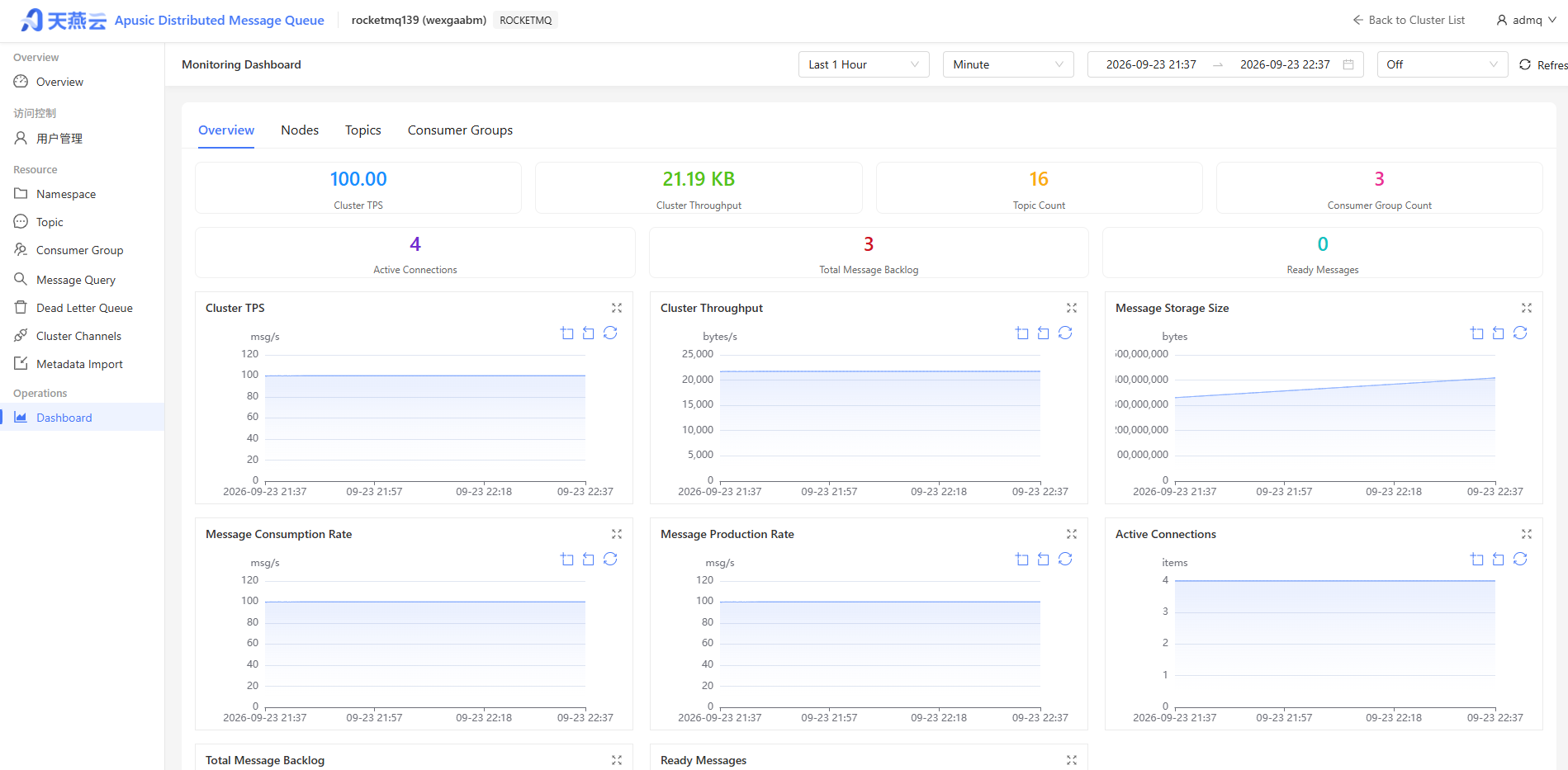
After enabling, the monitoring metrics are first displayed at http://ip:5557/metrics within the cluster;
Then the corresponding cluster information is collected via the Console's Prometheus component.
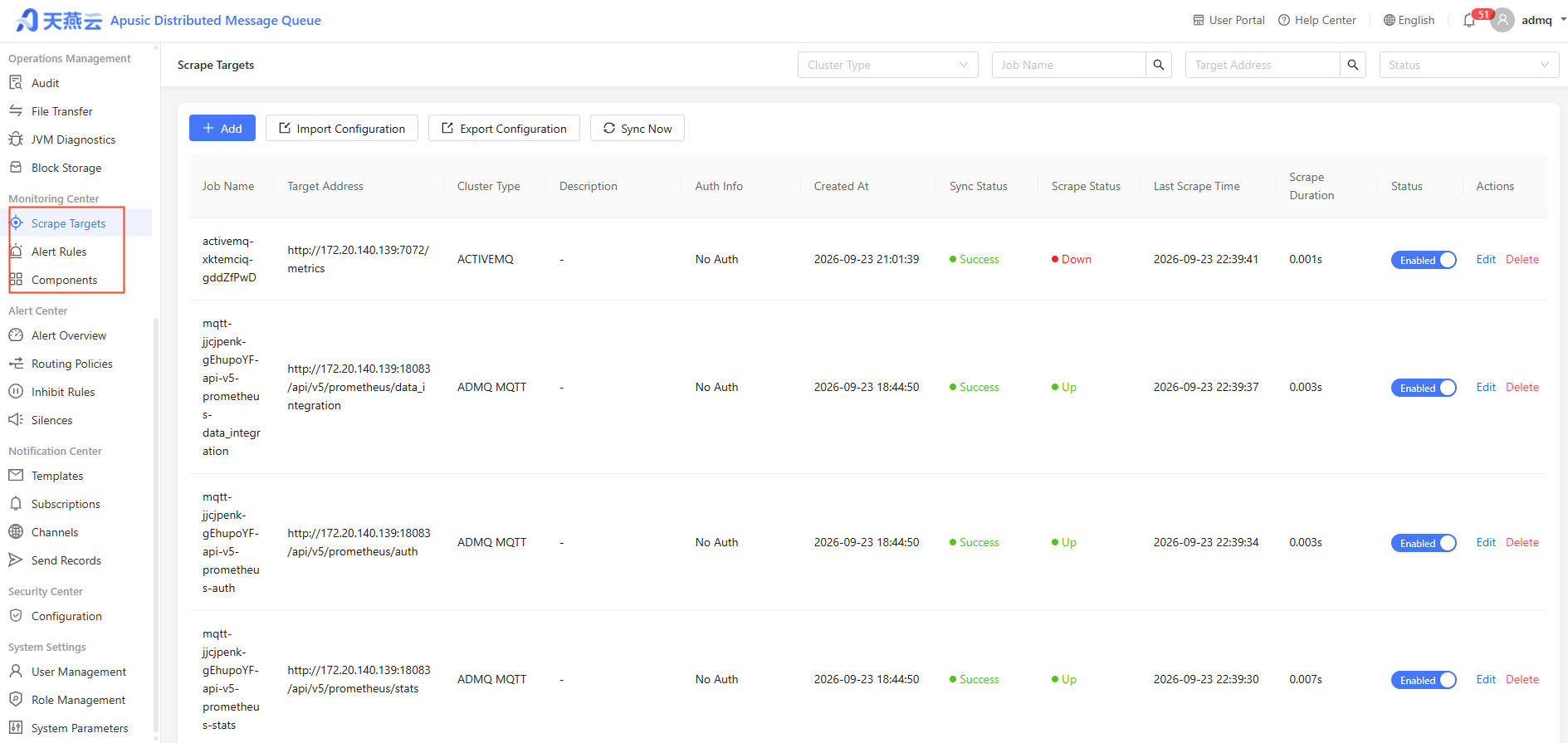
The corresponding monitoring information is presented on the monitoring dashboard (the monitoring dashboard mainly displays information in four dimensions: cluster, node, topic, and subscription group).
# Upgrade Maintenance
# Version Upgrade
# Pre-Upgrade Preparation
- Back up configuration files and data
- Review the version release notes
- Verify the upgrade process in a test environment
# Upgrade Steps
# 1. Stop Broker
bin/rocketmq stop broker

# 2. Back up data
cp -r store backup/store-$(date +%Y%m%d)

# 3. Upgrade software package
# Download the new version installation package and extract it
tar zxvf  ADMQ-V2.0.6.534-RocketMQ-20260625.tar.gz -C /apusic/
unzip rocketmq-V5.3.4-all.zip
mv rocketmq-V5.3.4-all nameserver
cd /apusic/nameserver

unzip rocketmq-V5.3.4-all.zip
mv rocketmq-V5.3.4-all broker
cd /apusic/broker

# 4. Migrate configuration or dependency packages
cp conf/namesrv.properties /apusic/nameserver/conf/
cp conf/broker.conf /apusic/broker/conf/

# 5. Start services
cd /apusic/nameserver
bin/rocketmq start nameserver
cd /apusic/broker
bin/rocketmq start broker

# 6. Verify upgrade
bin/mqadmin brokerStatus -n localhost:9876 -b broker-a:10911
2
3
4
5
6
7
8
9
10
11
12
13
14
15
16
17
18
19
20
21
22
23
24
25
26
27
28
29
# Cluster Rolling Upgrade
- Upgrade one Broker node at a time
- Confirm the node is back to normal before upgrading the next
- Ensure the cluster always has an available Broker