
Installation Manual

# Preface
This document is the installation manual for Kingdee Apusic Distributed Message Queue for RocketMQ (Apusic Distributed Message Queue for RocketMQ, abbreviation: ADMQ for RocketMQ). It provides guidance on the installation and deployment process for various deployment modes (including standalone, dual-master, multi-master multi-slave) across different operating systems and container environments, along with related configuration instructions.
# Intended Audience
This document is intended for IT information business leaders, R&D managers, software project managers, software architects, and operations engineers.
# Related Documents
For more information about ADMQ for RocketMQ products, please refer to the following ADMQ for RocketMQ product documentation set:
| No. | Document | Description |
|---|---|---|
| 1 | Kingdee Apusic Distributed Message Queue for RocketMQ Quick Start Manual | A brief introduction on how to quickly get started with ADMQ for RocketMQ. |
| 2 | Kingdee Apusic Distributed Message Queue for RocketMQ Installation Manual | Detailed instructions on installing ADMQ for RocketMQ on various operating systems, as well as starting and stopping ADMQ for RocketMQ services. |
| 3 | Kingdee Apusic Distributed Message Queue for RocketMQ Message Engine User Manual | Detailed description of the usage, configuration, management, and supporting tools of the ADMQ for RocketMQ message engine. |
| 4 | Kingdee Apusic Distributed Message Queue for RocketMQ Console User Manual | Detailed description of the usage and operation instructions for the ADMQ for RocketMQ console. |
| 5 | Kingdee Apusic Distributed Message Queue for RocketMQ Development Manual | Detailed instructions for developing ADMQ for RocketMQ client applications in various programming languages. |
| 6 | Kingdee Apusic Distributed Message Queue for RocketMQ Migration Manual | Detailed instructions on migrating from RocketMQ to ADMQ for RocketMQ. |
| 7 | Kingdee Apusic Distributed Message Queue for RocketMQ Operations Manual | Detailed description of ADMQ for RocketMQ monitoring, operations, security hardening, and other O&M instructions. |
| 8 | Kingdee Apusic Distributed Message Queue for RocketMQ Performance Optimization Manual | Detailed description of ADMQ for RocketMQ performance tuning. |
# Technical Support
ADMQ for RocketMQ provides comprehensive technical support services. You can obtain technical support through the following channels:
- Website: www.apusic.com
- Phone: 400-855-5800
- Email: support@apusic.com
- Kingdee Cloud Community: https://vip.kingdee.com/?productId=73&productLineId=14&lang=zh-CN
When contacting technical support, please provide the following information:
Your name
Company information and contact details
Operating system and its version
Product version number
Detailed information such as logs and screenshots of anomalies and errors
ADMQ for Kafka supports deployment via the console. Please refer to the [Quick Start] section in the "Kingdee Apusic Distributed Message Queue V2.0.6_Unified Console User Manual.pdf".
# Deployment Architecture
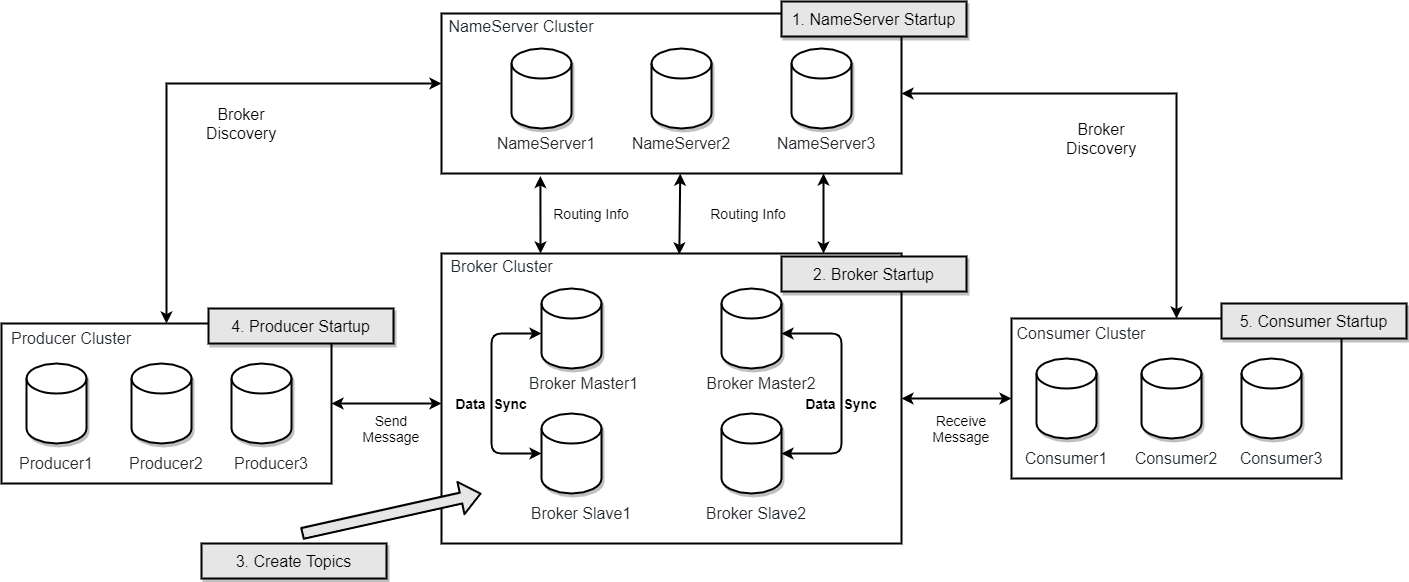
# ADMQ for RocketMQ Network Deployment Characteristics
NameServer is an almost stateless node that can be deployed in a cluster, with no information synchronization between nodes.
Broker deployment is relatively complex. Brokers are divided into Master and Slave. One Master can correspond to multiple Slaves, but one Slave can only correspond to one Master. The Master-Slave relationship is defined by specifying the same BrokerName with different BrokerId. A BrokerId of 0 indicates a Master, and non-zero indicates a Slave. Multiple Masters can also be deployed. Each Broker establishes persistent connections with all nodes in the NameServer cluster and periodically registers Topic information to all NameServers. Note: The current RocketMQ version supports one Master with multiple Slaves in its deployment architecture, but only the slave server with BrokerId=1 participates in message read load balancing.
Producer establishes persistent connections with one of the nodes (randomly selected) in the NameServer cluster, periodically obtains Topic routing information from NameServer, establishes persistent connections with the Master providing the Topic service, and periodically sends heartbeats to the Master. Producer is completely stateless and can be deployed in clusters.
Consumer establishes persistent connections with one of the nodes (randomly selected) in the NameServer cluster, periodically obtains Topic routing information from NameServer, establishes persistent connections with the Master and Slave providing the Topic service, and periodically sends heartbeats to the Master and Slave. Consumers can subscribe to messages from both Master and Slave. When a consumer pulls messages from the Master, the Master server determines whether the next pull should be from the Master or Slave based on factors such as the distance between the pull offset and the maximum offset (determining whether to read old messages, resulting in read I/O), and whether the slave server is readable.
Based on the deployment architecture diagram, the cluster workflow is described as follows:
- Start NameServer. After NameServer is started, it listens on a port and waits for Broker, Producer, and Consumer to connect, acting as a routing control center.
- Broker starts, maintains persistent connections with all NameServers, and periodically sends heartbeat packets. The heartbeat packets contain current Broker information (IP+port, etc.) and all stored Topic information. After successful registration, the mapping relationship between Topics and Brokers exists in the NameServer cluster.
- Before sending and receiving messages, first create a Topic. When creating a Topic, you need to specify which Brokers the Topic should be stored on. You can also automatically create a Topic when sending messages.
- Producer sends messages. When starting, it first establishes a persistent connection with one of the NameServer cluster nodes, obtains from NameServer which Brokers the current Topic to send exists on, polls to select a queue from the queue list, then establishes a persistent connection with the Broker where the queue is located to send messages to the Broker.
- Consumer, similar to Producer, establishes a persistent connection with one NameServer, obtains which Brokers the currently subscribed Topic exists on, then directly establishes a connection channel with the Broker to start consuming messages.
# Environment Preparation
# System Requirements
Before starting deployment, ensure your environment meets the following requirements:
- Operating System: 64-bit Linux (recommended CentOS 7+, Ubuntu 18.04+, domestic Kylin v10+, OpenEuler 22.03+)
- Java Version: JDK 8 and above
- Hardware Configuration:
- Minimum production environment requires 7 servers (or virtual machines)
- 3 for running Name Server
- 4 for running Broker (2 Master and 2 Slave)
- Test environment can run all components on a single server
- Minimum production environment requires 7 servers (or virtual machines)
- Network: All nodes can communicate with each other with a stable network connection
- DNS: Optional, configure a common DNS name for all Broker nodes
# Hardware Recommendations
The following table provides hardware recommendations for different cluster sizes (per node):
| Component | Small Cluster (250 Topics) | Medium Cluster (1000 Topics) |
|---|---|---|
| Name Server | • CPU: 4 cores • Memory: 16GB • Disk: 200GB SSD | • CPU: 8 cores • Memory: 32GB • Disk: 500GB SSD |
| Broker | • CPU: 8 cores • Memory: 32GB • Disk: 500GB SSD | • CPU: 16 cores • Memory: 64GB • Disk: 1TB SSD |
Hardware Selection Recommendations
- Name Server is only used for metadata storage and can use relatively smaller servers
- Broker computation requires fast CPU and network; a 10Gbps network interface is recommended for networking; storage requires fast storage devices; SSDs or RAID controllers with battery-backed cache are recommended
# Dependency Software
| Software | Version Requirement | Description |
|---|---|---|
| JDK | 1.8+ | Broker and NameServer runtime dependency |
| Java | 17+ | Console runtime dependency |
# Network Requirements
| Port | Purpose | Description |
|---|---|---|
| 9876 | NameServer | Service registration and discovery |
| 10911 | Broker | Producer and consumer connections |
| 10909 | Broker VIP | VIP channel |
| 10912 | Broker HA | Master-Slave replication port |
| 12305 | Console HTTP | Console web interface (HTTP) |
| 12306 | Console HTTPS | Console web interface (HTTPS) |
# Standalone Deployment
# Install JDK
# CentOS/RHEL
sudo yum install -y java-1.8.0-openjdk

# Ubuntu/Debian
sudo apt-get update
sudo apt-get install -y openjdk-8-jdk
2
3
4
5
6
# Install ADMQ for RocketMQ
mkdir -p /apusic
cd /apusic
# Extract installation package
#tar zxvf ADMQ-V2.0.6-RocketMQ-<build-date>.tar.gz -C /apusic/
tar zxvf ADMQ-V2.0.6.534-RocketMQ-20260625.tar.gz -C /apusic/
cd /apusic
# It is recommended to separate the nameserver and broker component folder structures
unzip rocketmq-V5.3.4-all.zip
mv rocketmq-V5.3.4-all nameserver
cd /apusic/nameserver

unzip rocketmq-V5.3.4-all.zip
mv rocketmq-V5.3.4-all broker
cd /apusic/broker

# Configure environment variables, change to the corresponding machine address
export NAMESRV_ADDR=localhost:9876

# Configure authorization certificate, place the corresponding authorization certificate in the root directory of the respective component. Assume the license.xml file (file name must be unified as license.xml) is placed under /opt
cp /apusic/license.xml /apusic/nameserver
cp /apusic/license.xml /apusic/broker
2
3
4
5
6
7
8
9
10
11
12
13
14
15
16
17
18
19
20
21
# Start NameServer
# Start NameServer
bin/rocketmq start nameserver

# Verify status
tail -f logs/namesrv.log
2
3
4
5
# Start Broker
# Configure Broker, some parameters are default, can be modified as needed, such as cluster brokerId, set according to the number of nodes
vi conf/broker.conf
2
# broker.conf
brokerClusterName=DefaultCluster
# (The brokerName of cluster nodes needs to be distinguished)
brokerName=broker-a
brokerId=0
brokerRole=ASYNC_MASTER
flushDiskType=ASYNC_FLUSH
# (For cluster deployment, fill in the port ip of all cluster nodes)
namesrvAddr=localhost:9876
# Enable Prometheus
enableMultiDispatch=true
enablemq=true
metricsPromExporterHost=0.0.0.0
metricsExporterType=PROM
2
3
4
5
6
7
8
9
10
11
12
13
14
# Start Broker
bin/rocketmq start broker

# Verify status
tail -f logs/broker.log
2
3
4
5
# Verify Installation
# View cluster status
bin/mqadmin clusterList -n localhost:9876

# View Topic list
bin/mqadmin topicList -n localhost:9876
2
3
4
5
# Standalone Deployment (Single Master Deployment)
This approach carries high risk. Once the Broker restarts or goes down, the entire service becomes unavailable. It is not recommended for production environments and can be used for local testing.
+-------------+
| NameServer1 |
+-------------+
       |
+-------------+
|  Broker-a   |
|   Master    |
+-------------+
2
3
4
5
6
7
8
# NameServer Deployment
Start NameServer on node1:
# node1
nohup bin/rocketmq start nameserver
2
# Broker Deployment
Broker-a (node1)
# conf/broker-a.properties
brokerClusterName=AdmqCluster
brokerName=broker-a
brokerId=0
brokerRole=SYNC_MASTER
flushDiskType=ASYNC_FLUSH
namesrvAddr=node1:9876
# Enable Prometheus
enableMultiDispatch=true
enablemq=true
metricsPromExporterHost=0.0.0.0
metricsExporterType=PROM
2
3
4
5
6
7
8
9
10
11
12
# node1
bin/rocketmq start broker
2
# Dual Master Deployment
# Deployment Architecture Diagram
+-------------+       +-------------+
| NameServer1 |       | NameServer2 |
+-------------+       +-------------+
       |                       |
+-------------+       +-------------+
|  Broker-a   |       |  Broker-b   |
|   Master    |       |   Master    |
+-------------+       +-------------+
2
3
4
5
6
7
8
# NameServer Deployment
Start NameServer on node1 and node2 respectively:
# node1
bin/rocketmq start nameserver

# node2
bin/rocketmq start nameserver
2
3
4
5
# Broker Deployment
Broker-a (node1)
# conf/broker-a.properties
brokerClusterName=AdmqCluster
# (The brokerName of cluster nodes needs to be distinguished)
brokerName=broker-a
brokerId=0
brokerRole=ASYNC_MASTER
flushDiskType=ASYNC_FLUSH
# (For cluster deployment, fill in the port ip of all cluster nodes)
namesrvAddr=node1:9876;node2:9876
# Enable Prometheus
enableMultiDispatch=true
enablemq=true
metricsPromExporterHost=0.0.0.0
metricsExporterType=PROM
2
3
4
5
6
7
8
9
10
11
12
13
14
Broker-b (node2)
# conf/broker-b.properties
brokerClusterName=AdmqCluster
# (The brokerName of cluster nodes needs to be distinguished)
brokerName=broker-b
brokerId=0
brokerRole=ASYNC_MASTER
flushDiskType=ASYNC_FLUSH
# (For cluster deployment, fill in the port ip of all cluster nodes)
namesrvAddr=node1:9876;node2:9876
# Enable Prometheus
enableMultiDispatch=true
enablemq=true
metricsPromExporterHost=0.0.0.0
metricsExporterType=PROM
2
3
4
5
6
7
8
9
10
11
12
13
14
# node1
bin/rocketmq start broker

# node2
bin/rocketmq start broker
2
3
4
5
# Multi-Master Multi-Slave Deployment
# Deployment Architecture Diagram
+------------------+       +------------------+
|   NameServer1    |       |   NameServer2    |
+------------------+       +------------------+
         |                         |
+------------------+       +------------------+
|  Broker-a-Master |       |  Broker-b-Master |
+------------------+       +------------------+
         |                         |
+------------------+       +------------------+
|  Broker-a-Slave  |       |  Broker-b-Slave  |
+------------------+       +------------------+
2
3
4
5
6
7
8
9
10
11
# NameServer Deployment
First start the corresponding nameserver component
./bin/rocketmq start nameserver
# Broker Configuration
Broker-a-Master (node1)
brokerClusterName=AdmqCluster
# (The brokerName of the cluster master node needs to be distinguished)
brokerName=broker-a
brokerId=0
brokerRole=ASYNC_MASTER
flushDiskType=ASYNC_FLUSH
# (For cluster deployment, fill in the port ip of all cluster nodes)
namesrvAddr=node1:9876;node2:9876
# Enable Prometheus
enableMultiDispatch=true
enablemq=true
metricsPromExporterHost=0.0.0.0
metricsExporterType=PROM
2
3
4
5
6
7
8
9
10
11
12
13
Broker-a-Slave (node3)
brokerClusterName=AdmqCluster
brokerName=broker-a
# (Slave node id, since master and slave have the same name, they are in the same group)
brokerId=1
brokerRole=SLAVE
flushDiskType=SYNC_FLUSH
# (For cluster deployment, fill in the port ip of all cluster nodes)
namesrvAddr=node1:9876;node2:9876
# Enable Prometheus
enableMultiDispatch=true
enablemq=true
metricsPromExporterHost=0.0.0.0
metricsExporterType=PROM
2
3
4
5
6
7
8
9
10
11
12
13
Broker-b-Master (node2)
brokerClusterName=AdmqCluster
# (The brokerName of the cluster master node needs to be distinguished)
brokerName=broker-b
brokerId=0
brokerRole=SYNC_MASTER
flushDiskType=SYNC_FLUSH
# (For cluster deployment, fill in the port ip of all cluster nodes)
namesrvAddr=node1:9876;node2:9876
# Enable Prometheus
enableMultiDispatch=true
enablemq=true
metricsPromExporterHost=0.0.0.0
metricsExporterType=PROM
2
3
4
5
6
7
8
9
10
11
12
13
Broker-b-Slave (node4)
brokerClusterName=AdmqCluster
brokerName=broker-b
# (Slave node id, since master and slave have the same name, they are in the same group)
brokerId=1
brokerRole=SLAVE
flushDiskType=SYNC_FLUSH
# (For cluster deployment, fill in the port ip of all cluster nodes)
namesrvAddr=node1:9876;node2:9876
# Enable Prometheus
enableMultiDispatch=true
enablemq=true
metricsPromExporterHost=0.0.0.0
metricsExporterType=PROM
2
3
4
5
6
7
8
9
10
11
12
13
Start via command
./bin/rocketmq start broker
# Console Deployment
# Install Console
# Extract console installation package
tar zxvf admq-manager-V2.0.6.tar.gz -C /apusic/
cd /apusic/admq-manager-V2.0.6

# Configure NameServer address
vi config/application.properties
2
3
4
5
6
# application.properties
server.port=12306
2
# Start console
bin/admq-service start

# Verify status
bin/admq-service status
2
3
4
5
# Access Console
Address: http://<Console IP>:12305(https://<Console IP>:12306)
Default account: admq / 11111111
2
# Initialize Cluster
You can quickly deploy a cluster directly through the console; for already deployed clusters, you can manage them by connecting through the console
# Common Issues and Troubleshooting
# NameServer Startup Failure
| Possible Cause | Solution |
|---|---|
| Port conflict | Check if port 9876 is occupied |
| JDK not installed | Install JDK 1.8+ |
| Insufficient permissions | Ensure the admq-rocketmq directory has correct permissions |
# Broker Startup Failure
| Possible Cause | Solution |
|---|---|
| NameServer unreachable | Check namesrvAddr configuration and network connectivity |
| Port conflict | Check if port 10911 is occupied |
| Insufficient disk space | Check disk space to ensure minimum requirements are met |
| Configuration error | Check if broker.conf configuration is correct |
# Console Inaccessible
| Possible Cause | Solution |
|---|---|
| NameServer unreachable | Check network connectivity from console to NameServer |
| Port conflict | Modify server.port in config/application.properties |
| Firewall blocking | Open ports 12305/12306 |
# Message Send Failure
| Possible Cause | Solution |
|---|---|
| Topic not created | Use mqadmin to create Topic |
| Broker unreachable | Check Broker status and network connectivity |
| Insufficient permissions | Check ACL configuration |
| Disk full | Clean up disk space or adjust message retention policy |