
Migration Manual

# Preface
This document is the migration guide for Kingdee Apusic Distributed Message Queue for RocketMQ (Apusic Distributed Message Queue for RocketMQ, referred to as: ADMQ for RocketMQ), detailing how to migrate from RocketMQ to ADMQ for RocketMQ.
# Target Audience
This document is intended for IT information business leaders, R&D managers, software project managers, software architects, and operations engineers.
# Related Documents
For more information about ADMQ for RocketMQ products, please refer to the following ADMQ for RocketMQ product documentation set:
| No. | Document | Description |
|---|---|---|
| 1 | Kingdee Apusic Distributed Message Queue for RocketMQ Quick Start Guide | Briefly introduces how to quickly get started with ADMQ for RocketMQ. |
| 2 | Kingdee Apusic Distributed Message Queue for RocketMQ Installation Guide | Details how to install ADMQ for RocketMQ on various operating systems, as well as ADMQ for RocketMQ service start/stop operations. |
| 3 | Kingdee Apusic Distributed Message Queue for RocketMQ Message Engine User Guide | Details the usage, configuration, management, and supporting tools of ADMQ for RocketMQ message engine related features. |
| 4 | Kingdee Apusic Distributed Message Queue for RocketMQ Console User Guide | Details the usage and operation instructions of the ADMQ for RocketMQ console. |
| 5 | Kingdee Apusic Distributed Message Queue for RocketMQ Development Guide | Details the instructions for developing ADMQ for RocketMQ client applications in various development languages. |
| 6 | Kingdee Apusic Distributed Message Queue for RocketMQ Migration Guide | Details the instructions for migrating from RocketMQ to ADMQ for RocketMQ. |
| 7 | Kingdee Apusic Distributed Message Queue for RocketMQ Operations Guide | Details ADMQ for RocketMQ monitoring, operations, security hardening and other operations instructions. |
| 8 | Kingdee Apusic Distributed Message Queue for RocketMQ Performance Optimization Guide | Details the instructions for ADMQ for RocketMQ performance tuning. |
# Technical Support
ADMQ for RocketMQ provides comprehensive technical support services. You can obtain technical support through the following methods:
- Website: www.apusic.com
- Phone: 400-855-5800
- Email: support@apusic.com
- Kingdee Cloud Community: https://vip.kingdee.com/?productId=73&productLineId=14&lang=zh-CN
When contacting technical support, please provide the following information:
Your name
Company information and contact details
Operating system and its version
Product version number
Detailed information such as logs, screenshots of exceptions and errors
# Process Diagram
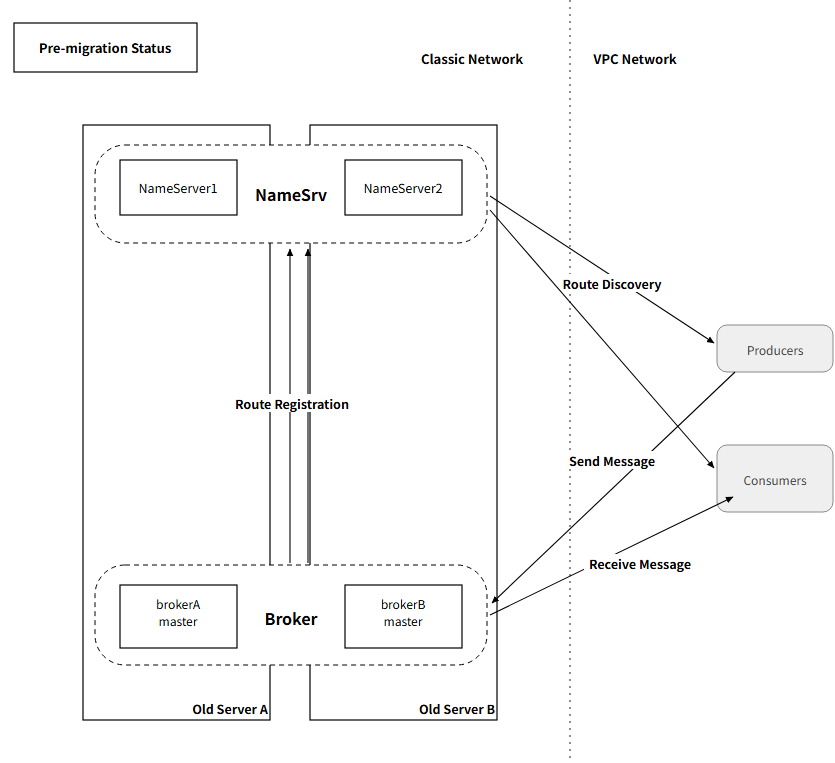
Pre-migration Status
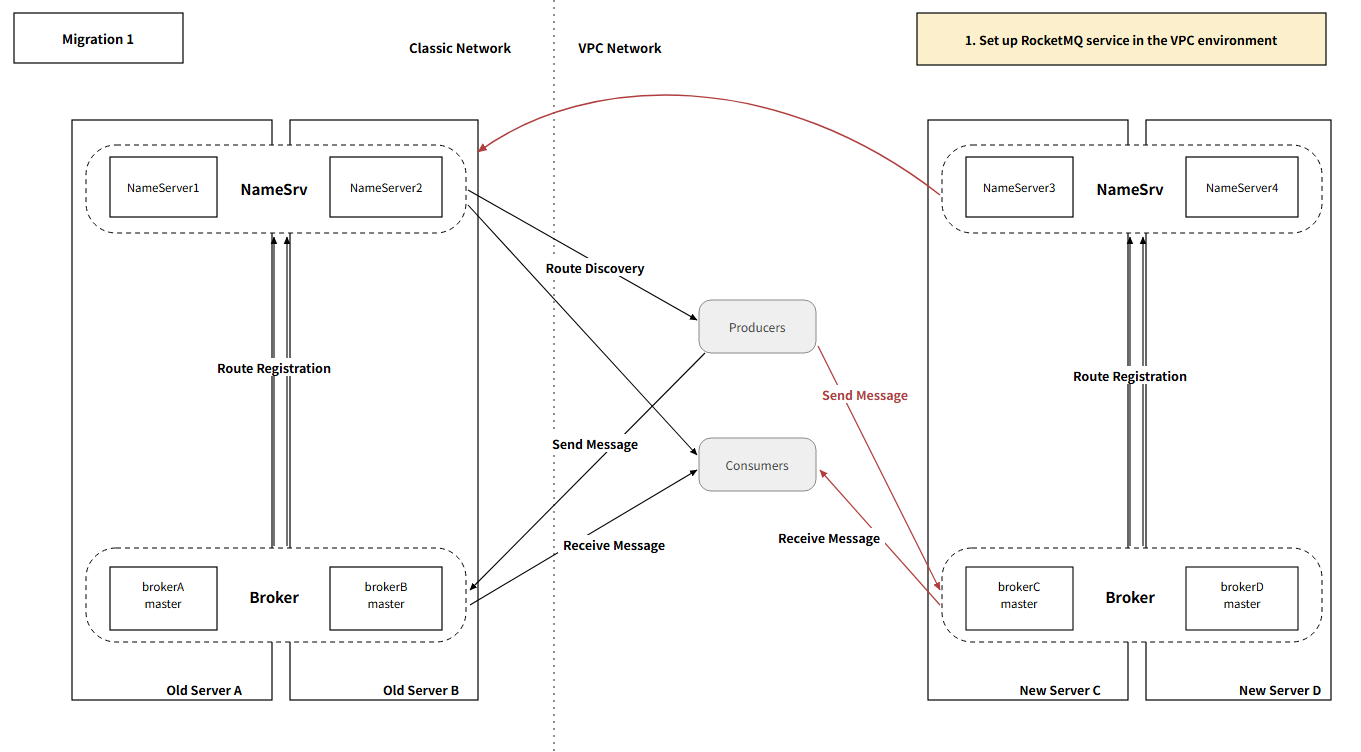
Set up New RocketMQ Service
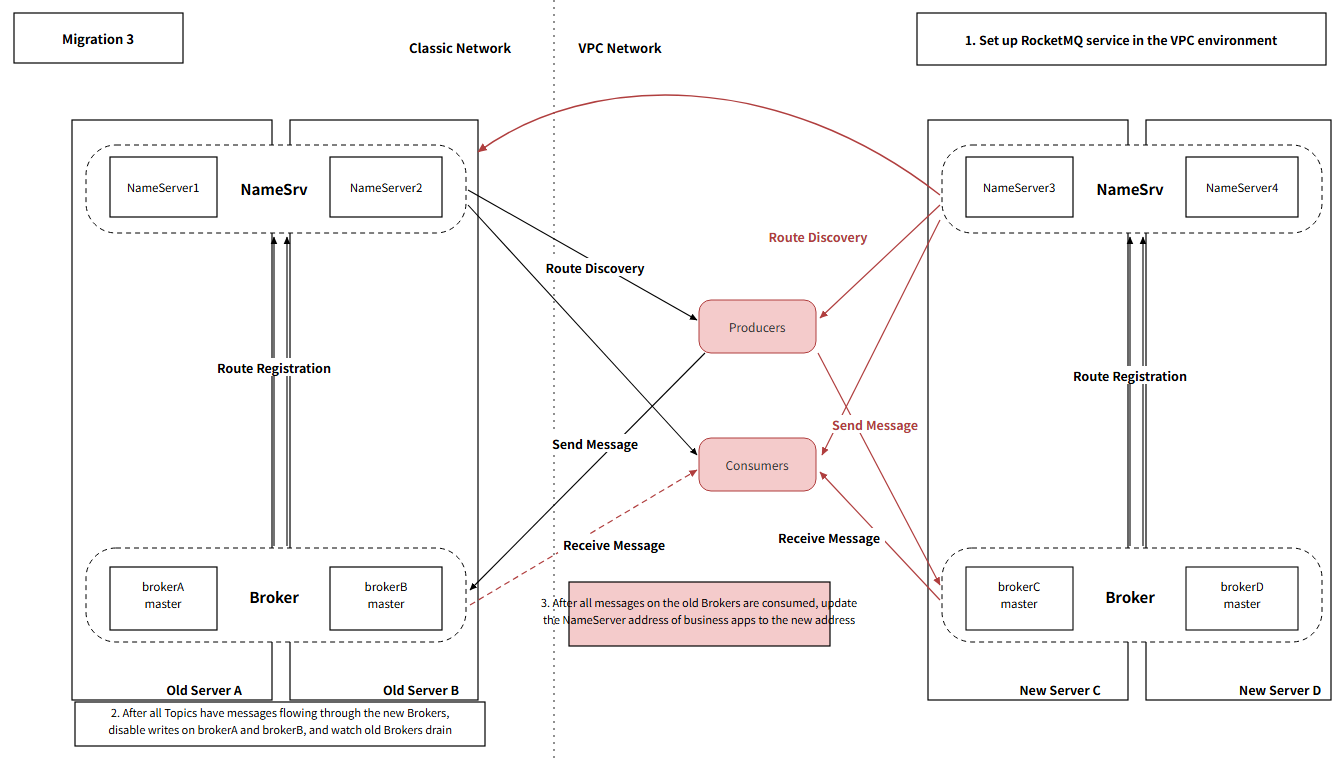
Disable Write Permissions on Old Broker
Switch to New NameSrv Address
Remove Old NameSrv Address from New Broker
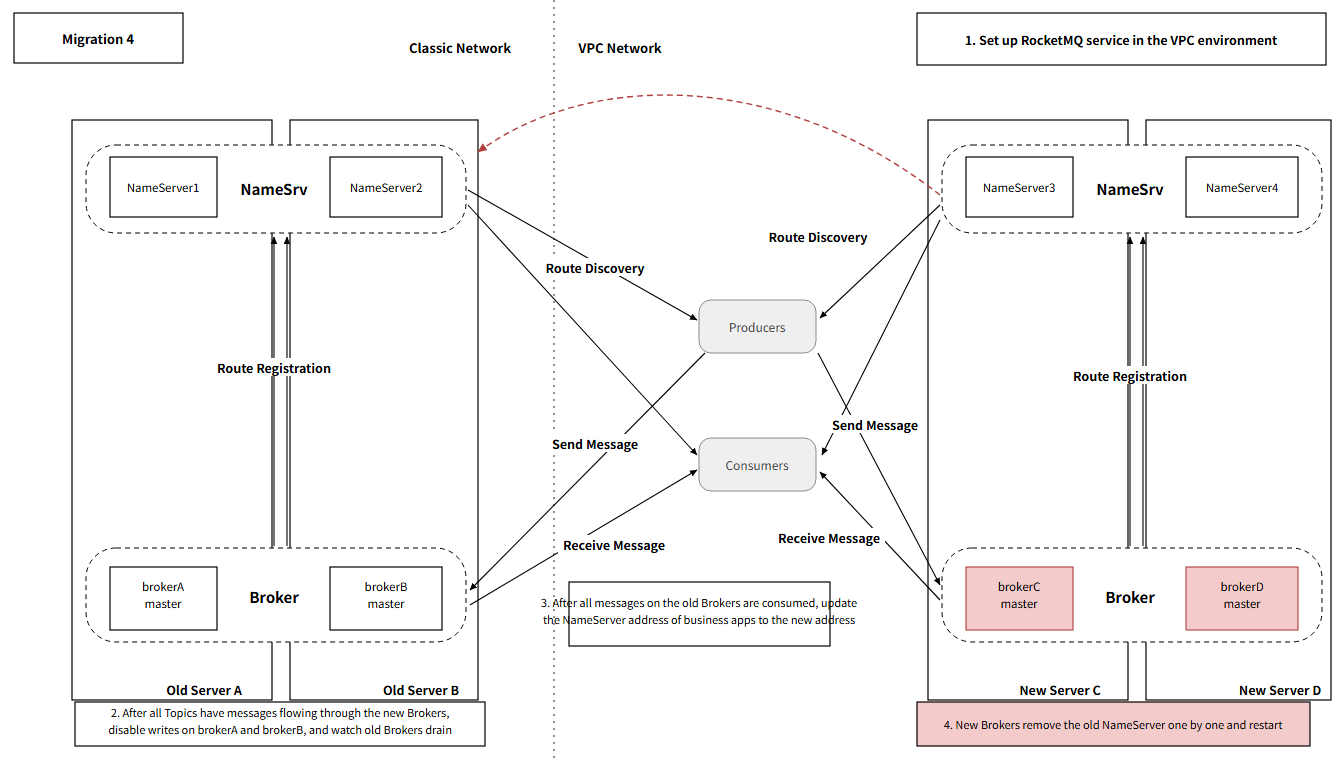
Post-migration Status
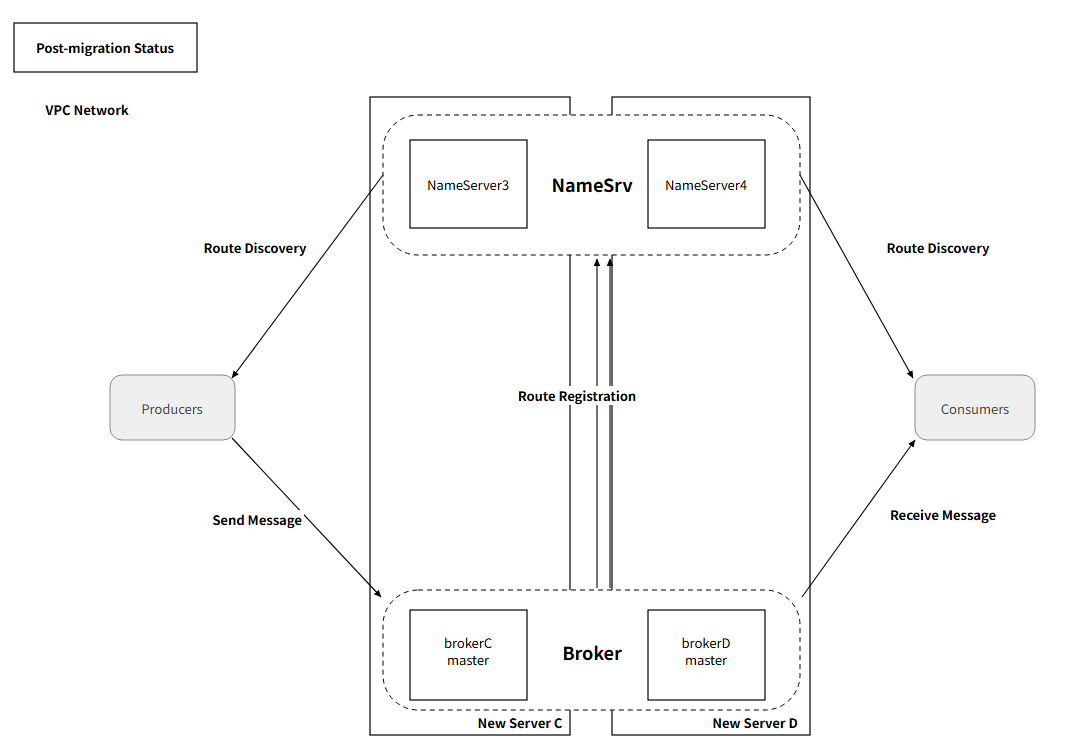
# Migration Overview
# Migration Principles
ADMQ for RocketMQ is fully compatible with RocketMQ's protocol and clients. The migration process follows these principles:
- Zero Code Modification: Clients require no code changes, only the NameServer address needs to be updated
- Configuration Compatibility: Supports RocketMQ native configuration parameters
- Data Migratable: Supports Topic configuration and message data migration
- Smooth Switchover: Supports dual-write and grayscale switchover to reduce migration risk
# Migration Scope
| Migration Content | Supported | Description |
|---|---|---|
| Application Code | Yes | No modification needed, only NameServer address needs to be changed |
| Client Configuration | Yes | Supports RocketMQ native clients |
| Topic Definition | Yes | Supports Topic creation and configuration migration |
| Consumer Group | Yes | Supports consumer group configuration migration |
| User Permissions | Yes | Supports ACL configuration migration |
| Message Data | Yes | Supports historical message migration |
| Consumer Offset | Yes | Supports consumption progress migration |
| Message Trace | Yes | Supports message trace configuration |
# Pre-migration Checks
# Version Compatibility Check
| Original RocketMQ Version | Compatibility | Description |
|---|---|---|
| 4.9.x | Fully Compatible | Recommended migration version |
| 5.0.x~5.3.x | Fully Compatible | Recommended migration version |
# Client Compatibility Check
| Client Type | Compatible Version | Description |
|---|---|---|
| Java | 4.9.x - 5.3.x | Fully Compatible |
| Go | 2.x | Fully Compatible |
| Python | 0.4.x | Fully Compatible |
| C/C++ | 2.x | Fully Compatible |
# Migration Plan
# Plan 1: Dual-Write Migration (Recommended)
Suitable for business scenarios that cannot tolerate downtime, ensuring data consistency through dual-write.
Steps:
Deploy ADMQ for RocketMQ Cluster
- Deploy the new cluster according to the installation guide
- Configure network and firewall
Configure Dual-Write
- Connect to both the original RocketMQ and ADMQ for RocketMQ in the application simultaneously
- Send messages to both clusters when sending
Sync Historical Data
- Use message回溯 (lookback) functionality to sync historical messages
- Verify data consistency
Switch Consumers
- First switch some consumers to ADMQ for RocketMQ
- Observe whether the business operates normally
Full Switchover
- After confirming no issues, switch all consumers
- Stop sending messages to the original RocketMQ
Decommission Original Cluster
- Retain for a period for data query purposes
- Decommission after confirming no issues
# Plan 2: Service-Stop Migration
Suitable for business scenarios that can tolerate brief downtime, with faster migration speed.
Steps:
Stop Producers
- Pause the business system from sending messages to RocketMQ
Export Configuration
- Use mqadmin to export Topic, consumer group, and other configurations
Migrate Configuration to ADMQ for RocketMQ
- Create corresponding resources in the console or command line
Migrate Message Data
- Use message query and sending tools to migrate messages
Switch NameServer Address
- Modify application configuration to point to ADMQ for RocketMQ
Start Producers
- Resume business system message sending
# Configuration Migration
# Export Original RocketMQ Configuration
# Use the export command to export corresponding configurations and metadata
./bin/mqadmin exportConfigs -n {nameserver address and port} -c {RocketMQ cluster name} -f {path to export metadata file}
./bin/mqadmin exportMetadata -n {nameserver address and port} -c {RocketMQ cluster name} -f {path to export metadata file}
2
3
# Create Configuration in ADMQ for RocketMQ
# Import Metadata Using the Console
- Log in to the console
- Go to the "Metadata Import" page
- Create a metadata import task to import the corresponding metadata
# Data Migration
# Migration Using Message Lookback
RocketMQ supports looking back to consume messages by time, which can be used for data migration.
// Consume historical messages from the original cluster and send to the new cluster
DefaultLitePullConsumer consumer = new DefaultLitePullConsumer("migrate-group");
consumer.setNamesrvAddr("old-rocketmq:9876");
consumer.subscribe("test-topic", "*");
consumer.setConsumeFromWhere(ConsumeFromWhere.CONSUME_FROM_FIRST_OFFSET);
consumer.start();

DefaultMQProducer producer = new DefaultMQProducer("migrate-group");
producer.setNamesrvAddr("admq-rocketmq:9876");
producer.start();

while (true) {
    List<MessageExt> msgs = consumer.poll();
    for (MessageExt msg : msgs) {
        Message newMsg = new Message(msg.getTopic(), msg.getTags(), msg.getKeys(), msg.getBody());
        producer.send(newMsg);
    }
}
2
3
4
5
6
7
8
9
10
11
12
13
14
15
16
17
18
# Export and Import Using mqadmin
# Export messages (by time range)
bin/mqadmin printMsg -n localhost:9876 -t test-topic -s "2026-01-01#00:00:00:000" -e "2026-01-02#00:00:00:000" > messages.txt

# Parse and send to the new cluster using a script
# You need to write your own script to parse the message content and send it
2
3
4
5
# Client Migration
# NameServer Address Change
Only the NameServer address in the application configuration file needs to be modified:
# Original configuration
rocketmq.namesrv.addr=old-rocketmq:9876

# New configuration
rocketmq.namesrv.addr=admq-rocketmq:9876
2
3
4
5
# Common Client Configurations
# Java (Spring Boot)
rocketmq:
  name-server: admq-rocketmq:9876
  producer:
    group: test-group
  consumer:
    group: test-group
2
3
4
5
6
# Go
producer, err := golang.NewProducer(
    golang.WithEndpoints("admq-rocketmq:9876"),
    golang.WithConsumerGroup("test-group"),
)
2
3
4
# Migration Verification
# Functional Verification
| Verification Item | Verification Method |
|---|---|
| Connection Test | Use a client to connect to ADMQ for RocketMQ, confirm that the connection can be established normally |
| Message Sending | Send a test message, confirm it successfully reaches the Broker |
| Message Consumption | Start a consumer, confirm it can normally receive and process messages |
| Ordered Messages | Send ordered messages, confirm the consumption order is correct |
| Delayed Messages | Send delayed messages, confirm timely delivery |
| Transactional Messages | Send transactional messages, confirm transaction consistency |
# Performance Verification
| Verification Item | Verification Method |
|---|---|
| Throughput | Compare the message sending rate of the original cluster and the new cluster |
| Latency | Measure the latency from message sending to consumption |
| Concurrency | Test multi-producer, multi-consumer concurrent scenarios |
| Stability | Run long-duration tests, observe for any anomalies |
# Data Consistency Verification
# Compare the number of Topic messages between the original cluster and the new cluster
bin/mqadmin topicStatus -n old-rocketmq:9876 -t test-topic
bin/mqadmin topicStatus -n admq-rocketmq:9876 -t test-topic

# Compare consumer progress
bin/mqadmin consumerProgress -n old-rocketmq:9876 -g test-group
bin/mqadmin consumerProgress -n admq-rocketmq:9876 -g test-group
2
3
4
5
6
7
# Rollback Plan
If problems occur during migration, rollback to the original RocketMQ cluster:
- Stop sending messages to ADMQ for RocketMQ
- Switch the NameServer address back to the original RocketMQ
- Sync new messages from ADMQ for RocketMQ back to the original cluster (if needed)
- Restore the business system