
Installation Manual

# Preface
This document is the installation guide for Kingdee Apusic Distributed Message Queue for RabbitMQ (Apusic Distributed Message Queue, referred to as ADMQ for RabbitMQ). It provides guidance on the installation and deployment process for various deployment modes (including standalone and cluster) across different operating systems and container environments, along with relevant configuration instructions.
# Target Audience
This document is intended for IT business leaders, R&D managers, software project managers, software architects, and operations engineers.
# Related Documentation
To learn more about ADMQ for RabbitMQ, please refer to the following ADMQ for RabbitMQ product documentation set:
| No. | Document | Description |
|---|---|---|
| 1 | Kingdee Apusic Distributed Message Queue for RabbitMQ Quick Start Guide | A brief introduction on how to quickly get started with ADMQ for RabbitMQ. |
| 2 | Kingdee Apusic Distributed Message Queue for RabbitMQ Installation Guide | Detailed instructions on installing ADMQ for RabbitMQ on various operating systems, as well as operations such as starting and stopping ADMQ for RabbitMQ services. |
| 3 | Kingdee Apusic Distributed Message Queue for RabbitMQ Message Engine User Guide | Detailed instructions on using, configuring, and managing ADMQ for RabbitMQ message engine features, along with supporting tools. |
| 4 | Kingdee Apusic Distributed Message Queue for RabbitMQ Console User Guide | Detailed instructions on using and operating the ADMQ for RabbitMQ console features. |
| 5 | Kingdee Apusic Distributed Message Queue for RabbitMQ Developer Guide | Detailed instructions on developing ADMQ for RabbitMQ client applications in various programming languages. |
| 6 | Kingdee Apusic Distributed Message Queue for RabbitMQ Migration Guide | Detailed instructions on migrating from RabbitMQ to ADMQ for RabbitMQ. |
| 7 | Kingdee Apusic Distributed Message Queue for RabbitMQ Operations Guide | Detailed instructions on monitoring, operations, and security hardening of ADMQ for RabbitMQ. |
| 8 | Kingdee Apusic Distributed Message Queue for RabbitMQ Performance Optimization Guide | Detailed instructions on performance tuning for ADMQ for RabbitMQ. |
# Technical Support
ADMQ for RabbitMQ provides comprehensive technical support services. You can obtain technical support through the following channels:
- Website: www.apusic.com
- Phone: 400-855-5800
- Email: support@apusic.com
- Kingdee Cloud Community: https://vip.kingdee.com/?productId=73&productLineId=14&lang=zh-CN
When contacting technical support, please provide the following information:
Your name
Company information and contact details
Operating system and version
Product version number
Detailed information such as error logs, screenshots, etc.
ADMQ for Kafka supports deployment via the console. Please refer to the [Quick Start] section in the "Kingdee Apusic Distributed Message Queue V2.0.6 Unified Console User Guide.pdf".
# Deployment Architecture
# Overall Architecture
ADMQ for RabbitMQ adopts a modular design, with the overall architecture consisting of the following core components:
┌─────────────────────────────────────────────────────────────┐
│                        客户端层                               │
│  ┌─────────────┐  ┌─────────────┐  ┌─────────────────────┐  │
│  │ 生产者应用   │  │ 消费者应用   │  │ 管控台/Web管理       │  │
│  └─────────────┘  └─────────────┘  └─────────────────────┘  │
└────────────────────────┬────────────────────────────────────┘
                         │ AMQP/MQTT/STOMP
┌────────────────────────▼────────────────────────────────────┐
│                     消息引擎层                                │
│  ┌───────────────────────────────────────────────────────┐  │
│  │              ADMQ for RabbitMQ 节点                    │  │
│  │  ┌─────────────┐  ┌─────────────┐  ┌──────────────┐  │  │
│  │  │  连接层      │  │  交换机      │  │   队列        │  │  │
│  │  │ Connection  │  │  Exchange   │  │   Queue      │  │  │
│  │  └─────────────┘  └─────────────┘  └──────────────┘  │  │
│  │                                                        │  │
│  │  ┌─────────────┐  ┌─────────────┐  ┌──────────────┐  │  │
│  │  │   路由层     │  │  镜像队列    │  │  持久化存储   │  │  │
│  │  │   Router    │  │Mirror Queue │  │  Mnesia/ETS  │  │  │
│  │  └─────────────┘  └─────────────┘  └──────────────┘  │  │
│  └───────────────────────────────────────────────────────┘  │
└─────────────────────────────────────────────────────────────┘
                         │
┌────────────────────────▼────────────────────────────────────┐
│                      集群通信层                               │
│  ┌───────────────────────────────────────────────────────┐  │
│  │              Erlang Distribution 网络                  │  │
│  │            (节点间元数据同步与心跳检测)                  │  │
│  └───────────────────────────────────────────────────────┘  │
└─────────────────────────────────────────────────────────────┘
2
3
4
5
6
7
8
9
10
11
12
13
14
15
16
17
18
19
20
21
22
23
24
25
26
27
28
29
30
# Component Description
| Component | Description | Function |
|---|---|---|
| Connection Layer | Connection | Handles client connections, protocol parsing, and security authentication |
| Exchange | Exchange | Receives messages and routes them to queues based on routing rules |
| Queue | Queue | Stores messages, supports standard queues and Quorum Queues |
| Mirror Queue | Mirror Queue | Synchronizes queue data across multiple nodes in cluster mode |
| Persistent Storage | Mnesia/ETS | Stores metadata, configuration information, and persistent messages |
| Cluster Communication | Erlang Distribution | Inter-node communication, synchronizes metadata and cluster state |
# Deployment Mode
ADMQ for RabbitMQ supports the following deployment modes:
| Deployment Mode | Nodes | Use Case | High Availability |
|---|---|---|---|
| Standalone | 1 node | Development/testing, low throughput scenarios | None |
| Standard Cluster | 2+ nodes | Production environment, horizontal scaling needed | Metadata HA |
| Mirror Queue Cluster | 3+ nodes | Production environment, message data HA needed | Metadata + Data HA |
# Architecture Features
- Distributed Design: Supports multi-node cluster deployment with automatic metadata synchronization
- High Availability: Supports mirror queues to ensure message data is not lost during node failures
- Elastic Scaling: Nodes can be dynamically added to expand cluster processing capacity
- Multi-Protocol Support: Natively supports AMQP 0-9-1 protocol
- Separation of Control and Data: Message engine and console can be deployed independently
# Environment Preparation
# System Requirements
| Component | Minimum Requirement | Recommended Configuration |
|---|---|---|
| CPU | 4 cores | 8 cores or more |
| Memory | 8 GB | 16 GB or more |
| Disk | 100 GB SSD | 500 GB or more SSD |
| Network | 1 Gbps | 10 Gbps |
| OS | Linux (CentOS 7+, Ubuntu 18.04+, Kylin, UOS) | - |
# Network Requirements
| Port | Purpose | Description |
|---|---|---|
| 5672 | AMQP protocol | Producer and consumer connections |
| 5671 | AMQP over SSL | SSL encrypted connection |
| 15672 | Management HTTP | HTTP API and Web management interface |
| 15671 | Management HTTPS | HTTPS API and Web management interface |
| 15692 | Prometheus Metrics | Monitoring metrics collection |
| 25672 | Erlang Distribution | Cluster inter-node communication |
| 12305 | Console HTTP | Console Web interface (HTTP) |
| 12306 | Console HTTPS | Console Web interface (HTTPS) |
# Standalone Deployment
This document guides users through the standalone deployment of ADMQ RabbitMQ in a Linux environment, including environment preparation, installation and configuration, license application, service startup, and status verification.
# Create Deployment Directory
First, create the application root directory and navigate to it:
mkdir -p /apusic
cd /apusic
2
# Download and Extract Package
Download the specified version of the installation package from the internal repository and extract it.
# Download installation package
# Provided by implementation personnel

# Extract installation package
tar zxvf ADMQ-V2.0.6.31214-RabbitMQ-20260227.tar.gz
2
3
4
5
# Directory Structure Description
After extraction, the admq-rabbitmq directory will be created in the current directory. The standard directory structure is as follows:
admq-rabbitmq/
├── bin/              # Executable scripts directory
├── config/           # Configuration files directory
├── data/             # Data storage directory
├── logs/             # Log files directory
├── lib/              # Dependency libraries directory
└── license.xml       # License file (needs to be placed manually)
2
3
4
5
6
7
# Configuration Changes
# Modify Hostname
The hostname may only contain:
- Letters (a-z A-Z)
- Digits (0-9)
- Hyphens (-)
# Check hostname
hostname

# Modify hostname
hostname node84
2
3
4
5
# Modify Listening Port etc. (Optional)
Edit config/rabbitmq.conf to modify listening ports, username, password, etc.
# Example: Modify listening port and default user
listeners.tcp.default = 5672
default_user = admq
default_pass = apusic_123
2
3
4
# License
ADMQ products require a License file to run properly.
Apply for License: Contact the administrator or apply for the corresponding version of the
license.xmlfile through the authorization platform.Place the File: Upload the obtained
license.xmlfile to the root path of the deployment directory.
# Confirm file location
ls -l /apusic/admq-rabbitmq/license.xml
2
# Start Service
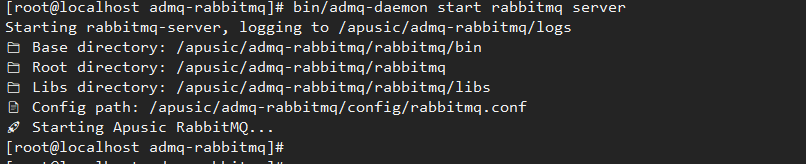
Start the message sending and receiving service:
bin/admq-daemon start rabbitmq server
# Service Verification
# Check Process Status
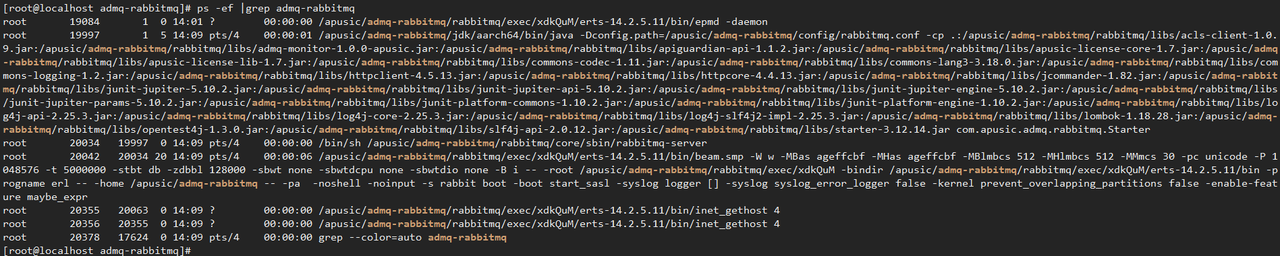
Use the ps command to check the process. Under normal conditions, relevant processes should be visible:
ps -ef | grep admq-rabbitmq
Expected output example:
# Check Port Listening
Use netstat to verify that port 5672 is in LISTEN state:
netstat -nltup | grep 5672
Expected output example:

If no output is seen, check the firewall settings or review the logs to troubleshoot startup failure.
# View Runtime Logs
If the service starts abnormally or you need to monitor runtime status, check the log files in the logs directory:
# View real-time logs
tail -f logs/server.log

# Or view directory structure
ls -lh logs/
2
3
4
5
Pay special attention to any ERROR level messages in the logs.

# Create User
Authentication is enabled by default. Clients need to add a username and password to send and receive messages.
Create user: test
Set password: test123
bin/admq rabbitmq admin ctl add_user test test123

# Create Virtual Host
Create virtual host: test
bin/admq rabbitmq admin ctl add_vhost test

Set permissions for user: test
bin/admq rabbitmq admin ctl set_permissions --vhost test test ".*" ".*" ".*"
bin/admq rabbitmq admin ctl set_user_tags test management
2


# Cluster Deployment
# Deployment Planning
Assume deploying a 3-node high-availability cluster, planned as follows:
Prerequisites:
Ensure time synchronization (NTP) across all three machines.
Disable the firewall or open ports:
5672,15672.
# All Nodes Execute: Basic Installation
Execute on Node 1, Node 2, Node 3 respectively:
# Create Directory and Extract
mkdir -p /apusic
cd /apusic
tar zxvf ADMQ-V2.0.6.31214-RabbitMQ-20260306.tar.gz
cd admq-rabbitmq
2
3
4
# Place License File
Upload license.xml to the /apusic/admq-rabbitmq/ directory.
# Modify Hostname
The hostname may only contain:
- Letters (a-z A-Z)
- Digits (0-9)
- Hyphens (-)
# Execute on Node 1
hostname node171

# Execute on Node 2
hostname node172

# Execute on Node 3
hostname node173
2
3
4
5
6
7
8
# Modify Server hosts File
Add information for all cluster nodes to /etc/hosts.
Add the following to all nodes:
172.20.140.171 node171
172.20.140.172 node172
172.20.140.173 node173
2
3
# Configure Cluster (Optional)
Edit config/rabbitmq.conf to configure listening ports, default username, password, etc.
# Node 1 Configuration (172.20.140.171)
listeners.tcp.default = 5672
# Default user
default_user = admq
default_pass = apusic_123
2
3
4
# Node 2 Configuration (172.20.140.172)
listeners.tcp.default = 5672
# Default user
default_user = admq
default_pass = apusic_123
2
3
4
# Node 3 Configuration (172.20.140.173)
listeners.tcp.default = 5672
# Default user
default_user = admq
default_pass = apusic_123
2
3
4
# Start Each Node Service
Log in to Node 1, 2, and 3 sequentially and execute:
cd /apusic/admq-rabbitmq
bin/admq-daemon start rabbitmq server
2
The startup log is as follows:

After startup, check the node status to confirm successful startup. You can directly verify whether the port is listening.
ss -anpl | grep 5672
Expected output:

# Create Cluster
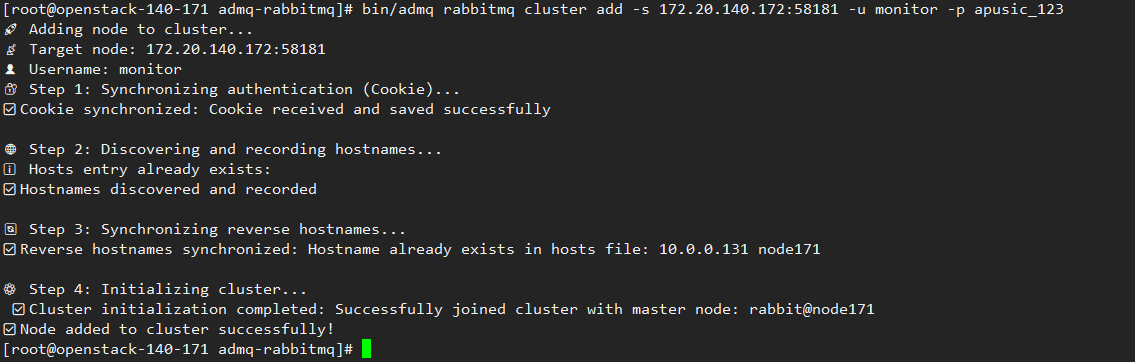
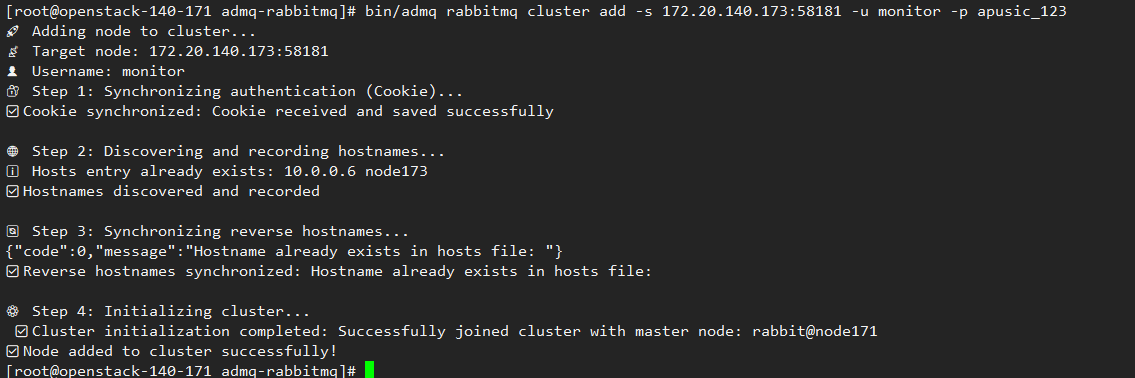
Execute the cluster creation command on the first node to join the other two nodes into the cluster:
bin/admq rabbitmq cluster add -s 172.20.140.172:58181 -u monitor -p apusic_123
bin/admq rabbitmq cluster add -s 172.20.140.173:58181 -u monitor -p apusic_123
2
# Mirror Mode (Optional)
In cluster mode, each node can only synchronize metadata, not the data under exchanges and queues. If not using the Quorum Queues mode, mirror queues can be used to synchronize data across nodes.
bin/admq rabbitmq admin ctl set_policy ha-all "^" '{"ha-mode":"all","ha-sync-mode":"automatic"}'
# Cluster Verification and Testing
# Verify Port Status of Each Node
Check port listening status on each server:
# Check if port 5672 is listening
ss -anpl | grep 5672
2
Expected: The port should be listening.

# Check Cluster Status
Execute on Node1:
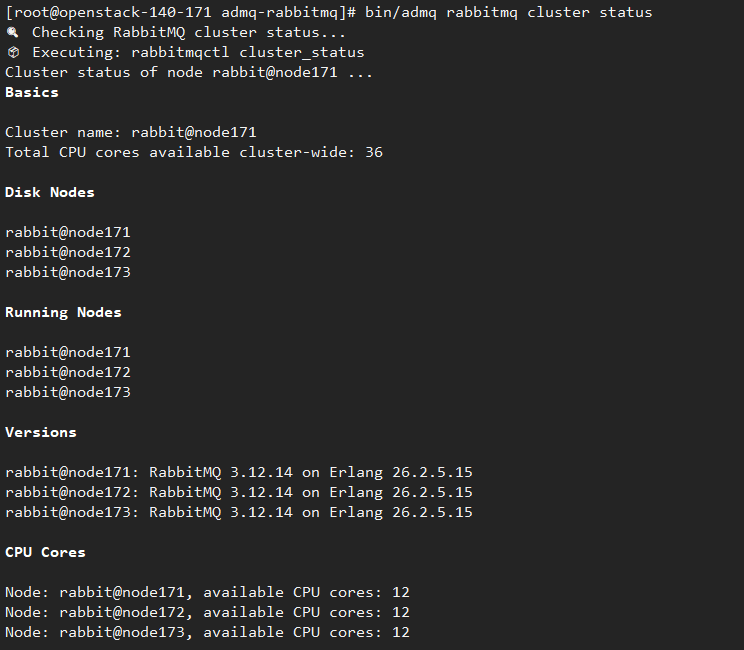
bin/admq rabbitmq cluster status
All three nodes should be shown as added to the cluster.
# Functional Test
- Create User:
Create user: test
Set password: test123
bin/admq rabbitmq admin ctl add_user test test123
Expected output example:
- Create Virtual Host:
Create virtual host: test
bin/admq rabbitmq admin ctl add_vhost test
Expected output example:
Set permissions for user: test
bin/admq rabbitmq admin ctl set_permissions --vhost test test ".*" ".*" ".*"
bin/admq rabbitmq admin ctl set_user_tags test management
2
# Cluster Failure Simulation and Maintenance
# Stop Service
bin/admq-daemon stop rabbitmq server
# Common Error Troubleshooting
Cluster node addition failed, node connection failed
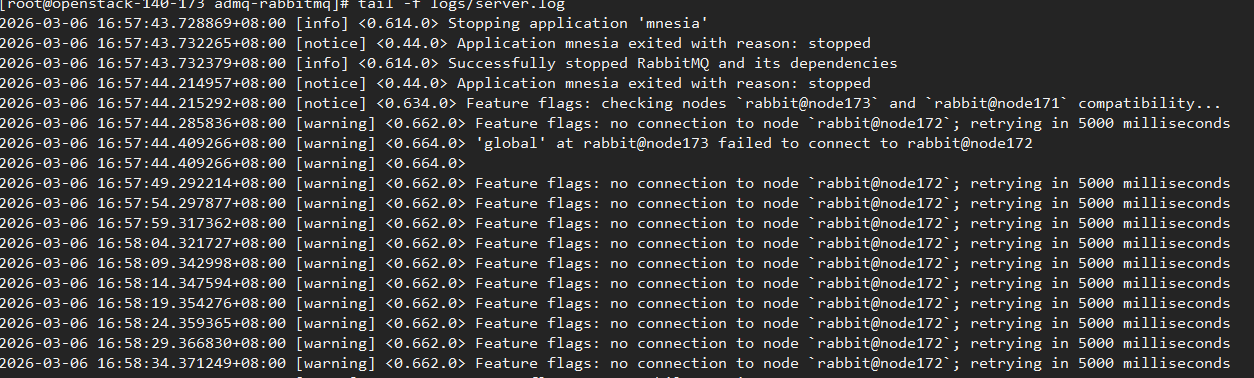
Solution: Configure /etc/hosts, add the node172 information, then restart the node.
Cluster node addition failed, node stop failed
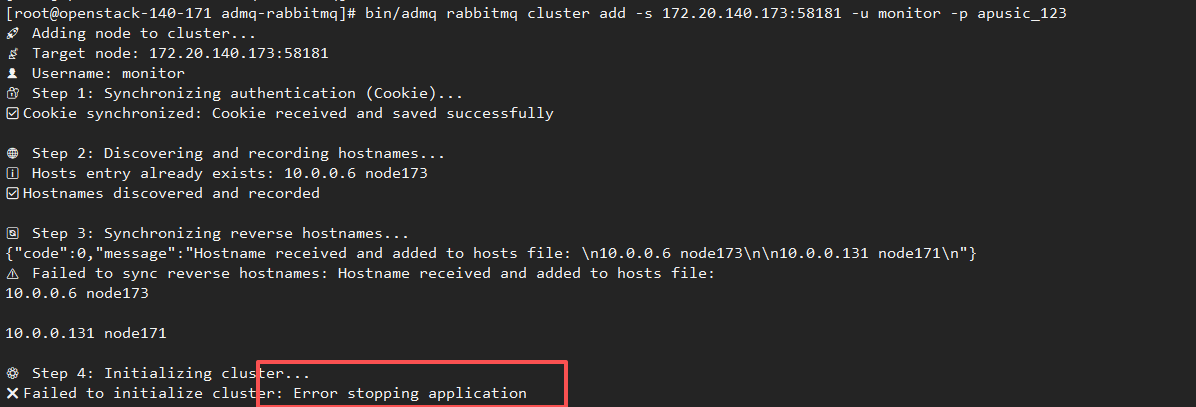
Solution: Restart the node to be added.
# Common Issues and Troubleshooting
# Service Startup Failure
| Possible Cause | Solution |
|---|---|
| Port conflict | Check if ports 5672, 15672, 25672 are occupied |
| Insufficient permissions | Ensure correct permissions on the admq-rabbitmq directory |
| Insufficient memory | Check system memory, ensure minimum requirements are met |
| License not placed or expired | Confirm license.xml is placed in the deployment root directory and has not expired |
| OpenSSL version incompatibility | Systems like Ubuntu 24.04 use OpenSSL 3.x by default, while the Erlang crypto module depends on libcrypto.so.1.1. Install the OpenSSL 1.1 compatibility library (libssl1.1), then restart the service |
OpenSSL 1.1 Compatibility Library Installation Example (Ubuntu/Debian):
# Ubuntu 24.04 requires installing libssl1.1 first
wget http://security.ubuntu.com/ubuntu/pool/main/o/openssl/libssl1.1_1.1.1f-1ubuntu2.24_amd64.deb
dpkg -i libssl1.1_1.1.1f-1ubuntu2.24_amd64.deb
2
3
Note: If you see errors like crypto:strong_rand_bytes or libcrypto.so.1.1: cannot open shared object file in logs/rabbitmq-server-*.out, this is an OpenSSL compatibility issue.
# Cluster Join Failure
| Possible Cause | Solution |
|---|---|
| Hostname does not meet specifications | Ensure hostname contains only letters, digits, and hyphens |
| Network unreachable | Check network connectivity and firewall settings between nodes |
| Hostname resolution failure | Ensure /etc/hosts or DNS configuration is correct |
| Node not started properly | Check that each node service has started normally |
# Console Inaccessible
| Possible Cause | Solution |
|---|---|
| Port conflict | Modify server.port in config/application.properties |
| Firewall blocking | Open ports 12305/12306 |
| Service not started | Check console service status |
# Datasource 403 Error
| Possible Cause | Solution |
|---|---|
| Insufficient RabbitMQ user permissions | Use a user with the administrator tag and configure .* permissions |
| Message sending and receiving errors | Check routing key and binding relationships |