
Overview

# Preface
This document is the product overview of the Apusic Application Server Migration Tool (hereinafter referred to as the "Migration Tool"). It covers the product introduction, product architecture, features, use cases, and product benefits.
# Intended Audience
This document is intended for engineering and technical personnel involved in Xinchuang (domestic IT innovation) adaptation and migration of Java applications, including:
- Implementation/O&M Engineers: personnel responsible for migrating existing Java applications from the source middleware to the Kingdee Apusic Application Server;
- Test/Assessment Personnel: personnel who need to assess application compatibility with AAS before migration and produce migration reports.
# Technical Support
Apusic provides comprehensive technical support. You can obtain technical support through the following channels:
- Website: www.apusic.com
- Telephone: 400-855-5800
- Email: support@apusic.com
- Kingdee Cloud Community: https://vip.kingdee.com/?productId=73&productLineId=14&lang=zh-CN
When requesting technical support, please provide the following information:
- Your name
- Company information and contact details
- Operating system and its version
- Product version number
- Detailed information about the exception or error, such as logs and screenshots
# Version Information
This document is the product overview of the Apusic Migration Tool. Its content is revised cumulatively as the tool version is updated.
| Date | Manual Version | Applicable Product | Revision Notes |
| September 2026 | V01E01F01 | Apusic Application Server Migration Tool | Product overview |
# Tool Overview
The Apusic Application Server Migration Tool (the "Migration Tool") is an automated migration tool designed for Xinchuang middleware replacement scenarios, providing end-to-end support for replacing application servers with domestic alternatives. Built around a standardized four-phase pipeline — Assessment & Analysis, Migration Preparation, Migration Execution, and Verification & Acceptance — the tool transforms application middleware migration, which traditionally depends on expert experience, into a standardized and automated process. This enables customers to migrate business applications and configurations from existing middleware to the Apusic Application Server smoothly, with zero modifications on the source side and no production downtime, completing the full Xinchuang migration loop for business application systems.
# Product Architecture
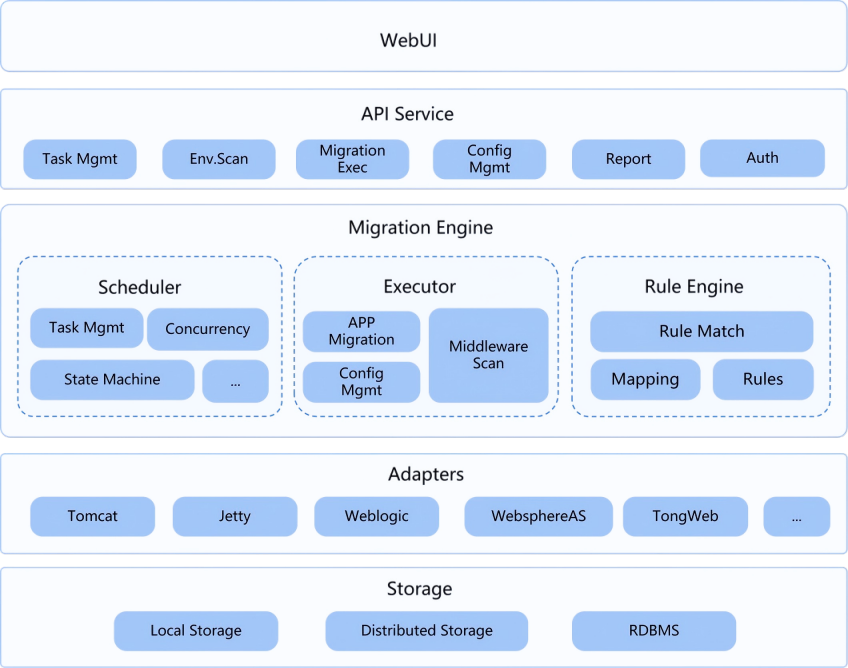
The Migration Tool adopts an "integrated deployment, layered decoupling" architecture: the Migration Tool server acts as the orchestration core, exposing a GUI-based web console upward while accessing the source middleware in read-only mode downward and delivering the target AAS locally through built-in media. All runtime data is retained on the tool side, and no additional agent components need to be installed on either the source or the target.
# Migration Workflow
The Migration Tool completes the migration of applications to the matching AAS version through a standardized four-phase process: Assessment & Analysis → Migration Preparation → Migration Execution → Verification & Acceptance.
| Phase | Name | Main Activities | Outputs |
|---|---|---|---|
| Phase 1 | Assessment & Analysis | Collection of source middleware and application information, environment condition checks (version/directory/JDK/disk/network/permissions), compatibility analysis (API/configuration/features) | Compatibility score, list of incompatible items, target AAS version recommendation, assessment report |
| Phase 2 | Migration Preparation | AAS installation and deployment (automatic extraction of the installation package and license application), basic resource configuration (JVM/thread pool/encoding), JDBC driver package preparation | Usable target AAS instance, basic configuration checklist |
| Phase 3 | Migration Execution | Application package migration (WAR / EAR / EJB JAR / exploded directories), configuration migration (data sources/thread pools/security/certificates), data source migration | Deployed applications, merged target configuration results |
| Phase 4 | Verification & Acceptance | Configuration comparison verification, startup verification (AAS startup / application deployment / health check), report generation and result confirmation | Migration report, access URLs for AAS and each web application |
# Supported Middleware
The current version of the Migration Tool supports migrating the following Java application servers to AAS. Support for additional middleware and versions is being added progressively.
| Middleware | Version | Notes |
|---|---|---|
| Apache Tomcat (opens new window) | 9.x / 10.x / 11.x | Includes Spring Boot embedded versions |
| TongWeb (opens new window) | 7.x / 8.x | Includes the security-hardened edition and Spring Boot embedded versions |
# System Requirements
Tool runtime environment:
| Item | Requirement |
|---|---|
| Operating System | Linux or Windows |
| Java Environment | JDK 17 (64-bit) or later |
| Disk Space | ≥ 10 GB recommended (including AAS installation media, application copies, and the target AAS runtime directory) |
| Service Port | Port 6880 (the Migration Tool Web service port) must be free |
| Browser | Mainstream browsers such as Chrome, Edge, and Firefox |
Supported operating systems and CPU architectures:
Linux
- Operating systems: Kylin V10/V11 Server, Kylin V10/V11 Desktop, UnionTech UOS V20 Server, UnionTech UOS V20 Desktop, RHEL, SUSE, Debian
- CPU architectures: x86_64 (Hygon, Zhaoxin, AMD, Intel), ARM (Kunpeng, Phytium, HiSilicon Kirin), LoongArch, SW64
Windows
Microsoft Windows 7, Windows 8, Windows 8.1, Windows 10, Windows 11, Windows Server 2008 R2, Windows Server 2012 R2, Windows Server 2016, Windows Server 2019, Windows Server 2022, Windows Server 2025
# Features
Visual One-Click Migration
The entire migration process is performed through a web-based graphical interface, with no complex command-line operations required. Complex enterprise applications can be migrated with a single click.
Multiple Migration Modes
The Migration Tool supports both local and remote migration, flexibly accommodating a wide range of migration and adaptation scenarios.
- Local mode: The Migration Tool, the source middleware, and the target AAS are deployed on the same local server, sharing compute, network, and storage resources. Application migration and adaptation are completed on that local server.
- Remote mode: The Migration Tool, the source middleware, and the target AAS are deployed on separate servers, and migration operations are performed over the standard SSH protocol. No agent needs to be installed on the source host, making this mode ideal for intranet migration from an x86 source to a Xinchuang target.
Full Application Migration
- Full coverage of application types: Supports WAR, EAR, EJB JAR, and exploded application directories;
- Automatic structure parsing: Automatically identifies the application packaging format and parses the WAR modules and EJB JAR modules contained in an EAR package, preserving the integrity of the application directory structure throughout migration;
- Batch migration: Supports batch migration of multiple applications under the same middleware instance;
- Application copy mechanism: During the scanning phase, applications are copied to the tool working directory. Migration is performed on these copies, so subsequent changes on the source side do not affect the migration result.
Spring Boot Embedded Migration
- For applications packaged as Spring Boot embedded containers, two approaches are provided: JAR package conversion and source project conversion;
- The conversion produces output in AAS embedded runtime format (JAR / WAR) and can automatically install the required adapter dependency packages into the local Maven repository;
- The Spring Boot version is detected automatically and a compatibility analysis is performed. The conversion runs as a single-step linear process; no four-phase pipeline configuration is required.
Resumable Migration and Rollback
- On an exception, execution is automatically paused and the failure context and complete logs are preserved, allowing manual intervention;
- Two retry modes are supported: "Re-run All" and "Continue from Failed Phase". The latter preserves applications and configurations that were migrated successfully, avoiding duplicated work;
- The target environment supports two rollback strategies:
Keep Failed Environment (default)andRestore Initial Environment, so issues can be identified and resolved before the switchover.
Rule Engine Mapping An extensible rule engine handles configuration differences across heterogeneous middleware and performs equivalent configuration conversion.
- Automatic conversion: Built-in configuration conversion rules automatically convert key source middleware configurations into their equivalent AAS configurations, covering groups such as data sources, HTTP connectors, thread pools, JVM configuration, JMX, virtual hosts, and logging configuration;
- Configuration comparison: Compares configurations before and after migration, and lists items not covered by rules as well as conversion-compatible parameters;
- Manual adjustment: Target configuration values can be modified item by item on the edit page; the changes take effect the next time the migration is executed.
Standard Migration Reports
- A migration report is generated automatically for every migration task (whether successful or failed). The report includes basic report information, the migration path, the execution summary, the source configuration scan, the configuration comparison, and the handling of compatible items;
- Reports can be exported in PDF / DOCX format, making it easy to archive and report on Xinchuang migration outcomes.
Extensibility
With an extensible architecture based on rules and templates, migration capabilities for foreign commercial middleware such as WebLogic and WebSphere are continuously added and evolve with each release.
# Product Benefits
Standards Compliance
The Migration Tool follows the definitions and operational practices of the T/CESA 9172-2021 Information Technology Application Innovation — Guidelines for Application Server Middleware Migration standard. The four-phase migration workflow is operationalized in an engineering manner, giving project initiation reviews and Xinchuang acceptance a standards-based foundation and ensuring compliance on the first attempt.
Improved Efficiency and Lower Cost
The lifecycle of Xinchuang application migration is compressed from days to minutes. Manual item-by-item comparison and repeated cross-checking are reduced, significantly lowering implementation labor and time costs.
Controllable Go-Live Risk
Automatic pausing on exceptions, resumable migration, and one-click rollback let issues be identified and resolved before the switchover. Successfully migrated configurations remain unaffected, markedly improving the success rate of the switchover and confidence in rollback.
Zero Intrusion into the Source Environment
Read-only scanning with zero modifications on the source side and no agent installation on the target side. Execution is performed remotely over standard protocols, so production systems are unaware of the migration and security reviews are easier to pass.
Effortless Audit and Compliance
Migration reports, configuration snapshots, and operation logs are archived automatically, with clear responsibility boundaries and a traceable process, making acceptance and audit delivery far less burdensome.
# Use Cases
Domestic middleware replacement in Xinchuang transformation
Migrate existing Java applications deployed on Apache Tomcat and other foreign commercial middleware to a domestic alternative, replacing the middleware with the Kingdee Apusic Application Server. Using remote mode, the source side is scanned in read-only mode with zero modifications and no production downtime, completing source environment assessment, configuration conversion, application migration, and verification in a single pass, and producing a deliverable migration report.
Xinchuang adaptation of Spring Boot applications
When Java business applications run in a Spring Boot embedded container, the built-in container migration feature of the Migration Tool converts and adapts the executable JAR package or source project to a format supported by the AAS embedded container, smoothly bringing Spring Boot applications into the Xinchuang middleware ecosystem.
Batch application migration
When multiple applications are deployed under the same middleware instance, a single scan produces a complete application inventory and configuration conversion rules are reused uniformly. The more applications there are, the lower the average migration cost per application.
Middleware replacement validation and assessment
In a POC test environment, use local mode to quickly validate migration feasibility and produce a migration report as input for the formal switchover decision and risk assessment.
← 用户手册 User Manual→