
Installation Guide

# Preface
This document is the installation guide for Apusic In-Memory Data Cache (AMDC) V2.0.5. It provides guidance on installing and deploying the product in various deployment modes (including standalone, Sentinel, and Cluster) on various operating systems and in container environments, as well as related configuration instructions.
# Intended Audience
This document is intended for AMDC operations engineers, IT system operations engineers, development engineers, software architects, and other personnel.
# Related Documents
For more information about AMDC V2.0.5, please refer to the following AMDC V2.0.5 product manual set:
| No. | Manual | Description |
|---|---|---|
| 1 | Apusic In-Memory Data Cache V2.0.5 Quick Start Guide | Briefly introduces how to quickly get started with AMDC. |
| 2 | Apusic In-Memory Data Cache V2.0.5 Installation Guide | Describes in detail how to install AMDC on various operating systems, as well as AMDC service start/stop operations and the product registration process. |
| 3 | Apusic In-Memory Data Cache V2.0.5 Cache Core User Manual | Describes in detail the use, configuration, and management of AMDC features and the usage of supporting tools. |
| 4 | Apusic In-Memory Data Cache V2.0.5 Console User Manual | Describes in detail the use of AMDC console features and operation instructions. |
| 5 | Apusic In-Memory Data Cache V2.0.5 Development Guide | Describes in detail how to develop AMDC client applications based on various programming languages. |
| 6 | Apusic In-Memory Data Cache V2.0.5 Migration Guide | Describes how to migrate and upgrade earlier AMDC versions to V2.0.5, as well as how to migrate from Redis to AMDC. |
| 7 | Apusic In-Memory Data Cache V2.0.5 Operations Guide | Describes AMDC monitoring, operations, security hardening, and other operations instructions. |
| 8 | Apusic In-Memory Data Cache V2.0.5 Performance Tuning Guide | Describes AMDC performance tuning. |
# Technical Support
AMDC provides comprehensive technical support services. You can obtain technical support in the following ways:
Website: www.apusic.com
Phone: 400-855-5800
Email: support@apusic.com
Kingdee Cloud Community: https://vip.kingdee.com/?productId=73&productLineId=14&lang=zh-CN
When requesting technical support, please provide the following information:
Your name
Company information and contact details
Operating system and its version
Product version number
Detailed information such as logs and screenshots of any exceptions or errors
# Related Concepts
| Term | Meaning | Usage Notes |
|---|---|---|
| Standalone | Stores data, responsible for data reads/writes and data synchronization | The default mode of AMDC; in standalone mode there is only one node |
| Master-Slave | Replicates data from the master node, handles data reads, and does not participate in write operations | A real-time replica of the master node's data. It actively connects to the specified master node and receives the data stream sent by the master to stay synchronized with it. By default, slave nodes are read-only, and all write operations must be sent to the master node. |
| Sentinel | Monitors master-slave nodes, handles master failover, and handles master-slave node synchronization | In Sentinel mode, when the master node goes down, a slave node is automatically switched to master, achieving automatic failover. |
| Cluster | A computer service system composed of multiple independent computers | In this document, master-slave, Sentinel, and Cluster modes can all be considered clusters; the cluster mode specifically refers to the multi-master data sharding storage mode. |
# Installation Overview
# Overview
The AMDC product package consists of two parts: the cache and the console. The cache is the core component of AMDC, and the console is the management component of AMDC.
# Environment Support
| Platform Type | System Type |
|---|---|
| Chip Type | Huawei Kunpeng, HiSilicon, Phytium, Zhaoxin, and other X86/ARM architecture chips |
| Operating System | Kylin series, UnionTech UOS, NeoKylin, etc. |
| Other Linux series | RedHat series, CentOS series, Ubuntu series, etc. |
# Recommended Configuration
| Deployment Mode | Operating System | Installation Content | Hardware Specifications (CPU/Memory/Disk) | Number of Servers |
|---|---|---|---|---|
| Standalone | Linux | AMDC service | 8 cores/16G/100G | 1 |
| Master-Slave | Linux | AMDC service | 8 cores/16G/100G | 2 |
| Sentinel | Linux | AMDC Sentinel service | 8 cores/16G/100G | 3 |
| Cluster | Linux | AMDC console, AMDC service | 8 cores/16G/100G | 3 |
# AMDC Cache Installation
# Cache Core Installation Package Naming Conventions
- Extractable installation package:
AMDC-<version>-<build-date>-<CPU-architecture>.tar.gz— extract it to any path on the target machine and it is ready to use. - Docker installation package:
AMDC-Docker-<build-date>-<CPU-architecture>-<base-OS>.tar.gz. - RPM package:
AMDC-<build-date>-<CPU-architecture>.rpm— install withrpm -ivh <package-name>; after installation, its installation path is/opt/amdc.
Note: the build date is the specific build date of the AMDC product package. The same version may have multiple build dates; use the package with the latest date.
# Standalone Mode
Installation steps:
- Upload the AMDC cache core installation package (
AMDC-<version>-<build-date>-<CPU-architecture>.tar.gz) to the installation directory on the target server (e.g., under /opt). - Extract the installation package:
tar -zxf AMDC-<version>-<build-date>-<CPU-architecture>.tar.gz - Enter the extracted folder:
cd amdc - Upload the license file
license.licto each node's installation directory/opt/amdc. For licensing, refer to the AMDC License Management Guide in this document.[root@private amdc]# tree -L 2 . ├── acls.properties ├── amdc-benchmark ├── amdc-check-aof ├── amdc-check-rdb ├── amdc-cli ├── amdc-conf-conv ├── amdc-sentinel ├── amdc-server ├── amdc.yaml ├── license.lic # License file └── sentinel.yaml1
2
3
4
5
6
7
8
9
10
11
12
13 - Run the startup command to start the AMDC cache core:
./amdc-server amdc.yaml
# Verifying the Installation
./amdc-cli
If the info output prints normally, the connection is successful.
./amdc-cli
127.0.0.1:6359> info
# Server
amdc_version:2.0.5
amdc_git_sha1:61420466
amdc_git_dirty:0
amdc_build_id:905134ad61530534
amdc_build_date:2026-06-04
amdc_mode:standalone
os:Linux 5.10.0-281.0.0.184.oe2203sp4.aarch64 aarch64
arch_bits:64
monotonic_clock:ARM CNTVCT @ 100 ticks/us
multiplexing_api:epoll
atomicvar_api:atomic-builtin
gcc_version:10.3.1
process_id:321475
process_supervised:no
run_id:69ffa6dd5f6bfa0250f5b0ee2bd38f8b9de143a3
tcp_port:6359
server_time_usec:1770275528738835
uptime_in_seconds:5201
uptime_in_days:0
hz:10
configured_hz:10
lru_clock:2168302
executable:/opt/amdc/amdc-server
config_file:/opt/amdc/amdc.yaml
worker_threads:1
mptcp_enabled:0
2
3
4
5
6
7
8
9
10
11
12
13
14
15
16
17
18
19
20
21
22
23
24
25
26
27
28
29
# Master-Slave Mode
Master-slave deployment diagram
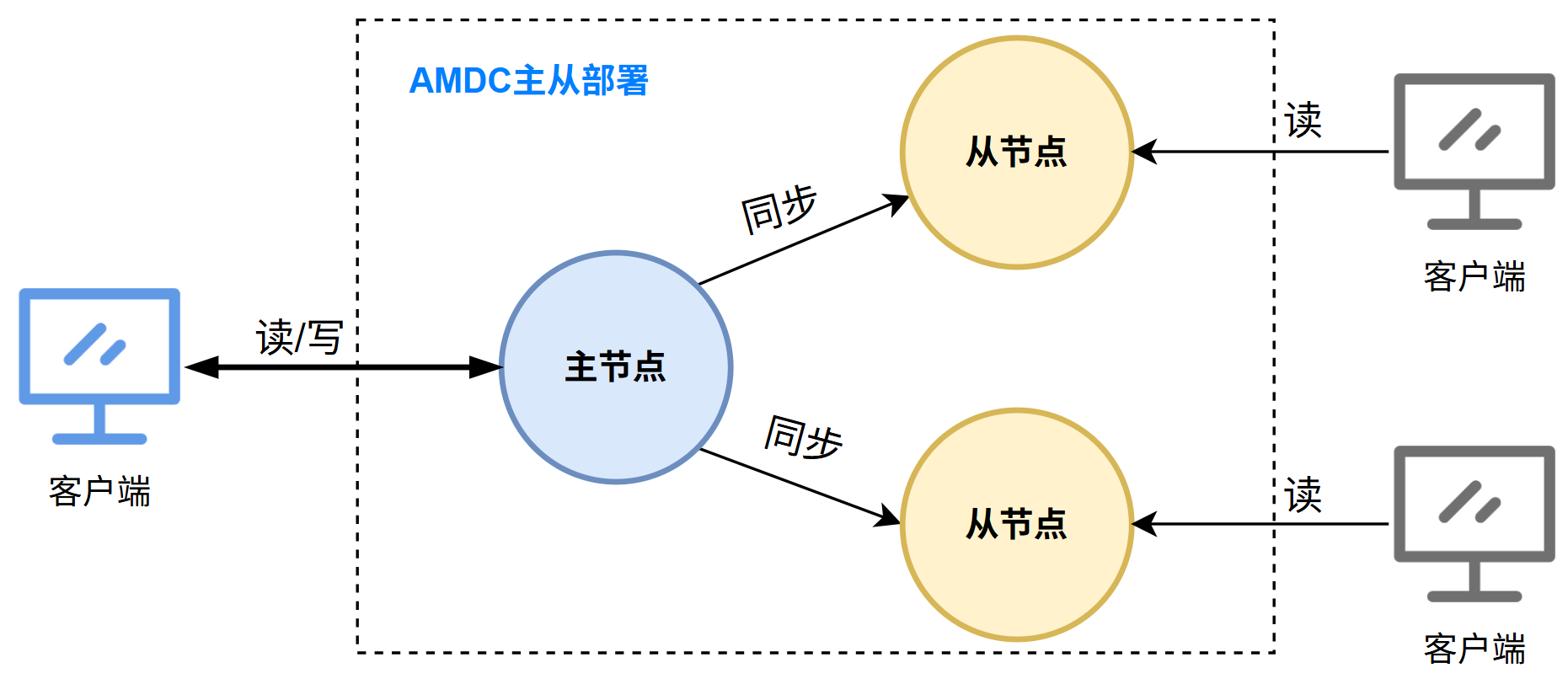
As shown above, three AMDC cache cores will be deployed — one master node and two slave nodes. The deployment steps are:
- Prepare three server nodes (the following nodes are examples)
- Master node: 10.0.1.46 (example IP; replace with the actual IP)
- Slave nodes: 10.0.1.66 (example IP; replace with the actual IP) and 10.0.1.32 (example IP; replace with the actual IP)
- Upload the AMDC cache core installation package (
AMDC-<version>-<build-date>-<CPU-architecture>.tar.gz) to the installation directory on the target server (e.g., under /opt).
- Upload the AMDC cache core installation package (
- Extract the installation package:
tar -zxf AMDC-<version>-<build-date>-<CPU-architecture>.tar.gz
- Extract the installation package:
- Enter the extracted folder:
cd amdc
- Enter the extracted folder:
- Upload the license file
license.licto each node's installation directory/opt/amdc. For licensing, refer to the AMDC License Management Guide in this document.
[root@private amdc]# tree -L 2
.
├── acls.properties
├── amdc-benchmark
├── amdc-check-aof
├── amdc-check-rdb
├── amdc-cli
├── amdc-conf-conv
├── amdc-sentinel
├── amdc-server
├── amdc.yaml
├── license.lic      # License file
└── sentinel.yaml
1
2
3
4
5
6
7
8
9
10
11
12
13- Upload the license file
- Configure the amdc.yaml file
Master node: change
bindinamdc.yamlto the current machine's IPNETWORK: # The network address to listen on. By default, only the local loopback address is listened on; comment out this line to listen on all interfaces (exposing to the public network is a security risk) bind: - "10.0.1.46 (example IP; replace with the actual IP)" # Change to the local machine's IP address - "-::1" # Protected mode: when no bind is specified and no password is set, only local loopback addresses and Unix domain socket connections are allowed1
2
3
4
5
6Slave nodes:
- 10.0.1.66 (example IP; replace with the actual IP): change
bindinamdc.yamlto the current machine's IP, and setreplicaofto the master node's IP and portNETWORK: # The network address to listen on. By default, only the local loopback address is listened on; comment out this line to listen on all interfaces (exposing to the public network is a security risk) bind: - "10.0.1.66 (example IP; replace with the actual IP)" # Add the local machine's IP - "-::1" # Non-configuration items omitted REPLICATION: replicaof: "10.0.1.46 (example IP; replace with the actual IP) 6359" # Add the master node's IP and port1
2
3
4
5
6
7
8
9 - 10.0.1.32 (example IP; replace with the actual IP): change
bindinamdc.yamlto the current machine's IP, and setreplicaofto the master node's IP and portNETWORK: # The network address to listen on. By default, only the local loopback address is listened on; comment out this line to listen on all interfaces (exposing to the public network is a security risk) bind: - "10.0.1.32 (example IP; replace with the actual IP)" # Add the local machine's IP - "-::1" # Non-configuration items omitted REPLICATION: replicaof: "10.0.1.46 (example IP; replace with the actual IP) 6359" # Add the master node's IP and port1
2
3
4
5
6
7
8
9
- 10.0.1.66 (example IP; replace with the actual IP): change
- Start the AMDC cache core on each node
- Start the master node:
./amdc-server amdc.yaml - Start the slave nodes:
./amdc-server amdc.yaml
- Verify the installation
# Execute on the master node
./amdc-cli -h 10.0.1.46 (example IP; replace with the actual IP) -p 6359, then enter info replication
```bash
10.0.1.46 (example IP; replace with the actual IP):6359> info replication
# Replication
role:master
connected_slaves:2
slave0:ip=10.0.1.66 (example IP; replace with the actual IP),port=6359,state=online,offset=322,lag=0
slave1:ip=10.0.1.32 (example IP; replace with the actual IP),port=6359,state=online,offset=322,lag=1
master_failover_state:no-failover
master_replid:c246dd7c8902e4ca62fc72df6473d9386b502c8e
master_replid2:0000000000000000000000000000000000000000
master_repl_offset:322
second_repl_offset:-1
repl_backlog_active:1
repl_backlog_size:1048576
repl_backlog_first_byte_offset:1
1
2
3
4
5
6
7
8
9
10
11
12
13
14
15
16
17- As shown in the output above, the appearance of two slave nodes indicates that the three-node master-slave mode has been started successfully.
# Sentinel Mode
Sentinel mode deployment diagram
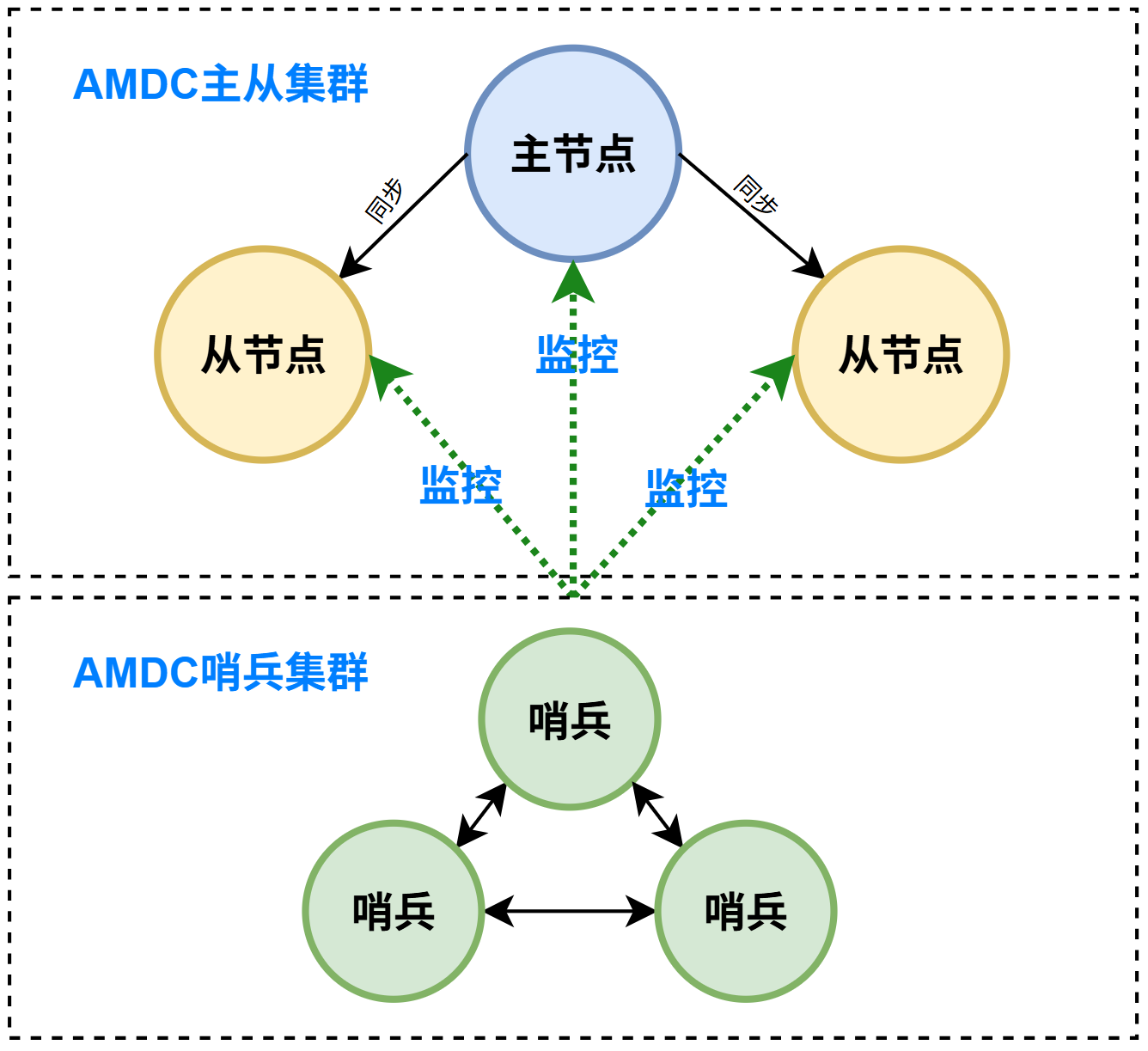
As shown above, three AMDC cache cores plus three Sentinels will be deployed. The deployment steps are:
- Prepare three server nodes (the following nodes are examples)
- 10.0.1.46 (example IP; replace with the actual IP): master node + Sentinel
- 10.0.1.66 (example IP; replace with the actual IP): slave node + Sentinel
- 10.0.1.32 (example IP; replace with the actual IP): slave node + Sentinel
- Upload the AMDC cache core installation package (
AMDC-<version>-<build-date>-<CPU-architecture>.tar.gz) to the installation directory on the target server (e.g., under /opt).
- Upload the AMDC cache core installation package (
- Extract the installation package:
tar -zxf AMDC-<version>-<build-date>-<CPU-architecture>.tar.gz
- Extract the installation package:
- Enter the extracted folder:
cd amdc
- Enter the extracted folder:
- Upload the license file
license.licto each node's installation directory/opt/amdc. For licensing, refer to the AMDC License Management Guide in this document.
- Upload the license file
- Configure the cache
amdc.yamlfile
Master node: change
bindinamdc.yamlto the current machine's IPNETWORK: # The network address to listen on. By default, only the local loopback address is listened on; comment out this line to listen on all interfaces (exposing to the public network is a security risk) bind: - "10.0.1.46 (example IP; replace with the actual IP)" # Change to the local machine's IP address - "-::1" # Protected mode: when no bind is specified and no password is set, only local loopback addresses and Unix domain socket connections are allowed1
2
3
4
5
6Slave nodes:
- 10.0.1.66 (example IP; replace with the actual IP): change
bindinamdc.yamlto the current machine's IP, and setreplicaofto the master node's IP and portNETWORK: # The network address to listen on. By default, only the local loopback address is listened on; comment out this line to listen on all interfaces (exposing to the public network is a security risk) bind: - "10.0.1.66 (example IP; replace with the actual IP)" # Add the local machine's IP - "-::1" # Non-configuration items omitted REPLICATION: replicaof: "10.0.1.46 (example IP; replace with the actual IP) 6359" # Add the master node's IP and port1
2
3
4
5
6
7
8
9 - 10.0.1.32 (example IP; replace with the actual IP): change
bindinamdc.yamlto the current machine's IP, and setreplicaofto the master node's IP and portNETWORK: # The network address to listen on. By default, only the local loopback address is listened on; comment out this line to listen on all interfaces (exposing to the public network is a security risk) bind: - "10.0.1.32 (example IP; replace with the actual IP)" # Add the local machine's IP - "-::1" # Non-configuration items omitted REPLICATION: replicaof: "10.0.1.46 (example IP; replace with the actual IP) 6359" # Add the master node's IP and port1
2
3
4
5
6
7
8
9
- 10.0.1.66 (example IP; replace with the actual IP): change
- Configure the cache
- Sentinel configuration
- On the 10.0.1.46 (example IP; replace with the actual IP) node's Sentinel, change bind to the current IP and set the master node's IP
NETWORK:
  # The network address to listen on. By default, only the local loopback address is listened on; comment out this line to listen on all interfaces (exposing to the public network is a security risk)
  bind:
      - "10.0.1.46 (example IP; replace with the actual IP)"
      - "-::1"
# Non-configuration items omitted
SENTINEL:
  # Defines the master node to monitor, in the format <master-name> <ip> <amdc-port> <quorum> (e.g., mymaster 127.0.0.1 6359 2 means the master is judged objectively down only when at least 2 Sentinels consider it down)
  sentinel monitor: mymaster 10.0.1.46 (example IP; replace with the actual IP) 6359 2
1
2
3
4
5
6
7
8
9 - On the 10.0.1.66 (example IP; replace with the actual IP) node's Sentinel, change bind to the current IP and set the master node's IP
NETWORK:
  # The network address to listen on. By default, only the local loopback address is listened on; comment out this line to listen on all interfaces (exposing to the public network is a security risk)
  bind:
      - "10.0.1.66 (example IP; replace with the actual IP)"
      - "-::1"
# Non-configuration items omitted
SENTINEL:                                                                             # Defines the master node to monitor, in the format <master-name> <ip> <amdc-port> <quorum> (e.g., mymaster 127.0.0.1 6359 2 means the master is judged objectively down only when at least 2 Sentinels consider it down)
  sentinel monitor: mymaster 10.0.1.46 (example IP; replace with the actual IP) 6359 2
1
2
3
4
5
6
7
8 - On the 10.0.1.32 (example IP; replace with the actual IP) node's Sentinel, change bind to the current IP and set the master node's IP
NETWORK:
  # The network address to listen on. By default, only the local loopback address is listened on; comment out this line to listen on all interfaces (exposing to the public network is a security risk)
  bind:
      - "10.0.1.32 (example IP; replace with the actual IP)"
      - "-::1"
# Non-configuration items omitted
SENTINEL:
  # Defines the master node to monitor, in the format <master-name> <ip> <amdc-port> <quorum> (e.g., mymaster 127.0.0.1 6359 2 means the master is judged objectively down only when at least 2 Sentinels consider it down)
  sentinel monitor: mymaster 10.0.1.46 (example IP; replace with the actual IP) 6359 2
1
2
3
4
5
6
7
8
9
- Start the cache and Sentinel on each node
- Start the master node:
./amdc-server amdc.yaml - Start the slave nodes:
./amdc-server amdc.yaml - Start Sentinel:
./amdc-sentinel sentinel.yaml
- Verify Sentinel mode
- Use the
amdc-cliclient tool with the -p and -h parameters to specify the Sentinel's IP and port./amdc-cli -p 26359 -h 10.0.1.46 (example IP; replace with the actual IP) 10.0.1.46 (example IP; replace with the actual IP):26359> info sentinel # Sentinel sentinel_masters:1 sentinel_tilt:0 sentinel_running_scripts:0 sentinel_scripts_queue_length:0 sentinel_simulate_failure_flags:0 master0:name=mymaster,status=ok,address=10.0.1.46 (example IP; replace with the actual IP):6359,slaves=2,sentinels=31
2
3
4
5
6
7
8
9 - If the master node information, the number of slave nodes, and the number of Sentinels are all correct, the deployment is successful.
# Sentinel Mode Operations FAQ
- Sentinel cluster state is disordered and node information is abnormal (master-slave/Sentinel mutual recognition is confused)
Symptoms
- Sentinels frequently switch the master node and the switching logic is chaotic;
sentinel infoshows a large number of old master, slave, and Sentinel records that have been taken offline or deleted;- Old and new nodes are mixed together, the master-slave relationship is judged incorrectly, and failover is frequently triggered by mistake;
- After a node is manually taken offline, the Sentinel still retains the node's information and cannot clean it up automatically.
Root cause
At runtime, Sentinels automatically append persistent records to the bottom of the sentinel.yaml file:
- known-replica: records all slave nodes associated with a master
- known-sentinel: records other Sentinel nodes in the same cluster
When known-replica differs from the actual master-slave node relationship, the master-slave relationship is identified incorrectly.
Fix steps
- Stop all Sentinel processes
amdc-cli -h <sentinel-ip> -p <sentinel-port> -a <password> shutdown

systemctl stop amdc_26359 (some machines are configured with auto-restart; use the systemctl stop command to stop the node manually)
2
3
- Edit the sentinel.yaml configuration file of every Sentinel
Delete all known-sentinel, known-replica, and other configuration lines automatically generated by config rewrite at the end of the configuration file, keeping the manually written basic configuration (sentinel monitor, authentication, failover parameters, etc. unchanged).
Before deletion:

SENTINEL:
    # Defines the master node to monitor, in the format <master-name> <ip> <amdc-port> <quorum> (e.g., mymaster 127.0.0.1 6359 2 means the master is judged objectively down only when at least 2 Sentinels consider it down)
    sentinel monitor: mymaster 127.0.0.1 6111 2
    # Authentication username for master-slave nodes, in the format <master-name> <username>
    sentinel auth-user: mymaster ""
    # Authentication password for master-slave nodes, in the format <master-name> <password>
    sentinel auth-pass: mymaster ""
    # Timeout (in milliseconds) for judging a node subjectively down; default 30000 (30 seconds)
    sentinel down-after-milliseconds: mymaster 30000
    # Authentication username for communication between Sentinels
    sentinel sentinel-user: ""
    # Authentication password and other settings for communication between Sentinels
    sentinel sentinel-pass: ""
    # Number of slaves that simultaneously sync from the new master during failover; default 1
    sentinel parallel-syncs: mymaster 1
    # Failover timeout (in milliseconds); default 180000 (3 minutes)
    sentinel failover-timeout: mymaster 180000
    # Notification script executed on warning-level events (e.g., email or SMS notification), in the format <master-name> <script-path>
    sentinel notification-script: mymaster ""
    # Script that notifies clients to reconfigure after failover, in the format <master-name> <script-path>
    sentinel client-reconfig-script: mymaster ""
    # Whether to forbid modifying script configuration at runtime; default yes
    sentinel deny-scripts-reconfig: yes
    # Rename command, in the format <master-name> <old-command-name> <new-command-name>
    sentinel rename-command: mymaster "" ""
    # Whether hostnames are supported (default no; requires DNS)
    sentinel resolve-hostnames: no
    # Whether to announce hostnames externally (default no)
    sentinel announce-hostnames: no
    # IP announced externally in NAT/Docker environments
    sentinel announce-ip: ""
    # Port announced externally in NAT/Docker environments
    sentinel announce-port: 0
    # Controls whether Sentinel triggers failover while the master is reloading data on restart; default 0 — as long as the master is loading data, Sentinel never switches the master
    sentinel master-reboot-down-after-period: mymaster 1

CONFIG REWRITE:
    sentinel myid: 7354c3cc4fb8faa5fc5de06781f8b497e60d25dc
    sentinel config-epoch: mymaster 0
    sentinel leader-epoch: mymaster 0
    sentinel current-epoch: 0
    sentinel known-replica: mymaster 127.0.0.1 6112
    sentinel known-sentinel: mymaster 127.0.0.1 26359 a2d89d7c88f0975fb61dcb5df7f78b297e2099ca
2
3
4
5
6
7
8
9
10
11
12
13
14
15
16
17
18
19
20
21
22
23
24
25
26
27
28
29
30
31
32
33
34
35
36
37
38
39
40
41
42
43
44
45
After deletion:

SENTINEL:
    # Defines the master node to monitor, in the format <master-name> <ip> <amdc-port> <quorum> (e.g., mymaster 127.0.0.1 6359 2 means the master is judged objectively down only when at least 2 Sentinels consider it down)
    sentinel monitor: mymaster 127.0.0.1 6111 2
    # Authentication username for master-slave nodes, in the format <master-name> <username>
    sentinel auth-user: mymaster ""
    # Authentication password for master-slave nodes, in the format <master-name> <password>
    sentinel auth-pass: mymaster ""
    # Timeout (in milliseconds) for judging a node subjectively down; default 30000 (30 seconds)
    sentinel down-after-milliseconds: mymaster 30000
    # Authentication username for communication between Sentinels
    sentinel sentinel-user: ""
    # Authentication password and other settings for communication between Sentinels
    sentinel sentinel-pass: ""
    # Number of slaves that simultaneously sync from the new master during failover; default 1
    sentinel parallel-syncs: mymaster 1
    # Failover timeout (in milliseconds); default 180000 (3 minutes)
    sentinel failover-timeout: mymaster 180000
    # Notification script executed on warning-level events (e.g., email or SMS notification), in the format <master-name> <script-path>
    sentinel notification-script: mymaster ""
    # Script that notifies clients to reconfigure after failover, in the format <master-name> <script-path>
    sentinel client-reconfig-script: mymaster ""
    # Whether to forbid modifying script configuration at runtime; default yes
    sentinel deny-scripts-reconfig: yes
    # Rename command, in the format <master-name> <old-command-name> <new-command-name>
    sentinel rename-command: mymaster "" ""
    # Whether hostnames are supported (default no; requires DNS)
    sentinel resolve-hostnames: no
    # Whether to announce hostnames externally (default no)
    sentinel announce-hostnames: no
    # IP announced externally in NAT/Docker environments
    sentinel announce-ip: ""
    # Port announced externally in NAT/Docker environments
    sentinel announce-port: 0
    # Controls whether Sentinel triggers failover while the master is reloading data on restart; default 0 — as long as the master is loading data, Sentinel never switches the master
    sentinel master-reboot-down-after-period: mymaster 1
2
3
4
5
6
7
8
9
10
11
12
13
14
15
16
17
18
19
20
21
22
23
24
25
26
27
28
29
30
31
32
33
34
35
36
37
- Verify that the cluster's master-slave node mapping is consistent with the Sentinel monitor configuration; if there is a mismatch, modify the sentinel monitor configuration item or execute the slaveof command to manually adjust the master-slave affiliation of the nodes.
Check the sentinel monitor configuration item of the Sentinel nodes

SENTINEL:
    # Defines the master node to monitor, in the format <master-name> <ip> <amdc-port> <quorum> (e.g., mymaster 127.0.0.1 6359 2 means the master is judged objectively down only when at least 2 Sentinels consider it down)
    sentinel monitor: mymaster 127.0.0.1 6111 2
2
3
4
5
Check master-slave node information

127.0.0.1:6111> info replication
# Replication
role:master
connected_slaves:1
slave0:ip=127.0.0.1,port=6112,state=online,offset=102202,lag=1,worker-thread=0
master_failover_state:no-failover
master_replid:b4a214a5cecfbd69098c2bcdc8237a58770095ef
master_replid2:0000000000000000000000000000000000000000
master_repl_offset:102202
second_repl_offset:-1
repl_backlog_active:1
repl_backlog_size:1048576
repl_backlog_first_byte_offset:1
repl_backlog_histlen:102202
repl_mptcp_enabled:0
2
3
4
5
6
7
8
9
10
11
12
13
14
15
16
17
- Restart the Sentinel nodes one by one
amdc-sentinel sentinel.yaml

systemctl start amdc_26359 (some machines are configured with auto-restart; use the systemctl start command to start the node manually)
2
3
- Verify the Sentinel cluster topology
# Connect to any Sentinel
amdc-cli -h <sentinel-ip> -p <sentinel-port> -a <password>
SENTINEL MASTERS
SENTINEL REPLICAS mymaster
SENTINEL SENTINELS mymaster
2
3
4
5
Confirm that the master-slave/Sentinel node relationships are normal.
- Sentinel triggers failover by mistake
Symptom
The master node experiences brief network jitter or high load and slow responses; the Sentinel judges the master to be down and automatically switches the master.
Troubleshooting & Resolution
- Increase the failover voting wait time to avoid switching triggered by transient jitter: sentinel down-after-milliseconds mymaster 50000;
- Check the master's CPU, disk, and network bandwidth, and optimize master node performance;
- Deploy multiple Sentinels across different server rooms/servers to avoid all Sentinels misjudging due to a single-point network failure.
- Sentinels cannot discover each other and Sentinel voting does not take effect
Symptom
Multiple Sentinels are deployed, but SENTINEL SENTINELS only shows itself, so failover voting cannot be completed.
Troubleshooting points
- Open the Sentinel port 26379 in the firewall so nodes can communicate with each other;
- Make sure the cluster name in the sentinel monitor configuration is exactly the same across all configuration files;
- Clean up redundant known-sentinel records at the bottom of the configuration files and restart the Sentinels;
- Check the password configuration; keep the master-slave and Sentinel authentication passwords consistent.
# Cluster Mode
Cluster deployment diagram
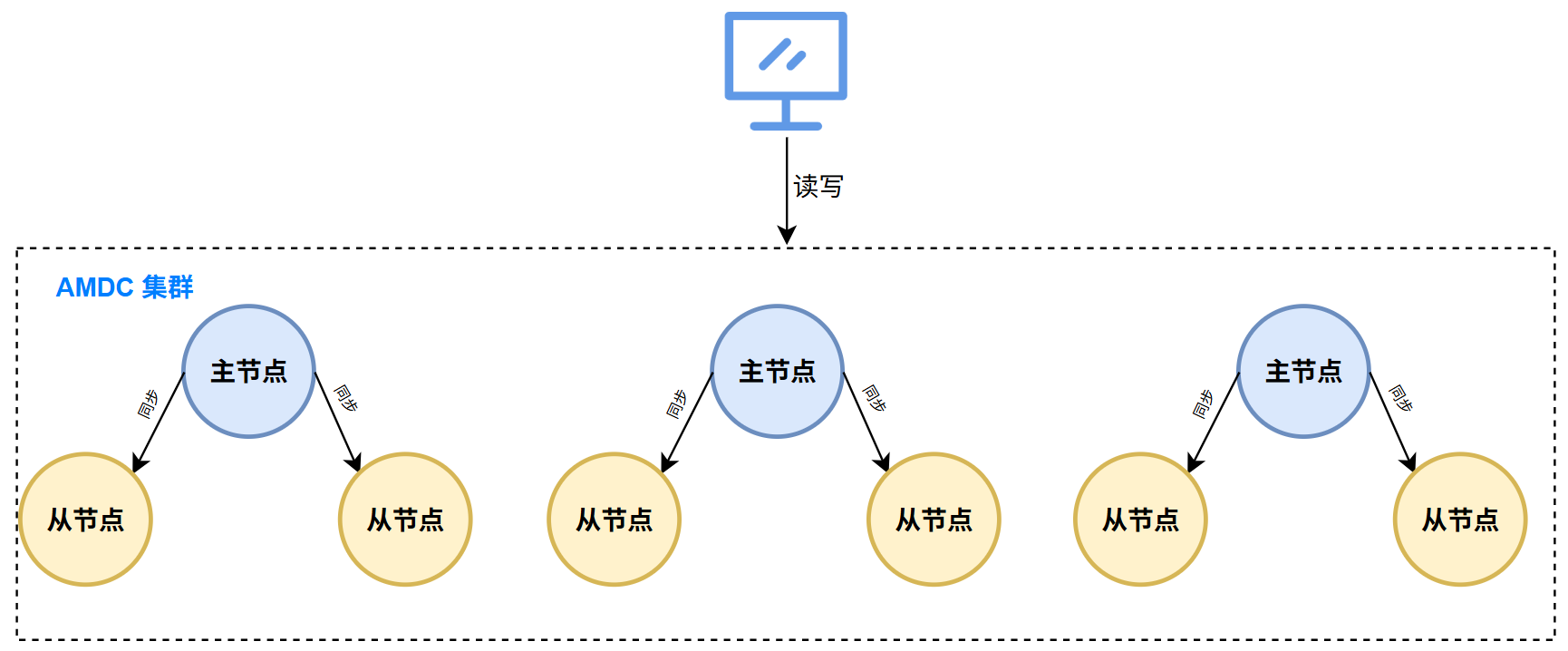
Cluster node planning
| Server IP | Role | Ports |
|---|---|---|
| 10.0.1.46 (example IP; replace with the actual IP) | Cluster node 1 + slave node 1 | 6359, 6360 |
| 10.0.1.66 (example IP; replace with the actual IP) | Cluster node 2 + slave node 2 | 6359, 6360 |
| 10.0.1.32 (example IP; replace with the actual IP) | Cluster node 3 + slave node 3 | 6359, 6360 |
# Cluster Installation Steps
- Prepare the server nodes
- Upload the AMDC cache core installation package (
AMDC-<version>-<build-date>-<CPU-architecture>.tar.gz) to the installation directory on the target servers above (e.g., under /opt).
- Upload the AMDC cache core installation package (
- Extract the installation package:
tar -zxf AMDC-<version>-<build-date>-<CPU-architecture>.tar.gz
- Extract the installation package:
- Copy the installation package for the
slavenode:cp -r amdc amdc-slave
- Copy the installation package for the
- Upload the license file
license.licto each node's installation directory/opt/amdc/(including slave). For licensing, refer to the AMDC License Management Guide in this document.
[root@private opt]# tree -L 2
.
├── amdc
│   ├── acls.properties
│   ├── amdc-benchmark
│   ├── amdc-check-aof
│   ├── amdc-check-rdb
│   ├── amdc-cli
│   ├── amdc-conf-conv
│   ├── amdc-sentinel
│   ├── amdc-server
│   ├── amdc.yaml
│   ├── license.lic # License file
│   └── sentinel.yaml
└── amdc-slave          # Slave node directory
    ├── acls.properties
    ├── amdc-benchmark
    ├── amdc-check-aof
    ├── amdc-check-rdb
    ├── amdc-cli
    ├── amdc-conf-conv
    ├── amdc-sentinel
    ├── amdc-server
    ├── amdc.yaml
    ├── license.lic # License file
    └── sentinel.yaml
1
2
3
4
5
6
7
8
9
10
11
12
13
14
15
16
17
18
19
20
21
22
23
24
25
26- Upload the license file
- Cluster configuration
- Cluster node 1 (10.0.1.46 (example IP; replace with the actual IP)): change
bindinamdc.yamlto the current machine's IP, enable Cluster mode, and enable background running modeNETWORK: # The network address to listen on. By default, only the local loopback address is listened on; comment out this line to listen on all interfaces (exposing to the public network is a security risk) bind: - "10.0.1.46 (example IP; replace with the actual IP)" # Add the local machine's IP - "-::1" GENERAL: # Whether to run in daemon mode daemonize: yes # Non-configuration items omitted CLUSTER: # Whether to enable Cluster mode cluster-enabled: yes1
2
3
4
5
6
7
8
9
10
11
12 - Cluster node 2 (10.0.1.66 (example IP; replace with the actual IP)): change
bindinamdc.yamlto the current machine's IP, enable Cluster mode, and enable background running modeNETWORK: # The network address to listen on. By default, only the local loopback address is listened on; comment out this line to listen on all interfaces (exposing to the public network is a security risk) bind: - "10.0.1.66 (example IP; replace with the actual IP)" # Add the local machine's IP - "-::1" # Non-configuration items omitted CLUSTER: # Whether to enable Cluster mode cluster-enabled: yes1
2
3
4
5
6
7
8
9
10 - Cluster node 3 (10.0.1.32 (example IP; replace with the actual IP)): change
bindinamdc.yamlto the current machine's IP, enable Cluster mode, and enable background running modeNETWORK: # The network address to listen on. By default, only the local loopback address is listened on; comment out this line to listen on all interfaces (exposing to the public network is a security risk) bind: - "10.0.1.32 (example IP; replace with the actual IP)" # Add the local machine's IP - "-::1" # Non-configuration items omitted CLUSTER: # Whether to enable Cluster mode cluster-enabled: yes1
2
3
4
5
6
7
8
9
10
- Slave node configuration
- Since the master node and the slave node are on the same machine, change the listening port here to:
6360 - Perform the following operations in the
amdc-slavedirectory - Slave node 1 (10.0.1.46 (example IP; replace with the actual IP)): change
bindinamdc.yamlto the current machine's IP and port, enable Cluster mode, and enable background running modeNETWORK: # The network address to listen on. By default, only the local loopback address is listened on; comment out this line to listen on all interfaces (exposing to the public network is a security risk) bind: - "10.0.1.46 (example IP; replace with the actual IP)" # Add the local machine's IP - "-::1" port: 6360 GENERAL: # Whether to run in daemon mode daemonize: yes # pid file path pidfile: "/var/run/amdc-server-slave.pid" # Non-configuration items omitted CLUSTER: # Whether to enable Cluster mode cluster-enabled: yes # Cluster configuration file path, maintained automatically by the node cluster-config-file: "node-6360.conf"1
2
3
4
5
6
7
8
9
10
11
12
13
14
15
16
17 - Slave node 2 (10.0.1.66 (example IP; replace with the actual IP)): change
bindinamdc.yamlto the current machine's IP and port, enable Cluster mode, and enable background running modeNETWORK: # The network address to listen on. By default, only the local loopback address is listened on; comment out this line to listen on all interfaces (exposing to the public network is a security risk) bind: - "10.0.1.66 (example IP; replace with the actual IP)" # Add the local machine's IP - "-::1" port: 6360 GENERAL: # Whether to run in daemon mode daemonize: yes # pid file path pidfile: "/var/run/amdc-server-slave.pid" # Non-configuration items omitted CLUSTER: # Whether to enable Cluster mode cluster-enabled: yes # Cluster configuration file path, maintained automatically by the node cluster-config-file: "node-6360.conf"1
2
3
4
5
6
7
8
9
10
11
12
13
14
15
16
17 - Slave node 3 (10.0.1.32 (example IP; replace with the actual IP)): change
bindinamdc.yamlto the current machine's IP and port, enable Cluster mode, and enable background running modeNETWORK: # The network address to listen on. By default, only the local loopback address is listened on; comment out this line to listen on all interfaces (exposing to the public network is a security risk) bind: - "10.0.1.32 (example IP; replace with the actual IP)" # Add the local machine's IP - "-::1" port: 6360 GENERAL: # Whether to run in daemon mode daemonize: yes # pid file path pidfile: "/var/run/amdc-server-slave.pid" # Non-configuration items omitted CLUSTER: # Whether to enable Cluster mode cluster-enabled: yes # Cluster configuration file path, maintained automatically by the node cluster-config-file: "node-6360.conf"1
2
3
4
5
6
7
8
9
10
11
12
13
14
15
16
17
- Start the cache and slave node on each node
- Start the master node:
./amdc-server amdc.yaml - Start the slave node (switch to amdc-slave):
./amdc-server amdc.yaml
- Use the
amdc-cliclient tool to create the cluster
amdc-cli:./amdc-cli --cluster create 10.0.1.46 (example IP; replace with the actual IP):6359 10.0.1.66 (example IP; replace with the actual IP):6359 10.0.1.32 (example IP; replace with the actual IP):6359 10.0.1.46 (example IP; replace with the actual IP):6360 10.0.1.66 (example IP; replace with the actual IP):6360 10.0.1.32 (example IP; replace with the actual IP):6360 --cluster-replicas 1Note: for the
amdc-cli --clustercommand usage manual, refer to the user manual.- During creation, enter "yes" to confirm the cluster node arrangement, as follows:
[root@private amdc]# ./amdc-cli --cluster create 10.0.1.46 (example IP; replace with the actual IP):6359 10.0.1.66 (example IP; replace with the actual IP):6359 10.0.1.32 (example IP; replace with the actual IP):6359 10.0.1.46 (example IP; replace with the actual IP):6360 10.0.1.66 (example IP; replace with the actual IP):6360 10.0.1.32 (example IP; replace with the actual IP):6360  --cluster-replicas 1
>>> Performing hash slots allocation on 6 nodes...
Master[0] -> Slots 0 - 5460
Master[1] -> Slots 5461 - 10922
Master[2] -> Slots 10923 - 16383
Adding replica 10.0.1.66 (example IP):6360 to 10.0.1.46 (example IP):6359
Adding replica 10.0.1.32 (example IP):6360 to 10.0.1.66 (example IP):6359
Adding replica 10.0.1.46 (example IP):6360 to 10.0.1.32 (example IP):6359
M: a11b0a053f596321a4e310046e2b69bca8c96d4a 10.0.1.46 (example IP):6359
  slots:[0-5460] (5461 slots) master
M: ab6dcd5d434ce3ec8ad199ac1a3d610ac33f3a7f 10.0.1.66 (example IP):6359
  slots:[5461-10922] (5462 slots) master
M: 70451b10ef6f7793083b47a994c900cccc218b39 10.0.1.32 (example IP):6359
  slots:[10923-16383] (5461 slots) master
S: 37ffc8538d24b332d45d6732b1df7e9386114522 10.0.1.46 (example IP):6360
  replicates 70451b10ef6f7793083b47a994c900cccc218b39
S: 3ffc63268838f02dd4e1d66f11b5a6ffdc83cdfe 10.0.1.66 (example IP):6360
  replicates a11b0a053f596321a4e310046e2b69bca8c96d4a
S: 4862dfb143cf5de0bebb64370f77c8bbe5bfc917 10.0.1.32 (example IP):6360
  replicates ab6dcd5d434ce3ec8ad199ac1a3d610ac33f3a7f
Can I set the above configuration? (type 'yes' to accept): yes
>>> Nodes configuration updated
>>> Assign a different config epoch to each node
>>> Sending CLUSTER MEET messages to join the cluster
Waiting for the cluster to join
.
>>> Performing Cluster Check (using node 10.0.1.46 (example IP):6359)
M: a11b0a053f596321a4e310046e2b69bca8c96d4a 10.0.1.46 (example IP):6359
  slots:[0-5460] (5461 slots) master
  1 additional replica(s)
S: 4862dfb143cf5de0bebb64370f77c8bbe5bfc917 10.0.1.32 (example IP):6360
  slots: (0 slots) slave
  replicates ab6dcd5d434ce3ec8ad199ac1a3d610ac33f3a7f
S: 37ffc8538d24b332d45d6732b1df7e9386114522 10.0.1.46 (example IP):6360
  slots: (0 slots) slave
  replicates 70451b10ef6f7793083b47a994c900cccc218b39
S: 3ffc63268838f02dd4e1d66f11b5a6ffdc83cdfe 10.0.1.66 (example IP):6360
  slots: (0 slots) slave
  replicates a11b0a053f596321a4e310046e2b69bca8c96d4a
M: 70451b10ef6f7793083b47a994c900cccc218b39 10.0.1.32 (example IP):6359
  slots:[10923-16383] (5461 slots) master
  1 additional replica(s)
M: ab6dcd5d434ce3ec8ad199ac1a3d610ac33f3a7f 10.0.1.66 (example IP):6359
  slots:[5461-10922] (5462 slots) master
  1 additional replica(s)
[OK] All nodes agree about slots configuration.
>>> Check for open slots...
>>> Check slots coverage...
[OK] All 16384 slots covered.
1
2
3
4
5
6
7
8
9
10
11
12
13
14
15
16
17
18
19
20
21
22
23
24
25
26
27
28
29
30
31
32
33
34
35
36
37
38
39
40
41
42
43
44
45
46
47
48
49- Use the
- View the cluster status
./amdc-cli --cluster info
[root@private amdc]# ./amdc-cli --cluster info
10.0.1.46 (example IP):6359> cluster info
cluster_state:ok
cluster_slots_assigned:16384
cluster_slots_ok:16384
cluster_slots_pfail:0
cluster_slots_fail:0
cluster_known_nodes:6
cluster_size:3
cluster_current_epoch:7
cluster_my_epoch:1
cluster_stats_messages_ping_sent:100
cluster_stats_messages_pong_sent:131
cluster_stats_messages_auth-ack_sent:1
cluster_stats_messages_sent:232
cluster_stats_messages_ping_received:131
cluster_stats_messages_pong_received:96
cluster_stats_messages_fail_received:1
cluster_stats_messages_auth-req_received:1
cluster_stats_messages_received:229
1
2
3
4
5
6
7
8
9
10
11
12
13
14
15
16
17
18
19
20
# Installation in a Docker Container Environment
AMDC provides Docker installation packages for arm and x86, which can be used to deploy AMDC directly.
# Installation Package Description
- AMDC-Docker compressed installation package names
- x86_64:
AMDC-Docker-20260604-amd64-kylin.tar.gz - arm64:
AMDC-Docker-20260604-arm64-kylin.tar.gz
Note: the installation package date may differ; choose according to the actual situation.
- Installation package directory structure
tree -L 1 AMDC-Docker-20260604-amd64-kylin
AMDC-Docker-20260604-amd64-kylin             # Directory after extracting the docker installation package
|-- AMDC-Docker-20260604-amd64-kylin.tar.gz  # docker image file
|-- amdc
|   |-- amdc.conf                                     # AMDC configuration file
|   |-- license.xml                                   # License file
|-- amdc-dockercompose.yaml                   # docker compose configuration file
2
3
4
5
6
7
# Installation Steps
The following operations use AMDC-Docker-20260604-amd64-kylin.tar.gz as an example.
- Extract and import the image
- Extract:
tar -zxvf AMDC-Docker-20260604-amd64-kylin.tar.gz - Enter the extracted folder:
cd AMDC-Docker-20260604-amd64-kylin - Load the image:
docker load < AMDC-Docker-20260604-amd64-kylin.tar.gz
- Modify the license file
The AMDC license file needs to be mounted to the installation directory inside the container. Place the different license files in the current amdc directory. Before starting the container, make sure the license file is valid; check or replace the license file as needed.
License file mounting instructions
- license.xml (legacy license) mount target path:
/usr/local/bin/license.xml- license.lic (KBC license) mount target path:
/usr/local/bin/license.lic- acls.properties (unified authorization configuration file) mount target path:
/usr/local/bin/acls.properties
- Starting and stopping the image
- Start command:
docker-compose -f amdc-dockercompose.yaml up -d - Stop command:
docker-compose -f amdc-dockercompose.yaml down
amdc-dockercompose.yamlconfiguration description
version: '3'
services:
  amdc:
    image: docker_image_tag
    ports:
      - 6359:6359
    volumes:
      - ./amdc:/opt/amdc:z  # Mount the host's ./amdc directory to /opt/amdc in the container
      - ./amdc/license.xml:/usr/local/bin/license.xml  # Mount the license file to the target location; .lic license files are mounted the same way
    working_dir: /opt/amdc  # Set the container's default working directory to the mounted path /opt/amdc, which matches the path configured in the dir parameter of the business configuration file amdc.yaml to ensure the program reads a consistent directory.
    command: /usr/local/bin/amdc-server # amdc-cli / amdc-server / amdc-sentinel and other executables are all located in the /usr/local/bin/ directory inside the docker container
2
3
4
5
6
7
8
9
10
11
# RPM Package Installation
RPM (Red Hat Package Manager) is a software package management format on Linux systems, originally developed by Red Hat and now widely used in Red Hat-based distributions. AMDC provides RPM installation packages for arm and x86, which can be installed with the rpm command. Supported operating systems:
- Kylin
- OpenEuler
- CentOS
# Installing the Package
- x86_64:
AMDC-2.0.5-20260206-1.el7.x86_64.rpm - arm64:
AMDC-2.0.5-20260206-1.el7.aarch64.rpm
- Installation command:
rpm -ivh AMDC-2.0.5-20260206-1.el7.x86_64.rpm
Preparing...                          ################################# [100%]
Updating / installing...
   1:amdc-2.0.5-1.el7                 ################################# [100%]
2
3
4
- After installation, the product media installation directory is
/opt/amdc-2.0.5 - Import the license file into
/opt/amdc-2.0.5/license.xml - Startup command:
/opt/amdc-2.0.5/amdc-server
# Stopping the Cache Core Service
The AMDC cache core provides multiple stop methods. To ensure data security and system stability, it is recommended to choose an appropriate stop method in the following priority order:
# Stop Methods
Send the SHUTDOWN command through the client
This is the safest stop method. AMDC exits only after completing data persistence, ensuring data integrity.
./amdc-cli -h [IP address] -p [port] -a [password] shutdown1Stop from the interactive client
When already connected to the AMDC client, execute the shutdown command directly:
127.0.0.1:6359> shutdown1
Execution flow:
- Disconnect all client connections
- Perform RDB/AOF persistence according to the configuration
- Safely exit the service process
# Emergency Stop Method
Use this method when the AMDC service is unresponsive or cannot be stopped normally. Note: this operation may cause data loss!
Steps:
Find the AMDC process PID:
ss -nltp | grep amdc
# or
ps -ef | grep amdc
1
2
3Forcefully terminate the process:
kill -9 [process ID]1
# Comparison of Stop Methods
| Stop Method | Data Safety | Applicable Scenarios | Recommendation |
|---|---|---|---|
| Client SHUTDOWN command | High | Normal maintenance, planned downtime | Recommended |
| Interactive shutdown | High | Debugging, test environments | Recommended |
| Forced kill -9 | Low | Service unresponsive, emergency failure handling | Not recommended |
Important: In production environments, prioritize graceful shutdown to avoid the risk of data loss caused by forced termination. Only consider forced termination when the AMDC service is completely unresponsive and cannot be stopped through normal methods.
# License Authorization Management
# Overview of Authorization Modes
Apusic In-Memory Data Cache (AMDC) V2.0.5 supports four License authorization verification modes. Users can choose the appropriate authorization method according to their actual needs:
| Authorization Mode | Applicable Scenarios | Configuration File | Features |
|---|---|---|---|
| Kingdee Apusic local authorization | Standalone deployment, offline environments | license.xml | Local file authorization, supports binding to IP and MAC addresses |
| Kingdee KBC authorization | Standard production environments | license.lic | Local license file, verified by authorization code |
| Kingdee Unified Authorization Center | Multi-tenant, cloud environments | acls.properties | Centralized authorization management, supports multi-tenancy |
| Kingdee Unified Authorization Center environment variables | Multi-tenant, cloud environments | acls.properties env | Centralized authorization management, supports multi-tenancy |
Default authorization modes: Kingdee Apusic local authorization and Kingdee KBC authorization verification
Note: AMDC V2.0.5 optimizes the license file loading logic. License files only need to be placed in the same directory as amdc-server; there is no need to configure the license path in amdc.yaml, which simplifies the deployment configuration process.
# Authorization Configuration Details
# Kingdee Apusic Local Authorization
Applicable scenarios: offline environments, standalone deployments, test environments
Configuration steps:
- Obtain the
license.xmllicense file - Place the license file in the AMDC installation directory
# Kingdee KBC Authorization
Applicable scenarios: standard production environments, scenarios requiring device binding, offline environments
Configuration steps:
Obtain the device feature code
Run the AMDC service startup command, and the system automatically outputs the device feature code:
./amdc-server1Example output:
400987:C 05 Feb 2026 17:33:59.232 # Warning: no config file specified, using the ./amdc.yaml
400987:C 05 Feb 2026 17:33:59.232 # oO0OoO0OoO0Oo AMDC is starting oO0OoO0OoO0Oo
400987:C 05 Feb 2026 17:33:59.232 * AMDC KBC authorization code: 'SZTY-1486655719' for mac: 00-00-00-00-00-00 (example MAC address)
400987:C 05 Feb 2026 17:33:59.235 # No valid license file found: ./license.xml or ./license.lic
400987:C 05 Feb 2026 17:33:59.235 # Local license verification failed!
1
2
3
4
5Feature code description:
- Format:
SZTY-XXXXXXXXXX(starting with SZTY) - Binding information: MAC address or other hardware features
- Note: each device's feature code is unique and cannot be used across devices
- Format:
Apply for a license file
- Access the Kingdee KBC authorization system (this operation is performed by Kingdee Apusic sales, implementation, or R&D personnel)
- Apply for authorization using the obtained feature code
- Download the generated
license.licfile
Configure the license file
- Place the
license.licfile in the AMDC installation directory
- Place the
# Kingdee Unified Authorization Center
Applicable scenarios: multi-tenant environments, cloud platform deployment, centralized authorization management
Configuration steps:
Create the
acls.propertiesconfiguration fileConfigure the authorization center connection information:
# Whether to enable the Unified Authorization Center
apusic_acls_enable=true

# Authorization center addresses (separate multiple addresses with commas)
apusic_acls_authUrls=10.0.1.100:8080,10.0.1.101:8080 (example IPs; replace with actual IPs)

# Namespace
apusic_acls_ns=public

# Tenant name (fill in public if unsure)
apusic_acls_tenant=public
1
2
3
4
5
6
7
8
9
10
11Place the
acls.propertiesfile in the AMDC installation directory
# License File Management
# License File Location
All license files must be placed in the AMDC installation directory, at the same level as the amdc-server executable.
# License Hot Update
AMDC supports license file hot updates without restarting the service:
- Directly replace the content of the existing license file
- The system automatically detects and loads the new authorization information
- Note: make sure the new license file is in the correct format to avoid authorization invalidation
# Authorization Verification Priority
When multiple types of license files exist at the same time, AMDC verifies them in the following priority order:
acls.properties env(Unified Authorization Center environment variables)acls.properties(Unified Authorization Center)license.lic(KBC authorization)license.xml(local authorization)
# Troubleshooting
# Common Error Messages
- "No valid license file found": no valid license file found
- "Local license verification failed": the license file is invalid or has expired
- "Authorization code mismatch": the feature code does not match the device
# Solutions
- Confirm that the license file is placed in the correct directory
- Verify that the license file format and content are correct
- Check that the device feature code matches the license file
- Confirm that the license file is within its validity period
# Cache Core Service Parameter Description
# Network Configuration Parameters
# Listening Address Configuration
| Parameter | Default Value | Description | Usage |
|---|---|---|---|
bind | 127.0.0.1 -::1 | The network address to listen on; specifies the IP addresses through which clients can access the cache. Connections from addresses other than the bound ones are not possible | Multiple addresses can be bound, e.g.: bind:- "127.0.0.1"- "192.168.x.x" (example IP; replace with the actual IP) |
# Port Configuration
| Parameter | Default Value | Description | Usage |
|---|---|---|---|
port | 6359 | The TCP port to listen on; set to 0 to disable listening on TCP sockets | port: 6359 |
# Protected Mode
| Parameter | Default Value | Description |
|---|---|---|
protected-mode | yes | Protected mode: when no bind is specified and no password is set, only local loopback addresses and Unix domain socket connections are allowed |
# Background Running Configuration
# Daemon Mode
| Parameter | Default Value | Description | Usage |
|---|---|---|---|
daemonize | no | Whether to run in daemon mode; if yes, runs in the background and generates a pid file | daemonize: yes, note: the logfile parameter must be filled in so that logs can be viewed |
# PID File Configuration
| Parameter | Default Value | Description | Usage |
|---|---|---|---|
pidfile | /var/run/amdc-sentinel.pid | pid file path, generated by default in daemon mode | pidfile: "/var/run/amdc-server.pid" |
# Security Authentication Configuration
# Password Authentication
| Parameter | Description | Usage |
|---|---|---|
requirepass | Sets the password; can be empty. It is recommended that the slave node password be the same as the master node password | requirepass: "123456"Note: when users.acl exists, the server prioritizes the password in users.acl |
masterauth | The password of the master node. If the master node has no password, this does not need to be filled in; if it has a password, all nodes, whether master or slave, must fill in this parameter | masterauth: "123456" |
# Cluster Configuration
# Cluster Mode
| Parameter | Default Value | Description | Usage |
|---|---|---|---|
cluster-enabled | - | Whether to enable Cluster mode | cluster-enabled: "yes" |
# Cluster Configuration File
| Parameter | Default Value | Description |
|---|---|---|
cluster-config-file | - | Cluster configuration file path, maintained automatically by the node |
# Cluster Ports
| Parameter | Default Value | Description | Usage |
|---|---|---|---|
port | 6359 | The TCP port to listen on; set to 0 to disable listening on TCP sockets | port: 6359 |
| Cluster bus | 16359 | Gossip communication port between cluster nodes (= cache port + 10000) |
# Sentinel Configuration
# Sentinel Port
| Parameter | Default Value | Description |
|---|---|---|
port | 26359 | The TCP port that the Sentinel process listens on |
# Sentinel Monitoring Configuration
| Parameter | Description | Usage |
|---|---|---|
sentinel monitor | Configuration of the master node to monitor | sentinel monitor: mymaster 127.0.0.1 6379 1 |
sentinel auth-pass | Master node password verification | sentinel auth-pass: mymaster 123456 |
# Master-Slave Mode
# Master-Slave Configuration
| Parameter | Description | Usage |
|---|---|---|
replicaof | Specifies the master node address and port | replicaof: "10.0.1.46 (example IP; replace with the actual IP) 6359" |
# Storage Configuration
# Data File Configuration
| Parameter | Default Value | Description |
|---|---|---|
dbfilename | "dump.rdb" | RDB file name, excluding the path |
dir | "./" | Other relative-path files such as the RDB file, AOF folder, license file, apusic-acls file, aclfile file, and cluster-config-file file are all affected by the dir parameter |
# AOF Persistence Configuration
| Parameter | Default Value | Description | Usage |
|---|---|---|---|
appendonly | no | Whether to enable AOF persistence | appendonly: yes |
appendfilename | "appendonly.aof" | AOF file name | appendfilename: "amdc.aof" |
appendfsync | everysec | AOF fsync policy:no (relies on the system)always (on every write)everysec (once per second) | appendfsync: everysec |
no-appendfsync-on-rewrite | no | Whether to disable fsync by the main process during AOF rewrite | no-appendfsync-on-rewrite: yes |
auto-aof-rewrite-percentage | 100 | Trigger percentage for automatic AOF rewrite | auto-aof-rewrite-percentage: 100 |
auto-aof-rewrite-min-size | 64mb | Minimum file size for automatic AOF rewrite | auto-aof-rewrite-min-size: 64mb |
aof-load-truncated | yes | Whether to load a truncated AOF file at startup | aof-load-truncated: yes |
aof-use-rdb-preamble | yes | Whether to use an RDB preamble during AOF rewrite | aof-use-rdb-preamble: yes |
# Important Configuration Examples
# Standalone Mode Configuration Example
NETWORK:
  bind:
    - "0.0.0.0"  # Allow access from all IPs
  port: 6359
  protected-mode: yes

GENERAL:
  daemonize: yes  # Run in the background
  pidfile: "/var/run/amdc-server.pid"

SECURITY:
  requirepass: "your_password"  # Set the access password
2
3
4
5
6
7
8
9
10
11
12
# Master-Slave Mode Configuration Example
# Master node configuration
NETWORK:
  bind:
    - "10.0.1.46 (example IP; replace with the actual IP)"  # Master node IP
  port: 6359

GENERAL:
  daemonize: yes

SECURITY:
  requirepass: "master_password"  # Master node password

# Slave node configuration
NETWORK:
  bind:
    - "10.0.1.66 (example IP; replace with the actual IP)"  # Slave node IP
  port: 6359

GENERAL:
  daemonize: yes

REPLICATION:
  replicaof: "10.0.1.46 (example IP; replace with the actual IP) 6359"  # Specify the master node

SECURITY:
  requirepass: "master_password"  # The slave node password must match the master node
  masterauth: "master_password"   # Master node password
2
3
4
5
6
7
8
9
10
11
12
13
14
15
16
17
18
19
20
21
22
23
24
25
26
27
# Sentinel Mode Configuration Example
NETWORK:
  bind:
    - "10.0.1.46 (example IP; replace with the actual IP)"  # Sentinel node IP
  port: 26359

GENERAL:
  daemonize: yes

SENTINEL:
  sentinel monitor: mymaster 10.0.1.46 (example IP; replace with the actual IP) 6359 2  # Monitor the master node
  sentinel auth-pass: mymaster master_password    # Master node password
2
3
4
5
6
7
8
9
10
11
# Cluster Mode Configuration Example
NETWORK:
  bind:
    - "10.0.1.46 (example IP; replace with the actual IP)"  # Cluster node IP
  port: 6359

GENERAL:
  daemonize: yes

CLUSTER:
  cluster-enabled: yes  # Enable Cluster mode
  cluster-config-file: "nodes.conf"  # Cluster configuration file

SECURITY:
  requirepass: "cluster_password"  # Cluster password
2
3
4
5
6
7
8
9
10
11
12
13
14
# Web Console Installation
# Installation Package Introduction
- Installation package:
AMDC-Console-[version]-[date]-[hardware architecture].tar.gz
# Package Directory Structure
After extracting the console package, the directory structure is as follows (Linux x86_64 as an example):
amdc_console/
├── agent/                    # agent CLI (for GUI-less automation)
├── amdc-console              # Console main program
├── config.yaml               # Core configuration file
├── console.db                # SQLite database file (auto-generated on first start)
├── resource/                 # Static resources (RSA keys, AMDC templates, etc.)
├── upload_files/             # User uploads (License, installation packages, etc.)
├── log/                      # Runtime log directory (auto-generated on first start)
└── web/                      # Front-end static resources
2
3
4
5
6
7
8
9
# Installation Steps
The installation steps are as follows:
- Upload the AMDC console installation package to the installation directory on the target server (e.g., under /opt)
- Extract the installation package:
tar -zxf AMDC-Console-[version]-[date]-[hardware architecture].tar.gz - Enter the extracted folder:
cd amdc_console - Modify
config.yamlas needed (see "Console Core Configuration" below) - Run the startup command (background startup):
nohup ./amdc-console > nohup.out 2>&1 & - After startup is complete, you can access the AMDC console through a browser:
http://ip:port(where ip is the IP of the server where the AMDC console is deployed, and port is the console port, default9001), e.g.:http://192.168.x.x:9001(example IP; replace with the actual IP)
# Verifying the Installation
Open a browser and visit http://ip:port (e.g., http://192.168.x.x:9001). If the AMDC console login page loads normally, the Web console installation is successful.
On the first startup, the console writes the initial passwords of all preset administrator accounts (including amdc_admin, the three-role administrators, and the tenant administrator) to ./resource/.initial_passwords. Please keep this file safe and change the passwords immediately after the first login.
# Stopping the Web Console
Steps:
- Find the console process PID with a port inspection command:
netstat -nltp | grep 9001ornetstat -nltp | grep amdc-console - Graceful stop:
kill -15 <PID>(recommended, waits for data flush) - Forced stop:
kill -9 <PID>
# Console Core Configuration
All console configurations are centralized in config.yaml under the installation directory. Modify them before first startup according to the deployment environment.
| Config Node | Parameter | Default | Description |
|---|---|---|---|
| system (Service Listening) | system.addr | 9001 | Console HTTP listen port. Change this to use a different port, e.g. addr: 8090 |
system.pprof-port | 0 | pprof diagnostic port. 0 = disabled; temporarily set to 9011 (listen on 127.0.0.1 only) for troubleshooting and set back to 0 when done | |
system.default-language | zh-CN | Default UI language: zh-CN / zh-TW / en | |
system.use-multipoint | false | Allow multi-point login (same account on multiple terminals) | |
| jwt (Authentication) | jwt.signing-key | see config file | JWT signing key. In production, MUST be overridden via the AMDC_JWT_SIGNING_KEY environment variable; the default value is forbidden |
jwt.expires-time | 86400 | Token validity in seconds (default 24h) | |
| sqlite (Database) | sqlite.path | ./console.db | SQLite database file path; in production, place it on a dedicated data disk |
| zap (Logging) | zap.level | info | Log level: debug / info / warn / error |
zap.director | log | Log output directory (relative path) | |
| local / oss (Storage) | local.path | uploads/file | Business file upload root directory |
oss-type | local | Object storage type: local / qiniu etc. | |
| tls (HTTPS) | tls.isEnable | false | Enable HTTPS. After enabling, the HTTP port becomes HTTPS; requires tls.key-path / tls.cert-path |
| amdc-conf (Cache Integration) | amdc-conf.conf-path | ./resource/amdc_conf/conf.yaml | Default amdc.yaml template used when onboarding a new cluster |
amdc-conf.resource-catalogue | ./resource | AMDC resource directory (unified management of packages, Licenses, configs, etc.) | |
amdc-conf.upload-files | ./upload_files/ | Directory for files uploaded via the console | |
amdc-conf.amdc-shake-path | ./resource/amdc-shake/amdc-shake | Path to the amdc-shake tool (used for upgrade/migration) | |
| license | license.license-path | ./license-console.xml | Path of the console License file; a valid License must be placed before startup |
| keycloak (SSO) | keycloak.isEnable | false | Enable Keycloak SSO. When enabled, configure configURL / clientID / clientSecret / redirectURL etc. |
| cli (agent Auth) | cli.ai_token | ApusicMDC | agent CLI AI Token (request header X-AMDC-CLI-Token); empty disables it. Use a sufficiently random strong key in production |
| prometheus | - | - | Has been migrated to the front-end page Monitoring Center / Prometheus Configuration; the console reads it from the database at startup |
Example: change the listen port
system:
  addr: 8090    # desired port
1
2After changing, restart the console:
kill -15 <PID>first, thennohup ./amdc-console > nohup.out 2>&1 &, and update the firewall accordingly.
# Common O&M Operations
# View Runtime Logs
tail -f log/amdc-console.log
# Reset Preset Administrator Password
If the .initial_passwords file is lost or a preset account is locked, run the following in the directory where the console executable resides:
./amdc-console --reinit amdc_admin
A new 12-character random password is printed to the terminal (applies to the 5 preset accounts only).
# Backup & Migration
| Data Type | Path | Description |
|---|---|---|
| SQLite Database | console.db | Accounts, onboarded clusters, monitoring configs, audit logs, etc. |
| Uploads | upload_files/ | Installation packages, Licenses, patches, etc. |
| License File | license-console.xml | Console License |
| Static Resources | resource/ (excluding auto-generated files such as casbin_rule.csv and amdc-shake) | RBAC model, key pairs, AMDC template configs |
| Logs | log/ | Clean periodically according to the retention policy |
To migrate to a new server, package and restore the directories listed above.