
維運手冊

# 前言
本文檔為金蝶Apusic分散式訊息佇列for RocketMQ(Apusic Distributed Message Queue for RocketMQ,簡稱:ADMQ for RocketMQ)的運維手冊,旨在為中間件運維人員提供ADMQ for RocketMQ標準化運維指南,涵蓋安裝部署、配置優化、日常運維、故障排查、安全加固等核心場景,確保ADMQ for RocketMQ產品服務穩定、高效、安全運行。
# 適用對象
本文檔適用於IT資訊化業務負責人、研發經理、軟體專案經理、軟體架構師、運維工程師。
# 相關文檔
了解更多ADMQ for RocketMQ產品相關的資訊,請參閱以下ADMQ for RocketMQ產品手冊文件集:
| 序號 | 手冊文檔 | 說明 |
|---|---|---|
| 1 | 金蝶Apusic分散式訊息佇列for RocketMQ 快速使用手冊 | 簡單介紹了如何快速上手使用ADMQ for RocketMQ 。 |
| 2 | 金蝶Apusic分散式訊息佇列for RocketMQ 安裝手冊 | 詳細介紹如何在各作業系統上安裝ADMQ for RocketMQ,以及ADMQ for RocketMQ服務啟停等操作。 |
| 3 | 金蝶Apusic分散式訊息佇列for RocketMQ 訊息引擎使用者手冊 | 詳細介紹 ADMQ for RocketMQ 訊息引擎相關功能的使用、配置、管理及配套工具的使用方法。 |
| 4 | 金蝶Apusic分散式訊息佇列for RocketMQ 管控台使用者手冊 | 詳細介紹ADMQ for RocketMQ管控台相關功能的使用和操作說明。 |
| 5 | 金蝶Apusic分散式訊息佇列for RocketMQ 開發手冊 | 詳細介紹基於各開發語言進行ADMQ for RocketMQ用戶端應用開發的說明。 |
| 6 | 金蝶Apusic分散式訊息佇列for RocketMQ 遷移手冊 | 詳細介紹從RocketMQ遷移到ADMQ for RocketMQ的說明。 |
| 7 | 金蝶Apusic分散式訊息佇列for RocketMQ 運維手冊 | 詳細介紹ADMQ for RocketMQ的監控、運維、安全加固等運維說明。 |
| 8 | 金蝶Apusic分散式訊息佇列for RocketMQ 效能優化手冊 | 詳細介紹ADMQ for RocketMQ效能調優的說明。 |
# 技術支援
ADMQ for RocketMQ產品提供全面的技術支援服務,您可以透過以下方式獲得技術支援:
- 網址:www.apusic.com
- 電話:400-855-5800
- 郵箱:support@apusic.com
- 金蝶雲社區:https://vip.kingdee.com/?productId=73&productLineId=14&lang=zh-CN
您在取得技術支援時,請提供如下資訊:
- 您的姓名
- 公司資訊與聯絡方式
- 作業系統及其版本
- 產品版本號
- 出現異常及錯誤的日誌、截圖等詳細資訊
# 日常運維
# 服務管理
# 啟動服務
# 啟動 NameServer
bin/rocketmq start nameserver

# 啟動 Broker
bin/rocketmq start broker

# 啟動管控台
bin/admq-service start
1
2
3
4
5
6
7
8
2
3
4
5
6
7
8
# 停止服務
# 停止 Broker
bin/rocketmq stop broker

# 停止 NameServer
bin/rocketmq stop nameserver

# 停止管控台
bin/admq-service stop
1
2
3
4
5
6
7
8
2
3
4
5
6
7
8
# 查看服務狀態
# 查看行程
ps -ef | grep rocketmq

# 查看 NameServer 日誌
tail -f logs/namesrv.log

# 查看 Broker 日誌
tail -f logs/broker.log

# 查看叢集狀態
bin/mqadmin clusterList -n localhost:9876
1
2
3
4
5
6
7
8
9
10
11
2
3
4
5
6
7
8
9
10
11
# 重新啟動服務
# 先停止再啟動
bin/rocketmq stop broker
sleep 5
bin/rocketmq start broker
1
2
3
4
2
3
4
# 日誌管理
# 日誌位置
| 日誌類型 | 路徑 | 說明 |
|---|---|---|
| NameServer 日誌 | logs/namesrv.log | NameServer 運行日誌 |
| Broker 日誌 | logs/broker.log | Broker 運行日誌 |
| 管控台日誌 | /opt/admq-manager-V2.0.6/logs/ | 管控台運行日誌 |
# 日誌級別配置
# 查看當前日誌級別
# 在 conf/logback_namesrv.xml 和 conf/logback_broker.xml 中配置

# 動態調整日誌級別(透過 JMX 或設定檔)
# 修改 logback 設定檔後自動生效
1
2
3
4
5
2
3
4
5
# 日誌輪轉
# logback 自動輪轉配置
# 在 logback_broker.xml 中配置:
# <rollingPolicy class="ch.qos.logback.core.rolling.TimeBasedRollingPolicy">
#     <fileNamePattern>${user.home}/logs/broker.%d{yyyy-MM-dd}.%i.log</fileNamePattern>
#     <maxHistory>30</maxHistory>
# </rollingPolicy>
1
2
3
4
5
6
2
3
4
5
6
# 監控檢查
# 日常檢查清單
| 檢查項 | 檢查命令 | 正常標準 |
|---|---|---|
| NameServer 狀態 | ps -ef | grep mqnamesrv | 行程存在 |
| Broker 狀態 | ps -ef | grep mqbroker | 行程存在 |
| 叢集狀態 | mqadmin clusterList | 所有 Broker 線上 |
| 磁碟空間 | df -h | 高於 disk_free_limit |
| 記憶體使用 | free -m | 低於 vm_memory_high_watermark |
| 訊息堆積 | mqadmin topicStatus | 無異常堆積 |
| 消費延遲 | mqadmin consumerProgress | 延遲在合理範圍 |
# 健康檢查腳本
Bash
# 目前內建對應的監控腳本
./bin/monitor-namesrv.sh
./bin/monitor-broker.sh
1
2
3
4
2
3
4
# 配置管理
# Broker 配置
# broker.conf
主設定檔,位於 conf/broker.conf。
# 叢集配置
brokerClusterName=AdmqCluster
brokerName=broker-a
brokerId=0

# NameServer 位址
namesrvAddr=node1:9876;node2:9876

# 儲存配置
storePathRootDir=/data/rocketmq/store
storePathCommitLog=/data/rocketmq/store/commitlog

# 刷盤配置
flushDiskType=ASYNC_FLUSH
flushIntervalCommitLog=500

# 主從配置
brokerRole=ASYNC_MASTER
haMasterAddress=

# 訊息配置
defaultTopicQueueNums=8
autoCreateTopicEnable=false
autoCreateSubscriptionGroup=false

# 限流配置
sendMessageThreadPoolNums=16
pullMessageThreadPoolNums=16
1
2
3
4
5
6
7
8
9
10
11
12
13
14
15
16
17
18
19
20
21
22
23
24
25
26
27
28
2
3
4
5
6
7
8
9
10
11
12
13
14
15
16
17
18
19
20
21
22
23
24
25
26
27
28
# NameServer 配置
# namesrv.properties
listenPort=9876
# 其他配置較少,主要為 JVM 參數
1
2
3
2
3
# 動態配置
# 查看 Broker 配置
bin/mqadmin getBrokerConfig -n localhost:9876 -b broker-a:10911

# 更新 Broker 配置
bin/mqadmin updateBrokerConfig -n localhost:9876 -b broker-a:10911 -k sendMessageThreadPoolNums -v 32

# 查看 NameServer 配置
bin/mqadmin getNameServerConfig -n localhost:9876

# 更新 NameServer 配置
bin/mqadmin updateNameServerConfig -n localhost:9876 -k key -v value
1
2
3
4
5
6
7
8
9
10
11
2
3
4
5
6
7
8
9
10
11
# 故障排查
# 常見問題及解決方案
# NameServer 啟動失敗
| 現象 | 可能原因 | 解決方案 |
|---|---|---|
| 埠衝突 | 9876 埠被佔用 | 查找並停止佔用行程 |
| JDK 未安裝 | 未安裝 JDK 或版本過低 | 安裝 JDK 1.8+ |
| 權限不足 | 目錄權限不正確 | 確保目錄權限正確 |
# Broker 啟動失敗
| 現象 | 可能原因 | 解決方案 |
|---|---|---|
| NameServer 不可達 | 網路不通或配置錯誤 | 檢查 namesrvAddr 配置 |
| 埠衝突 | 10911 埠被佔用 | 修改 listenPort |
| 磁碟空間不足 | 磁碟空間低於限制 | 清理磁碟或調整 disk_free_limit |
| 配置錯誤 | broker.conf 格式錯誤 | 檢查設定檔 |
# 訊息發送失敗
| 現象 | 可能原因 | 解決方案 |
|---|---|---|
| Topic 未建立 | 未提前建立 Topic | 建立 Topic 或開啟自動建立 |
| Broker 不可達 | 網路不通或 Broker 宕機 | 檢查 Broker 狀態 |
| 權限不足 | ACL 配置不正確 | 檢查 ACL 配置 |
| 磁碟已滿 | CommitLog 目錄滿 | 清理磁碟或調整保留策略 |
# 訊息消費異常
| 現象 | 可能原因 | 解決方案 |
|---|---|---|
| 訊息堆積 | 消費者處理速度過慢 | 增加消費者或優化消費邏輯 |
| 消費延遲 | 網路延遲或消費邏輯複雜 | 優化消費邏輯 |
| 消費失敗 | 業務邏輯異常 | 檢查業務邏輯和重試機制 |
| 重複消費 | 消費者未正確返回消費狀態 | 確保返回正確的消費狀態 |
# 故障排查命令
# 查看叢集狀態
bin/mqadmin clusterList -n localhost:9876

# 查看 Broker 狀態
bin/mqadmin brokerStatus -n localhost:9876 -b broker-a:10911

# 查看 Topic 狀態
bin/mqadmin topicStatus -n localhost:9876 -t test-topic

# 查看消費者進度
bin/mqadmin consumerProgress -n localhost:9876 -g test-group

# 查看消費者連線
bin/mqadmin consumerConnection -n localhost:9876 -g test-group

# 查看生產者連線
bin/mqadmin producerConnection -n localhost:9876 -t test-topic -g test-group

# 查看訊息
bin/mqadmin queryMsgByKey -n localhost:9876 -t test-topic -k test-key
bin/mqadmin queryMsgById -n localhost:9876 -i message-id

# 查看訊息軌跡
bin/mqadmin printMsg -n localhost:9876 -t test-topic

# 查看 Broker 統計
bin/mqadmin brokerConsumeStats -n localhost:9876 -b broker-a:10911
1
2
3
4
5
6
7
8
9
10
11
12
13
14
15
16
17
18
19
20
21
22
23
24
25
26
27
2
3
4
5
6
7
8
9
10
11
12
13
14
15
16
17
18
19
20
21
22
23
24
25
26
27
# 備份與恢復
# 配置備份
# 匯出 Topic 配置
bin/mqadmin topicList -n localhost:9876 > topics-backup.txt

# 匯出消費者組配置
bin/mqadmin consumerProgress -n localhost:9876 > consumer-groups-backup.txt

# 備份 Broker 設定檔
cp conf/broker.conf backup/broker.conf.$(date +%Y%m%d)

# 備份 NameServer 設定檔
cp conf/namesrv.properties backup/namesrv.properties.$(date +%Y%m%d)
1
2
3
4
5
6
7
8
9
10
11
2
3
4
5
6
7
8
9
10
11
# 資料備份
# CommitLog 備份
# CommitLog 是訊息儲存檔案,位於 store/commitlog 目錄
# 建議定期備份整個 store 目錄

# 停止 Broker 後備份
bin/rocketmq stop broker
tar czf backup/store-$(date +%Y%m%d).tar.gz store/
nohup bin/rocketmq start broker
1
2
3
4
5
6
7
2
3
4
5
6
7
# 增量備份
# 使用 rsync 進行增量備份
rsync -avz --delete store/ backup/store/
1
2
2
# 定期備份腳本
#!/bin/bash

BACKUP_DIR="/backup/rocketmq/$(date +%Y%m%d)"
mkdir -p $BACKUP_DIR

# 備份配置
cp conf/broker.conf $BACKUP_DIR/
cp conf/namesrv.properties $BACKUP_DIR/

# 備份 Topic 和消費者組
bin/mqadmin topicList -n localhost:9876 > $BACKUP_DIR/topics.txt
bin/mqadmin consumerProgress -n localhost:9876 > $BACKUP_DIR/consumer-groups.txt

# 壓縮備份
tar czf $BACKUP_DIR.tar.gz $BACKUP_DIR
rm -rf $BACKUP_DIR

# 保留最近7天備份
find /backup/rocketmq -name "*.tar.gz" -mtime +7 -delete
1
2
3
4
5
6
7
8
9
10
11
12
13
14
15
16
17
18
19
2
3
4
5
6
7
8
9
10
11
12
13
14
15
16
17
18
19
# 安全加固
# 網路安全
# 防火牆配置
# 開放必要埠
firewall-cmd --permanent --add-port=9876/tcp    # NameServer
firewall-cmd --permanent --add-port=10911/tcp   # Broker
firewall-cmd --permanent --add-port=10909/tcp   # Broker VIP
firewall-cmd --permanent --add-port=10912/tcp   # Broker HA
firewall-cmd --permanent --add-port=12305/tcp   # 管控台 HTTP
firewall-cmd --permanent --add-port=12306/tcp   # 管控台 HTTPS
firewall-cmd --reload
1
2
3
4
5
6
7
8
2
3
4
5
6
7
8
# TLS 配置
# broker.conf
tls.server.mode=enforcing
tls.server.certPath=/path/to/server.crt
tls.server.keyPath=/path/to/server.key
tls.server.trustCertPath=/path/to/ca.crt

tls.client.keyPath=conf/auth/client.key
tls.client.keyPassword=123456
tls.client.certPath=conf/auth/client.pem
tls.client.trustCertPath=conf/auth/ca.pem
1
2
3
4
5
6
7
8
9
10
2
3
4
5
6
7
8
9
10
# 存取控制
# ACL (1.0-適用4.x)配置
# conf/plain_acl.yml
globalWhiteRemoteAddresses:
  - 10.*.*.*
  - 192.168.*.*

accounts:
  - accessKey: admin
    secretKey: admin-password
    whiteRemoteAddress:
    admin: true
    defaultTopicPerm: CREATE+WRITE+READ
    defaultGroupPerm: CREATE+WRITE+READ

  - accessKey: app-user
    secretKey: app-password
    whiteRemoteAddress:
    admin: false
    defaultTopicPerm: DENY
    defaultGroupPerm: SUB
    topicPerms:
      - app-topic=CREATE+WRITE+READ
    groupPerms:
      - app-group=READ
1
2
3
4
5
6
7
8
9
10
11
12
13
14
15
16
17
18
19
20
21
22
23
2
3
4
5
6
7
8
9
10
11
12
13
14
15
16
17
18
19
20
21
22
23
# 啟用 ACL
# 更新 Broker 配置啟用 ACL
bin/mqadmin updateBrokerConfig -n localhost:9876 -b broker-a:10911 -k aclEnable -v true

# 重新啟動 Broker 生效
bin/rocketmq stop broker
nohup bin/rocketmq start broker
1
2
3
4
5
6
2
3
4
5
6
# ACL (2.0-適用5.x版本)配置
# 設定檔修改
修改broker.conf
# 啟用認證
authenticationEnabled = true
authenticationMetadataProvider = org.apache.rocketmq.auth.authentication.provider.LocalAuthenticationMetadataProvider

# 啟用授權
authorizationEnabled = true
authorizationMetadataProvider = org.apache.rocketmq.auth.authorization.provider.LocalAuthorizationMetadataProvider

# 初始化管理員使用者(首次啟動自動建立)
initAuthenticationUser = {"username":"rocketmq","password":"12345678"}

# 元件間認證憑證(用於Broker主從同步、叢集內部通訊等)
innerClientAuthenticationCredentials = {"accessKey":"rocketmq","secretKey":"12345678"}
1
2
3
4
5
6
7
8
9
10
11
12
13
2
3
4
5
6
7
8
9
10
11
12
13
透過修改broker.conf,需要重新啟動叢集
# 配置mqadmin工具
啟用ACL後,需要配置mqadmin工具的認證憑證才能執行管理命令。
編輯 conf/tools.yml 檔案:
# 使用初始化的管理員使用者憑證
accessKey: rocketmq
secretKey: 12345678
1
2
3
2
3
# 建立業務使用者和授權
生產者
# 建立生產者使用者
bin/mqadmin createUser -n 127.0.0.1:9876 -c DefaultCluster \
  -u producer_user \
  -p producer123 \
  -t Normal

# 授予Topic傳送許可權
bin/mqadmin createAcl -n 127.0.0.1:9876 -c DefaultCluster \
  -s User:producer_user \
  -r Topic:TestTopic \
  -a Pub \
  -d Allow
1
2
3
4
5
6
7
8
9
10
11
12
2
3
4
5
6
7
8
9
10
11
12
消費者
# 建立消費者使用者
bin/mqadmin createUser -n 127.0.0.1:9876 -c DefaultCluster \
  -u consumer_user -p consumer123 -t Normal

# 授予消費者消費許可權
bin/mqadmin createAcl -n 127.0.0.1:9876 -c DefaultCluster \
  -s User:consumer_user -r Topic:TestTopic,Group:TestGroup -a Sub -d Allow
1
2
3
4
5
6
7
2
3
4
5
6
7
# 驗證配置
使用Java用戶端傳送一條測試訊息:
SessionCredentials credentials = new SessionCredentials("producer_user", "producer123");
StaticSessionCredentialsProvider credentialsProvider =
    new StaticSessionCredentialsProvider(credentials);

ClientConfiguration clientConfiguration = ClientConfiguration.newBuilder()
    .setEndpoints("127.0.0.1:10911")
    .setCredentialProvider(credentialsProvider)
    .build();
// ... 建立Producer並傳送訊息
1
2
3
4
5
6
7
8
9
2
3
4
5
6
7
8
9
# 審計日誌
# 開啟審計日誌
# 在 conf/logback_broker.xml 中配置 audit appender
# 審計日誌記錄所有管理操作和訊息操作
1
2
3
2
3
# 效能監控
# Prometheus 監控
# 啟用 Prometheus Exporter
# 啟用 prometheus 外掛
bin/mqadmin updateBrokerConfig -n localhost:9876 -b broker-a:10911 -k metricsExporterType -v PROM
1
2
2
# 監控資訊
啟用後,首先在叢集的http://ip:5557/metrics地址展示對應的監控指標資訊;
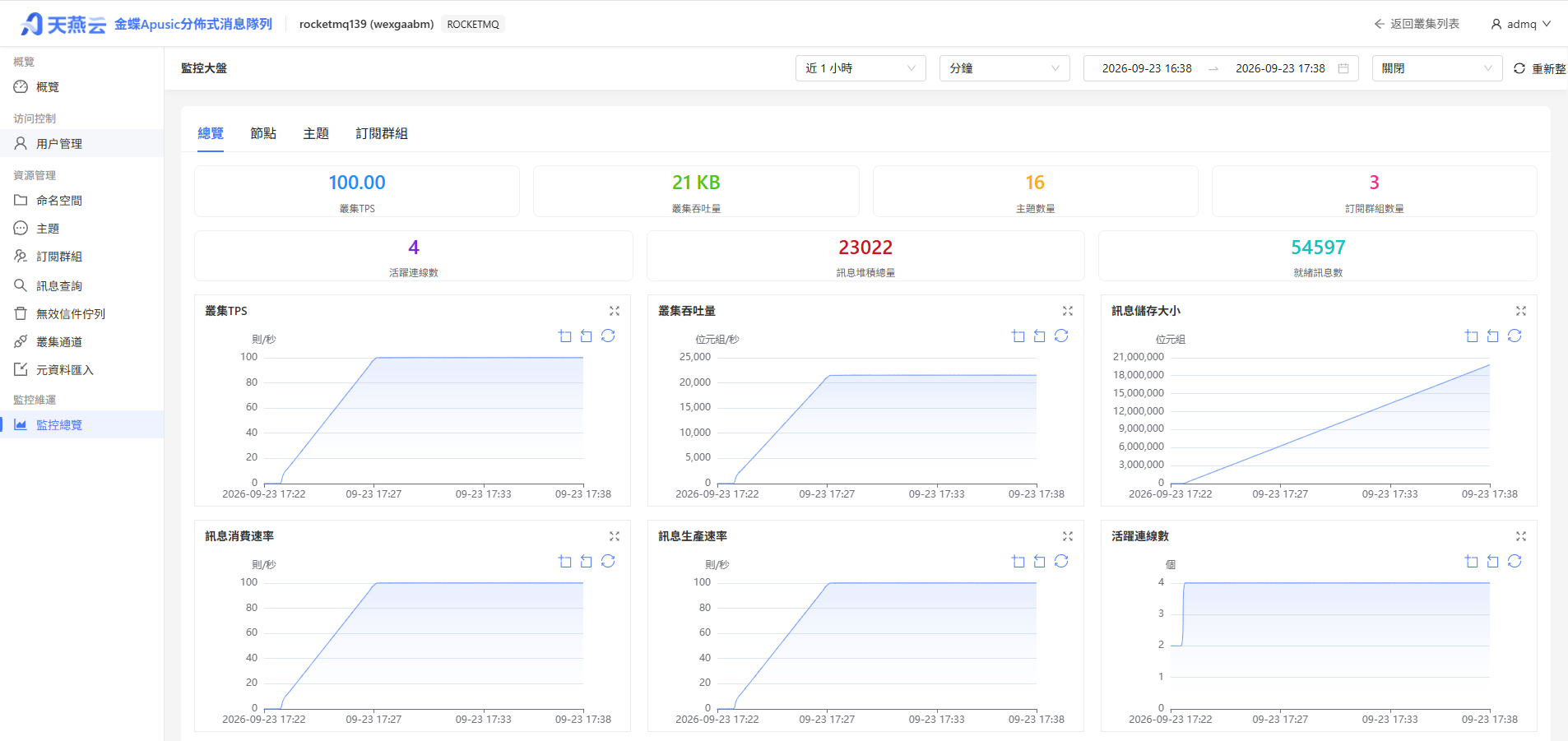
然後經由管控台的Prometheus元件收集對應叢集的資訊
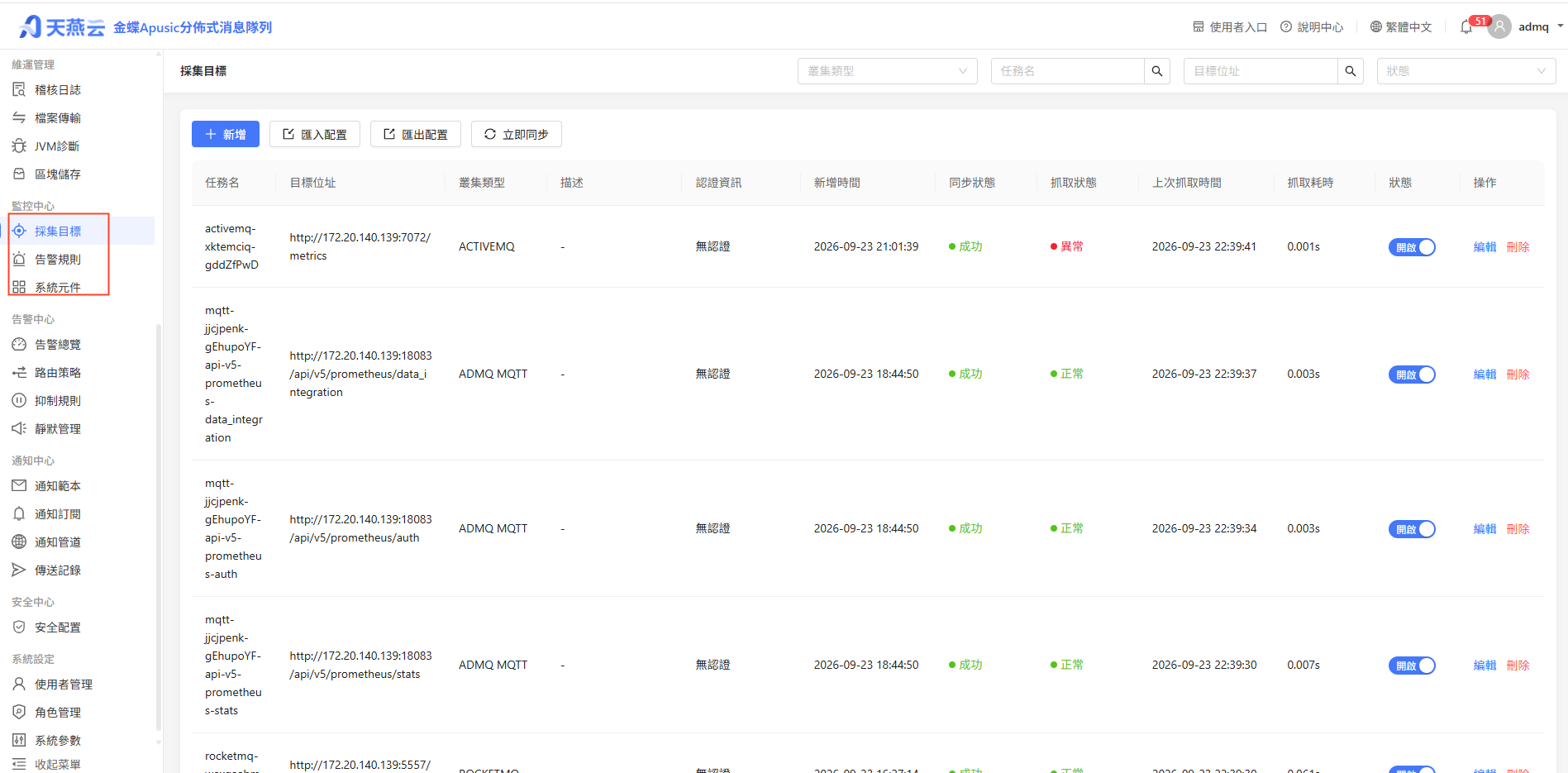
呈現對應的監控資訊到監控大盤(監控大盤主要展示叢集,節點,主題,訂閱組四個維度的資訊)
# 升級維護
# 版本升級
# 升級前準備
- 備份設定檔和資料
- 查看版本釋出說明
- 在測試環境驗證升級流程
# 升級步驟
# 1. 停止 Broker
bin/rocketmq stop broker

# 2. 備份資料
cp -r store backup/store-$(date +%Y%m%d)

# 3. 升級軟體包
# 下載新版本安裝包並解壓
tar zxvf  ADMQ-V2.0.6.534-RocketMQ-20260625.tar.gz -C /apusic/
unzip rocketmq-V5.3.4-all.zip
mv rocketmq-V5.3.4-all nameserver
cd /apusic/nameserver

unzip rocketmq-V5.3.4-all.zip
mv rocketmq-V5.3.4-all broker
cd /apusic/broker

# 4. 遷移配置或者依賴包
cp conf/namesrv.properties /apusic/nameserver/conf/
cp conf/broker.conf /apusic/broker/conf/

# 5. 啟動服務
cd /apusic/nameserver
bin/rocketmq start nameserver
cd /apusic/broker
bin/rocketmq start broker

# 6. 驗證升級
bin/mqadmin brokerStatus -n localhost:9876 -b broker-a:10911
1
2
3
4
5
6
7
8
9
10
11
12
13
14
15
16
17
18
19
20
21
22
23
24
25
26
27
28
29
2
3
4
5
6
7
8
9
10
11
12
13
14
15
16
17
18
19
20
21
22
23
24
25
26
27
28
29
# 叢集滾動升級
- 一次升級一個 Broker 節點
- 確認節點恢復正常後再升級下一個
- 確保叢集始終有可用的 Broker
编辑页面 (opens new window)