
Installation Manual

# Overview
# Abstract
This Installation Manual mainly introduces the basic process of installing ,using and uninstalling the Apusic Application Server V10 (referred to as "AAS-V10"), which is suitable for developers who use Apusic Application Server for development, system administrators in production environments, operation and maintenance personnel, etc.
# Introduction
Apusic Application Server provides a simple and fast development and operation platform for complex applications. For distributed enterprise level applications, it offers features such as easy scalability, high security, and so on.
On the basis of V9.0, V10 has added functions such as domain management, nodes, independent instances, and cluster management. The domain service manager manages nodes, instances, and clusters uniformly.
By default, there is a local instance server that can create remote nodes. Each node is equivalent to an AAS, and the instance runs on the node.
V10 supports unified management of resources, such as application resources, database resources, etc., which can be used for unified upgrade operations.
# Terminology
Apusic Application Server
A server is the physical deployment unit of an application server. Intuitively, this is a physical installation of the application server on a user machine.
Domain
A domain is a group of related server resources that are managed as a unit. A domain can contain one or more independent servers, as well as a cluster of servers that share a common set of configurations defined using Extensible Markup Language xml in a configuration file called domain.xml and stored in the DOMAIN_HOME/config/ directory. A domain is a complete management unit. When an application is deployed in the domain, the application can only be deployed on the servers in the domain. If a domain contains a cluster, all servers in the cluster must belong to the same domain.
Instance
A server instance is a single virtual machine on the Java platform (JVM) that runs on a single node of the server. Server instances form the basis of application deployment. Instances are important components in building clusters, load balancing, and server session persistence. Each instance belongs to only one domain and has its own directory structure, configuration, and deployed application. Each instance contains a reference to the node.
Node
Each node corresponds to a host running application server software. The host where the application server instance is installed must have a corresponding node. The node configuration information includes the machine name and the location of the application server on the host.
Cluster
A server cluster is a logical entity collection of multiple server instances that share the same application, resource, and configuration information. Regardless of whether the server instances are on the same host or different hosts, the application server can manage all instances in the cluster as a unit in the administrative control center.
# Default Administrative Value
| name | default value |
|---|---|
| domain name | mydomain |
| asadmin Command-line utilities | APUSIC_HOME/bin |
| config files | DOMAIN_HOME/config |
| logs files | DOMAIN_HOME/logs |
# Default Module Port
| functional module | port |
|---|---|
| Manager port | 6848 |
| HTTP port | 6888 |
| HTTP SSL port | 6887 |
| IIOP SSL port | 6838 |
| IIOP MUTUALAUTH port | 6839 |
| JMS port | 6876 |
| IIOP port | 6837 |
| JMX port | 6886 |
| OSGI SHELL port | 6866 |
| JAVA DEBUGGER port | 8000 |
# System Environment Requirements
# Operate System
Linux:
- Domestic operating system(Chinese): KylinOS, NeoKylin, iSoft, Red Flag Asianux, Deepin, etc
- RedHat
- CentOS
- Suse Linux
Windows:
- Windows 7
- Windows 8
- Windows 10
- Windows 2003
- Windows 2008
- Windows 2012
Unix:
- HP Unix
- IBM AIX
- Solaris
# JDK Version
- Oracle JDK 8+
- Open JDK 8+
- IBM JDK 8+
# Install and Uninstall
This section describes how to install and uninstall AAS.
# Install
# Installation on Linux
If the installation package is a .zip package, store it in the specified directory and run the unzip AAS-V10.zip command to decompress the installation package.
Obtain the graphical installation package, place it in the specified directory, and run the authorization command chmod 755 AAS-V10.bin. Then run AAS-V10.bin to complete the installation according to the installation guide.


# Installation on Windows
If the installation package is a .zip package, store it in a specified directory and unzip the AAS-V10.zip package to complete the installation.
If the installation package is a .exe file, double-click AAS-V10.exe and follow the installation instructions to install the program.
# Uninstall
# Uninstallation on Linux
If the installation method is directly unzipped zip package, you can go to the installation directory, directly delete the installation directory to uninstall.
For graphical installation, double-click "Uninstall AAS".
Note: You need to stop running AAS before uninstalling.
####Uninstallation on Windows
If the installation method is directly unzipped zip package, you can go to the installation directory, directly delete the installation directory to uninstall.
For graphical installation, click Start -> Program -> Kingdee Apusic Application Server -> Uninstall Apusic Application Server.
# License Authorization
AAS requires a corresponding license for normal use. Under normal circumstances, Apusic will match the corresponding license according to the product version purchased by the user.
The license location is ${APUSIC_HOME}/license.xml.
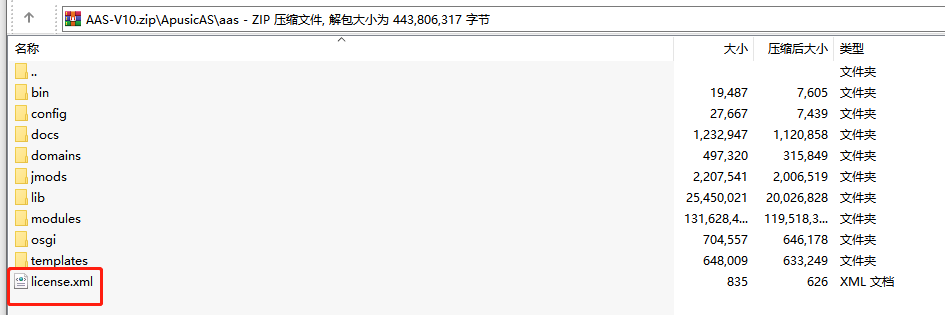
If the license expires or becomes invalid during usage, it is advisable to contact the relevant Apusic service personnel and initiate a re-application process for the corresponding license. When re-applying for the license, it is essential to furnish the product's authentication code to Apusic's support staff as depicted in the illustration:

If the node has an authorization problem, you can view the log. The log will print the corresponding auth code, send the code to the Apusic interconnection personnel to apply for the corresponding license again.
# Start and Stop
# Start
# Start on Linux
Go to the installation directory ${APUSIC_HOME}/aas/bin and execute asadmin start-domain. The default administrator password is required for the first launch.
[apusic@test2 bin]# ./asadmin start-domain

This domain requires an administrative password to be set before
the domain can be started. Please specify an administrative password.
Enter an administrative password for user "audit">
Enter an administrative password for user "audit" again>
Password for User audit has change Successfully!

Enter an administrative password for user "admin">
Enter an administrative password for user "admin" again>
Password for User admin has change Successfully!

Enter an administrative password for user "secure">
Enter an administrative password for user "secure" again>
Password for User secure has change Successfully!
Waiting for mydomain to start ....
Successfully started the domain : mydomain
domain  Location: /opt/testz/1213/ApusicAS/aas/domains/mydomain
Log File: /opt/testz/1213/ApusicAS/aas/domains/mydomain/logs/server.log
Admin Port: 6848
Command start-domain executed successfully.
# Start on Windows
Go to the installation directory ${APUSIC_HOME}/aas/bin and execute asadmin start-domain. The default administrator password is required for the first launch.
E:\testz\1213\AAS-V10\ApusicAS\aas\bin>asadmin start-domain

This domain requires an administrative password to be set before
the domain can be started. Please specify an administrative password.
Enter an administrative password for user "audit">
Enter an administrative password for user "audit" again>
Password for User audit has change Successfully!

Enter an administrative password for user "admin">
Enter an administrative password for user "admin" again>
Password for User admin has change Successfully!

Enter an administrative password for user "secure">
Enter an administrative password for user "secure" again>
Password for User secure has change Successfully!
Waiting for mydomain to start .............
Successfully started the domain : mydomain
domain  Location: E:\testz\1213\AAS-V10\ApusicAS\aas\domains\mydomain
Log File: E:\testz\1213\AAS-V10\ApusicAS\aas\domains\mydomain\logs\server.log
Admin Port: 6848
Command start-domain executed successfully.
# Stop
# Stop on Linux
Go to the installation directory ${APUSIC_HOME}/aas/bin and execute asadmin stop-domain.
[apusic@test2 bin]# ./asadmin stop-domain
Waiting for the domain to stop .
Command stop-domain executed successfully.
# Stop on Windows
Go to the installation directory ${APUSIC_HOME}/aas/bin and execute asadmin stop-domain.
E:\testz\1213\AAS-V10\ApusicAS\aas\bin>asadmin stop-domain
Waiting for the domain to stop .
Command stop-domain executed successfully.